


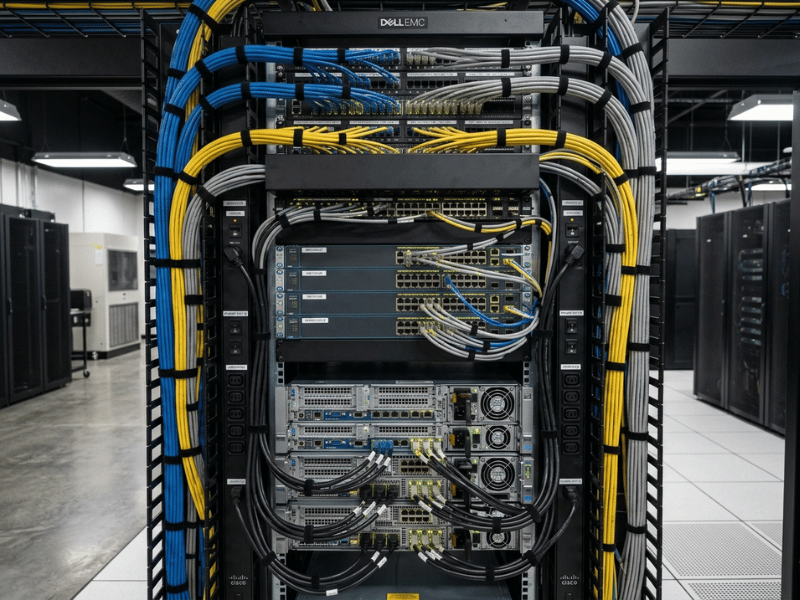
Walk into a data center that has been running for a few years, and you can tell within seconds whether the person who built it knew what they were doing. The tidy racks are not just about looking good. Behind that order sits better airflow, faster repairs, and far fewer 2 a.m. mistakes. A single tangled bundle can quietly cost you thousands: it blocks exhaust, forces fans to work harder, and turns a five-minute swap into an hour of untangling. One accidental tug on the wrong cable can even drop a production server offline.
Choosing the right server rack cable management equipment is not about aesthetics. It is about uptime, cooling efficiency, and how fast your team can work when something breaks. This guide is written for IT managers, data center engineers, and hardware buyers who want to specify racks correctly the first time. You will learn what equipment exists, how to match it to your rack type, how to route cables the right way, and which mistakes quietly sabotage otherwise solid builds, plus a quick-reference setup table you can act on today.
Why Server Rack Cable Management Matters
Cable management is an operational and financial concern long before it is a visual one. Here is what is actually at stake.
Airflow and Cooling Efficiency
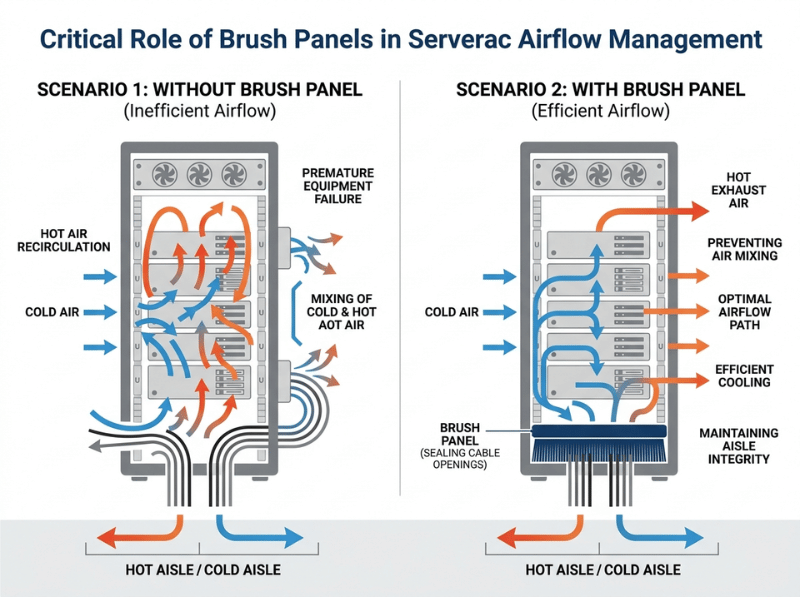
Modern servers rely on clean front-to-back airflow. When cables pile up at the rear of a rack, they act like a dam, trapping hot exhaust and forcing fans to spin faster. That raises power draw and noise while shortening component lifespan. In dense deployments, poor cabling can push intake temperatures several degrees higher, enough to trigger thermal throttling on GPUs and CPUs. Deliberate routing keeps exhaust paths open and cooling predictable.
Faster Maintenance and Troubleshooting
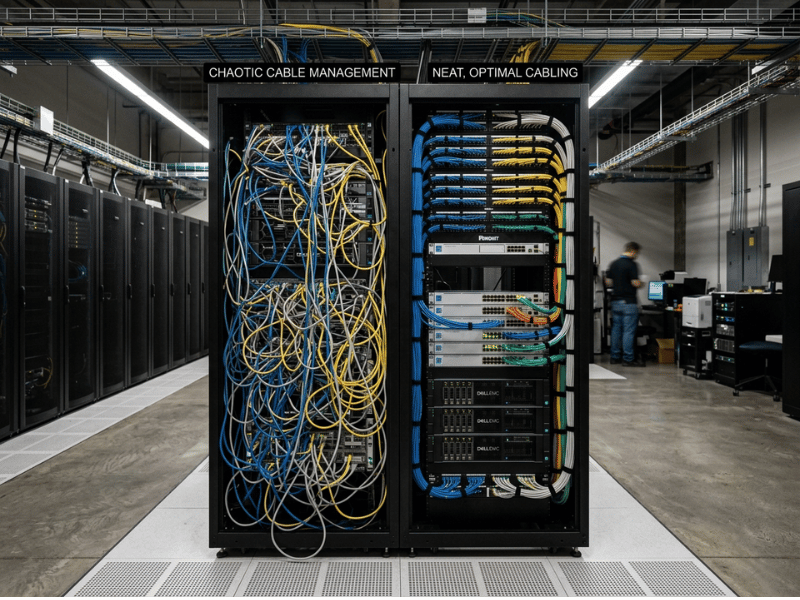
When every cable is labeled and routed cleanly, a technician can trace a connection, unplug it, and reseat it without disturbing anything else. Compare that to a rat’s nest, where pulling one cable disturbs ten others. Clean runs let you perform maintenance without downtime, even at 2 a.m., without second-guessing which cable feeds which port. That speed directly protects your service-level commitments.
Uptime, Safety, and Scalability
Loose cabling invites accidental disconnects, one of the most common causes of avoidable outages. Poorly separated power and data runs can also introduce crosstalk on copper links. Good structure does more than prevent today’s problems; it reserves room for tomorrow, so future moves, adds, and changes do not require ripping the rack apart. A well-managed rack scales gracefully. A messy one hits a wall.
Mini takeaway: Cable management protects uptime and cooling, not just appearances.
Essential Server Rack Cable Management Equipment
Here is the full toolkit. For each item, you will find what it does, when to reach for it, and one practical selection tip drawn from real deployments.
Horizontal Cable Managers
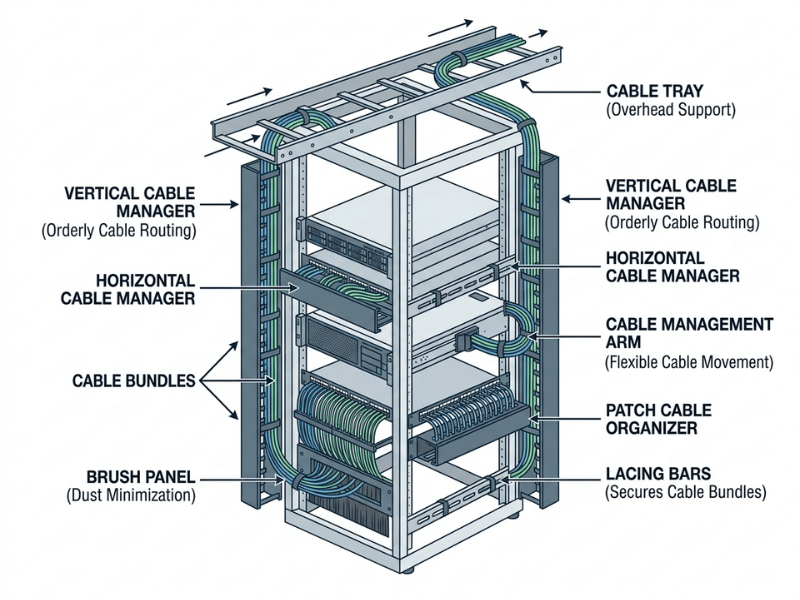
Horizontal cable managers are the workhorses of any rack. They sit between patch panels and switches, guiding cables sideways into neat runs before those cables head to their destination. They also hold slack, so nothing droops onto the gear below.
Most come in 1U and 2U sizes, and those two options cover the bulk of what you will build. A 1U manager handles lighter patch runs. Once you are dealing with dense patching or thicker Cat6A, step up to 2U so cables have room to breathe without bending past their limit. Tip: When in doubt between sizes, go up. Cable counts always climb, and a crowded 1U ages badly.
Finger Duct vs D-Ring Managers
Two common horizontal styles solve different problems, and picking the wrong one slows your team down.
- Finger duct managers use rows of flexible plastic fingers to guide cables into side channels. Snap on the front cover, and the mess disappears while the cover protects cables from getting yanked during service. Choose these for organized patch fields where you want a clean face and predictable routing.
- D-ring managers skip the cover, giving you open loops built for speed and access. When you route high-density copper or fiber that you touch often, open D-rings let you add or pull a cable without fighting a lid. The trade-off is that everything stays visible.
Tip: pick a finger duct for a tidy, protected look, and a D-ring for runs you service frequently.
Single-Sided vs Double-Sided Managers
Some managers organize only the front face; others handle both front and rear. If you patch on both sides of the rack, a double-sided unit saves space and maintains consistent routing. For a simpler layout, a single-sided manager does the job for less money and less depth. Tip: match this to how your patch fields are actually laid out, not to a default spec sheet.
Vertical Cable Managers
Vertical cable managers run the full height of a rack along the sides, carrying large bundles that connect switches, patch panels, and gear stacked across many rack units. In high-density setups, the vertical channels do most of the heavy lifting. Skimp here and you get “cable waterfalls” spilling across the front of your equipment.
A few features separate a good vertical manager from a frustrating one:
- Wide channels allow large Cat6 or Cat6A runs to live without crushing them or forcing a tight bend.
- Split-finger designs let cables exit at every rack unit, so a run peels off exactly at its destination without dragging tension across the connector below it.
- Toolless mounting snaps into the rack frame, speeding installation and sparing you dropped screws in a deep cabinet.
- Hinged covers hide and protect runs, then swing open for quick access during live maintenance.
Tip: size vertical channels for at least 50% more cable volume than you need today. Vertical space fills up faster than anyone expects.
Cable Management Arms
A cable management arm attaches to rail-mounted equipment, keeping slack organized as you slide a server in and out. Without one, pulling a node either yanks the cables or leaves a messy loop dangling. Tip: Confirm the arm is rated for your server’s rail depth and cable weight before ordering. A mismatched arm binds and defeats the purpose.
Cable Trays
Cable trays act like bridges, carrying large bundles across a rack without terminating in it. They are ideal for routing trunk cabling between racks or to overhead pathways. Unlike horizontal ducts, they have no top-and-bottom openings; cables sit in the tray and secure with straps. Tip: Use trays for backbone runs and keep patch-level cabling in dedicated managers.
Patch Cable Organizers
Patch cable organizers manage the short runs common at patch panels, where many cables travel a short distance between ports. They keep excess neat and replace the need to stock dozens of ultra-short custom cables. Tip: mount a patch organizer directly above or below the panel for the cleanest one-U routing.
Offset Cable Tie Bars and Lacing Bars
Offset cable tie bars and lacing bars support cable weight, so your connectors and ports do not. Lacing bars provide a solid anchor point right where cables exit a device, holding the bundle rather than the port. Offset bars push the bundle out to a set depth, keeping it clear of power supplies and fan modules behind the equipment, which matters a lot in a dense chassis fighting to stay cool. Tip: Use offset bars to support heavy power cabling so connectors are not stressed.
Brush and Pass-Through Panels
Brush panels solve a thermal problem, not just a tidiness one. Whenever cables pass from the front of the rack to the back, you cut a hole in your airflow strategy, and that opening lets hot and cold air mix, exactly what you do not want in a dense chassis. A brush panel fills the pass-through with dense bristles: cables slide through easily while the brush seals around them and blocks stray airflow. You keep the hot and cold aisles separated while still moving cables where they need to go. Tip: install brush panels wherever cables cross between the front and rear of an enclosed cabinet.
D-Rings, Cable Rings, and Lacing Bars for Small Racks
D-rings, cable rings, and lacing bars are low-cost guides that bundle and steer cables, especially in smaller or budget-conscious racks. They will not organize a data center, but they bring real order to a modest network rack. Tip: space D-rings evenly so bundles cannot sag between mounting points.
Velcro Straps, Labels, and Fastening Tools
Velcro straps (hook-and-loop) are reusable, gentle on cables, and impossible to over-tighten to the point of damage, which makes them the preferred fastener over zip ties in most racks. Treat labeling as its own equipment category. A handheld label printer and a consistent naming scheme are as essential as any duct.
Label types matter, too. Wrap-around labels circle the cable and identify both ends of a run. For high-density fiber where there is no room to wrap, flag-style labels stick out like a small tag, giving you a readable surface in the tightest bundles. Tip: Label both ends of every cable at the time of installation. Retro-labeling a live rack is miserable work.
Equipment Summary Comparison
| Equipment | Best Use | U-Space | Secures With |
|---|---|---|---|
| Horizontal cable manager | Cables entering/exiting equipment | 1U–2U | Built-in fingers, Velcro straps |
| Vertical cable manager | Bulk side-of-rack routing | Full height | Velcro straps, zip ties |
| Cable management arm | Rail-mounted sliding gear | Shares equipment U | Velcro straps, zip ties |
| Cable tray | Cross-rack trunk runs | Varies | Straps |
| Patch cable organizer | Short patch-panel runs | 1U–2U | Fingers, Velcro straps |
| Offset cable tie / lacing bar | Heavy/long excess cables | ~⅓ U | Velcro straps |
| Brush/pass-through panel | Airflow-sealed entry points | 1U | N/A (pass-through) |
| D-rings/lacing bars | Small racks, light bundling | Minimal | Velcro straps, zip ties |
| Velcro straps/labels | Securing and tracing all cables | None | Self-fastening |
Mini takeaway: The right mix of managers, trays, and fasteners depends on cable volume, rack type, and access needs.
How to Choose Equipment by Rack Scenario
Equipment choice starts with the rack itself. Match the gear to your rack type first, then adjust for cable density.
2-Post Racks
2-post racks offer limited depth and mounting surface, so heavy vertical channels rarely fit well. If you run a 2-post rack, choose D-rings, lacing bars, and lightweight horizontal managers. Keep bundles small and support them often, since there is no rear frame to lean on.
4-Post Racks
4-post racks provide depth, weight support, and space for rear mounting. If you run a 4-post rack, choose vertical managers paired with horizontal ducts, and add cable management arms for any rail-mounted servers. This is the most common enterprise setup, and it rewards a full toolkit.
Enclosed Cabinets
Enclosed cabinets house dense, high-value gear and depend on tight hot/cold separation. If you run an enclosed cabinet, choose vertical managers in the side channels, brush panels at every cable crossover, and airflow-aware routing that never blocks exhaust. Sealing the airflow path matters as much as organizing the cables.
Open Frame Racks
Open-frame racks provide easy access but leave cabling fully exposed. If you run an open frame rack, choose neat vertical runs and cable trays for clean visual routing, since untidy runs are obvious when everything is on display. Consistency is your friend here.
Mixed Power and Data Environments
When power and data share a rack, both interference and confusion rise. If you run a mixed environment, choose dedicated managers for each cable type, routing power on one side and data on the other. Give top-of-rack switch uplinks their own clearly labeled path.
Mini takeaway: Match equipment to rack type first, then to cable density.
Horizontal vs Vertical Cable Management
These two categories look similar but solve different problems. Understanding the split prevents overbuying one and starving the other.
|
Factor |
Horizontal Managers |
Vertical Managers |
|---|---|---|
|
Primary job |
Equipment-level entry/exit |
Bulk side routing top to bottom |
|
Orientation |
Between devices, use the rack U |
Along rack sides, full height |
|
Fastening |
Often self-holding |
Relies on Velcro straps/ties |
|
Best for |
Patch and device connections |
Aggregating many runs |
What Each Does Best
Horizontal managers shine at the device level, holding the slack for each connection and routing cables cleanly into and out of gear. Vertical managers handle the heavy lifting, aggregating dozens of runs and carrying them the full height of the rack.
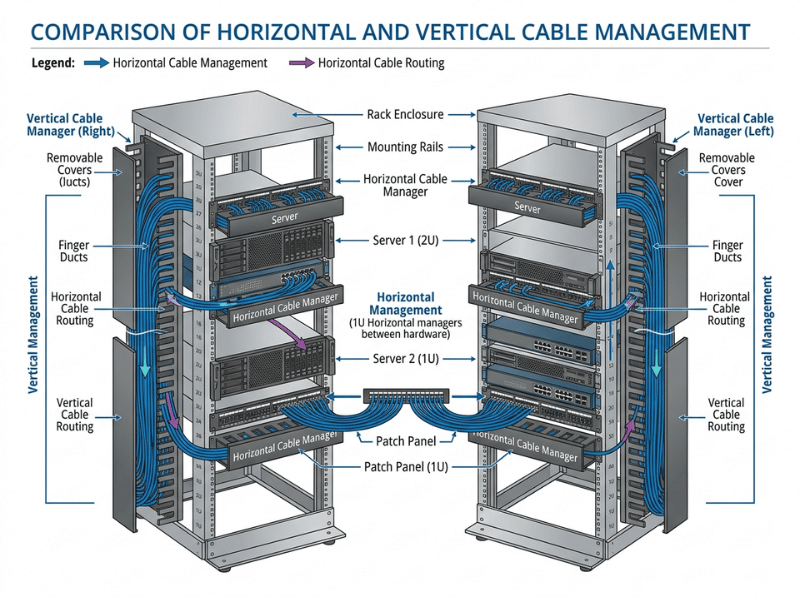
When to Use One, Both, or Neither
Most clean enterprise builds use both together: vertical channels move bulk cabling to the right height, and horizontal ducts feed it into equipment. The exception is a very small network rack, where a couple of D-rings and one horizontal manager may be all you need.
Mini takeaway: Horizontal and vertical managers solve different problems and usually work best paired.
Best Practices for Server Rack Cable Routing
Good routing is planned before the first cable goes in. Use this checklist as you build.
- Design front and rear paths intentionally. Decide entry points, service loops, and which side carries power versus data before mounting equipment.
- Protect airflow. Keep cables clear of exhaust vents, and use brush panels and baffles to preserve hot/cold separation.
- Separate power and data. Route them on opposite sides to reduce interference and simplify future changes.
- Respect the bend radius, especially for fiber. Avoid tight bends that degrade the signal or crack the fiber, and follow the manufacturer’s minimum radius.
- Label both ends and leave service loops. Traceability and a little slack give you safe maintenance headroom without extra clutter.
- Plan for growth. Size managers and trays above the current need, so the next expansion does not force a rebuild.
Mini takeaway: Good routing is planned before the first cable goes in, not fixed afterward.
Common Cable Management Mistakes to Avoid
Most cabling problems trace back to skipped planning, and each has a simple fix.
- Too much or too little slack. Excess slack clutters the rack; too little strains connectors. Fix: Use consistent service loops sized to each run.
- Zip ties over-tightened. Plastic zip ties are easy to crank down too hard, and that pressure can cut into the cable jacket. On a high-speed Cat6A or fiber run, it can distort the internal geometry and hurt performance. Fix: Use hook-and-loop straps on every data and fiber bundle, and keep plastic zip ties out of the rack.
- No labeling system. Untraceable cables turn every change into detective work. Fix: Label both ends at install time with a consistent scheme.
- Blocking rear access and airflow. Cables draped over exhaust or hinged panels cause heat and access problems. Fix: route away from vents and swing-out access points.
- Mixing cable types carelessly. Bundled power and data invite interference and confusion. Fix: dedicate separate paths for power, copper, and fiber.
- No capacity for growth. Fully packed managers leave no room to expand. Fix: size managers and trays above the current need from day one.
Mini takeaway: Most cabling problems trace back to skipped planning, and each has a simple fix.
Recommended Setup by Rack Type (Quick Reference)
Start from your rack type and density, then scale the equipment list to match.
|
Rack Type |
Core Equipment |
Priorities |
|---|---|---|
|
Small network rack/cabinet |
D-rings, one horizontal manager, Velcro straps, labels |
Simplicity, low cost, basic order |
|
Standard 4-post server rack |
Vertical + horizontal managers, arms for rail gear, brush panels |
Balanced density, serviceability |
|
High-density / data center rack |
Full vertical channels, trays, patch organizers, strict power/data separation |
Airflow, scalability, uptime |
Mini takeaway: Start from your rack type and density, then scale the equipment list.
Frequently Asked Questions
What equipment do I need for server rack cable management?
At minimum, you need a way to route cables (horizontal and vertical managers), a way to secure them (Velcro straps), and a way to trace them (labels). Larger or denser racks add cable trays, patch organizers, cable management arms for sliding gear, and brush panels to protect airflow.
Should I use 1U or 2U horizontal cable managers?
Match the size to your cable volume. A 1U manager works fine for lighter patch runs. If you are handling dense patching or thick Cat6A bundles, go with 2U so the cables have room and you do not crowd the bend radius. When in doubt, size up, since cable counts only grow.
Should I use horizontal or vertical cable managers?
Most clean builds use both. Vertical managers carry bulk cabling up and down the rack sides, while horizontal managers feed cables into individual devices. Only very small racks can get by with a single horizontal manager and a few D-rings.
What is the difference between a D-ring and a finger duct manager?
Finger duct managers use covered plastic fingers to hide cables and give a clean, protected face. D-ring managers use open loops with no cover for fast access. Pick a finger duct for a tidy look and protection, and a D-ring for runs you touch often.
How many vertical cable managers does a standard 42U rack need?
It depends on cable volume, but a common setup uses one vertical manager on each side of the rack. High-density switching may call for wider channels or managers on both sides of each rack pair. Plan for more capacity than you think you need, since bundles only grow over time.
Are Velcro straps better than zip ties for server racks?
For data and fiber, yes. Velcro straps are reusable, gentler on cable jackets, and impossible to over-tighten to the point of damage. Zip ties over-tighten easily and can cut into the jacket, which risks performance on high-speed runs. They still have a place for permanent bundles, but hook-and-loop is the safer default in a rack that changes over time.
How do I manage cables on sliding rail equipment?
Use a cable management arm sized to your server’s rail depth. It keeps Slack organized and accessible so you can pull the server out for service without straining or disconnecting cables. Confirm the arm’s weight rating matches your cable bundle.
Do I need brush panels for thermal management?
If cables pass from the front of the rack to the back, yes. That pass-through opening lets hot and cold air mix, which undercuts your cooling. A brush panel seals around the cables, keeping your hot and cold aisles separated. In a dense chassis, that separation is worth protecting.
How does cable management improve airflow and cooling?
Neat routing keeps cables out of exhaust paths so hot air can escape freely. Brush panels and baffles seal gaps between hot and cold zones. The result is lower intake temperatures, less fan effort, and reduced risk of thermal throttling.
How much extra cable slack should I leave in a rack?
Leave a consistent service loop, typically enough to reach the fully extended position of any sliding equipment, plus a small margin for reseating. Avoid large coils, which trap heat and clutter the rack. Size the loop to the run, not by guesswork.
Do I need to separate power and data cables in a rack?
Yes. Separating power and data reduces the chance of interference on copper links and simplifies future changes. Route power on one side of the rack and data on the other, each in its own manager.
What is the best cable management setup for a high-density rack?
High-density racks need full vertical channels on both sides, cable trays for trunk runs, patch organizers at each panel, and strict power/data separation. Brush panels seal airflow crossovers, and generous capacity leaves room for growth. Airflow and scalability should drive every choice.
Conclusion and Next Steps
Choosing the right server rack cable management equipment starts with your rack type and cable density, then follows sound routing practices. Get those two things right, and the equipment list almost writes itself.
Your key takeaways:
- Match equipment to your rack type first, then scale for cable density.
- Use horizontal and vertical managers together in most enterprise builds.
- Protect airflow by keeping cables clear of exhaust and sealing crossovers with brush panels.
- Use hook-and-loop, not zip ties, on every data and fiber bundle.
- Label both ends and leave service loops so maintenance stays fast and safe.
- Plan for growth by sizing managers and trays above today’s needs.
Clean cabling is not a one-time chore. It is an investment in lower operating costs, faster service, and longer hardware life. Your next step is simple: pick one rack, set your standard, and build it right, then make that rack the template for everything you deploy after it. Explore our cable management product lineup to find the horizontal managers, vertical channels, arms, trays, and fastening tools built for your rack, or reach out to our team for help planning a deployment that stays clean as it scales.
