


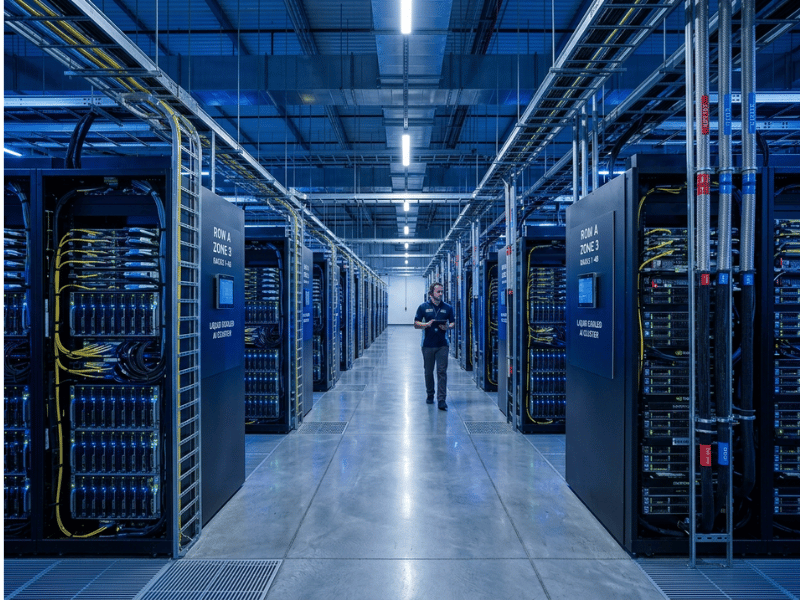
I’ve spent years around GPU server chassis, watching a slab of silicon become a working machine that has to fit, breathe, and stay cool inside a rack. The AI boom changed everything about that work. The boxes got hotter, denser, and hungrier for power than anything I saw a decade ago.
An AI data center is where all that hardware finally comes together. If you’re planning AI infrastructure, the old data center playbook no longer applies — the demands have simply outgrown what traditional facilities were built to handle.
This guide walks you through what these facilities actually are, how they’re built, what they cost, and how to choose the right deployment model for your organization. Here’s what you’ll take away:
- What separates an AI-ready data center from a conventional one — from processors and power density to cooling and networking.
- The core components and deployment models enterprises choose from — build, colocate, cloud, or hybrid.
- How to evaluate cost, power, and readiness before you commit — with a checklist and decision framework you can use right away.
What Is an AI Data Center?
An AI data center is a facility purpose-built to train, deploy, and run artificial intelligence workloads. It combines high-performance compute (mainly GPUs and other accelerators), ultra-fast networking, high-throughput storage, and advanced power and cooling systems designed for the intense, sustained demands AI places on hardware.
The short version: it’s a data center engineered around parallel processing and extreme density — not general-purpose computing.
Why the term “AI-ready data center” is emerging
You’ll see “AI-ready data center” used more and more, and for good reason. Most organizations aren’t building dedicated AI facilities from scratch. Instead, they’re upgrading or selecting infrastructure that can support AI workloads — enough rack power, the right cooling, and a network fabric that won’t bottleneck a GPU cluster. “AI-ready” signals capability without implying every square foot is dedicated solely to AI.
Common misconceptions
The biggest myth is that an AI data center is “just a regular data center with more GPUs.” Add accelerators without matching networking, storage, power delivery, and cooling, and you create an expensive, underperforming mess. GPUs left waiting on slow storage or a congested network sit idle — and idle GPUs are one of the costliest mistakes in AI infrastructure.
Another misconception is that these facilities only matter to hyperscalers. Open-source models and cloud GPU rentals have lowered the barrier to the point that mid-sized companies now run serious AI workloads, too.
The scale of recent investment tells the story: Microsoft planned to spend roughly USD 80 billion on AI-capable data center construction in 2025, and Meta committed USD 10 billion to a single four-million-square-foot hyperscale development in Louisiana. When companies move capital at that scale, AI infrastructure has clearly become a category in its own right.
Why AI Workloads Require Different Infrastructure
Before we look inside these facilities, it’s worth understanding why AI breaks the traditional data center model.
Generative AI and machine learning need to run the same calculation millions of times, all at once. That’s a job for chips built to handle thousands of tasks in parallel. Standard data centers are built around CPUs, which handle sequential tasks well but choke on massive parallel workloads.
Drop AI hardware into a legacy facility, and you hit a wall fast. The power circuits can’t feed it. The cooling can’t keep up. The floor may not even hold the weight. AI facilities sit closer to the high-performance computing (HPC) world — long used for weather modeling and physics simulations — but push further still, with tighter chip-to-chip links and racks that run flat-out for weeks at a time.
The contrast is stark. A standard web app serves pages and queries a database on a comfortable CPU server. Training a large language model means thousands of GPUs working in lockstep, constantly exchanging data, reading terabytes from storage, and running at full throttle for weeks. One workload sips resources; the other demands a facility engineered around it.
AI Data Center vs. Traditional Data Center
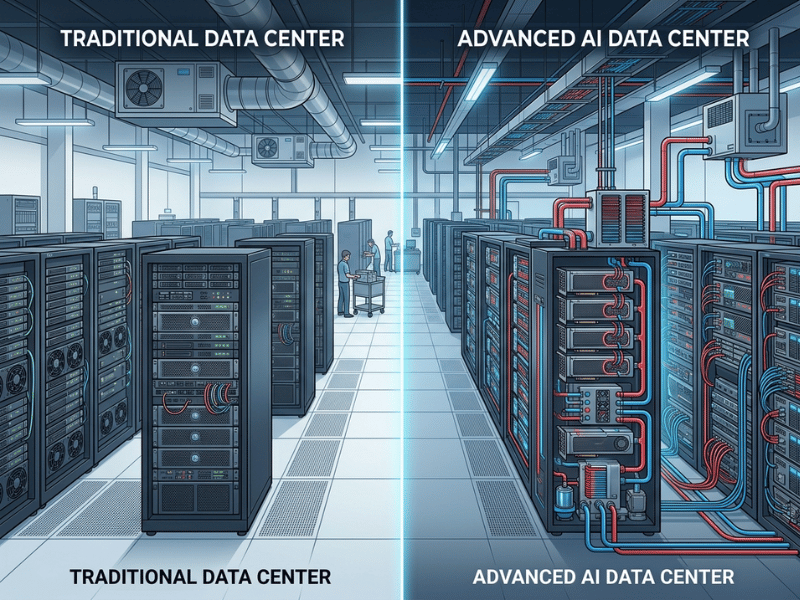
Both share the same DNA — concerns about servers, storage, networking, security, and reliability. The difference comes down to how each handles the extraordinary demands of AI workloads.
Traditional facilities optimize for versatility and cost-efficiency across many workload types. AI data centers optimize for throughput and density, accepting far higher power and cooling costs in exchange for the ability to keep accelerators continuously busy.
|
Attribute |
Traditional Data Center |
AI Data Center |
|---|---|---|
|
Primary processor |
CPUs |
GPUs and AI accelerators (TPUs, NPUs) |
|
Power density per rack |
~5–10 kW |
50–100+ kW |
|
Cooling method |
Air cooling, hot/cold aisle containment |
Liquid cooling (direct-to-chip, immersion) |
|
Networking |
Standard Ethernet, moderate latency |
InfiniBand or high-speed Ethernet, ultra-low latency |
|
Storage |
HDD/SSD, general-purpose |
NVMe SSD, parallel file systems, HBM |
|
Typical workloads |
Web apps, databases, virtualization |
Model training, inference, HPC |
|
Cost profile |
Lower CAPEX and OPEX |
High CAPEX, high energy OPEX |
What this means for you: If your workloads are mostly transactional — websites, databases, business applications — a traditional facility or standard cloud is the right fit. The moment you commit to training or serving models at scale, you need infrastructure built for density, speed, and heat. Forcing AI onto traditional infrastructure typically wastes more in idle compute than building it right from the start would have cost.
Core Physical Components of an AI-Ready Data Center
Here’s what’s actually inside these facilities, and why each piece matters.
Compute — GPUs, TPUs, and accelerators
The heart of the operation is the accelerator chip. GPUs do the heavy lifting for most AI work. Originally built to render graphics — a massively parallel job — that same architecture turned out to be perfect for training AI models. TPUs (tensor processing units) are custom chips designed specifically for AI math, while NPUs (neural processing units) mimic neural pathways for efficient real-time inference. Everything else in the building exists to keep these engines fed and cool.
High-density racks
In a normal data center, a rack holds a reasonable amount of gear at manageable power levels. In an AI facility, hardware is packed far more densely — stacks of GPU servers shoulder to shoulder. Fitting eight power-hungry GPUs into a chassis, then stacking those chassis in a rack, means every millimeter of airflow matters. Get the internal layout wrong and the chips throttle or fail outright.
Networking — and why topology matters
Thousands of chips have to act like one coordinated system, which only works if they communicate with almost no delay. InfiniBand delivers extremely low latency and is the preferred choice for large training clusters. High-speed Ethernet — now reaching 400–800 Gbps — offers a flexible, broadly supported alternative.
Topology matters as much as raw speed. Traditional data centers mostly handled North-South traffic: data flowing in and out of the building as users made requests. AI clusters generate enormous East-West traffic instead — constant server-to-server communication inside the facility. To handle this, AI data centers use a spine-leaf architecture, where every server connects through leaf switches that all tie into a set of spine switches. The result is a fast, predictable path between any two nodes, with no congestion bottlenecks in the middle.
Storage — feeding the GPUs
Training datasets are massive, and standard storage can’t feed data to accelerators fast enough. NVMe SSDs deliver the speed and parallelism AI requires. High-bandwidth memory (HBM) sits close to the processor for rapid data transfer at lower power. Parallel file systems let thousands of GPUs read data simultaneously without stepping on each other, while object storage holds the vast datasets that fuel training runs. In an AI data center, storage is a performance component — not just a place to park files.
Floors, ceilings, and physical space
This is the detail that catches teams off guard. A rack full of GPU servers is genuinely heavy — floors must be rated to bear the load. Overhead space matters too, because high-speed interconnects and cooling lines need somewhere to run. Retrofitting an older building typically means reinforcing floors and completely rethinking cable routing. It’s far easier — and cheaper — to design for these requirements from the start.
The software orchestration stack
Hardware is only half the picture. Traditional data centers rely on basic virtualization to slice servers into smaller pieces. AI facilities need orchestration software to coordinate thousands of chips into a unified system. Tools like Kubernetes manage workloads and resource allocation, while specialized AI frameworks handle the actual training and inference jobs. The software layer must schedule work intelligently, automatically recover from hardware failures, and keep every expensive GPU as busy as possible.
Security — protecting data and models
An AI data center holds three things worth protecting: the physical infrastructure, the sensitive data used to train models, and the models themselves, which represent significant intellectual property. Security operates on two layers. The physical layer covers guards, cameras, and access-controlled cages. The logical layer covers encryption, access controls, and network defenses. A gap in either puts the whole operation at risk. In one IBM survey, 57% of CEOs cited data security concerns as a barrier to adopting generative AI.
Power and Cooling: The Two Hardest Constraints
Power and heat define the outer limits of what an AI data center can do — and they’re the areas where planning most often falls short.
Power density and the grid problem
A standard server rack draws around 10 kW. An AI rack pulls 50–100 kW, and newer designs push higher still. Feeding that load into a single rack changes the entire electrical design — busbars, cooling loops, circuit capacity. You’re effectively running a small industrial machine in the footprint of a refrigerator.
Here’s the constraint few anticipated fast enough: local power grids often can’t supply what a large AI campus needs. A major facility can demand as much electricity as a small city, forcing operators to build dedicated substations and negotiate directly with utilities. In some regions, grid access has become the hard ceiling on how fast AI infrastructure can grow. Goldman Sachs projects AI will drive a 165% increase in data center power demand by 2030 — a number that’s already reshaping energy planning globally.
From air to liquid cooling
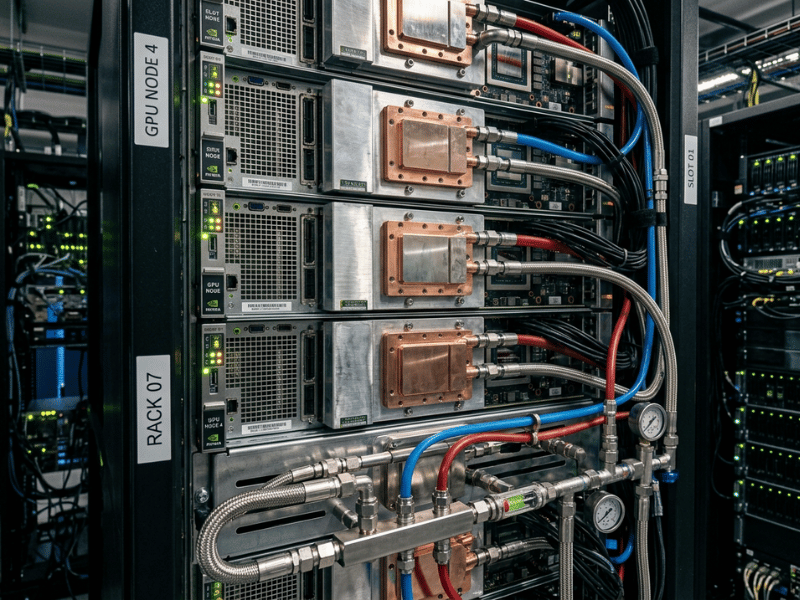
Air cooling worked well for decades and still makes sense up to roughly 30–40 kW per rack. AI hardware quickly blows past that threshold. Direct-to-chip cooling circulates coolant through plates mounted directly on the hottest components, removing heat far more efficiently than air ever could. Immersion cooling goes further, submerging entire servers in a non-conductive fluid that absorbs heat from every surface at once. Both approaches handle the thermal loads that would overwhelm air-cooled setups, and both improve PUE (power usage effectiveness) — the ratio of total facility power to useful IT power delivered.
Cleaner power and sustainability
All that consumption creates real sustainability pressure, and operators are pursuing several answers at once. Microgrids allow a campus to generate and manage its own power on-site. Renewables — mostly solar and wind — offset grid draw; Apple has run its data centers entirely on renewable energy since 2014. Nuclear power has re-entered serious conversations as a source of steady, carbon-free electricity at the scale these facilities need. Expect more AI campuses to be co-located with their own dedicated power generation going forward.
The Data Lifecycle: Training Marathon vs. Inference Sprint
Data moves through an AI data center in distinct phases, each of which stresses the hardware differently. Understanding this distinction is one of the most important — and most overlooked — factors in designing the right infrastructure.
The training phase
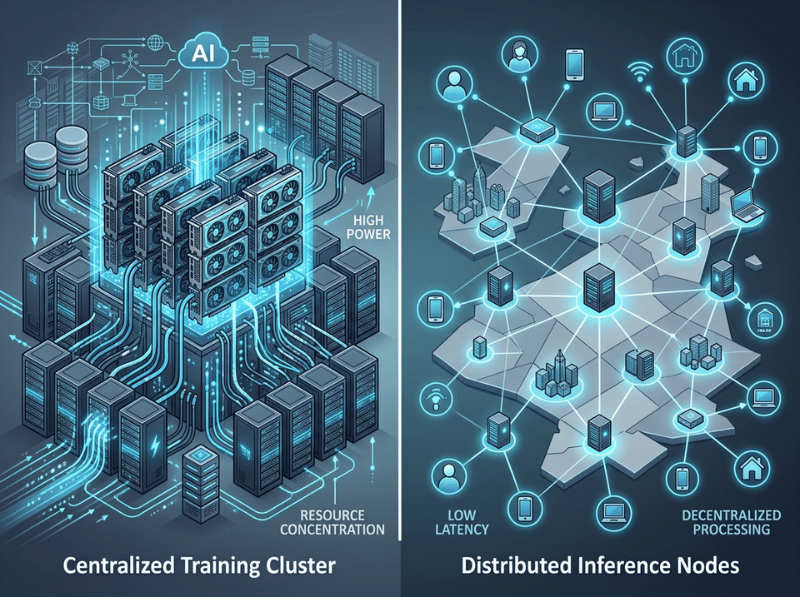
Training is the marathon. Large GPU clusters run for weeks or even months to build a single model, with chips connected by high-bandwidth, low-latency interconnects so they can constantly share gradient updates. The load is fully sustained — flat-out, day and night, with no natural breaks. This is the phase that pushes power and cooling to their limits. Any weakness in the thermal design will surface here.
The inference phase
Once a model is trained, it shifts to inference — doing its actual job by responding to user requests in real time. The priorities flip completely. Instead of maximizing raw sustained throughput, you optimize for low latency and cost per query. Inference arrives in spiky, unpredictable bursts rather than a constant load. Many facilities run training and inference on separate, purpose-tuned hardware to match the demands of each phase.
Edge data centers
Not all AI inference needs to run in a large central campus. Edge data centers are smaller facilities placed close to end users. The goal is latency: routing a request across the country and back introduces a delay that users notice. Processing it nearby keeps responses fast. A common and cost-effective pattern is to train models once, centrally, on a powerful cluster — then deploy inference regionally or at the edge, where it runs continuously at a fraction of the training cost.
AI Data Center Deployment Models
You don’t have to build your own facility to run AI. Here are the four main paths, and the situations each suits best.
On-premises (build your own)
You own and operate everything — hardware, facility, power, cooling, and staff. This gives you maximum control over infrastructure, data, and security. The trade-off is enormous capital investment and the operational complexity of managing it all. Best for: large enterprises or regulated industries with predictable, long-term AI workloads and strict data residency requirements.
Colocation
You rent space, power, and cooling from a purpose-built facility and install your own hardware. You get enterprise-grade infrastructure without the construction and commissioning burden. Colocation has grown rapidly for exactly this reason — for many organizations, it’s the fastest realistic path to serious AI capacity. Best for: enterprises that want dedicated hardware control without having to build and manage a facility.
Hyperscale cloud (AWS, Azure, GCP)
You rent GPU capacity on demand from a major cloud provider — no upfront hardware, immediate elasticity, and the ability to scale up or down within minutes. The trade-off: costs accumulate quickly under sustained heavy use, and you have less control over the underlying hardware stack. Best for: startups, teams running short training runs, or any organization validating workloads before committing capital.
Hybrid
You combine on-premises or colocation infrastructure with cloud burst capacity. Steady, predictable workloads run on your own hardware at lower long-run cost; peak demand and one-off training runs tap the cloud. Best for: enterprises that need both control and flexibility, and want to optimize costs across variable workload patterns.
Decision snapshot
- Startup or early experimentation → Hyperscale cloud. No capital risk, full flexibility to iterate.
- Sustained, predictable workloads at scale → On-prem or colocation. Lower total cost over time.
- Sensitive data or strict compliance requirements → On-prem or hybrid. Maximum control over data and infrastructure.
- Variable demand with cost pressure → Hybrid. The advantages of both ownership and elasticity.
How Much Does an AI Data Center Cost?
There’s no single figure, but understanding the cost structure lets you plan with much more confidence.
CAPEX (upfront capital) covers hardware — GPUs are typically the largest single line item and can dominate the budget, plus the facility, networking gear, and the power and cooling buildout. For a serious on-premises build, these costs are substantial and front-loaded.
OPEX (ongoing costs) includes energy (often the largest recurring expense given AI’s power appetite), cooling, staffing, maintenance, and cloud or colocation fees where applicable. Over a multi-year horizon, energy costs alone can rival or exceed the original hardware investment.
Three factors drive AI costs above the traditional data center baseline: GPU pricing and supply constraints, extreme power density (which compounds both electrical and cooling costs), and the redundancy required to protect hardware that’s expensive, long-lead, and hard to replace.
The deployment model reshapes the equation entirely. On-prem is CAPEX-heavy with lower marginal cost per workload once the infrastructure is in place. Cloud is OPEX-heavy, with near-zero upfront cost but rising total spend under sustained load. The break-even point depends heavily on how continuously you’ll use the infrastructure — the more constant the workload, the stronger the case for ownership.
Current Challenges and Market Trends
The industry is scaling fast and running into real friction in the process.
- Supply chain pressure. High-end GPU chips are hard to get, with lead times that stretch well beyond typical procurement cycles. The constraint doesn’t stop at chips — purpose-built cooling systems, high-speed networking gear, and specialized power equipment can all carry long back-order queues. Organizations planning new builds need to lock in critical components long before breaking ground.
- Gigawatt-scale campuses. The ambition behind new projects is extraordinary. Operators are announcing campuses with power capacity measured in gigawatts — among the largest private construction programs underway anywhere in the world. The race to build capacity ahead of demand is intense, and the capital commitments reflect it.
- Regulatory complexity. Large facilities draw scrutiny. Land-use approvals can stretch for years. Water consumption for cooling has become a flashpoint in water-stressed regions. And carbon footprints face rising pressure from regulators, investors, and public stakeholders alike. Operators that treat these as afterthoughts face delays and reputational risk; those that build them into project plans from day one move faster.
How to Evaluate Whether You Need an AI Data Center
Dedicated AI infrastructure isn’t right for every organization. Start with these questions before making a commitment:
- What type of AI work are you doing — training, inference, or both?
- Is your workload steady and sustained, or occasional and variable?
- How sensitive is your data, and what compliance requirements apply?
- What’s your timeline, and how much capital can you responsibly commit?
You’re ready to invest in dedicated infrastructure when workloads are sustained and heavy, cloud GPU costs have exceeded what ownership would cost, you have strict data residency or security requirements, and your AI roadmap is genuinely long-term rather than exploratory.
Cloud or colocation is the smarter starting point when workloads are intermittent, you’re still validating use cases, you want to avoid capital risk, you need to move quickly, or your team lacks the expertise to operate a facility.
A common objection: “Can’t we just stay in the cloud?” Often, yes — especially early on. The cloud is the right starting point for most organizations. But as workloads grow larger and more continuous, cloud costs can outpace the price of owning infrastructure. The smart approach is to start in the cloud, track spend and utilization carefully, and reassess when sustained demand makes ownership or colocation the more economical choice.
Enterprise AI Data Center Checklist
Use this before committing budget to any infrastructure decision:
- Compute and accelerators — Have you matched your GPU, TPU, or NPU choice to your actual training and inference requirements?
- Networking — Is your fabric (InfiniBand or high-speed Ethernet) fast enough to keep accelerators from waiting on data?
- Storage — Do your NVMe drives, parallel file systems, and memory bandwidth match your data throughput needs?
- Power capacity — Have you confirmed grid access and verified that rack power density supports your hardware configuration?
- Cooling — Is your cooling approach (air vs. liquid) matched to the density of your deployment?
- Physical space — Can your floor’s load handle the weight? Is overhead space sufficient for cabling and cooling infrastructure?
- Software stack — Do you have orchestration tooling (Kubernetes, AI frameworks) to schedule workloads and keep GPUs utilized?
- Security and compliance — Are physical security, data privacy, and model protection built into the design?
- Deployment model — Have you chosen the model — on-prem, colocation, cloud, or hybrid — that fits your workload profile and growth plans?
- Budget and TCO — Have you modeled total cost of ownership across upfront CAPEX and multi-year OPEX?
Common Mistakes When Planning AI Infrastructure
- Mistake 1: Underestimating power and cooling. Hardware planning dominates early conversations, and power and cooling get treated as details to sort out later. Then teams discover the facility can’t supply enough electricity or remove enough heat. Fix: Confirm power availability and finalize your cooling strategy before purchasing hardware.
- Mistake 2: Buying GPUs without matching network and storage. Expensive accelerators sit idle when the network congests or storage can’t feed them fast enough. The GPUs aren’t the bottleneck — everything around them is. Fix: Plan and budget for balanced infrastructure. Fast networking and storage are not optional add-ons.
- Mistake 3: Ignoring the training-versus-inference distinction. Building a single architecture that tries to serve both phases well often serves neither well. Fix: Design training and inference environments separately, each optimized for its actual workload characteristics.
- Mistake 4: No clear TCO or scalability plan. Committing to infrastructure without modeling multi-year costs or planning a path to scale leads to budget surprises and architectural dead ends. Fix: Model total cost of ownership before signing anything, and build a clear plan for expanding — or exiting — as your needs evolve.
Frequently Asked Questions
What is the difference between an AI data center and a traditional data center?
A traditional data center is built around CPUs for general-purpose workloads, operates at moderate power density, and uses air cooling. An AI data center is built around GPUs and specialized accelerators, operating at far higher power density, with ultra-fast networking, high-throughput storage, and liquid cooling designed to sustain intense AI workloads.
How much power does an AI data center use?
Significantly more than a traditional facility. AI racks draw 50–100+ kW compared to around 10 kW for standard racks. A large campus can consume as much electricity as a small city, which is why grid access and utility relationships have become critical constraints. Goldman Sachs projects AI will drive a 165% increase in global data center power demand by 2030.
Is liquid cooling required for AI workloads?
Not always, but it becomes necessary at higher densities. Air cooling handles racks up to roughly 30–40 kW adequately. Beyond that threshold, direct-to-chip or immersion liquid cooling is required to remove heat efficiently and keep hardware stable under sustained load.
Can existing data centers be upgraded for AI workloads?
Sometimes, but it’s rarely straightforward. The primary obstacles are power capacity and cooling — older buildings often can’t deliver the electricity AI racks demand or remove the heat they generate, and structural floors may not support the weight. Light upgrades are possible for modest workloads, but serious AI capacity usually requires significant renovation or a purpose-built facility.
Should we build, colocate, or use the cloud for AI?
Start in the cloud for flexibility and low upfront risk. Evaluate moving to colocation or on-premises ownership when workloads become large and sustained, when cloud costs begin to exceed what ownership would cost, or when data sensitivity and compliance requirements demand greater control. A hybrid approach can combine the advantages of both.
How does location affect AI data center efficiency?
Location is a foundational decision. Proximity to affordable, reliable, and ideally clean power is the most important factor. A cooler climate reduces cooling costs directly. Water availability affects liquid cooling feasibility. And for inference workloads, proximity to end users reduces latency. The right site can materially improve both economics and performance; the wrong one creates constraints that are hard to overcome.
Conclusion
AI data centers represent a genuine departure from the technology infrastructure that came before them — denser, hotter, more power-hungry, and built entirely around parallel work rather than the varied, sequential tasks that traditional facilities handle well. Every design decision, from the choice of accelerator to the cooling system to the floor rating, reflects that single-minded purpose.
The right infrastructure choice for your organization depends on your workload type, scale, data requirements, and budget. Use the checklist above to assess where you stand, then explore the deployment model that genuinely fits your needs — whether that’s cloud capacity today, colocation tomorrow, or a long-term on-premises build.
AI models will keep getting larger and more resource-intensive, and the infrastructure behind them will keep evolving to match. The organizations that plan around their actual workload requirements — rather than industry momentum — are the ones that scale AI efficiently and sustainably.
