


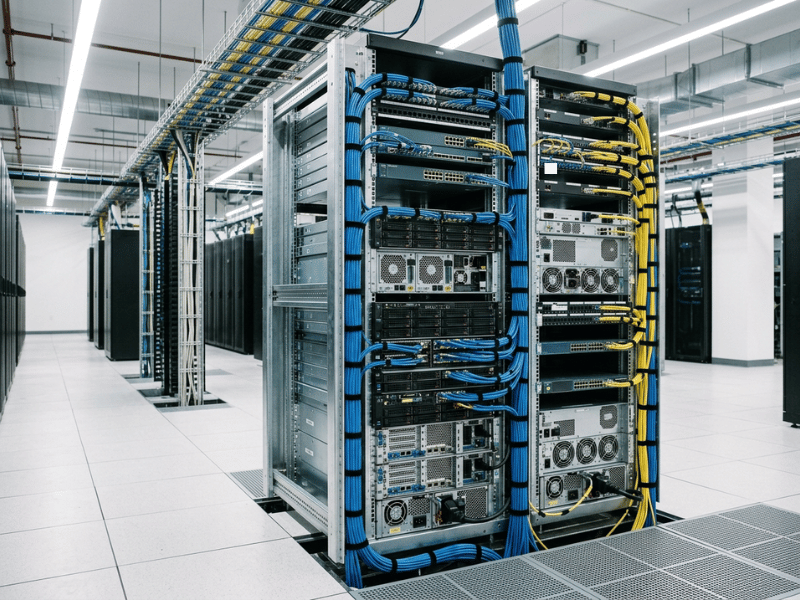
TL;DR: Open-frame server racks are cost-effective, high-airflow structures built from 2 or 4 vertical uprights and have no doors or side panels. They excel in controlled environments—data centers, labs, and network closets—where cooling performance, ease of access, and budget efficiency take priority over physical security. Choose a 2-post rack for lightweight networking gear; choose a 4-post rack for heavy servers and high-density GPU hardware.
Choose the wrong rack, and you’ll work around it for years. Choose the right one, and it disappears into the background while you focus on the hardware inside.
Open frame server racks are a standard choice for IT professionals managing equipment in controlled environments—from enterprise data centers running dense GPU workloads to compact network closets serving a single floor. Enclosed cabinets get most of the attention. They look polished, they lock up, and they project a sense of security. But appearances aren’t always the right basis for an infrastructure decision.
In environments built for performance and efficiency, an open-frame rack often cools better, costs less, and enables faster maintenance. This guide covers the real benefits of open frame server racks, an honest assessment of their limitations, a direct comparison with enclosed cabinets, and a practical selection framework. By the end, you’ll know whether an open frame rack is right for your environment—and exactly how to configure one if it is.
What Is an Open Frame Server Rack?
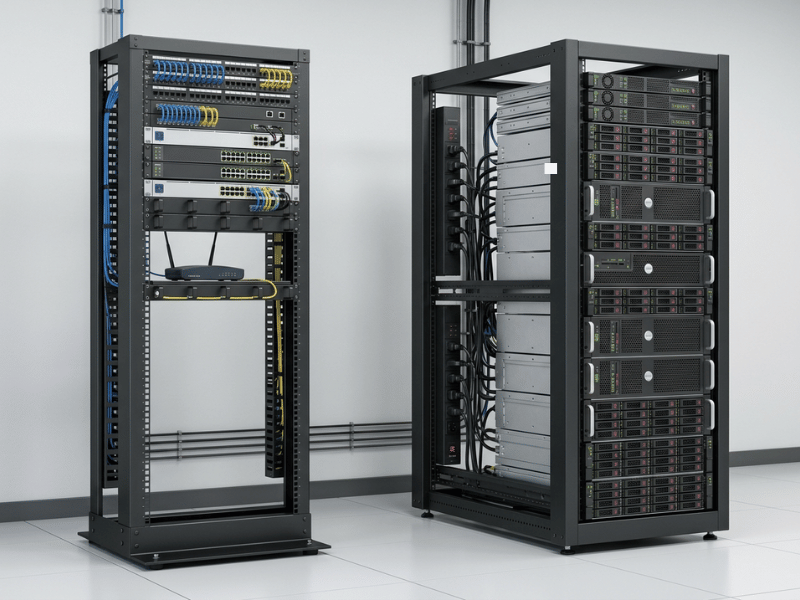
An open frame server rack is a mounting structure built from 2 or 4 vertical metal uprights fitted with standardized holes for securing rack-mount hardware. Unlike enclosed cabinets, open-frame designs have no side panels, doors, or top or bottom enclosures. All mounted equipment is fully accessible from every direction.
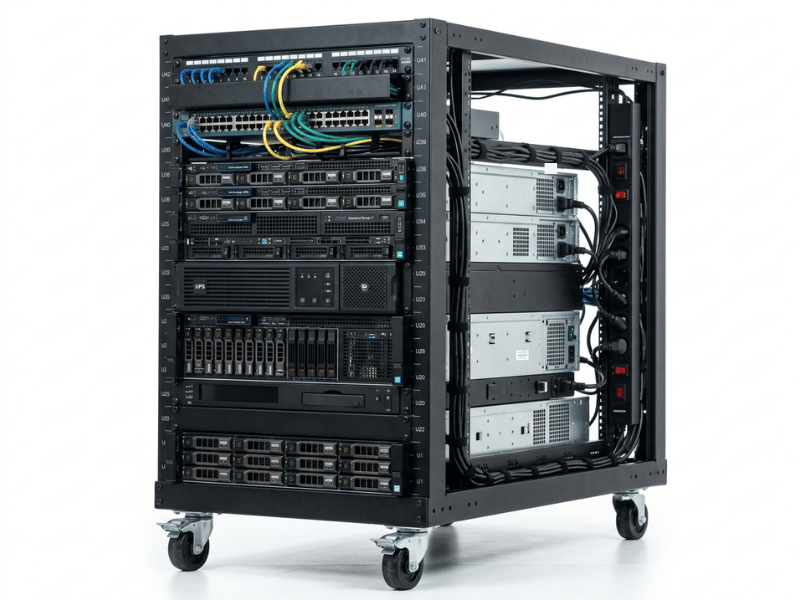
Most open frame racks conform to the EIA-standard 19″ mounting width, ensuring compatibility with hardware from virtually every major OEM—Dell, HPE, IBM, Cisco, and others. Rack height is measured in rack units (U), where 1U equals 1.75 inches of vertical mounting space. Available heights range from 5U for compact deployments up to 58U for full data center builds.
Two primary configurations exist:
- 2-post racks use two uprights and are designed for lighter equipment that doesn’t require rear rail support—patch panels, switches, and rack-mount drawers.
- 4-post racks use four uprights and support deeper, heavier hardware: servers, UPS units, storage arrays, and GPU chassis that require rear rail support.
That configuration choice shapes nearly every other decision in the buying process, which is why we’ll return to it in the selection guide below.
Top Benefits of Open Frame Server Racks
Superior Airflow and Natural Cooling
Airflow is the defining advantage of an open frame rack—and the reason most engineers default to them in performance-driven environments.
With no doors and no side panels, air circulates freely in all directions: front, rear, and sides. There’s nothing blocking it and nothing trapping it. Enclosed cabinets operate under different constraints. Air must pass through perforated doors, and without careful management, it can pool inside the cabinet. That’s how hot spots form—one server runs hotter than its neighbors, thermal throttling sets in, and you’re diagnosing a problem the rack itself introduced.
Open frame designs eliminate that failure mode. Ambient room cooling reaches equipment intakes without obstruction, which is especially valuable in high-density deployments where modern GPU servers and compute hardware generate substantial heat. When room-level climate control does the heavy lifting, the dependency on rack-mounted cooling fans decreases—reducing both energy draw and noise on the floor.
Tip: For high-density compute or GPU deployments where heat loads are significant, open airflow is one of the most effective and lowest-cost ways to maintain safe operating temperatures.
Lower Upfront Cost
Open frame racks cost less to manufacture, and the savings compound across the supply chain. A frame uses significantly less steel than a full cabinet—no doors, no side panels, no locking mechanisms. Fewer components mean a lower purchase price.
Shipping costs are lower as well. The units weigh less and are commonly shipped flat-packed, reducing freight costs and simplifying on-site logistics. Within the open-frame category, 2-post racks cost roughly one-third as much as comparable 4-post models, making them a practical entry point for organizations with modest networking footprints. For startups and growing teams, the cost differential is meaningful—money that stays available for the compute hardware that drives actual results.
Easier Access for Installation and Maintenance
Cooling may be the primary benefit. Access is what your operations team will notice on every service call.
No doors, no side panels, no latches to clear before reaching a cable. Technicians can work on equipment, ports, and cabling from any angle—front, sides, or rear—without first removing rack components. This matters most during heavy equipment installs. A loaded server chassis is unwieldy, and open access from all sides makes the job safer and more manageable with fewer personnel.
The operational impact extends beyond individual tasks. Reduced access friction lowers mean time to repair (MTTR) in environments where downtime carries financial consequences. Over a year of routine maintenance and incident response, eliminating unnecessary steps from every service visit adds up to meaningful time savings.
Simpler Cable Management
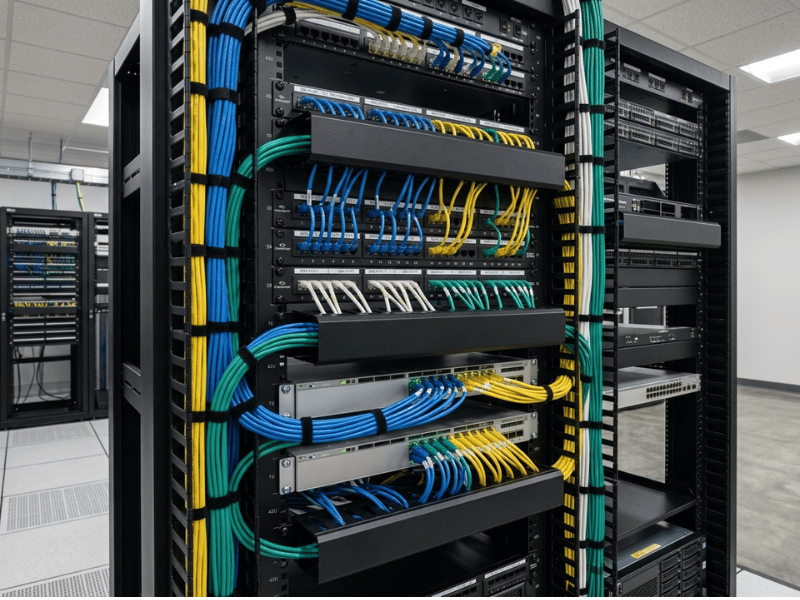
Every cable run in an open-frame rack is visible and accessible from multiple angles. Vertical cable management bars attach directly to the uprights, horizontal raceways span the full rack width, and D-rings guide individual runs without threading through enclosed channels or around door hardware.
Cable entry and exit flexibility is another practical advantage. In dense networking setups, the ability to route runs from any direction—rather than through specific cabinet cutouts—simplifies both initial installation and future reconfigurations. When a port goes down, and a specific cable needs tracing, following an exposed run end-to-end takes seconds. The same task inside a closed cabinet means working through bundled, hidden runs.
One important note: open accessibility does not compensate for poor cable discipline. Use hook-and-loop fasteners rather than plastic zip ties on data and fiber runs—zip ties can over-tighten and degrade performance. Keep bundles clear of airflow paths, and label both ends of every run. An open rack makes good cable management easier and makes bad cable management immediately visible.
A useful reference point: 4-post racks provide roughly twice as many cable management attachment points as 2-post racks, which matters significantly in high-density, rear-heavy cabling environments.
Faster Deployment and Better Operational Visibility
A 2-post open frame rack can arrive in as few as 4–6 components. Even large 4-post configurations assemble quickly with standard hand tools—no door hinge alignment, no panel fitting, no complex integration steps before equipment can be mounted. For rapid deployments, temporary installations, or edge computing locations where time-to-operational is a constraint, that assembly advantage is real.
Operational visibility is equally valuable after installation. LED status indicators, port activity lights, and cable runs are all visible without opening anything. During an incident, a technician can scan drive activity indicators across an entire server row in seconds. The equivalent task in an enclosed cabinet requires opening a door and checking units individually—a meaningful difference during a high-pressure outage response.
When an Open Frame Rack Makes Sense
Open frame racks perform best in controlled, access-restricted indoor environments. They are the right tool for specific deployment scenarios—not a universal replacement for enclosed cabinets.
- Data centers: Purpose-built for open frame configurations. Temperature and humidity are actively managed, hot/cold aisle layouts maximize unrestricted airflow, and physical security operates at the facility level rather than the rack level.
- Network closets: Smaller footprint fits space-constrained environments. A single technician can manage cabling and equipment without removing panels in a tight room.
- Lab and testing environments: Frequent hardware changes demand fast, unobstructed access. Cost efficiency matters when configurations are in constant flux.
- AV and telecom deployments: Frequent patching, live reconfiguration, and real-time cable verification all benefit from full visibility and unrestricted access.
- Edge and temporary deployments: Lighter weight, simpler assembly, and faster teardown make open frames the practical choice for pop-up infrastructure, event setups, and short-term edge locations.
- High-density compute environments: Dense GPU deployments and high-performance computing clusters generate serious heat loads. Open ventilation provides a meaningful thermal advantage that enclosed cabinets can only partially replicate with active cooling.
Open Frame Rack vs. Enclosed Rack: Side-by-Side Comparison
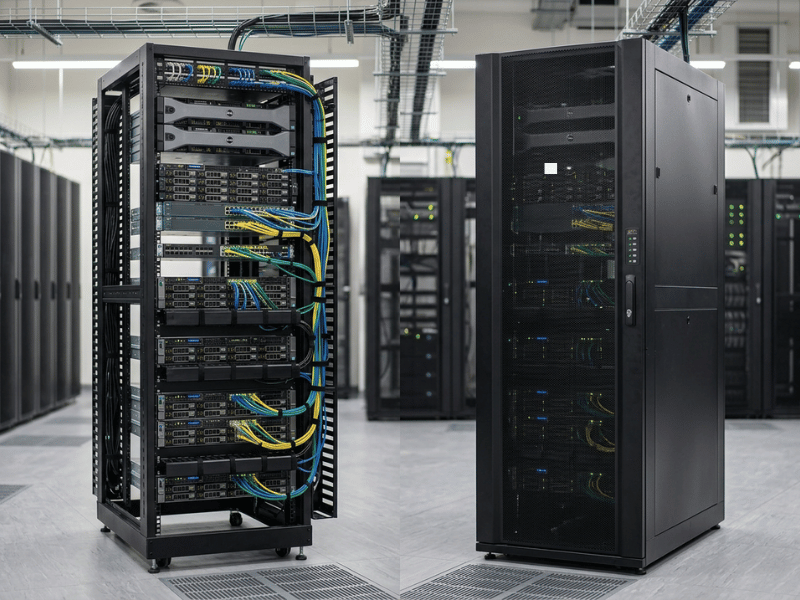
Neither configuration is universally superior. The right choice depends on your environment, security requirements, and operational priorities.
|
Factor |
Open Frame Rack |
Enclosed Rack |
|---|---|---|
|
Airflow |
Unrestricted — natural airflow in all directions |
Controlled — perforated doors, requires active cooling fans |
|
Security |
Low — no locking doors or side panels |
High — lockable doors, solid side panels |
|
Dust Protection |
Poor — equipment exposed to the environment |
Good — sealed body limits dust ingress |
|
Noise Containment |
None — operational noise fully escapes |
Moderate — solid walls dampen noise |
|
Cable Visibility |
High — all cables visible from any angle |
Low — cables routed inside the cabinet |
|
Cost |
Lower — less material, lighter to ship |
Higher — more material, heavier freight |
|
Weight |
Lighter — easier to move and redeploy |
Heavy — large floor models can exceed 300 kg |
|
Best Use Case |
Data centers, labs, server rooms, AV/telecom, edge |
Public spaces, offices, retail, compliance-driven environments |
Open frame racks are optimized for airflow, accessibility, and cost. Enclosed racks are optimized for physical security, dust protection, and noise management. If the room is already secure and environmentally controlled, the protective features of an enclosed cabinet often add cost without adding meaningful value.
Potential Drawbacks of Open Frame Server Racks
A buying guide that lists only benefits is marketing copy, not a useful analysis. Here’s where open frame racks fall short.
- Limited physical security: No lockable doors, no side panels. Anyone with physical access to the space can directly interact with mounted equipment. In shared offices, co-working environments, or any location without controlled entry, this is a genuine risk that rack-level accessories can only partially mitigate.
- Greater exposure to dust and particulates: Open equipment accumulates environmental debris. Dust acts as a thermal insulator, trapping heat and accelerating component wear. In open frame deployments, proactive cleaning schedules and room-level air filtration become operational requirements rather than optional maintenance.
- No noise containment: Server fans, drive activity, and cooling hardware generate noise that escapes freely. In office-adjacent server rooms or open-plan environments where the rack is within earshot of staff, this can be a meaningful quality-of-life factor.
- Not appropriate for uncontrolled environments: High humidity, temperature fluctuations, or airborne contaminants—conditions common in manufacturing spaces, warehouses, or outdoor edge locations—pose real hardware risks when equipment lacks environmental protection. Enclosed racks with appropriate environmental ratings are the correct choice for these settings.
The decision often reduces to two questions: Is the room already secure? And is it clean and environmentally stable? If the answer to either is no, an enclosed rack is the stronger choice.
How to Choose the Right Open Frame Server Rack
2-Post vs. 4-Post: Which Configuration Do You Need?
Choose a 2-post rack when your deployment consists primarily of lightweight equipment—patch panels, switches, and rack-mount drawers—that doesn’t require rear rail support. Two-post racks have a smaller footprint, cost roughly one-third as much as 4-post equivalents, and are easier to move and redeploy. Most 2-post models support between 330 and 880 lbs, depending on design.
Choose a 4-post rack when you’re mounting servers, UPS units, deep storage arrays, or GPU hardware that requires rear rail support and stable four-point mounting. Four-post racks support between 800 and 3,000 lbs, offer adjustable mounting depth (typically 20″–40″), and provide twice as many cable management attachment points. For any deployment involving heavy compute hardware, a 4-post rack is the appropriate baseline.
Rack Height, Depth, and Weight Capacity
- Height (U): Size to current equipment plus a realistic growth buffer—not maximum theoretical capacity. Use blanking panels in all empty U spaces; they prevent hot exhaust air from recirculating into equipment intakes, which is a common and preventable cause of elevated operating temperatures.
- Depth: Confirm the rack accommodates your deepest device with sufficient clearance at the rear for cable connections. Four-post racks typically offer adjustable depth to handle varying equipment profiles.
- Weight capacity: Calculate the total planned equipment weight before purchasing, and do not select a rack at its rated maximum capacity. Account for future additions. If mobility is part of the deployment plan, check both static and dynamic (caster) weight ratings—these figures differ meaningfully between configurations.
Accessories, Mobility, and Standards Compatibility
- Cable management: Plan all cable routes before mounting equipment. Vertical bars, horizontal raceways, and D-rings mount directly onto open-frame uprights. Routing decisions are far easier to make before hardware is in place.
- Casters vs. stationary mounts: Casters add redeployment flexibility but reduce weight capacity per manufacturer specifications. Stationary floor mounts are more appropriate for permanent, high-density installations.
- Standards compliance: Verify EIA-standard 19″ compliance for compatibility with equipment from major OEMs. Confirm whether your hardware requires square-hole or threaded-hole mounting before purchasing.
- Floor anchoring: For tall racks or heavy-loaded deployments, bolt the rack to the floor. Most open frame designs include base holes for anchoring. Anchored racks resist tipping when heavy equipment is extended forward during service—a genuine safety consideration in seismic zones or high-traffic areas.
Best Practices for Open Frame Rack Deployment
The right rack configuration is the foundation. Disciplined deployment habits determine how well it performs over time.
- Plan for growth, not just current needs. Leave 20–30% of rack space unused at initial deployment. Overfilling a rack at launch forces expensive, disruptive retrofits when new hardware arrives—and new hardware always arrives.
- Map cable routes before installation begins. Decide where every run will go before mounting the first piece of equipment. Front-to-back and side-to-side routing decisions are straightforward on paper and complicated after the rack is loaded.
- Confirm airflow paths. Verify that room-level cooling directs air efficiently across the racks. Blanking panels in empty U spaces prevent hot exhaust from recirculating into adjacent equipment intakes.
- Add accessories with intention. Cable management bars, PDUs, and cooling accessories should address specific requirements—not be installed as defaults. Overloading uprights with accessories restricts the airflow that makes open frame racks valuable in the first place.
- Verify floor load ratings and aisle clearance. Check structural floor capacity before deploying high-density racks, particularly in older facilities. Maintain 36″–48″ of aisle clearance for safe equipment access and alignment with standard data center operational guidelines.
The Bottom Line on Open Frame Server Racks
Open frame server racks are a proven, cost-effective solution for controlled IT environments where thermal performance, operational accessibility, and deployment efficiency take priority over physical security and environmental protection. For equipment housed in dedicated server rooms, data centers, or controlled network closets, open frame configurations deliver measurable operational and financial advantages over enclosed cabinets.
Before committing, run through two practical checks. First: Is the room already secure and environmentally stable? Second: Does the equipment generate enough heat for unrestricted airflow to provide a meaningful advantage? If both answers are yes, an open frame rack is almost certainly the more efficient choice.
From there, the selection logic is straightforward. Confirm your space dimensions, total equipment weight, and depth requirements. Choose a 4-post configuration for servers, UPS units, and GPU hardware; choose a 2-post configuration for lightweight networking gear. Configure for current needs, plan for growth, and anchor anything tall or heavily loaded.
Get the rack right, and it becomes invisible infrastructure—exactly what good rack design is supposed to be.
Browse our range of open-frame server racks or contact our team for a configuration recommendation tailored to your specific deployment requirements.
Frequently Asked Questions
Are open-frame racks safe for servers?
Yes, in controlled environments. Open frame racks are standard in professional data centers and server rooms where physical access is restricted and environmental conditions—temperature, humidity, and air quality—are actively managed. The determining factor is the environment, not the rack type itself.
Do open-frame racks run cooler than enclosed racks?
Generally, yes. Open frame racks allow unrestricted airflow in all directions, relying on natural or ambient air circulation rather than active cooling fans inside the cabinet. In rooms with properly designed HVAC, open-frame configurations can maintain lower operating temperatures than enclosed cabinets with equivalent equipment density.
What is the difference between a 2-post and a 4-post open-frame rack?
A 2-post rack uses two uprights and is suited for lightweight equipment—patch panels, switches, and shallow rack-mount devices—that don’t require rear support. A 4-post rack uses four uprights and supports heavier, deeper hardware such as servers, UPS units, and GPU chassis, with weight capacities ranging from 800 to 3,000 lbs and adjustable mounting depth from 20″ to 40″. For any deployment involving heavy compute hardware, a 4-post rack is the appropriate starting point.
When should I choose an enclosed rack instead?
Choose an enclosed rack when equipment is located in a public or shared space, in an environment with poor air quality, elevated humidity, or airborne contaminants, or when compliance requirements mandate locked, enclosed housing. In these scenarios, physical security and environmental protection outweigh the airflow and cost advantages of an open frame design.
Can open-frame racks be bolted to the floor for added stability?
Yes, it is recommended for tall racks or configurations that carry significant weight. Most open frame designs include base holes for floor anchoring. Anchored racks resist tipping when heavy equipment is slid forward for servicing and provide additional stability in seismic zones or high-traffic operational areas.
Can open-frame racks be used in a data center?
Yes. Open frame racks are a standard component in enterprise data centers and are used extensively in both hyperscale and colocation facilities. Their unrestricted airflow characteristics align directly with how modern data centers manage heat at scale, and their accessibility supports efficient operations across large equipment deployments.
How much does an open frame server rack cost compared to an enclosed rack?
Open frame racks cost significantly less than enclosed cabinets of equivalent height and depth, primarily because they use less raw material and weigh less to ship. Within the open frame category, 2-post racks cost roughly one-third as much as comparable 4-post configurations.
