


TL;DR: Server room monitoring uses environmental sensors to track temperature, humidity, water, power, smoke, access, vibration, and HVAC performance in real time. Without it, small physical hazards quietly escalate into full-outages. This guide covers every major risk, recommended sensors, alert thresholds, and a ready-to-use maintenance checklist.
Cyberattacks get the headlines. But when a server room goes dark, the culprit is more likely a dripping pipe, a failing air conditioner, or a temperature sensor that nobody checked. Physical and environmental threats cause outages just as often as digital ones—yet most organizations invest far less in preventing them.
This guide is your complete playbook for server room monitoring. It covers eight common server room hazards, explains how each one leads to downtime, maps each risk to the right sensor, and gives you specific alert thresholds, best practices, and a daily-through-quarterly checklist you can start using today.
By the end, you’ll have everything you need to shift from reactive firefighting to proactive, continuous monitoring—whether you’re managing one server closet or a distributed network of edge sites.
Why Server Room Monitoring Matters
Downtime is expensive. According to the ITIC 2024–2025 Hourly Cost of Downtime Survey, a single hour of server downtime costs more than $300,000 for most organizations, and data centers, in particular, can incur losses between $300,000 and $540,000 per hour. That number includes labor, lost revenue, recovery work, and the reputational damage that lingers long after the systems come back online.
The real danger is that most environmental failures don’t happen all at once. A cooling unit degrades over weeks. A pipe develops a slow drip under a raised floor. A rack gradually runs hotter as airflow becomes blocked. Without continuous monitoring, these problems stay invisible until the damage is already done.
Modern server room monitoring changes that equation. Distributed sensors stream real-time data—temperature, humidity, power draw, motion, moisture—to a central dashboard. Alert thresholds trigger instant notifications by text, email, or voice the moment conditions drift outside safe limits. The result: problems get caught in minutes, not days, and most are resolved long before they cause downtime.
That shift matters more than ever. Many server rooms are unmanned for long stretches of the day, run as lights-out facilities, or sit in remote branch offices that IT rarely visits in person. Continuous data center environmental monitoring fills the gap left by infrequent physical inspections.
Top Server Room Risks
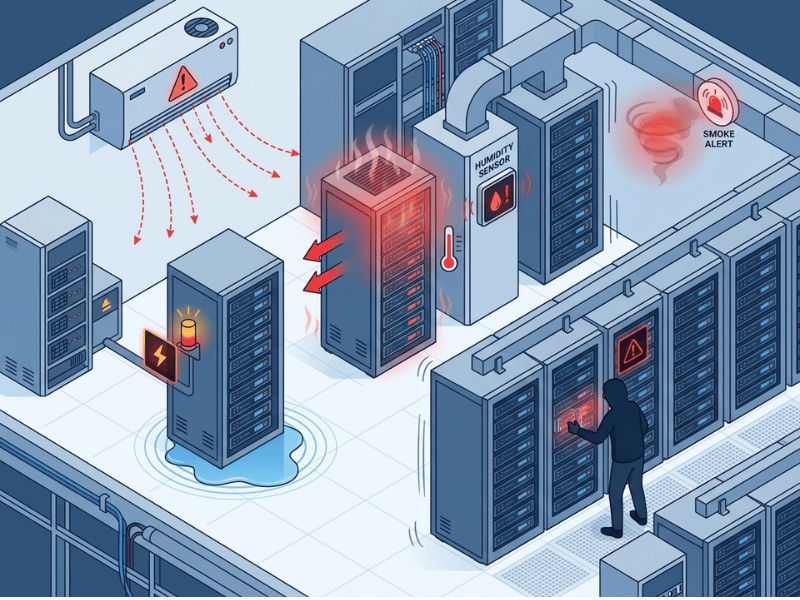
The frequently cited list stops at five hazards. Here are eight—each one covered with its causes, the damage it inflicts, and the early warning signs.
What temperature range is safe for a server room?
ASHRAE recommends an intake air temperature range of 18°–27°C (64°–80°F) for server environments. Most organizations target a tighter band of 20°–24°C (68°–72°F) for optimal reliability.
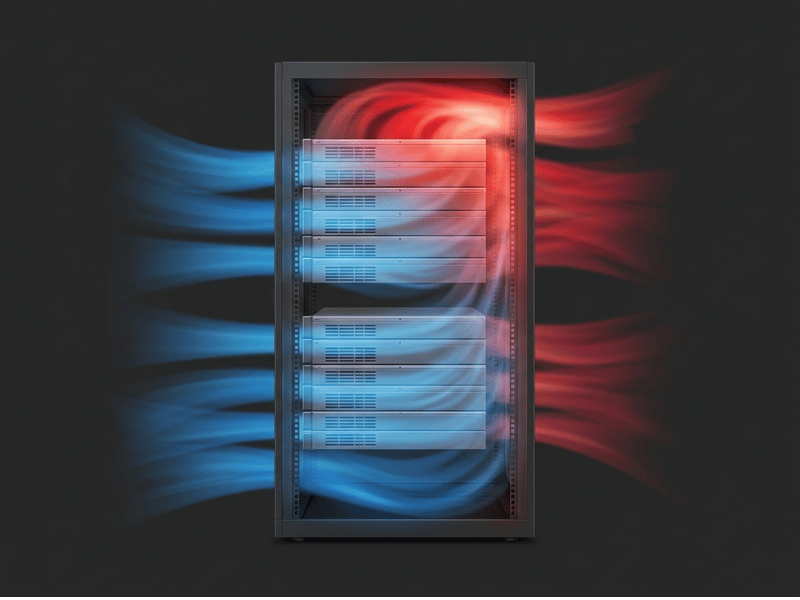
The problem is that room-average temperatures can look fine even as localized hotspots form within individual racks. High-density racks, blocked cold-air paths, and sunlight through unshielded windows can push local temperatures well above safe limits—even when the thermostat reads normal. Rack-level temperature sensors, placed at the top, middle, and bottom of each rack front and back, catch these hotspots before they cause hardware stress or thermal shutdowns.
How does humidity affect server room equipment?
Relative humidity should stay between 45% and 55%. Stray above that band, and water condenses on circuit boards, leading to corrosion, rust, and short circuits. Drop below it, and the environment becomes dry enough to generate electrostatic discharge, which can silently damage sensitive components.
Because temperature and humidity are physically linked, a failing HVAC unit tends to knock both metrics out of range at the same time. Monitoring them together—and alerting on either—is standard practice.
Water Leaks
Water contributes to a significant percentage of data center outages. Pipes run behind walls and above ceilings in most buildings, and server rooms are no exception. HVAC condensate lines, roof leaks, and plumbing failures all create water paths into spaces where no water should exist. A small amount of moisture near a power supply or storage array can trigger a full outage within hours.
Rope-style leak sensors trace the perimeter of raised floors and run under cooling units. Point sensors are installed in low-lying areas and at-risk locations. Any detection triggers an immediate alert—there’s no safe threshold for standing water near live hardware.

Power Anomalies
According to the Uptime Institute’s 2025 Annual Survey, power-related failures account for 45% of all impactful data center outages, most often tied to UPS issues. Sags, surges, brownouts, and complete outages all stress hardware. But subtle power anomalies—overloaded circuits, deteriorating UPS batteries, and inconsistent generator output—are harder to spot without active monitoring.
Current meters on server racks track real-time power draw and flag abnormal consumption that could indicate failing hardware or a circuit approaching its limit. UPS health monitors ensure backup power will actually perform when it’s needed.
Smoke and Fire Risk
Overheating components and electrical faults are the most common ignition sources in server rooms. By the time smoke becomes visible to the human eye, significant damage has usually occurred. Early-warning smoke detectors catch combustion byproducts at the parts-per-million level—well before conventional detectors would activate—and can integrate directly with fire suppression systems to minimize response time.
Unauthorized Access
Physical intrusion is a threat that often gets overlooked in favor of network security. An unlocked door, a propped-open access panel, or a tailgating visitor can expose hardware to theft, accidental damage, or deliberate sabotage. Door sensors log every entry and exit. Motion detectors alert when movement occurs outside of authorized hours. Access logs provide the audit trails required by compliance frameworks such as SOC 2 and ISO 27001.
Vibration and Physical Disturbance
Servers house components that are sensitive to movement. Spinning hard drives are particularly vulnerable—even a minor shock during operation can cause a read/write head to contact the disk surface, corrupting or destroying data. Vibration sources range from heavy foot traffic in adjacent corridors to nearby construction equipment to external seismic activity. Vibration sensors placed on or near racks detect irregular movement and alert teams before cumulative damage accumulates.
HVAC Failure
An HVAC failure is often the trigger event behind both temperature and humidity incidents. When cooling output drops, rack temperatures begin rising within minutes. If the failure goes undetected overnight in an unmanned room, equipment can reach thermal shutdown thresholds before anyone investigates. Monitoring the HVAC output directly—rather than waiting for temperature sensors to catch the downstream effect—provides the earliest possible warning and the most time to respond.
How These Risks Cause Downtime
Environmental incidents rarely happen in isolation. A failing HVAC unit raises rack temperatures. Higher temperatures drive humidity imbalance. Overheating hardware draws more current and stresses the UPS. A fatigued UPS fails during the next power fluctuation, and what started as a cooling maintenance issue ends in a full outage with potential data loss.
This chain reaction is why continuous server room monitoring pays for itself so quickly. Each risk generates early warning signals—a gradual temperature trend, a slight humidity drift, a power draw anomaly—that are impossible to catch with weekly walkthroughs but trivial to catch with automated sensor alerts. Monitoring turns every one of those signals into a preventable event.
Recommended Sensors and Monitoring Tools
The table below maps each server room hazard to the sensor that catches it earliest.
| Risk | Sensor Type | What It Monitors | Alert Method |
|---|---|---|---|
| Temperature spikes | Rack-level temperature sensor | Intake/exhaust air at rack level | Text, email, app |
| Humidity imbalance | Humidity sensor | Relative humidity % | Text, email, app |
| Water leaks | Rope or point leak sensor | Moisture presence | Immediate alert on any detection |
| Power anomalies | AC current meter / UPS monitor | Draw, surges, battery health | Text, email, voice |
| Smoke / fire | Early-warning smoke sensor | Combustion particles | Text, email, suppression trigger |
| Unauthorized access | Door sensor / motion sensor | Entry events, movement | Text, email, audit log |
| Vibration | Vibration sensor | Shock and movement events | Text, email, app |
| HVAC failure | HVAC output monitor | Cooling output and status | Text, email, app |
Wireless vs. wired: Wireless sensors are generally the better choice for retrofitting existing server rooms. Running new cable through a production environment introduces risk and cost. Modern wireless sensors communicate over licensed or unlicensed radio frequencies, report to a central gateway, and provide the same real-time data as hardwired alternatives.
Remote monitoring and multi-site management: Cloud-connected platforms let IT teams view all sensors—across every location—from a single dashboard. Trend data supports predictive maintenance: when the temperature at a specific rack gradually rises over several weeks, the trend flags a likely airflow blockage or HVAC degradation before it leads to an outage.
Alert Thresholds and Monitoring Best Practices
The table below provides suggested alert thresholds for the most common server room conditions. Actual thresholds should be adjusted for your specific hardware specifications and site conditions.
| Condition | Safe Range | Warning Threshold | Critical Threshold |
|---|---|---|---|
| Temperature (intake) | 64°–80°F (18°–27°C) | Outside 64°–75°F | Above 80°F or below 60°F |
| Humidity (RH) | 45%–55% | Outside 40%–60% | Below 35% or above 65% |
| Water / moisture | No detection | — | Any detection = immediate alert |
| Power draw | Baseline ± 10% | Baseline + 15% | Baseline + 25% or sudden drop |
| Door open duration | Per policy | Open > 5 minutes | Open > 15 minutes or after hours |
| Smoke | No detection | — | Any detection = immediate alert |
Tiered alerts reduce alert fatigue. Warning-level alerts prompt a check. Critical-level alerts require immediate action and should page on-call staff directly. Every alert should have a named owner and an escalation path so notifications don’t get lost in a shared inbox.
Additional best practices:
- Test alert delivery monthly—verify that texts, emails, and voice calls actually reach the right people
- Log all sensor data for compliance reporting and post-incident analysis
- Review trends weekly, not just active alerts; gradual drift is often the first sign of a developing problem
- Right-size your sensor deployment to the environment: a small wiring closet needs fewer sensors than a mid-size data room, but the categories above apply to both
Server Room Monitoring Checklist
Use this checklist to build a consistent maintenance routine. Copy it into your ticketing system, a shared doc, or a printed log kept near the room.
Daily
- Review the monitoring dashboard—confirm all sensors are reporting
- Check for any active alerts or recent alert history
- Verify temperature and humidity readings are within safe ranges
Weekly
- Inspect temperature and humidity trends for gradual drift
- Visually inspect cooling units and check for condensate buildup
- Check under raised floors and near pipes for any moisture signs
- Review access logs for unexpected entries
Monthly
- Test all alert notifications end-to-end (trigger a test, confirm delivery)
- Verify escalation contacts are current
- Review and clear any sensor faults or low-battery warnings
- Check UPS battery status and runtime estimates
Quarterly
- Verify HVAC output and schedule preventive maintenance if due
- Audit sensor placement—add or reposition sensors if rack density or layout has changed
- Run a UPS load test
- Review downtime logs and incident reports; update thresholds if needed
New room deployment checklist
- Identify all water entry points (pipes, condensate lines, ceiling risk areas)
- Map rack layout and plan sensor placement per ASHRAE guidelines (minimum 3 points per rack)
- Install temperature and humidity sensors at the room level and the rack level
- Place leak sensors at all water-risk locations
- Install door and motion sensors at all entry points
- Configure alert thresholds and test delivery before going live
Frequently Asked Questions
What is the ideal server room temperature?
ASHRAE recommends intake air temperatures between 18 °C and 27°C (64 °F and 80 °F). Most operations target a tighter range of 20°–24°C (68°–72°F) for maximum hardware reliability. Room-average readings can be misleading—rack-level sensors are more accurate because hotspots can form at specific racks even when the room overall reads within range.
Why is humidity dangerous for servers?
High relative humidity (above 60%) causes condensation on circuit boards, leading to corrosion, rust, and short circuits. Low relative humidity (below 40%) creates an electrostatic environment in which static discharge can permanently damage chips and drives. Both extremes cause hardware failures, which is why relative humidity should be tracked alongside temperature and kept between 45% and 55%.
How do you detect water leaks in a server room?
Rope-style leak sensors run along the perimeter of raised floors and beside cooling units, detecting moisture anywhere along their length. Point sensors are placed at specific high-risk spots—under pipes, near HVAC drain lines, in floor depressions. Both types generate an immediate alert on any moisture detection, with no safe threshold to wait for.
What events should trigger a server room alert?
Any reading outside the safe ranges in the thresholds table above should generate at least a warning alert. Immediate critical alerts should fire on: any water detection, any smoke detection, temperature above 80°F, and door-open events outside authorized hours. Power alerts should trigger when the draw deviates significantly from the baseline or drops entirely.
How often should a server room be physically inspected?
Daily dashboard reviews should complement weekly visual inspections of cooling units and sub-floor areas, as well as monthly alert tests. Physical inspections alone—even daily ones—miss the gradual drift that continuous sensors catch in real time.
Can I monitor multiple server room locations remotely?
Yes. Cloud-connected monitoring platforms aggregate sensor data from multiple sites into a single dashboard. Alerts can be routed to on-call staff by location, so a temperature spike at a branch office pages the local team rather than the central IT department.
Continuous Monitoring Is the Standard—Not the Exception
Eight risks. One common outcome when any of them goes undetected is downtime that costs hundreds of thousands of dollars per hour and leaves teams scrambling to recover hardware, data, and customer trust.
The good news is that every one of these risks broadcasts early warning signals. Temperature drifts gradually. Humidity shifts slowly. Power anomalies follow patterns. A monitoring platform with the right sensors, properly configured thresholds, and a tested alert path turns those signals into action—before the outage happens.
Start by auditing your current environment against the eight risks covered here. Map your sensors to the risk table, verify your alert thresholds, and run through the deployment checklist for any gaps. Then build the daily-through-quarterly checklist into your regular operations.
Preventing server room downtime doesn’t require a large team or a massive budget. It requires continuous visibility and a clear process for acting on what the sensors tell you.
