


Tired of tangled cables and messy connections in your data center? Managing a web of wires can feel overwhelming, especially when every device demands seamless connectivity. Patch panels offer a simple yet powerful solution to this chaos, acting as the unsung heroes of cable organization. They bring order to the clutter, making it easier to manage, troubleshoot, and scale your network.
Patch panels do more than just tidy up cables—they improve efficiency, reduce downtime, and enhance the overall reliability of your data center. By centralizing connections, they allow you to quickly identify and resolve issues, saving valuable time and effort. Whether you’re running a small server room or a large-scale data center, patch panels streamline operations and set the foundation for a well-organized infrastructure.
This guide dives into the world of patch panels, breaking down their purpose, benefits, and how they can transform your data center. By the end, you’ll understand why patch panels are not just a convenience but a necessity for any organized and efficient network setup. Let’s explore how these essential tools can simplify your cabling and elevate your data center’s performance.
What Is a Patch Panel?
A patch panel is the unsung hero of cable management, quietly working behind the scenes to keep your data center organized and efficient. This hardware device, equipped with multiple ports, serves as a central hub for organizing and connecting cables. Think of it as the traffic controller of your network, ensuring every connection is routed correctly and efficiently.
Definition
At its core, a patch panel is a hardware device designed to organize and manage network cables. It features rows of ports that allow you to connect and route cables between various devices, such as servers, switches, and storage systems. By centralizing these connections, a patch panel simplifies cable management, reduces clutter, and makes troubleshooting a breeze. Whether you’re dealing with Ethernet, fiber optic, or telephone cables, a patch panel provides the structure your network needs to operate smoothly.
Transitioning from what a patch panel is to how it works, let’s explore its two main sides and their roles in your network.
How It Works
A patch panel operates with two distinct sides: the rear side and the front side. Each plays a critical role in maintaining an organized and functional network.
- Rear Side: This is where the permanent cables are terminated. These cables typically run from your network’s backbone, such as switches or routers, to the patch panel. For example, in a data center, you might terminate Cat6 or fiber optic cables on the rear side, ensuring a secure and stable connection.
- Front Side: The front side is where patch cords come into play. These shorter, flexible cables connect the patch panel to your network devices, such as servers, switches, or workstations. This setup allows you to easily reconfigure connections without disturbing the permanent cabling on the rear side.
By separating permanent and temporary connections, a patch panel makes it easier to manage your network, troubleshoot issues, and scale as your infrastructure grows.
Now that you understand how a patch panel works, let’s look at where they are commonly used and why they’re indispensable in these environments.
Common Uses
Patch panels are a staple in environments where cable organization and flexibility are paramount. You’ll find them in:
- Data Centers: In high-density setups, patch panels keep the maze of cables under control, ensuring quick access and easy reconfiguration. For example, a GPU server chassis in a data center may connect to a switch via a patch panel, enabling seamless upgrades or maintenance.
- Communication Closets: In smaller setups, such as office buildings, patch panels centralize connections for phones, computers, and other networked devices, making it easier to manage and troubleshoot.
- Telecom Facilities: Patch panels play a vital role in telecom facilities, where they organize and route large volumes of telephone and data lines efficiently.
By understanding what a patch panel is, how it works, and where it’s used, you can see why it’s a cornerstone of any well-organized network. Whether you’re managing a small office or a sprawling data center, a patch panel provides the structure and flexibility needed to keep your network running smoothly.
Key Benefits of Patch Panels
Patch panels are more than just a convenience—they are a strategic investment in the efficiency, reliability, and scalability of your network. By centralizing and organizing connections, they address some of the most common challenges in data center management. Let’s explore the key benefits of patch panels and how they can transform your cable management strategy.
Simplifies Cable Management
One of the most immediate and visible benefits of a patch panel is its ability to simplify cable management. Tangled cables and disorganized connections not only look unprofessional but also create airflow blockages that can lead to overheating. A patch panel reduces this clutter by neatly organizing cables into a structured layout, improving airflow and maintaining optimal operating conditions for your equipment.
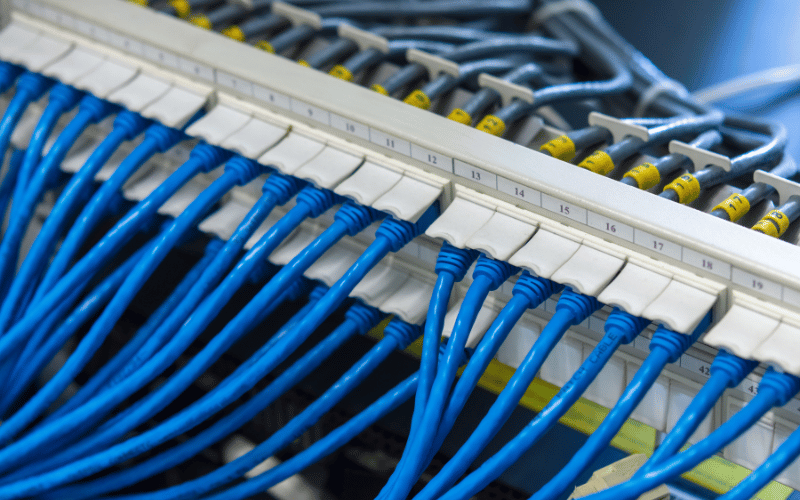
Clear labeling is another game-changer. With a patch panel, you can label each port to correspond with specific devices or connections. For example, you might label ports for GPU server chassis, storage arrays, or networking switches. This organization enables faster and more efficient maintenance and troubleshooting. Instead of guessing which cable goes where, you can quickly identify and address issues, saving valuable time and effort.
Transitioning from organization to reliability, patch panels also play a critical role in protecting your network’s performance.
Improves Network Reliability
Patch panels act as a buffer between your network devices and the physical cables, protecting sensitive equipment like switches from wear and tear. Instead of plugging and unplugging cables directly into your switches, you make all changes at the patch panel. This reduces the risk of damaging expensive hardware and extends the lifespan of your equipment.
Additionally, patch panels help minimize signal degradation and crosstalk, which are common issues in poorly managed cabling systems. By maintaining proper cable separation and using high-quality terminations, patch panels ensure that your network delivers consistent and reliable performance. For instance, in a high-performance GPU server environment, where even minor signal disruptions can impact workloads, this reliability is invaluable.
As your network grows, the scalability of patch panels becomes another critical advantage.
Enhances Scalability
Patch panels make it easy to scale your network without the headache of re-cabling. When you need to add new devices, such as additional GPU server chassis or storage units, you simply connect them to the patch panel. There’s no need to disrupt existing connections or run new cables through your racks, which saves time and reduces the risk of errors.
They also simplify moves, adds, and changes (MACs). Whether you’re relocating equipment, upgrading hardware, or reconfiguring your network, patch panels provide the flexibility to make adjustments quickly and efficiently. For example, if you need to move a server to a different rack, you can reroute its connection at the patch panel without touching the permanent cabling.
By simplifying cable management, improving network reliability, and enhancing scalability, patch panels provide tangible benefits that go beyond aesthetics. They create a foundation for a well-organized, high-performing, and future-ready network, making them an essential component of any data center or IT environment.
Types of Patch Panels
Choosing the right patch panel for your data center isn’t a one-size-fits-all decision. The type of patch panel you select depends on your network’s specific needs, including the type of cables you’re using, the speed of your connections, and the flexibility you require. Let’s break down the main types of patch panels and their unique features to help you make an informed choice.
Copper Patch Panels
Copper patch panels are the workhorses of many networks, designed to handle Ethernet connections with ease. They support various cable categories, including CAT 5e, CAT 6, and CAT 6A, each offering different levels of performance. For example, if your network requires speeds up to 1 Gbps, a CAT 5e patch panel will suffice. However, for higher speeds like 10 Gbps, you’ll need a CAT 6A patch panel to ensure optimal performance.
When selecting a copper patch panel, consider whether you need a shielded or unshielded configuration. Shielded patch panels are ideal for environments with high electromagnetic interference (EMI), such as data centers with dense deployments of GPUs. They protect against signal degradation and ensure reliable performance. Unshielded patch panels, on the other hand, are more cost-effective and work well in low-EMI environments, such as small office networks.
Transitioning from copper to fiber, let’s explore the benefits of fiber optic patch panels for high-speed connections.
Fiber Optic Patch Panels
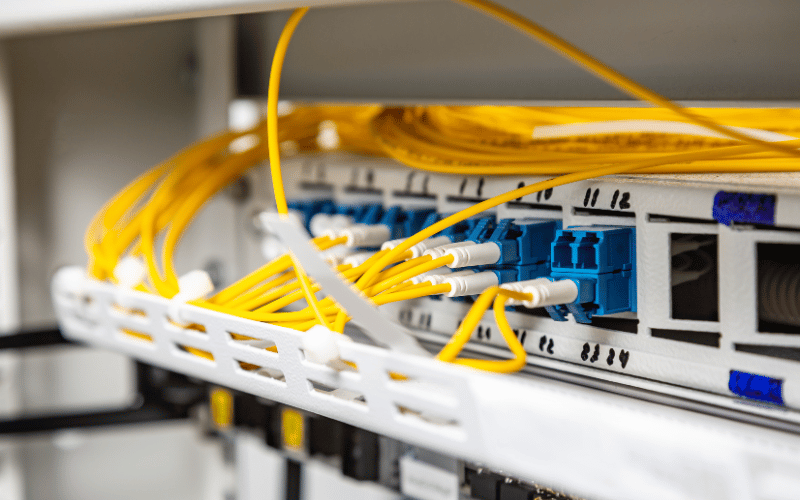
Fiber optic patch panels are the go-to choice for networks that demand high-speed, high-bandwidth connections. These panels support a variety of connector types, including LC, SC, and MTP/MPO, each suited for different applications. For instance, LC connectors are compact and ideal for high-density setups. In contrast, MTP/MPO connectors are designed for multi-fiber cables, making them perfect for backbone connections in large data centers.
Fiber optic patch panels excel in environments where speed and distance are critical. For example, if your GPU server chassis is part of a high-performance computing cluster, fiber optic connections ensure low-latency communication between nodes. Additionally, these panels protect delicate fiber cables from damage, ensuring long-term reliability and performance.
For those who need maximum flexibility, modular patch panels offer a versatile solution.

Modular Patch Panels
Modular patch panels are the Swiss Army knife of cable management, allowing you to mix and match different media types within a single panel. These panels can accommodate both copper and fiber connections, making them ideal for hybrid networks. For example, you might use copper ports for local Ethernet connections and fiber ports for long-distance or high-speed links.
The flexibility of modular patch panels makes them an excellent choice for growing networks. If you’re expanding your data center to include more GPU server chassis or adding new storage systems, a modular patch panel allows you to adapt without replacing your existing infrastructure. Swap out the modules to accommodate new cable types or connection standards.
By understanding the differences between copper, fiber optic, and modular patch panels, you can select the type that best aligns with your network’s needs. Each type offers unique advantages, ensuring your patch panel not only meets today’s requirements but also supports future growth and technological advancements.
Installation and Cable Management Tips
Installing a patch panel isn’t just about plugging in cables—it’s about creating a system that’s efficient, scalable, and easy to maintain. Proper installation and cable management can save you countless hours of troubleshooting and ensure your network operates at peak performance. Let’s dive into some practical tips to help you get it right from the start.
Choose the Right Panel
The first step in a successful installation is selecting the right patch panel for your network. Match the panel type to your network speed and density requirements. For example, if you’re managing a high-density GPU server chassis setup with 10 Gbps connections, a CAT 6A or fiber optic patch panel is essential. On the other hand, a smaller office network with lower bandwidth needs might only require a CAT 5e panel. Always consider your current needs and future growth when making your choice.
Once you’ve chosen the right panel, labeling and documentation become critical for long-term efficiency.
Label and Document
A well-labeled patch panel is like a roadmap for your network. Use a logical labeling scheme that corresponds to your devices and connections. For instance, label each port with the rack and device it connects to, such as “Rack 1, GPU Server 3.” This makes it easy to identify and troubleshoot connections without guesswork.
In addition to labeling, maintain network maps that document your entire setup. These maps should include details like cable routes, device locations, and port assignments. For example, if you’re running multiple GPU server chassis in a high-performance computing cluster, your map should clearly show how each server connects to switches and storage. This documentation will save you time during upgrades, repairs, or audits.
With labeling in place, focus on organizing your cables to keep everything neat and accessible.
Organize Cables
Cable organization is more than just aesthetics—it’s about functionality and airflow. Use patch cable organizers, zip ties, and color-coded cables to keep everything tidy. For example, assign specific colors to different types of connections, such as blue for Ethernet, yellow for fiber, and red for power. This visual distinction makes it easier to trace cables and identify issues.
Avoid over-tightening zip ties, as this can damage cables and affect performance. Instead, use Velcro ties for a secure but flexible hold. Additionally, ensure cables are routed in a way that doesn’t block airflow to your GPU server chassis or other equipment. Proper airflow is critical for maintaining optimal operating temperatures and preventing overheating.
As you organize cables, don’t forget to follow wiring standards for consistent performance.
Follow Wiring Standards
Adhering to industry-standard wiring schemes, such as T568A or T568B, ensures consistent performance and compatibility across your network. Choose one standard and stick to it throughout your installation. For example, if you’re terminating Ethernet cables, use the same wiring scheme on both the patch panel and the device end to avoid connectivity issues.
Following these standards also simplifies troubleshooting. If a connection isn’t working, you can quickly verify the wiring against the standard to identify any errors. This consistency is especially important in high-density environments, where even a single miswired cable can disrupt operations.
Finally, plan the placement of your patch panel to maximize accessibility and efficiency.
Plan Placement
Install your patch panel near switches to minimize cable lengths and reduce signal loss. For example, if your GPU server chassis connects to a top-of-rack switch, place the patch panel in the same rack for a clean and efficient setup. Use cable management rings or trays to route cables neatly and prevent tangling.
Consider future growth when planning placement. Leave enough space in your rack for additional patch panels or equipment, and ensure the layout allows for easy access during maintenance. A well-planned installation not only looks professional but also makes your network easier to manage and scale.
By choosing the right panel, labeling and documenting connections, organizing cables, following wiring standards, and planning placement, you can create a patch panel setup that’s efficient, reliable, and ready for future expansion. These tips will help you build a network that’s as organized as it is powerful.
Common Mistakes to Avoid
Even the most well-intentioned patch panel installations can go awry if certain pitfalls aren’t avoided. These mistakes often lead to inefficiencies, downtime, and unnecessary frustration. Let’s address some of the most common errors and how to steer clear of them to ensure your patch panel setup operates smoothly and effectively.
Skipping Cable Labeling
Neglecting to label cables is one of the most frequent and costly mistakes in patch panel management. Without clear labels, even a simple task like tracing a connection can turn into a time-consuming guessing game. Imagine trying to identify which cable connects to a specific GPU server chassis during a critical maintenance window—it’s a recipe for chaos.
To avoid this, implement a consistent labeling system from the start. Label both ends of every cable with clear identifiers, such as “Rack 2, Port 5” or “Switch 1, GPU Server 4.” Use durable, legible labels that won’t fade or peel over time. Pair this with a detailed network map that documents all connections, so you always have a reference point. This small step can save hours of troubleshooting and prevent unnecessary downtime.
Transitioning from labeling to hardware compatibility, mismatched cables and ports can create a host of connectivity issues.
Using Mismatched Cables and Ports
Using the wrong cables or ports for your patch panel is like trying to fit a square peg into a round hole—it simply doesn’t work. For example, connecting a CAT 5e cable to a CAT 6A patch panel might seem harmless, but it can limit your network’s performance and create bottlenecks. Similarly, using unshielded cables in a high-EMI environment can lead to signal degradation and unreliable connections.
To prevent these issues, always match your cables to the specifications of your patch panel and network devices. If your GPU server chassis requires 10 Gbps connections, use CAT 6A cables and a compatible patch panel to ensure optimal performance. For fiber optic setups, verify that the connector types (e.g., LC, SC, MTP/MPO) align with your patch panel and devices. Double-checking compatibility before installation can save you from headaches down the line.
As you focus on compatibility, don’t overlook the importance of managing capacity to maintain efficiency and organization.
Overloading the Patch Panel
Overloading a patch panel with too many connections can quickly turn an organized setup into a tangled mess. When every port is crammed with cables, it becomes difficult to trace connections, manage airflow, and maintain proper cable separation. This not only reduces efficiency but also increases the risk of signal interference and hardware strain.
To avoid overloading, plan your patch panel layout with room for growth. For example, if you anticipate adding more GPU server chassis in the future, leave some ports open for expansion. Use cable management accessories, such as horizontal organizers and Velcro ties, to keep cables neat and accessible. Additionally, monitor the load on your patch panel to ensure it doesn’t exceed its capacity, both in terms of physical connections and power requirements.
By avoiding these common mistakes—skipping cable labeling, using mismatched cables and ports, and overloading the patch panel—you can create a network that’s not only efficient but also easy to manage and scale. These proactive measures will save you time, reduce errors, and ensure your patch panel setup supports your data center’s performance goals.
Frequently Asked Questions (FAQs)
Q: What is the difference between a patch panel and a switch?
A: A patch panel organizes and connects cables, acting as a central hub for managing physical connections in your network. It doesn’t actively process or route data. A switch, on the other hand, is an active device that directs data traffic between devices on the network. Think of the patch panel as the organizer and the switch as the traffic controller—they work together but serve different purposes.
Q: Can I use a patch panel for home networking?
A: Yes, you can use a patch panel for home networking, especially if you have multiple devices or rooms requiring Ethernet connections. A patch panel helps organize cables neatly and allows you to centralize connections in one location, such as a utility closet. Pair it with a switch to manage data traffic effectively.
Q: How often should patch panels be replaced?
A: Replace patch panels only when they show signs of wear, such as damaged ports, loose connections, or outdated specifications that no longer meet your network’s needs. With proper maintenance, a patch panel can last for many years. Regularly inspect it to ensure it remains in good condition and supports your network’s performance.
Q: Does a patch panel affect network speed or latency?
A: A patch panel itself doesn’t directly affect network speed or latency, as it simply passes signals between devices. However, poor installation, low-quality cables, or improper terminations can introduce issues like signal degradation or crosstalk, which may impact performance. Use high-quality components and follow proper installation practices to maintain optimal network performance.
Q: What tools are needed to install a networking patch panel?
A: To install a networking patch panel, you’ll need tools such as a punch-down tool for terminating cables, a cable tester to verify connections, and a wire stripper for preparing cables. Additional tools like a screwdriver, cable management accessories (e.g., Velcro ties, cable organizers), and a label maker can help ensure a clean and professional installation.
Conclusion
Patch panels play a critical role in organizing and managing data center cables, ensuring efficiency and reliability in your network. Investing in quality patch panels and following best practices for cable management, such as proper labeling and organization, helps maintain a streamlined and scalable setup. Remember, a well-organized patch panel serves as the backbone of an efficient data center, keeping your operations running smoothly.
