


There is no single answer to how many servers a data center contains. The count depends on facility size, rack density, power capacity, cooling infrastructure, and server form factor. Small server rooms may hold as few as 10 servers; hyperscale facilities can exceed 200,000. For AI and HPC deployments, rack density and chassis design often matter more than raw server count.
Ask a data center operator how many servers their facility holds, and you’ll rarely get a clean number. That’s not evasiveness—it’s accuracy. Server count is a derived figure, shaped by rack layout, power budget, cooling capacity, and the physical dimensions of every chassis installed. A facility running 1U servers and one running 4U GPU nodes can occupy identical floor space yet differ by a factor of four in total unit count.
This distinction matters for anyone planning, procuring, or building out server infrastructure. Sizing a new deployment, comparing facilities, or selecting chassis for a high-density AI cluster all require a clearer understanding of what actually drives server count—not a rule-of-thumb average.
This post breaks down server counts by facility type, explains the formulas infrastructure teams use to estimate capacity, and examines how chassis form factor and rack density decisions shape those numbers in ways that raw server counts never fully capture.
Typical Server Counts by Data Center Type
Facilities vary enormously in scale, from a single-room server closet to a campus spanning hundreds of megawatts. The table below provides practical reference ranges based on facility classification.
|
Facility Type |
Typical Server Count |
Common Use Case |
|---|---|---|
|
Small server room |
10–200 |
SMBs, branch offices, edge deployments |
|
Enterprise data center |
500–5,000 |
Corporate IT, mid-size cloud workloads |
|
Large colocation facility |
5,000–50,000+ |
Managed hosting, multi-tenant cloud |
|
Hyperscale data center |
50,000–200,000+ |
Hyperscalers (AWS, Google, Meta, Microsoft) |
These are directional ranges, not hard limits. A dense enterprise deployment using blade servers might exceed 5,000 units in a relatively modest footprint. Conversely, an AI-focused facility running large 4U GPU chassis may stay well under 5,000 units while delivering far greater compute density per rack than a traditional 1U-heavy environment.
How to Estimate Server Count in a Data Center
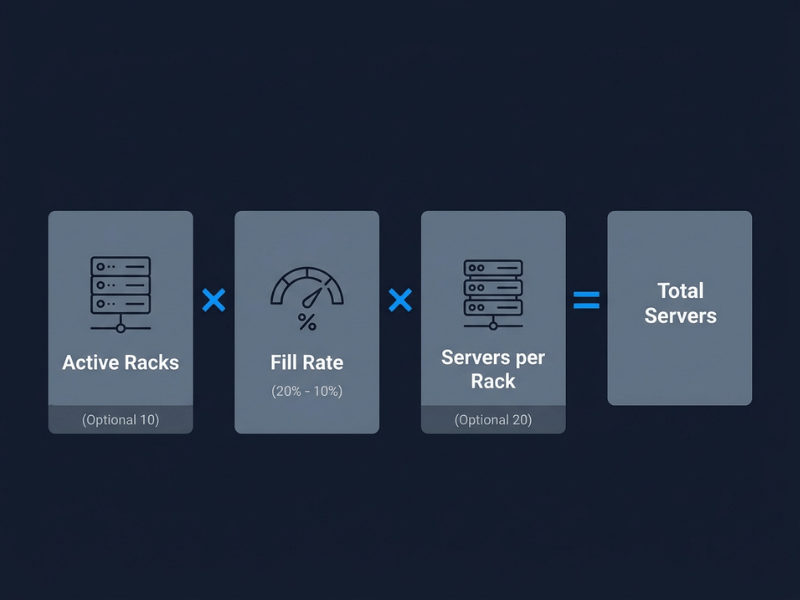
Infrastructure planners use a straightforward formula to estimate total server capacity:
Total Servers = Active Racks × Fill Rate × Servers per Rack
Each variable carries real-world nuance.
- Active racks refer to populated, powered racks—not total rack capacity in the white space.
- Fill rate accounts for the fact that racks are rarely 100% populated. A typical fill rate for operational facilities sits between 60% and 80%.
- Servers per rack depends entirely on chassis form factor, which the next section covers in detail.
Worked Example 1: Standard 1U Deployment
A mid-size enterprise data center with 100 active racks, a 75% fill rate, and 1U servers (42 per rack at full capacity):
100 × 0.75 × 42 = 3,150 servers
Worked Example 2: High-Density 4U GPU Deployment
The same facility reconfigured for AI inference workloads using 4U GPU chassis (10 units per rack at full capacity):
100 × 0.75 × 10 = 750 servers
The unit count drops by 76%—but the compute power delivered per rack increases dramatically. This trade-off sits at the heart of why server count alone is an incomplete metric for modern infrastructure planning.
How Many Servers Fit in One Rack?
A standard rack is 42U tall. The number of servers it holds depends almost entirely on chassis form factor.
|
Form Factor |
Servers per 42U Rack |
Typical Use Case |
|---|---|---|
|
1U rackmount |
30–42 |
General compute, web servers, virtualization |
|
2U rackmount |
15–20 |
Storage-heavy workloads, mid-range compute |
|
Blade (7U chassis) |
14–28 blades |
High-density enterprise compute |
|
4U GPU chassis |
8–10 |
AI training and inference, HPC |
|
HCI (Hyper-Converged) |
10–15 nodes |
Converged compute and storage |
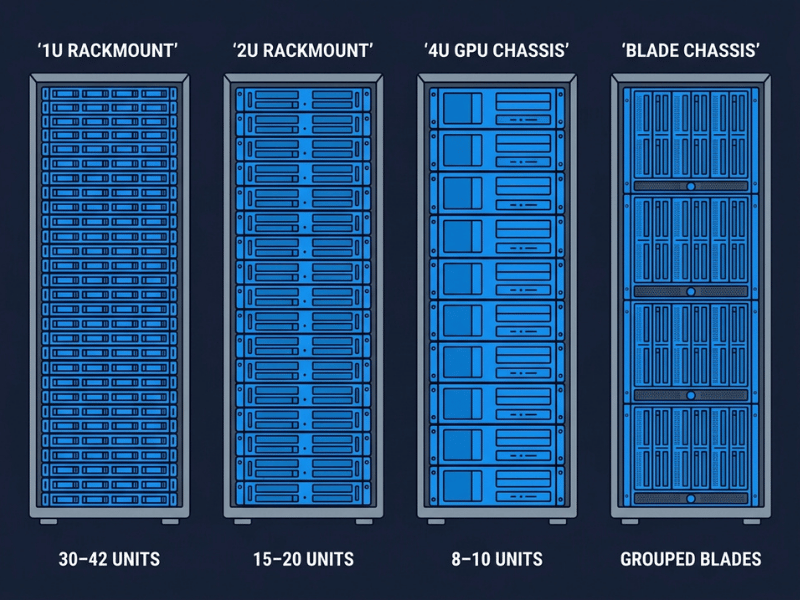
The shift from 1U general-purpose servers to 4U GPU server cases reduces per-rack unit count significantly—but each unit carries far more compute weight. A single 4U GPU node housing eight high-end GPUs can deliver more AI throughput than an entire rack of 1U compute nodes.
What Actually Limits Server Count in a Data Center?
Four factors constrain how many servers a facility can physically and operationally support. Understanding each one helps planners avoid costly miscalculations.
Available Rack Count and White Space
Total usable floor area—typically called white space—determines how many racks can be installed. Power distribution, cooling infrastructure, and aisle containment systems all consume floor space alongside the racks themselves. This is the foundational constraint everything else builds on.
Power Capacity
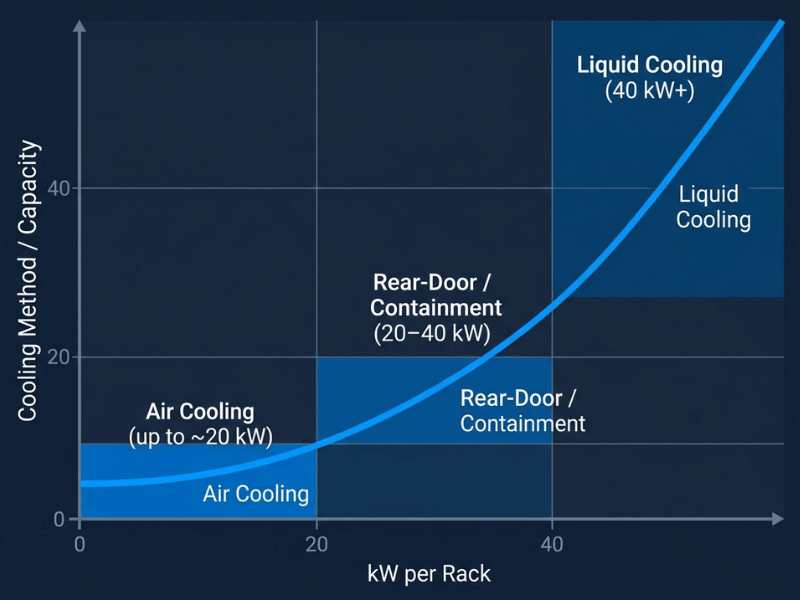
Power per rack is often the binding constraint, especially in dense deployments. Traditional data centers average roughly 8–12 kW per rack for general compute. High-density GPU clusters commonly require 20–40 kW per rack, and some liquid-cooled AI deployments push well beyond that.
If a facility’s power infrastructure can’t support higher rack densities, expanding server count requires either load reduction per server or significant electrical upgrade work—both of which carry cost and timeline implications.
Cooling Strategy
Air cooling becomes increasingly inadequate above ~20 kW per rack. Facilities running standard CRAC/CRAH systems hit thermal limits before electrical ones in dense deployments. Liquid cooling—whether direct liquid cooling (DLC), rear-door heat exchangers, or full immersion—removes this ceiling but requires chassis compatibility. Not every rackmount chassis supports liquid-cooling manifolds, making cooling readiness a chassis selection criterion, not just a facility concern.
Server Form Factor
As shown in the rack density table above, chassis height directly determines how many units fit per rack. But form factor also affects airflow path, PSU configuration, and cable management—all of which influence how reliably a rack operates at high density. A poorly designed 4U chassis can create hotspots that force operators to underpopulate racks, effectively reducing usable server count below what the math suggests.
Why Server Count Alone Is Misleading in AI Data Centers
For traditional IT workloads, server count is a reasonable proxy for capacity. For AI infrastructure, it’s close to meaningless without context.
A facility running 10,000 1U CPU servers and one running 1,000 4U GPU nodes are in entirely different performance classes—despite the 10x difference in unit count favoring the former. GPU-based servers for AI training and inference are evaluated on:
- GPU count per node (commonly 4, 8, or 16 GPUs per chassis)
- Rack-level power draw (often 20–40+ kW)
- Memory bandwidth and interconnect (NVLink, InfiniBand)
- Cooling configuration (air vs. liquid vs. hybrid)
When comparing AI data centers—or planning an AI deployment—rack density and chassis design carry more weight than total server count. A hyperscale AI campus with 50,000 GPU nodes delivers radically different throughput than 50,000 general-purpose servers, even if the headline unit count looks identical.
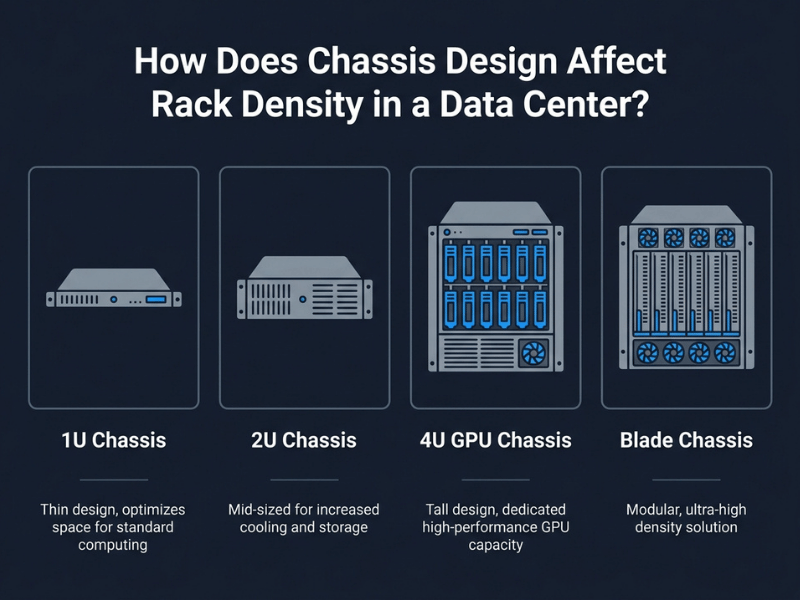
How Does Chassis Design Affect Rack Density in a Data Center?
Chassis design is where abstract capacity planning meets physical reality. The decisions made at the chassis level—height, airflow path, PSU layout, cable management, and cooling compatibility—directly shape how densely a rack can be populated and how reliably it operates under sustained load.
1U Chassis
Optimal for high unit count per rack. Thermal management is constrained by limited internal airflow volume, which caps GPU count per node at 1–2 cards in most designs. Well-suited for compute-heavy but not GPU-heavy workloads.
2U Chassis
Provides more internal volume for airflow and component layout. Supports 2–4 GPUs per node in many configurations. A practical balance point for mixed compute and storage workloads where moderate GPU density is required.
4U GPU Chassis
The dominant form factor for AI and HPC deployments. Internal volume supports 8–16 GPU cards per node, along with high-capacity PSU arrays (2,000W+), multiple NVMe drives, and optimized airflow—or liquid cooling manifolds in newer designs. The OneChassis GPU server case range is engineered specifically for this deployment profile, with configurations supporting full GPU card populations and thermal paths designed for sustained high-load operation.
Blade Chassis
Multiple compute nodes share a common chassis, backplane, and often a shared power infrastructure. Blade configurations achieve high density per U, but offer less flexibility for GPU expansion due to slot constraints per blade—a meaningful limitation for AI workloads requiring high per-node GPU counts.
The critical point: two 4U chassis from different manufacturers installed in the same rack can produce very different thermal outcomes depending on airflow design, PSU placement, and whether the chassis supports rear exhaust baffling. Rack density is not just a unit count—it’s an engineering outcome determined at the chassis level.
How to Choose a Chassis for High-Density GPU Deployment
Selecting a server case for a high-density environment means matching chassis specifications to deployment requirements across four dimensions.
GPUs per Node
Define the GPU population your workload requires first. An 8-GPU node for distributed training needs a 4U chassis with wide PCIe lane allocation and a backplane designed for full-speed GPU-to-GPU communication. Choosing a chassis that constrains GPU count forces either more servers (and more rack space) or compromised performance per node—neither outcome is acceptable in a cost-optimized deployment.
Rack Power Density
Match the chassis PSU configuration to your rack’s power allocation. A 4U chassis hosting eight high-end GPUs may draw 6–8 kW on its own. At 10 units per rack, that pushes rack-level draw to 60–80 kW—well beyond standard facility power and cooling budgets. Chassis with modular, redundant PSU options give deployment teams the flexibility to configure per-node power within facility constraints without sacrificing redundancy.
Cooling Strategy
Determine whether your facility supports direct liquid cooling before specifying chassis. Air-cooled 4U chassis with optimized front-to-rear airflow paths perform well up to approximately 20–25 kW per rack. Beyond that threshold, liquid-cooling-ready chassis—with manifold attachment points and sealed CPU/GPU cooling loops—become operationally necessary. OneChassis offers OEM/ODM chassis configurations with liquid cooling readiness for facilities targeting higher rack power densities.
OEM/ODM Customization
Standard off-the-shelf chassis rarely match every deployment constraint exactly. OEM/ODM arrangements allow operators and system integrators to specify custom I/O configurations, branding, cable routing cutouts, drive bay layouts, and PCIe riser configurations. For large-scale deployments, custom chassis reduce integration labor and improve rack uniformity—both of which lower total deployment cost over the lifecycle of the facility.
Rack Density and Chassis Design Are the Real Metrics
Server count gives you a starting point—but it rarely gives you the full picture. The questions that actually drive infrastructure decisions are: How many racks do you have? What’s your power budget per rack? What workloads are you running? And what chassis form factor fits those constraints?
For AI and HPC deployments especially, the shift from counting servers to optimizing rack density per watt is already underway. Facilities are now designed around power delivery and thermal management first, with chassis selection and unit count derived from those constraints—not the other way around.
If you’re planning a high-density deployment or evaluating chassis options for a GPU cluster, OneChassis manufactures a full range of GPU server cases and rackmount chassis built for demanding deployment environments. OEM/ODM configurations are available for organizations with specific form factor, cooling, or branding requirements. Contact the OneChassis team to discuss chassis specifications for your next deployment.
Frequently Asked Questions
How many servers does a typical enterprise data center have?
A typical enterprise data center holds between 500 and 5,000 servers, depending on the organization’s size, virtualization ratio, and workload density. Facilities using dense blade or 1U configurations trend toward the higher end; those running larger 2U or 4U servers trend lower.
How many servers fit in a standard 42U rack?
The number depends on chassis form factor. A 42U rack holds up to 42 × 1U servers, 20 × 2U servers, or 8–10 × 4U GPU chassis. In practice, fill rates of 60–80% are common due to power, cooling, and cable management constraints.
Do GPU servers reduce the total server count in a data center?
Yes. GPU servers use larger 4U chassis, which reduces per-rack unit count compared to 1U general compute servers. A rack that holds 42 × 1U servers holds only 8–10 × 4U GPU chassis. However, each GPU node delivers significantly more compute throughput—so a lower unit count does not mean lower capacity for AI or HPC workloads.
Why does rack density matter more than server count in AI data centers?
AI workloads are GPU-bound, not CPU-bound. The relevant metric is GPU compute per rack, measured against the power and cooling budget available to that rack. A facility with 1,000 racks at 40 kW per rack delivers far more AI throughput than one with 2,000 racks at 10 kW each—even if the latter has more total servers.
What chassis form factor is best for high-density GPU deployments?
4U GPU chassis are the standard for high-density AI and HPC deployments. They support 8–16 GPU cards per node, accommodate high-capacity redundant PSUs, and provide sufficient internal volume for effective thermal management. For deployments exceeding ~20 kW per rack, liquid-cooling-ready chassis designs become important to maintain sustained performance.
