



Choosing the right server form factor may seem like a small decision. It isn’t. The shape of your hardware decides how you cool it, how you power it, how fast you can fix it, and how much it costs you over five years.
I’ve spent years on the chassis side of this business—designing enclosures, fighting hot spots, and figuring out how to fit big GPUs into tight spaces without cooking them. So when someone asks me whether a rack server is the right call, I don’t think about brochures. I think about airflow paths, fan walls, rail kits, and what happens when a rack is fully loaded at 2 a.m.
Rack servers are the workhorse of modern IT for good reasons. But they come with real trade-offs. Let me walk you through both sides plainly so you can decide whether this format fits your space, budget, and workloads.
What Is a Rack Server?
A rack server is a server designed to be mounted horizontally in a standardized 19-inch rack or cabinet. Instead of sitting on the floor like a tower, it slides in on rails and stacks neatly with other gear—switches, storage, power units, and more servers.
You’ll find rack servers in data centers, dedicated server rooms, labs, and any growing business that needs to manage several machines in one organized spot.
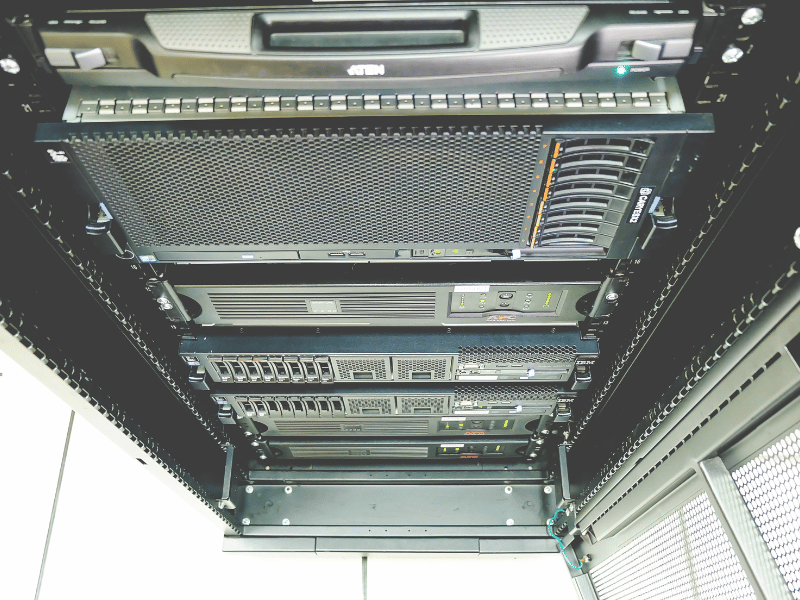
What 1U, 2U, and 4U Mean
Rack server height is measured in rack units (U). One U equals 1.75 inches.
- 1U is the thin, pizza-box style. Great for density, tough on cooling.
- 2U gives you more room for airflow, bigger heatsinks, more drives, and better GPU fit.
- 4U is the roomy option. It handles tall coolers, multiple full-size GPUs, and heavy storage loads.
Here’s the part people skip: form factor isn’t just about how many you can stack. It directly shapes your thermal margin. A 1U chassis forces small, high-RPM fans that scream to move enough air. A 2U or 4U gives those same components more breathing room and quieter, more efficient cooling.
Why Rack Servers Are Widely Used
Three reasons keep rack servers popular.
They use vertical space well, so you fit a lot of computing in a small footprint. They keep multiple systems organized in one place. And they line up neatly with centralized power, networking, and cooling—which makes life easier as you grow.
Why Rack Servers Are So Common in Modern IT
Standardization You Can Build On
The 19-inch rack standard is the quiet hero here. Servers, switches, storage arrays, and power distribution units from different vendors all fit the same rails and the same width.
That means you’re not locked into one brand. You can mix and match certified gear, plan layouts with confidence, and swap components without redesigning your whole setup.
Centralized Management
When your servers are housed in a single rack, your team manages them from a single location. No hunting for machines scattered across closets and offices.
Most enterprise rack servers also support remote management via tools such as IPMI or a BMC. You can power-cycle, monitor temps, and push updates without standing in front of the box. When something fails, you can often pull and service one unit without taking down the rest.
Built to Grow
Need more capacity? Slide another server into an open slot. You scale in steps that match actual demand rather than buying everything up front. For a business expecting steady growth, that flexibility is hard to beat.
Advantages of Rack Servers
Better Space Efficiency
Stacking vertically beats spreading towers across a room. You pack far more compute per square foot, and everything stays tidy. For space-tight businesses with growing hardware needs, this is the core appeal.
Easier Scalability
Adding capacity is simple. Open slot, new server, done. No disruptive overhaul, no rebuilding your environment. You grow in predictable, budget-friendly steps.
Centralized Maintenance and Clean Cabling
Rail-mounted servers slide out for quick access. Many parts—drives, power supplies, fans—are hot-swappable on enterprise units, so you replace them without powering down.
Good in-rack cable management keeps power and data lines organized and labeled. That cuts mistakes and speeds up repairs. I’ve seen far too many outages caused by someone yanking the wrong cable in a messy rack. Clean cabling isn’t cosmetic—it’s uptime.
Strong Performance for Demanding Workloads
Rack servers handle serious work: virtualization, databases, application hosting, and environments serving lots of users at once. With powerful CPUs, ample memory, and room for expansion, they deliver consistent performance. For GPU and AI workloads, a 2U or 4U rack server gives you the slots, power headroom, and airflow that accelerators demand.
Standardization and Flexibility
Because the rack format is universal, you can combine servers, networking, and storage from multiple vendors in one cohesive setup. That keeps sourcing flexible and planning simple.
More Cost-Effective at Scale
The upfront cost is real, but rack servers get cheaper per unit as you grow. Shared racks, cooling, and power distribution are spread across many servers. Once you’re running several machines, the math tips in your favor.
Disadvantages of Rack Servers
Now the honest side. Rack servers aren’t free of pain, and ignoring these points leads to expensive surprises.
Higher Upfront Infrastructure Cost
A rack server rarely stands alone. You also need the rack, rails, power distribution units, cooling, and structured cabling. For a first deployment with no existing infrastructure, that bundle can cost far more than a single tower. Small shops feel this most.
Heavy Cooling and Power Demands
This is where my chassis experience kicks in hardest. Stack several servers in one cabinet, and you concentrate a lot of heat into a small space. Office AC won’t cut it.
You need real thermal planning—front-to-back airflow, cool air in the front, hot air out the back, and no recirculation. Skip this, and you get hot spots, throttling, and shortened hardware life. Dense racks also draw serious power, which drives up your energy bill every month.
Noise Can Be Brutal
Those thin 1U chassis rely on small, high-speed fans. Under load, they’re loud. Really loud. A populated rack belongs in a dedicated room, not next to people’s desks. If you’ve ever stood beside a full rack at full tilt, you know you can’t hold a conversation.
Deployment and Management Complexity
Centralization helps, but dense racks demand discipline. Troubleshooting in a tightly packed cabinet means navigating cables and closely spaced gear. Without good labeling, documentation, and skilled staff, things get error-prone fast. This format rewards teams with real IT capability.
Weight, Space, and Installation Limits
A fully loaded rack is heavy—often hundreds of pounds. Your floor has to handle the load. You also need clearance around the rack for airflow, cabling, and technician access. And the chassis depth has to fit the rack, with enough rear room for cables and the back door to close. These aren’t details to wing.
Rack vs. Tower vs. Blade Servers
Each format fits a different situation. Here’s how they stack up.
Rack vs. Tower
Tower servers look like desktop PCs. They run more quietly, require no mounting hardware, and cost less when you only need one or two. Great for small offices without a server room.
Rack servers win once you’re managing several machines or planning to grow. Consolidation, centralized management, and easy expansion quickly outweigh the tower’s simpler start.
Read more: Tower Server Vs. Rack Server: Pros And Cons of Each
Rack vs. Blade
Blade servers push density further by packing blades into a shared chassis that supplies power, cooling, and networking. They shine in very large data centers—but they require specialized, costly infrastructure and lock you into one vendor’s ecosystem.
Rack servers sit in the practical middle. Strong density and scalability, without the steep blade investment or lock-in. For most growing businesses, that balance is exactly right.
Read more: Rack Server vs. Blade Server: Pros and Cons of Each
| Format | Best Use Case | Density | Cost |
|---|---|---|---|
| Tower | Small businesses, few servers | Low | Low entry, high per unit |
| Rack | Growing businesses, data centers | High | Moderate, efficient at scale |
| Blade | Large, high-density data centers | Very high | High infrastructure cost |
Practical Deployment Considerations Before You Buy
This is the section I wish more buyers read first. Get these right, and the rest goes smoothly.
Plan Your Power
Check that your circuit can handle the combined load of all servers, switches, and cooling fans in the rack. Don’t think about the server in isolation. Add it all up, then leave headroom. Tripped breakers and overloaded circuits are not fun discoveries.
Get the Airflow Right
Design for front-to-back airflow and make sure the room can remove the heat you’re generating. Use blanking panels to fill empty slots so cool air doesn’t sneak around and mix with hot exhaust. In dense GPU builds, even small gaps create hot spots that throttle your cards. Treat cooling as a first-class design step, not an afterthought.
Mind Rack Depth and Cable Clearance
Make sure the rack is deep enough for your chassis. GPU and storage-heavy servers run long. You also need rear clearance for power cables, network cables, and a proper bend radius so nothing gets crimped. The back door has to close cleanly. I’ve seen teams buy servers that physically didn’t fit their rack—an expensive lesson.
Protect Power With a UPS
Invest in a quality uninterruptible power supply. It guards the whole rack against outages, voltage spikes, and sudden shutdowns. Even a small setup benefits, because an unclean shutdown can corrupt data and damage hardware.
Leave Room to Grow
Don’t pack the rack to the ceiling on day one. Leave open units for future servers and for airflow. Confirm your power and cooling can support that growth, too. Planning ahead beats a disruptive, expensive overhaul later.
Keep It Serviceable
Make sure technicians can safely reach the front and rear of the rack. Overpacking a cabinet without thought for access turns every repair into a struggle. Easy access means faster fixes and less downtime.
Who Should Choose a Rack Server?
Best-Fit Scenarios
Rack servers fit well when you:
- Run multiple workloads and expect steady growth
- Have a dedicated server room or a structured IT environment
- Need virtualization, databases, storage pools, or GPU and AI compute
- Have a team capable of managing power, cooling, and maintenance
If you already plan to invest in proper cooling, power, and staffing, the rack format pays that investment back with efficiency and control.
When a Rack Server May Not Fit
A rack server is the wrong call when you:
- Only need one or two low-demand servers
- Lacks a controlled room for heat and noise
- Have minimal IT staff or want the simplest possible setup
- Can meet your needs with a tower or a cloud service instead
Be honest about your situation. Forcing a rack into a small office usually costs more than it’s worth.
Frequently Asked Questions
What does the “U” mean in rack server sizing?
U stands for rack unit, a measure of height. One U equals 1.75 inches. A 1U server is one unit tall, a 2U is two units, and so on. It tells you how much vertical space a server takes in the rack and hints at how much room it has for cooling and components.
Do I need a dedicated cooling system for a single rack?
Usually, yes. Even one populated rack concentrates enough heat that standard office air conditioning can’t keep up. A dedicated, climate-controlled space with good airflow protects your gear from overheating, throttling, and early failure. The denser the rack, the more this matters.
How much weight can a standard 42U rack hold?
It varies by model, but many standard 42U racks support somewhere between 1,500 and 3,000 pounds of static load. Always check the manufacturer’s rating. Just as important, confirm that your floor can support the load, since a full rack gets heavy fast.
What is the difference between a two-post and a four-post rack?
A two-post rack supports equipment at two mounting points and is well-suited for lighter gear such as network switches and patch panels. A four-post rack supports equipment front and rear, which you need for heavier servers and full rail kits. For most rack servers, go with four posts.
Can a small business start with a partial rack setup?
Absolutely. You don’t need a full 42U cabinet on day one. A half-height or smaller rack keeps costs down while staying organized and ready to grow. Starting small is a smart way to get the benefits of a rack without overcommitting your budget.
Conclusion: Are Rack Servers Right for You?
Rack servers deliver density, scalability, centralized management, and strong performance. That makes them a solid foundation for growing, space-conscious businesses with demanding workloads.
The trade-offs are just as real. Higher upfront infrastructure cost, concentrated cooling and power needs, fan noise, and management complexity make them a poor fit for very small or under-resourced setups.
My advice from years on the chassis side: don’t just look at the server. Look at the whole environment—your power, cooling, floor, rack depth, and your team’s skills. Plan the airflow before you buy, leave room to grow, and start with a pilot if you’re unsure. Get those fundamentals right, and a rack server becomes one of the most dependable choices you can make for your infrastructure.
