


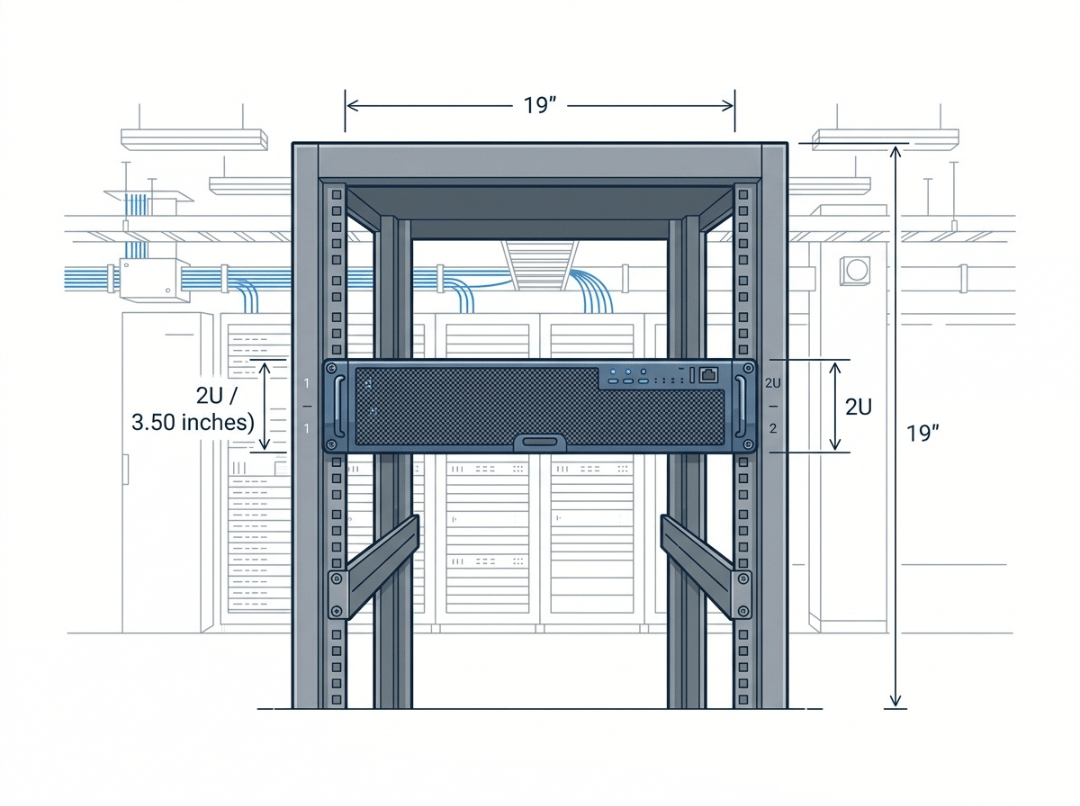
Ordering the wrong rack depth is one of the most common — and most avoidable — mistakes in server room builds. Your equipment arrives, nothing seats properly, and you’re left sourcing extensions, deeper cabinets, or custom rail kits. Most of these problems trace back to the same misunderstanding: treating “19-inch” as a complete specification when it only tells you one of three critical dimensions.
This guide covers what the numbers actually mean, where buyers typically go wrong, and how to match a rack to your equipment with confidence.
What “19-Inch” Actually Means — and What It Doesn’t
The 19-inch standard originated in early telecommunications infrastructure, where a consistent mounting width let carriers install equipment from multiple vendors into a single frame without custom fabrication. That convention carried over into computing and has remained the global baseline ever since.
Here’s what the “19 inches” actually refers to: the width of the mounting area where equipment attaches to the rack rails — specifically, the faceplate width as defined by the EIA-310 standard. It is not the internal usable width of the rack, and it is not the external width of the cabinet.
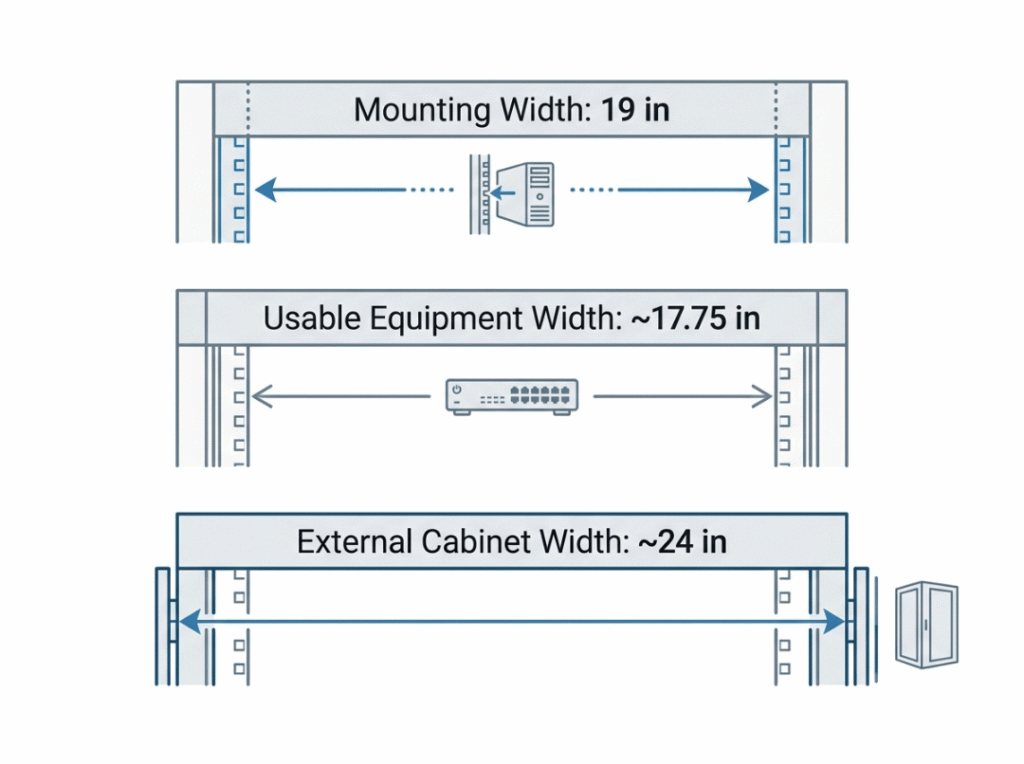
In practice, the numbers break down like this:
|
Measurement |
Inches |
mm |
|---|---|---|
|
Mounting width standard (the “19-inch”) |
19.0 |
482.6 |
|
Usable equipment width (after rails and brackets) |
~17.75 |
~450 |
|
External rack cabinet width (typical) |
~24.0 |
~600 |
When you’re sizing equipment, the number you need is that ~17.75-inch usable width. Equipment manufacturers spec their gear to this figure. The external cabinet measurement matters for floor planning and rack-to-rack spacing, but it tells you nothing about whether a server will physically mount.
This distinction trips up buyers more often than any other dimension because the product name — “19-inch rack” — doesn’t match either of the usable measurements. Keep the three numbers separate.
2U Height: The Exact Figures
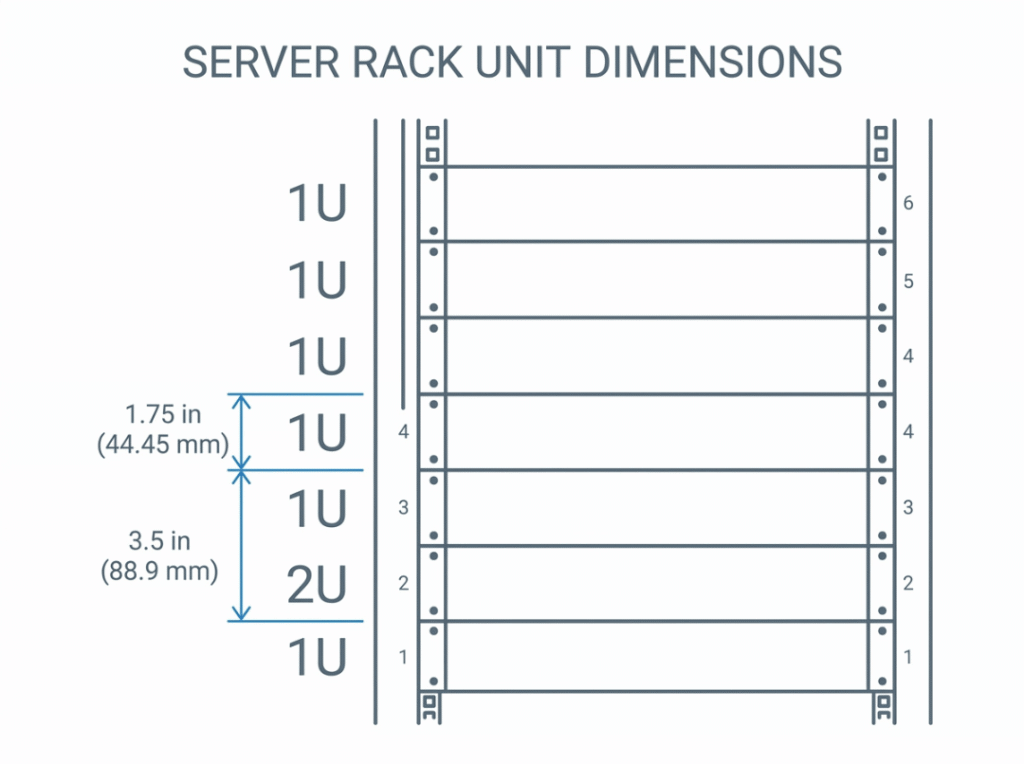
A rack unit (abbreviated U or RU) is the standard increment for vertical space in a 19-inch rack. One U equals 1.75 inches, or 44.45 mm. A 2U device occupies two of those increments:
2U = 3.5 inches = 88.9 mm
That height is fixed by EIA-310 and consistent across every compliant manufacturer. Here’s the full reference for common form factors:
|
Form Factor |
Height (inches) |
Height (mm) |
|---|---|---|
|
1U |
1.75 |
44.45 |
|
2U |
3.50 |
88.90 |
|
3U |
5.25 |
133.35 |
|
4U |
7.00 |
177.80 |
|
6U |
10.50 |
266.70 |
Because the increments are fixed and uniform, calculating total rack usage is straightforward arithmetic. The harder question — and the one that causes more problems — is depth.
Depth: The Dimension That Actually Causes Fit Failures
Height is easy. Depth is where most rack sizing mistakes happen.
Rack depth isn’t standardized the way height is. Common internal depths run from 600 mm on the shallow end up to 1200 mm for deep-server environments. The number you need to match is the internal rail-to-rail depth — not the external cabinet measurement, which includes the door, frame, and rear panel.
Modern 2U servers, particularly compute-dense or storage-heavy models, typically need between 700 and 900 mm of internal usable depth. Factor in front clearance for airflow and rear clearance for cable management, and you can easily add another 100–150 mm to what you need on paper.
The safest approach: measure the depth of your longest chassis, add at least 50–75 mm on each end for cables and airflow, and then match that to the rack’s internal rail-to-rail specification — not its overall depth.
Common rack depths to be aware of:
- 600 mm — suitable for networking gear and patch panels, too shallow for most 2U servers
- 800 mm — a reasonable fit for shorter servers; verify against your specific model
- 1000–1200 mm — appropriate for full-depth 2U servers with rear cable management
1U vs. 2U vs. 4U: Choosing the Right Form Factor
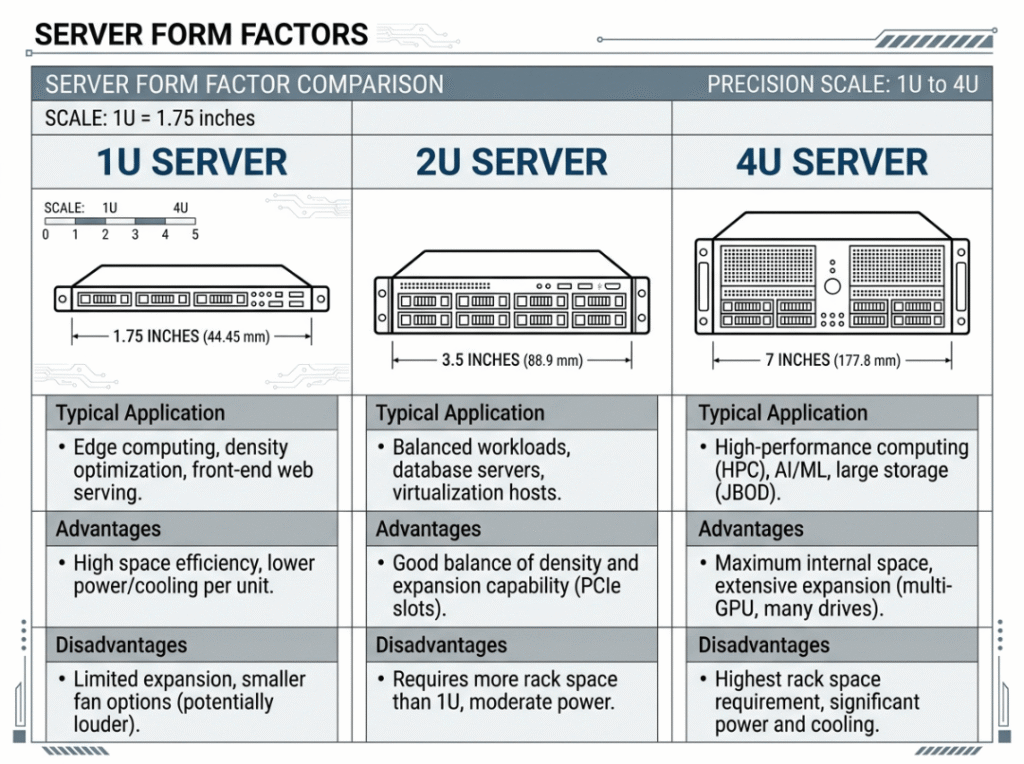
The form factor question comes up frequently, and the answer depends on your workload rather than any single preference.
|
1U |
2U |
4U |
|
|---|---|---|---|
|
Height |
1.75 in / 44.45 mm |
3.5 in / 88.9 mm |
7.0 in / 177.8 mm |
|
Internal space |
Limited |
Moderate |
High |
|
Cooling |
Small, loud fans |
Balanced |
Large, quieter fans |
|
Expansion slots |
Few |
Several |
Most |
|
Typical use |
High-density compute, web hosting |
General-purpose servers, NAS |
GPU workloads, HPC, heavy storage |
|
Noise |
Higher |
Moderate |
Lower |
1U suits environments where rack density is the priority and heat loads are manageable — think hyperscale web servers or bare-metal hosting. The trade-off is limited internal expansion and fans that run loud to compensate for the cramped airflow path.
2U is where most enterprise and mid-market workloads land. The extra 1.75 inches opens up room for additional drive bays, more PCIe slots, and larger fans that run at lower speeds. It’s the logical choice when you want a server that can be configured and reconfigured without hitting capacity limits from day one.
4U makes sense when components themselves are large — full-length GPU cards, oversized power supplies, or high-airflow coolers that physically can’t fit in a shorter chassis. If you’re building a dedicated AI training node or a storage server with twenty-plus drives, 4U gives you the room to do it properly.
Rail Compatibility and EIA-310
Physical fit involves more than height and depth. The mounting holes have to align, and the rail system has to match both the rack and the server chassis.
EIA-310 standardizes the mounting hole pattern within each rack unit — a repeating set of three holes spaced at defined intervals. For a 2U device, that gives six mounting positions across the 3.5-inch height. This uniform pattern is why equipment from different vendors can mount in the same rack.
What EIA-310 does not standardize is hole type. Three variants are common:
- Square holes — the most common in modern server cabinets, used with cage nuts
- Round holes (unthreaded) — also used with cage nuts, found in older installations
- Threaded round holes — screws thread directly in, no cage nut required
Beyond hole type, you’ll choose among rail systems. Fixed rails are simple and rigid but offer no slide-out access — serviceable for gear you rarely touch. Sliding rails let you extend the server forward for maintenance without removing it from the rack entirely, which matters in dense environments where manual handling is otherwise difficult. Universal rail kits adjust across different depths and hole styles, which is useful if you’re standardizing across mixed rack populations.
Before ordering rails, confirm hole type compatibility and verify the rail kit’s depth range against your actual internal rack depth.
Airflow: Why a Correctly Sized Rack Can Still Overheat
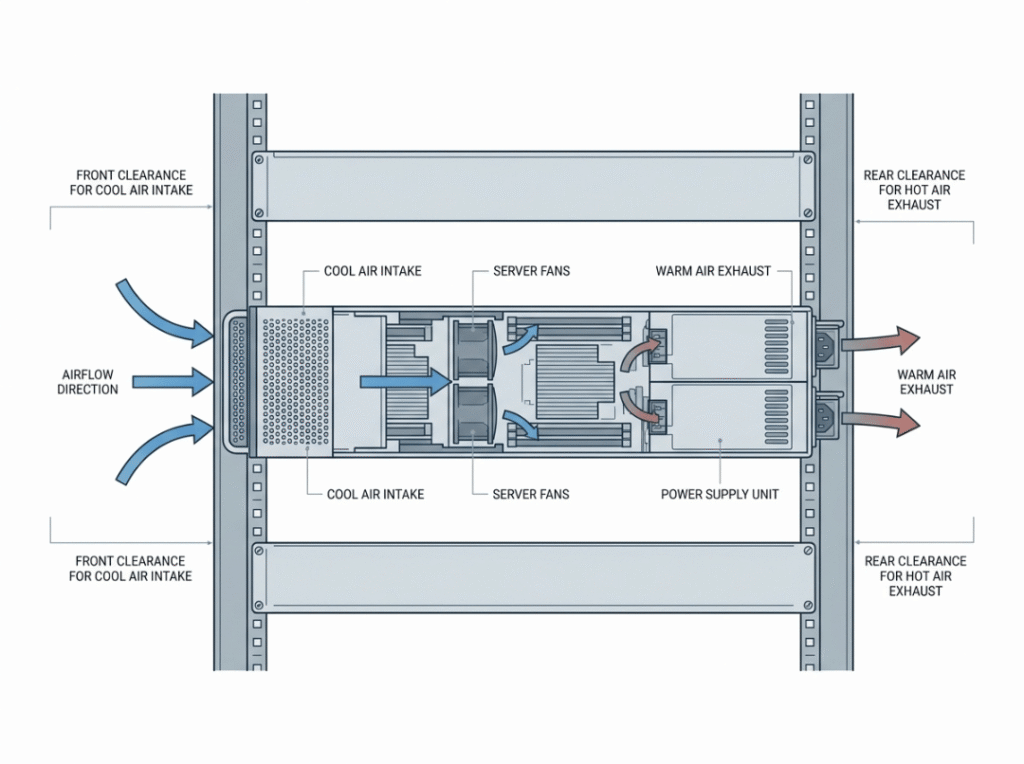
A rack that fits your equipment by every dimension can still fail thermally if airflow isn’t planned. 2U servers typically pull cool air from the front and exhaust hot air from the rear. That intake-to-exhaust path needs to stay clear.
A few principles that matter in practice:
- Front clearance. Cabinet doors with poor perforation ratings and cables routed across the front of the rack restrict intake airflow. Even a partial obstruction reduces cooling capacity across every unit in the rack.
- Rear clearance. Cables bundled too tightly against the rear exhaust create back-pressure that forces fans to work harder. Route cables to the sides of the chassis where possible, and respect each cable’s minimum bend radius.
- Blanking panels. Empty U spaces are not neutral — they become paths for hot exhaust air to recirculate back to the front intakes. Fill every unused unit with a blanking panel. This one step has a measurable effect on thermal performance in moderately loaded racks.
- Hot aisle / cold aisle. If you’re populating multiple racks, orient them so server fronts face each other (cold aisle) and server rears face each other (hot aisle). This prevents exhaust from one row from feeding the intake of the next.
In a 2U context specifically, thermal planning matters more than it might seem. The form factor is compact enough that fans are smaller and operate closer to their limits under load. There’s less thermal headroom than a 4U chassis provides, which means the environment around the server needs to do more of the work.
Selecting a Rack: What to Actually Verify Before You Buy
Most rack selection errors come from verifying height while skipping depth, or matching external width without checking internal usable width. Here’s what to confirm before committing:
- Total your U count with room to grow. Add up the U requirements for every device you’re installing, then leave at least 20–25% headroom for future additions. Migrating to a larger rack later is expensive and disruptive.
- Match internal rail-to-rail depth to your deepest device. Add cable and airflow clearance to your longest chassis. If your server is 750 mm deep and you need 75 mm on each end, you need at least 900 mm of internal rail-to-rail depth.
- Check static and dynamic load ratings. Racks carry both stationary load ratings (for installed equipment) and dynamic ratings (for when the rack is moved). Heavier equipment belongs in the lower rack units regardless — bottom-heavy racks are more stable.
- Verify rail type compatibility end to end. Server chassis rail requirements, rack hole type, and rail kit specifications all need to match. One mismatch in the chain means the server won’t mount correctly.
- Plan cable management before installation. Retrofitting cable management in a populated rack is genuinely difficult. Run your cable path mentally before the first device goes in — where patch cables exit, where power cables route, and where rear clearance is tightest.
Common Mistakes Worth Knowing Before You Start
Most rack sizing problems are repeatable. These come up regularly:
- Treating “19-inch” as the equipment width or the internal cabinet width — it’s neither.
- Choosing rack depth by external measurement rather than internal rail-to-rail clearance.
- Ignoring cable bend radius when planning rear clearance, then finding the back of the rack is impassable.
- Mounting heavy equipment high in the rack, creating stability problems if the rack is ever moved or partially unloaded.
- Leaving empty U spaces unpaneled and wondering why thermal performance is poor.
Frequently Asked Questions
Is 2U height always 3.5 inches?
Yes, in any EIA-310-compliant rack. Two rack units at 1.75 inches each equals 3.5 inches (88.9 mm), and this is consistent across manufacturers.
Is a 19-inch rack actually 19 inches wide on the inside?
No. The 19-inch figure is the mounting standard — the width of the front panel where equipment attaches. After rails and brackets, the usable internal width is approximately 17.75 inches (450 mm). The external cabinet is typically around 24 inches wide.
Can any 2U server go into any 19-inch rack?
Width compatibility is generally reliable, but depth and rail type are not guaranteed. Always verify internal rail-to-rail depth against your chassis length, and confirm hole type compatibility before ordering rails.
What depth rack do I need for a 2U server?
Measure your server’s chassis depth, add 50–75 mm of clearance at each end for cables and airflow, and match that total to the rack’s internal rail-to-rail specification. Most modern 2U servers need between 700 and 900 mm of usable internal depth.
How much clearance should I leave for airflow?
At the front, enough space to keep cabinet doors and cable runs from restricting the intake. At the rear, enough for cables to route without pressing against the exhaust. Fill any unused U spaces with blanking panels to prevent hot air recirculation. Exact figures depend on your server’s airflow rating and thermal density, but 50–75 mm minimum on each end is a reasonable starting point for most deployments.
When does it make more sense to go with 4U instead of 2U?
When your components are physically too large for a 2U chassis — full-length GPU cards, high-capacity storage backplanes, or large-format cooling solutions. If a 2U chassis can accommodate your workload’s expansion requirements, it’s the more space-efficient choice. If you’re consistently running out of slots or drive bays in 2U configurations, 4U removes those constraints.
