


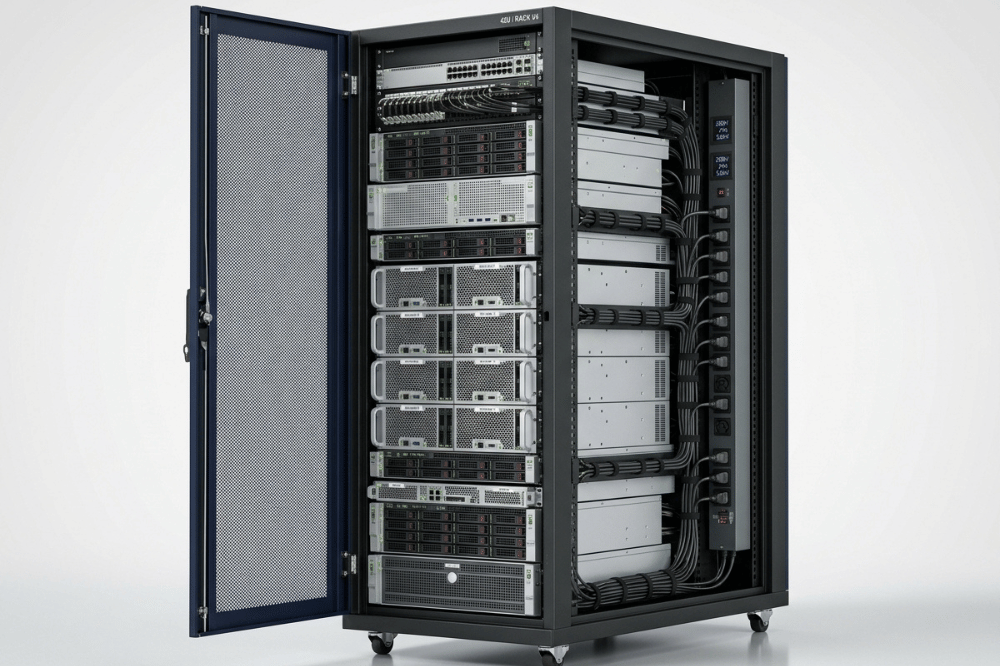
A rack mount enclosure is the outer cabinet that houses multiple servers; a server chassis is the individual unit that holds a server’s components. Choosing the wrong combination leads to thermal failures, power shortfalls, and costly retrofits. This guide covers every decision point—dimensions, cooling strategy, GPU compatibility, and power distribution—so you can specify the right setup from the start.
Procurement decisions for rack infrastructure look deceptively simple on paper. A rack is a rack, right? In practice, specifying the wrong enclosure or chassis for a GPU-dense or high-throughput server deployment can mean thermal throttling, unplanned downtime, or a complete rebuild six months later.
This guide is designed for system integrators, data center procurement teams, industrial computing project managers, and OEM/ODM partners who need to get the specification right the first time. It covers terminology, dimensions, enclosure types, cooling strategies, weight and power distribution, and a practical buying checklist—with a specific focus on GPU server deployments where the stakes are highest.
What Is a Rack Mount Enclosure?
A rack mount enclosure—also called a rack cabinet or rack frame—is the structural housing that holds multiple servers, networking gear, patch panels, PDUs, and other IT equipment in a standardized vertical column. The enclosure itself does not perform any computation; it provides mechanical support, airflow structure, cable management pathways, and physical security for everything mounted inside it.
Rack enclosures are sold by height (measured in rack units, or U), width (almost universally 19 inches for server equipment, per the EIA-310-D standard), and depth (typically 600mm, 800mm, or 1000mm, depending on intended equipment).
Rack Enclosure vs. Server Chassis: What’s the Difference?
These two terms are frequently conflated, but they refer to distinct hardware layers.
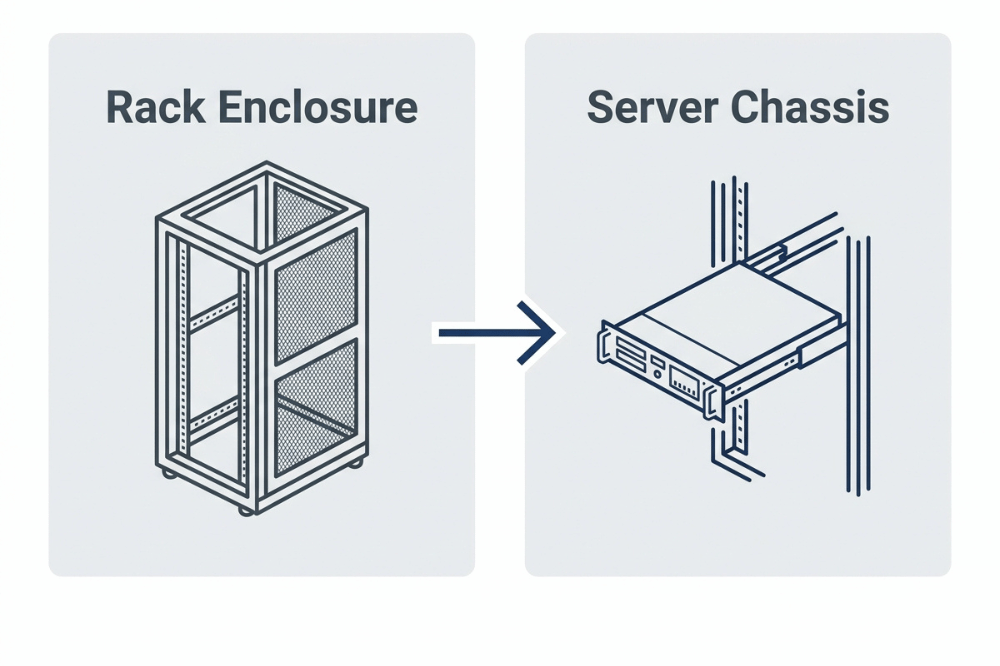
- A rack enclosure is the outer cabinet—the steel frame bolted to the floor or freestanding in a row. It is the environment in which servers live.
- A server chassis is the individual enclosure for a single server node. It holds the motherboard, CPU(s), memory, storage drives, GPU cards, and power supply units. The server chassis slides into the rack enclosure via a rail kit and is measured in U-height—1U, 2U, 4U, and so on.
The distinction matters at the time of procurement because each layer has its own specifications, compatibility requirements, and failure modes. A 4U GPU chassis that is 900mm deep will not fit cleanly into a 600mm-deep rack enclosure. A chassis rated for a 1200W PSU will not perform reliably in a rack PDU circuit designed for 10A loads.
Standard Rack Dimensions: Height (U), Width, and Depth
Understanding rack dimensions is foundational. Here are the key numbers.
- Rack Unit (U) height: Per the EIA-310-D standard maintained by the Electronic Industries Alliance, one rack unit equals 1.75 inches (44.45mm). Vertical hole spacing follows a repeating 1/2″–5/8″–5/8″ pattern within each U space. Common rack heights are 12U, 24U, 42U, and 48U, with 42U being the data center default.
- Width: Standard 19-inch racks are defined by a front panel width of exactly 19 inches—the one EIA-310 dimension that actually measures what it says. The internal mounting opening is a minimum of 17.72 inches (450mm). Horizontal spacing between vertical hole rows is specified at 18 5/16 inches (465.1mm), though some manufacturers use slots rather than fixed holes to accommodate variation.
- Depth: Rack depth is not standardized consistently. Common depths are 600mm (shallow, suited to networking gear), 800mm (mid-depth, general-purpose servers), and 1000mm+ (deep racks required for high-density GPU servers, where cards can reach 300–380mm in length plus clearance for cabling).
- Choosing depth for GPU deployments: Modern full-length GPU cards, such as the NVIDIA H100 or A100, are physically long and thermally demanding. A chassis that houses 4–8 of these cards will typically require 900–1000mm of usable interior depth. Specifying a 600mm rack for a GPU cluster is a common and costly mistake.
Open Frame vs. Enclosed Cabinets
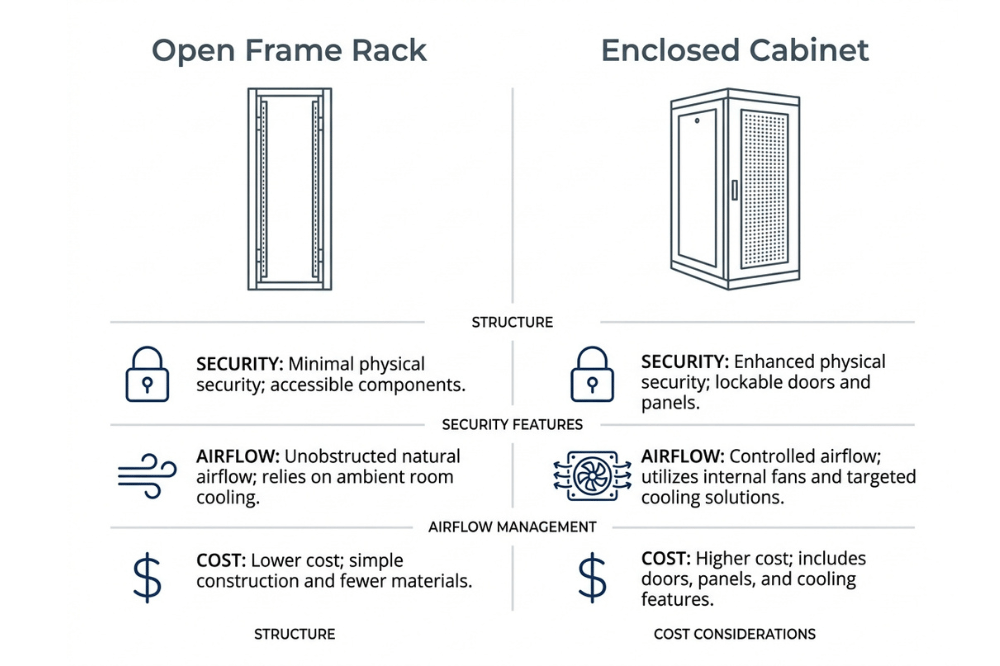
The structural design of your rack enclosure significantly affects security, airflow, and cost. Here is a direct comparison.
| Factor | Open Frame Rack | Enclosed Cabinet |
|---|---|---|
| Physical security | No doors or panels; limited protection | Lockable front/rear doors; solid or perforated side panels |
| Airflow | Unrestricted; relies on room-level cooling | Controlled; directs airflow front-to-back through the cabinet |
| Cost | Lower upfront cost | Higher upfront cost |
| Maintenance access | Excellent; access from any angle | Good with doors open; slightly restricted on sides |
| Hot/cold aisle compatibility | Difficult to contain | Well-suited; integral to containment strategy |
| Best for | Test labs, dev environments, controlled data center floors | Production data centers, colocation, edge deployments, and offices |
Choose an open-frame rack if: Your environment has dedicated room-level cooling, your team requires frequent access for reconfiguration, and the space has controlled physical access with limited foot traffic.
Choose an enclosed cabinet if: You are deploying in a colocation facility, a shared office environment, or any space where hot/cold aisle containment is part of the cooling strategy. Enclosed cabinets also provide the structured mounting points for PDUs, cable management arms, and blanking panels that production environments require.
How to Choose a Rack Enclosure for GPU Servers
GPU deployments impose requirements that a standard server specification will miss. Here is what to evaluate specifically.
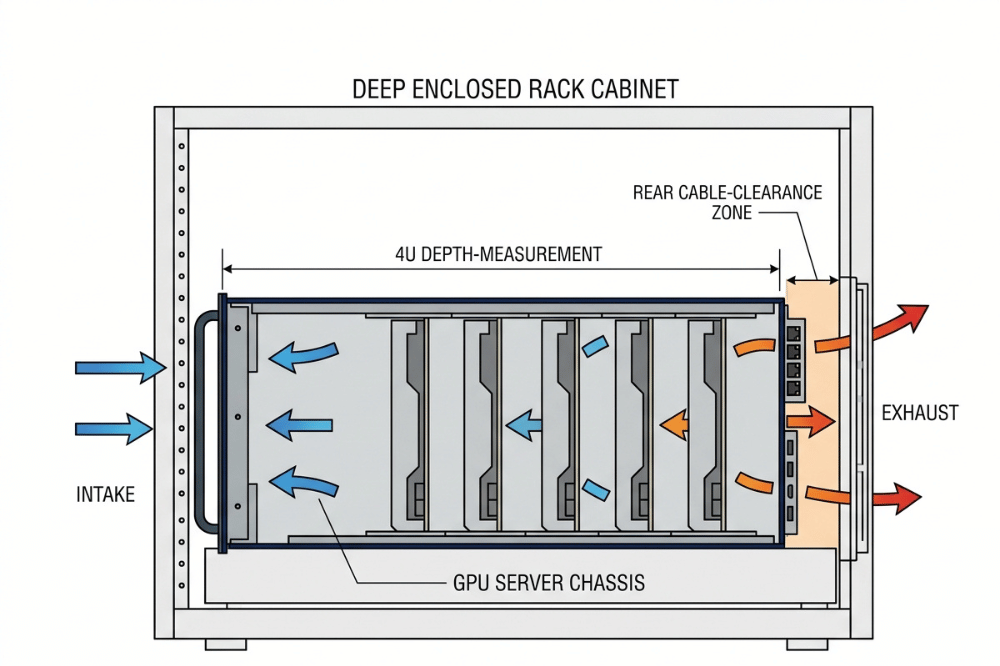
- Chassis depth vs. card length. Full-length, full-height (FLFH) GPU cards range from 267mm to over 340mm in length. Add connector clearance and cable bend radius, and you need a chassis with 380–400mm of internal GPU clearance. Map this against your rack’s internal depth to confirm fit before ordering.
- TDP and power density. Modern PCIe GPUs carry TDPs between 300W and 600W per card (Supermicro, 2025). An 8-GPU chassis under full AI training load can draw 4,800W or more from the PSU alone. NVIDIA HGX-class systems can require 120–140 kW per rack. Your chassis PSU rating, rack PDU amperage, and facility power circuit must all be sized accordingly—not just one of them.
- PCIe topology. For multi-GPU inference and training, PCIe lane topology directly affects inter-GPU communication bandwidth. Specify whether the chassis routes GPUs through a PLX switch, direct CPU lanes, or NVLink. This is not a chassis afterthought—it determines whether you can run NVLink bridging, which cards are compatible, and your maximum AI training throughput.
- Rail kit load rating. A 4U chassis populated with 8 full-length GPU cards, a redundant PSU pair, and NVMe drives can weigh 40–60 kg. Verify that the rail kit’s dynamic load rating (not just the static shelf rating) supports the installed weight, especially if the chassis will be extended for service.
Cooling Strategies for Rack Deployments
Thermal management is where GPU rack deployments most often fail. There are three primary strategies.
Air Cooling with Front-to-Back Airflow
Most server chassis and rack enclosures are designed around front-to-back airflow: cool air enters the perforated front bezel, passes across drives, GPU cards, CPUs, and memory, and exits through high-static-pressure rear fans. For this to work efficiently, blanking panels must fill every empty U space in the rack—unused gaps short-circuit airflow and create recirculation hotspots.
Hot Aisle / Cold Aisle Containment
Containment separates supply air from exhaust air at the row level. Cold Aisle Containment (CAC) encloses the cold air supply at the fronts of opposing racks. Hot Aisle Containment (HAC) encloses the exhaust aisle and channels hot air directly to return units.
According to ASHRAE TC 9.9 (5th Edition, 2021), high-density computing equipment classified under the new H1 category requires operating temperatures between 18°C and 22°C (64.4°F and 71.6°F). For GPU racks producing 15kW or more per cabinet, HAC is generally the stronger choice because it captures heat at the source. CAC is easier to retrofit into existing facilities and typically costs less to implement—$400–$1,500 per rack position—with energy savings of 20–40% of cooling costs and payback periods as short as 6–18 months (Introl, 2025).
Choose HAC if you are deploying high-density GPU racks with more than 15kW per cabinet in a purpose-built or heavily modified facility.
Choose CAC if you are retrofitting an existing data center and need a cost-effective, low-disruption containment solution.
Liquid Cooling
For the highest GPU densities—NVIDIA HGX-class nodes, dense AI training clusters—direct liquid cooling (DLC) or rear-door heat exchangers are increasingly necessary. Liquid cooling removes heat at the component level and significantly reduces dependence on room-level airflow. If you are specifying a chassis for next-generation AI infrastructure, verify liquid-cooling compatibility at the chassis selection stage, not after installation.
Weight, Rail Compatibility, and Power Distribution
Three mechanical and electrical factors are frequently underspecified.
Weight and structural load. Confirm the rack enclosure’s rated load capacity against the combined weight of every chassis, cable run, and PDU when fully populated. A 42U rack filled with GPU servers and redundant PDUs can exceed 900 kg. Raised floor tiles and building floor sections have their own load limits that must be verified independently.
Rail compatibility. Not all rail kits are interchangeable. Square-hole, round-hole, and threaded-hole rails require different mounting hardware. Confirm the rail kit supplied with each chassis matches the hole pattern of your rack enclosure before deployment. Mismatched rails are one of the most common installation delays in data center buildouts.
Power distribution units (PDUs). Rack PDUs for GPU deployments must be sized for high-amperage circuits—typically 30A or 60A per PDU at 208V or 240V in North America, or 32A at 230V in international deployments. Specify metered or switched PDUs if you need per-outlet monitoring or remote power cycling. Confirm the PDU form factor (vertical or 1U horizontal) fits your rack’s available U space and cable management scheme.
Common Mistakes to Avoid
| Mistake | Why It Matters | How to Avoid It |
|---|---|---|
| Specifying rack depth without checking the GPU card length | Cards physically won't fit, or cables can't route | Add 80–100mm to card length; verify against chassis internal depth spec |
| Ignoring PSU redundancy in the GPU chassis | A single PSU failure takes down the whole node | Specify 1+1 or 2+1 redundant PSU configurations for production workloads |
| Skipping blanking panels in open U spaces | Hot air recirculates, raising inlet temperatures | Fill every unused U space before powering on the equipment |
| Mixing open-frame racks with hot/cold aisle containment | Containment cannot seal properly; airflow leaks | Use enclosed cabinets for any containment strategy |
| Choosing rails by brand rather than hole type | Rail kits won't mount; installation stalls | Confirm square, round, or threaded hole pattern before ordering |
| Undersizing PDU amperage | Circuit breakers trip under GPU training load | Calculate full chassis TDP + 20% headroom; size PDU accordingly |
| Overlooking chassis depth when specifying rack enclosures | Deep chassis overhangs the rear of shallow racks | Specify rack internal depth ⥠chassis depth + cable clearance |
Rack Enclosure Buying Checklist
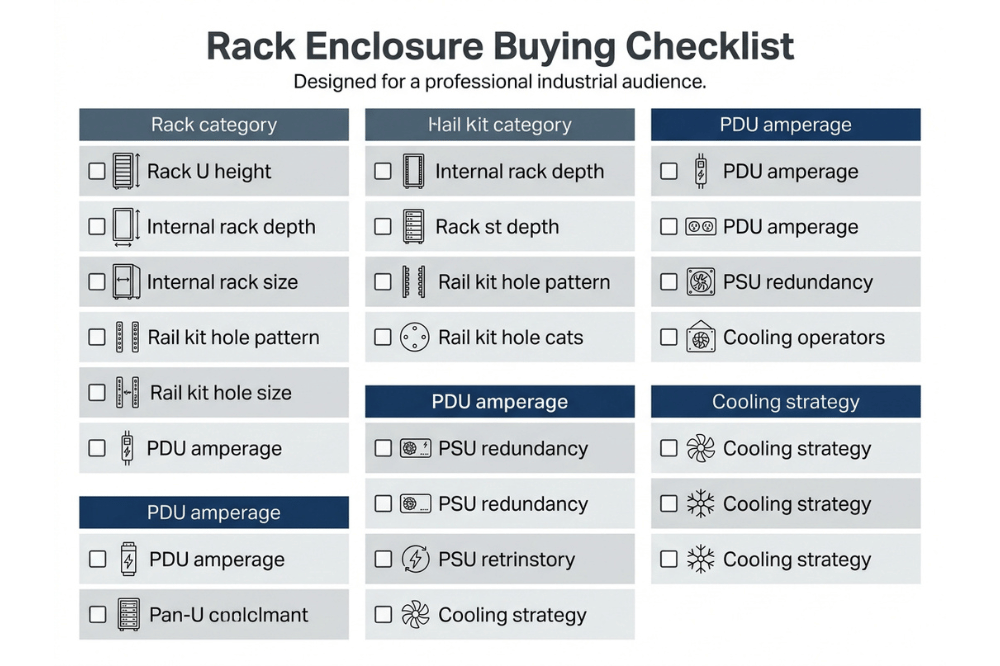
Before finalizing any rack enclosure or chassis order, confirm the following:
- Rack U height is sufficient for all planned chassis, plus cable management accessories
- Internal rack depth accommodates the deepest chassis in your configuration, plus cabling clearance
- Rail kit hole pattern (square, round, threaded) matches your rack enclosure
- Rail kit dynamic load rating supports a fully populated chassis weight
- PDU amperage and outlet count covers full-load draw across all chassis with ≥20% headroom
- Enclosure type (open-frame or enclosed cabinet) aligns with your cooling and security strategy
- Blanking panels are available for all unused U spaces
- Chassis GPU clearance (internal depth from PCIe slot to rear panel) accommodates card length
- PSU configuration is redundant (1+1 or 2+1) for production GPU workloads
- Cooling strategy (air, HAC, CAC, or liquid) is confirmed before enclosure selection, not after
Frequently Asked Questions
What is the difference between a rack enclosure and a server chassis?
A rack enclosure is the external cabinet—the steel frame that holds multiple pieces of equipment in a standardized column. A server chassis is the individual housing for one server node, including the motherboard, storage, GPUs, and PSUs. The chassis slides into the enclosure via rail kits. The two must be specified together to ensure dimensional, thermal, and power compatibility.
What rack depth do I need for GPU servers?
Most full-length, full-height GPU cards are 267–340mm long. With connector clearance and cable routing, you typically need a chassis with 380–400mm of internal GPU clearance. Map the chassis external depth against the rack’s internal usable depth—a common minimum for GPU deployments is 1000mm of rack internal depth.
How many rack units does a GPU server typically use?
GPU servers most commonly come in 4U chassis configurations, which accommodate 4–8 full-length GPU cards. Some high-density designs use 8U or 10U chassis. 1U and 2U chassis can accept 1–2 low-profile GPUs but are rarely used for serious AI or HPC workloads.
Should I use hot-aisle or cold-aisle containment for GPU racks?
For GPU racks producing more than 15kW per cabinet, Hot Aisle Containment (HAC) is generally more effective—it captures heat at the source and routes it directly to cooling units. Cold Aisle Containment (CAC) is a better fit for retrofitting existing facilities at a lower cost. Both strategies can reduce cooling energy consumption by 20–40% compared with an uncontained layout, according to Introl (2025).
What PDU do I need for a GPU server rack?
GPU servers under training workloads draw 300–600W per GPU card. A fully loaded 8-GPU chassis can draw up to 5,000W from the wall. Specify rack PDUs rated for at least 30A at 208V (or 32A at 230V) per chassis, with 20% headroom above calculated peak draw. Metered PDUs that provide per-outlet monitoring are strongly recommended for GPU deployments to track load in real time.
Can I mix open-frame racks and enclosed cabinets in the same row?
Mixing enclosure types in the same containment aisle undermines the containment strategy. If you are using hot- or cold-aisle containment, all cabinets in a row should be enclosed to prevent air bypass. Open-frame racks can coexist in the same facility if they are in a separate zone with room-level cooling.
What certifications should I look for in a rack chassis manufacturer?
At a minimum, look for CE certification (required for European markets) and RoHS compliance (restriction of hazardous substances). For OEM/ODM customers, confirm that the manufacturer offers documented quality control processes, offers prototype and drawing services, and can meet your lead time requirements.
Specify Once, Deploy with Confidence
The cost of a mis-specified rack enclosure or chassis shows up months after procurement—in thermal alerts, tripped breakers, installation delays, and emergency retrofits. Getting the specification right from the start means matching rack depth to chassis dimensions, enclosure type to cooling strategy, PDU capacity to actual GPU load, and rail kits to hole patterns before a single bolt is turned.
OneChassis Technology, operating since 2012 with over a decade of experience in rack enclosure and server chassis manufacturing, offers 1U to 4U rackmount chassis, GPU server cases, wall-mount chassis, ITX cases, NAS, and storage chassis—all available with OEM/ODM customization, CE and RoHS certification, and a 21-day standard lead time.
If you are specifying infrastructure for AI, big data, cloud computing, IoT, or industrial automation, the OneChassis team can support your design from initial chassis concept through prototype, production, and logistics.
Contact OneChassis Technology:
📧 sales@onechassis.com
📱 WhatsApp: +86 138 2378 2297
