


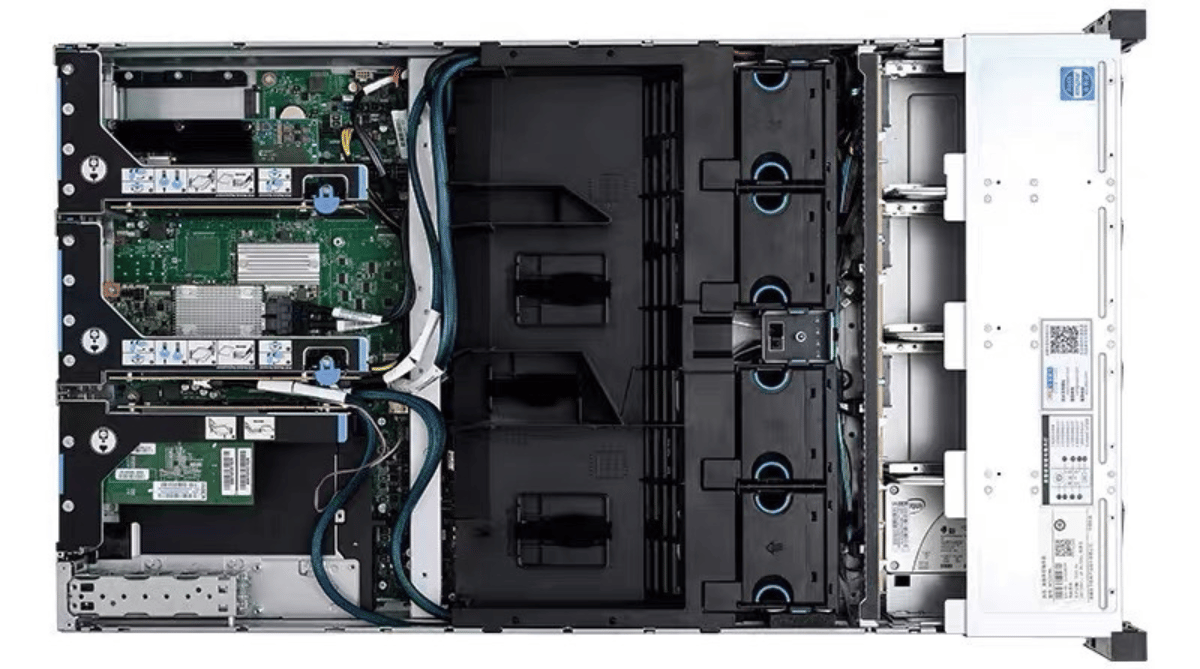
The right server chassis depends on your workload type, form factor constraints, thermal requirements, and growth trajectory. Match 1U for density and edge use cases, 2U for balanced GPU and general-purpose builds, and 4U for high-density GPU, AI training, or storage workloads. Verify GPU card length clearance, backplane protocol support, and PSU redundancy before committing to any enclosure.
Most infrastructure procurement decisions center on compute—CPUs, GPUs, memory. The chassis earns considerably less attention. That’s the wrong order of priorities.
The server chassis determines whether your hardware runs at rated performance or thermal throttles at 80% load. It governs how quickly a technician can replace a failed drive. It decides whether your infrastructure can absorb a hardware upgrade in 18 months or requires a full system replacement. And for GPU compute and AI training workloads, it’s often the first constraint that limits what hardware you can physically install.
This guide is written for system integrators, data center procurement teams, industrial computing project managers, and OEM/ODM partners who need to make chassis decisions that withstand production conditions. It covers every factor that matters—form factor, thermal design, workload-specific requirements, backplane modularity, acoustic trade-offs, and EMI shielding—with concrete guidance on when to choose each option.
What Is a Server Chassis?
A server chassis is a purpose-built metal enclosure designed to house, power, cool, and protect a server’s internal computing components. That definition sounds straightforward. The engineering behind it is not.
The gap between a consumer PC case and a professional server chassis is substantial. Consumer cases are built for modest, intermittent workloads. Server chassis are engineered for 24/7 continuous operation under sustained thermal and mechanical stress. They use heavier-gauge steel or aircraft-grade aluminum, standardized mounting rails, redundant cooling paths, and backplane systems that consumer enclosures are never designed to support.
The chassis is the physical foundation that ties everything together. The motherboard, power supply, storage drives, GPU accelerators, and networking cards all depend on the enclosure to hold them securely, maintain thermal stability, and allow maintenance without taking the system offline. In a data center or server room, the chassis also provides the standardized footprint that makes it possible to organize, cable, and manage dozens—or hundreds—of servers systematically.
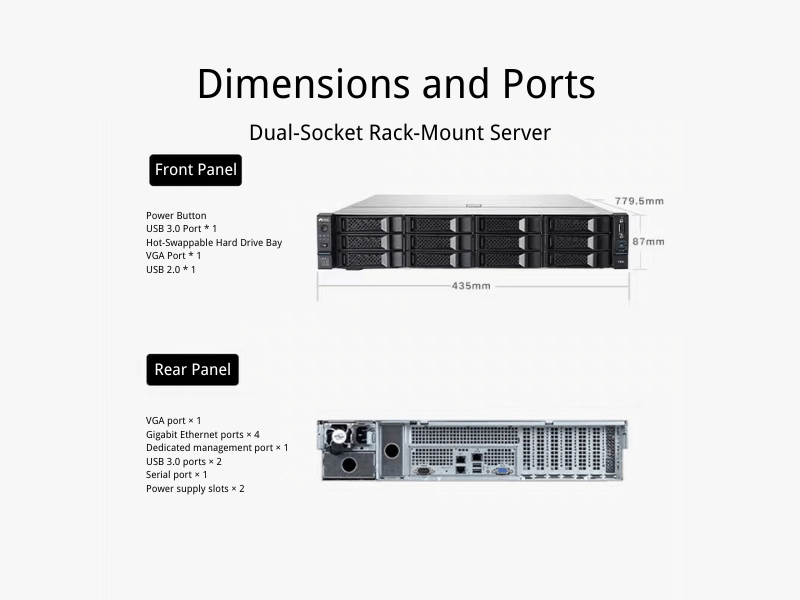
Why Server Chassis Selection Matters
Thermal Performance: Where Chassis Design Has the Most Direct Impact
Heat is the primary constraint on sustained compute performance. Thermal throttling degrades CPU and GPU throughput well before components reach their absolute temperature limits—and it happens silently, without alerts in most configurations.
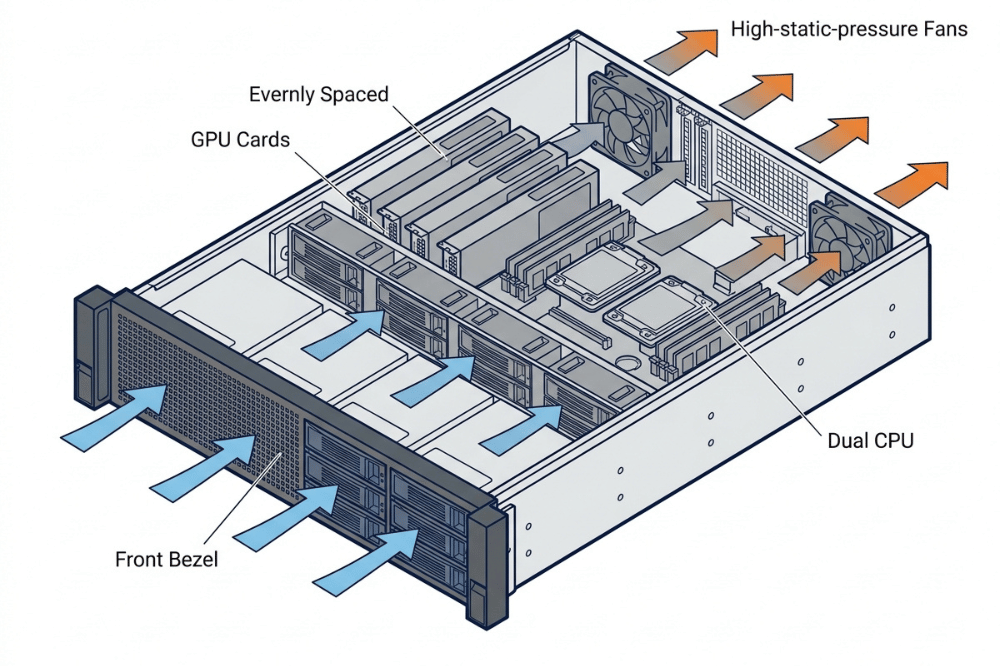
In a dense GPU server chassis, standard high-airflow fans frequently aren’t sufficient. The resistance created by heatsinks, dense GPU card arrays, and backplane structures requires high-static-pressure fans to maintain airflow against back pressure. Without them, hot spots develop in predictable locations: behind the GPU array, above VRM zones, and around NVME devices mounted in secondary positions.
Proper chassis airflow follows a front-to-back path: cool air enters through perforated front bezels, passes across drives and expansion cards, moves over CPUs and memory, and exits through rear fans or exhaust vents. Any obstruction to that path—a poorly routed cable, a missing blanking panel, or an undersized fan assembly—degrades the thermal envelope. Foam or plastic baffles inside the chassis channel intake air directly over critical components rather than allowing short-circuit paths to the nearest exhaust opening.
Component Protection: Physical and Electromagnetic
Modern servers carry real weight. Dual CPUs, multiple GPU cards, a full complement of storage drives, and redundant power supplies can push a 4U system past 50 pounds before rails and cabling. A chassis built from light-gauge metal will flex under load, gradually misaligning PCIe slots and drive bays over months of operation. Quality chassis use heavy-gauge steel or aircraft-grade aluminum specifically to prevent this deformation.
Dust accumulation is one of the most common causes of gradual thermal degradation in production environments. A well-designed chassis includes filtered intake bezels that trap particulates before they reach heatsinks and fan blades. In environments with higher contamination—manufacturing floors, warehouse edge deployments—this filtration is not optional.
EMI shielding is a function most buyers overlook until it becomes a problem. Server chassis act as Faraday cages, attenuating electromagnetic interference generated by switching power supplies, high-frequency processors, and GPU clock cycles. Without proper shielding—achieved through continuous metal construction, conductive gaskets at seams and cable penetrations, and tight-fitting panels—that interference can corrupt data signals, disrupt network interfaces, and affect nearby equipment. Purpose-built server chassis are engineered to meet FCC and CE emissions standards. Consumer cases typically are not.
Serviceability and Scalability
Tool-less drive trays, accessible expansion card brackets, and front-access maintenance panels directly reduce the time cost of servicing production hardware. In rack-dense environments where physical access is already constrained, a chassis that requires disassembly to replace a failed drive is a liability.
Scalability is equally important. Buying a chassis sized exactly for today’s workload is a false economy. Hardware grows—drives fill, workloads expand, additional network interfaces get added. A chassis with spare drive bays and open PCIe slots costs marginally more upfront and avoids a full enclosure replacement when requirements change.
1U vs. 2U vs. 4U: Which Chassis Size Is Right?
Rackmount chassis are measured in rack units (U), where 1U equals 1.75 inches (44.45 mm) of vertical space. A standard 42U rack cabinet provides the frame. The choice of chassis height directly determines GPU capacity, cooling headroom, storage density, and acoustic profile.
| Specification | 1U | 2U | 4U |
|---|---|---|---|
| Height | 1.75 in (44.5 mm) | 3.5 in (89 mm) | 7.0 in (177.8 mm) |
| Max GPUs (full-height) | 1–2 (low-profile or riser) | 2–4 | 4–8 |
| Typical Power Draw | 800–1,500W | 2,000–3,500W | 5,000–6,000W |
| PSU Capacity | Up to ~1,200W | Up to ~2,200W | 3,000W+ (redundant) |
| Fan Size / Noise | 40mm, high RPM, loud | 60â80mm, moderate | High-CFM, moderate to high |
| Servers per 42U Rack | ~38–40 | ~19–20 | ~9–10 |
| Typical Drive Bays | 2–4 | 4–12 | 12–36+ |
| Best For | Edge inference, dense CPU workloads | Production inference, general-purpose | AI training, storage servers, HPC |
Choose 1U when the rack-unit budget is tight, and workloads require 1–2 GPUs or are primarily CPU-bound. Edge inference deployments and colocation environments where per-rack space is billed at a premium are natural fits.
Choose 2U when you need 2–4 full-height, full-length GPUs without sacrificing rack density. The 2U form factor is the practical sweet spot for production AI inference, general-purpose servers, and mixed storage/compute builds. It supports larger fans at lower RPMs—quieter and more thermally stable than 1U under sustained load.
Choose 4U when workload demands 8 GPUs per node, sustained 100% GPU utilization (AI training), high-density storage, or maximum thermal headroom. The 4U chassis supports redundant PSUs rated at 3,000W or more, high-CFM fan assemblies, and full-length PCIe cards without riser compromises.
On acoustics: A 1U server running 40mm fans under load frequently exceeds 65 dB—acceptable in a dedicated server room, problematic in proximity to people. A 4U chassis or tower server can move equivalent or greater airflow with larger-diameter fans at lower RPMs and significantly less noise. If deployment proximity to personnel matters, chassis height directly affects the acoustic environment.
Rackmount vs. Tower vs. Blade: Form Factor Use Cases
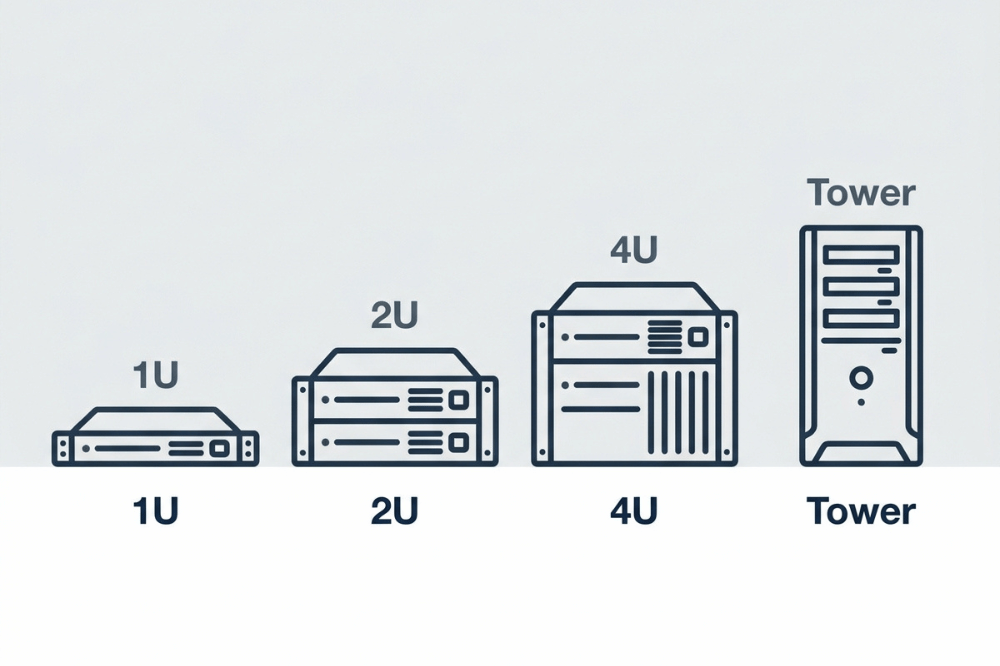
Rackmount Chassis
Rackmount is the dominant form factor in data centers, colocation facilities, and server rooms of any meaningful size. Standardized 19-inch rack compatibility, high density, and systematic cable management make rackmount the default choice for environments managing more than a handful of servers.
Best for: Data centers, colocation, server rooms, multi-server deployments.
Tower Server Chassis
Tower chassis stand upright and provide simpler cooling paths, easier physical access, and lower per-unit cost. They work well for small business server rooms, branch offices, and environments without a rack cabinet.
Best for: SMB server rooms, branch offices, development environments, single-server deployments.
Blade Server Enclosures
Blade architecture places multiple server blades—each a self-contained compute module—into a shared enclosure that provides common power, cooling, and high-speed midplane interconnects. Blade systems deliver exceptional compute density and centralized management but require significant upfront infrastructure investment.
Best for: Large-scale enterprise deployments where operational efficiency at scale justifies the infrastructure cost.
How to Choose a Server Chassis Based on Workload
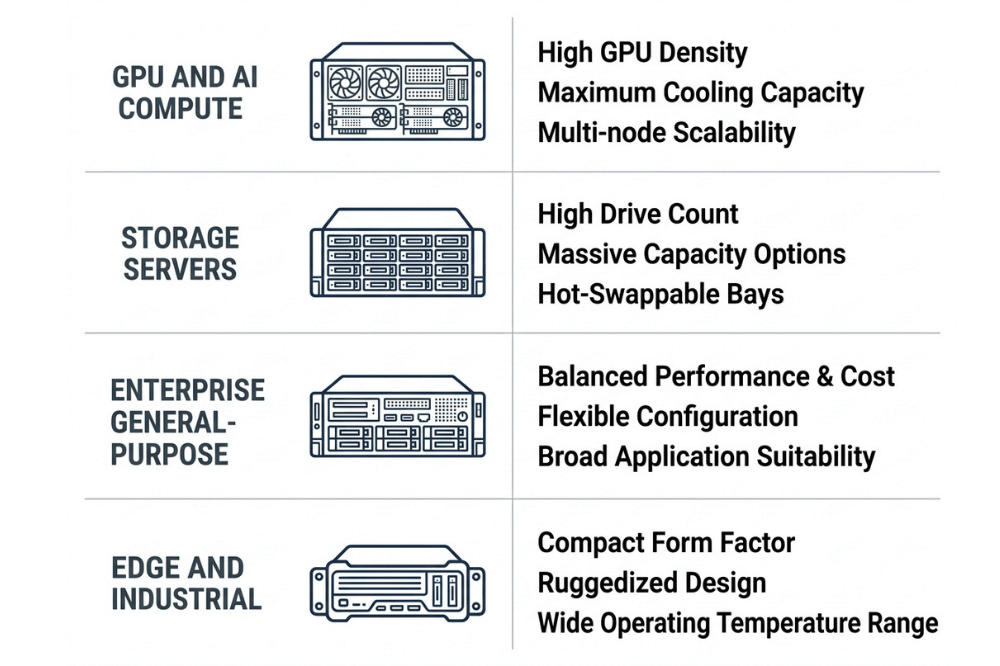
GPU and AI Compute Servers
GPU workloads impose the most demanding chassis requirements of any server category. Key specifications to verify before buying:
- Full-length GPU card clearance: Many chassis advertise PCIe slot counts without specifying whether full-length, full-height (FL/FH) cards fit. Verify the chassis’s maximum GPU card length against your GPU’s physical dimensions. NVIDIA H100, H200, and RTX PRO 6000 Blackwell cards are typically 336mm or longer.
- PCIe riser card support: In 2U chassis, GPUs are often repositioned horizontally via riser cards to fit within the enclosure height. Confirm the riser supports your PCIe generation (Gen 4 or Gen 5) at full x16 bandwidth. Bandwidth-limited risers are a common source of GPU underperformance in production.
- Card spacing: Double-wide GPU cards require adequate spacing between PCIe slots for airflow. A chassis that places double-wide cards slot-to-slot with no gap between them creates localized thermal problems.
- High-static-pressure fan requirements: Standard airflow fans lose effectiveness against the resistance of dense GPU arrays. Look for chassis that specify or include high-static-pressure fan support.
Storage Servers
Storage server chassis selection centers on drive density, backplane protocol, and access design:
- Hot-swap drive bay count: For production storage, hot-swap bays are mandatory. Count the bays you need today, then add capacity for 18–24 months of growth. 4U storage chassis commonly support 24–36 hot-swap bays in the front panel.
- SATA, SAS, and NVMe backplane options: The backplane protocol determines which drives the chassis supports. SATA backplanes are lowest cost and support standard HDDs and SSDs. SAS-4 (24 Gb/s) backplanes support enterprise SAS drives, offering higher throughput and a higher drive count per expander. NVMe U.2/U.3 backplanes support the highest-throughput SSDs for all-flash arrays.
- Modular vs. fixed backplane: A modular backplane can be reconfigured as storage technology evolves—SATA today, NVMe U.2 in two years—without replacing the chassis enclosure. A fixed backplane locks you into the original protocol. For any storage deployment expected to outlast one hardware refresh cycle, modular backplane support is a significant long-term cost factor.
- Front-access maintenance: Storage servers benefit from chassis designs that allow drive replacement from the front without removing the enclosure from the rack.
Enterprise and General-Purpose Servers
Enterprise deployments prioritize reliability, manageability, and long service life. Key chassis requirements include redundant power supply support (1+1 hot-swap PSUs), tool-less maintenance access, compatibility with enterprise motherboard form factors (E-ATX, SSI-EEB), and standardized rail-kit compatibility for structured rack environments.
Edge and Industrial Deployments
Edge and industrial environments impose requirements that standard data center chassis are not designed to meet:
- Dust filtration: Industrial environments—manufacturing floors, outdoor enclosures, transportation infrastructure—require chassis with sealed or filtered intake bezels rated for high-particulate environments. IP ratings (IP54 or higher for dust protection) are relevant in these contexts.
- Vibration resistance: Chassis deployed in vehicles, in the proximity of industrial equipment, or in seismically active zones require vibration-damped drive mounting and reinforced structural connections. Standard rackmount chassis are not designed for exposure to vibration.
- Compact depth: Edge deployments frequently use non-standard enclosures—wall cabinets, compact racks—with reduced depth. Verify chassis depth against the enclosure’s usable depth before specifying.
- Extended temperature tolerance: Standard server chassis are rated for 0°C to 40°C ambient. Industrial edge deployments may require tolerance to -25°C to 60°C ambient temperatures, necessitating chassis airflow designs that accommodate both cold-start condensation risk and sustained high-ambient operation.
Key Features to Look For Before You Buy
Hot-swappable drive bays allow failed drives to be replaced while the system remains online. For any production environment where uptime matters, this is a requirement—not a preference. Look for tool-less drive trays that release with a single lever.
Redundant power supply support protects against PSU failure without service interruption. A 1+1 hot-swap PSU configuration allows one supply to fail while the second carries full load, with the failed unit replaceable without a power-down. For mission-critical workloads, always specify a chassis that supports redundant power.
PCIe expansion slot count and configuration determine what you can install today and upgrade tomorrow. GPU builds need full-height, full-length PCIe slots—often with riser card support to position cards within the enclosure. Count the slots required for current hardware, then add headroom for cards likely to be added within 24 months.
Motherboard compatibility is a specification that’s frequently overlooked until it becomes a problem. Standard ATX fits most chassis. E-ATX (305mm × 330mm) and SSI-EEB (305mm × 330mm to 305mm × 344mm) boards used in high-core-count server builds require explicit chassis support confirmation. Locking into a chassis that can’t accommodate a board upgrade forces an earlier enclosure replacement.
Integrated cable management pathways—channels, tie-down posts, and routing guides built into the chassis—keep cables out of the airflow path. Unmanaged cables in a dense server are a thermal hazard and a maintenance problem.
Rail kit and rack compatibility: Confirm the chassis includes or supports rack rail kits compatible with your rack cabinet’s post spacing. Mismatched rail specs are a common procurement error in mixed-vendor rack environments.
Airflow design and baffle system: Ducted baffles channel intake air directly over CPUs, VRMs, and memory modules, preventing short-circuit airflow paths. Without them, localized hot spots persist even with adequate total fan capacity.
Common Mistakes to Avoid
Underestimating thermal requirements. Choosing a chassis based on CPU TDP alone, while ignoring GPU thermal load, is the most common thermal error. Multi-GPU builds require chassis thermal design rated for the combined GPU power envelope, not just the CPU.
Choosing on price alone. A chassis that saves $200 upfront but requires a full enclosure replacement to support a storage protocol upgrade costs significantly more over a three-year deployment cycle. Evaluate chassis cost over the expected hardware lifecycle, not the purchase price.
Ignoring expansion headroom. A chassis with zero spare drive bays and no open PCIe slots is already at its limit at deployment. Growth always happens. Build in headroom.
Missing GPU card length clearance. This is the most common GPU server specification error. Always verify the chassis’s maximum supported GPU card length against the specific GPU model being installed, not GPU class in general.
Skipping backplane protocol verification for storage. A chassis that physically accepts NVMe drives but uses a SATA backplane delivers SATA-limited throughput regardless of drive specification. Verify backplane protocol explicitly, not just drive bay count.
Assuming standard rack depth. Not all environments use full-depth 1000mm racks. Chassis depths range from 400mm to 900mm. Verify the chassis fits your specific rack or enclosure before ordering.
Server Chassis Buying Checklist
Before finalizing any chassis procurement decision, confirm the following:
- Chassis supports the required motherboard form factor (ATX / E-ATX / SSI-EEB)
- Maximum GPU card length confirmed against the longest GPU being installed
- PCIe slot count meets current needs with headroom for planned expansion
- PCIe riser card (if required) supports PCIe Gen 4 or Gen 5 at full x16 bandwidth
- Chassis fan specification includes high-static-pressure support (GPU workloads)
- Redundant PSU support confirmed for mission-critical deployments
- PSU wattage capacity covers the peak combined TDP of all installed components
- Hot-swap drive bay count meets current and 24-month projected storage needs
- Backplane protocol (SATA / SAS / NVMe U.2/U.3) matches planned drives
- Modular backplane available if storage protocol evolution is anticipated
- Dust filtration adequate for the deployment environment
- Chassis depth fits within the available rack or enclosure depth
- Rail kit included or compatible with rack post spacing
- Vibration resistance specification meets edge/industrial deployment requirements (if applicable)
- Temperature tolerance covers the deployment environment’s ambient range
- EMI shielding meets FCC/CE compliance requirements for the deployment region
Frequently Asked Questions
What chassis size do I need to run 4 full-height GPUs?
A minimum 2U chassis is required for four full-height, double-width GPUs. Verify that the chassis provides full-length PCIe slot clearance (typically 336mm or more for current NVIDIA data center cards), supports a PSU rated for at least 2,000–2,200W, and includes riser card support if card repositioning is required. For four GPUs at sustained 100% utilization, a 4U chassis provides additional thermal headroom.
Is a 2U chassis suitable for AI inference workloads?
Yes. A 2U chassis is the recommended starting point for production AI inference with 2–4 GPUs. It delivers the highest GPU density per rack unit for inference workloads while supporting 60–80mm fan assemblies that run more quietly and maintain better thermal stability than 1U at sustained load. Choose 4U when the inference workload requires more than four GPUs per node or sustained utilization exceeds what 2U cooling can support.
How many hot-swap drive bays does a 4U storage chassis typically support?
4U storage chassis from enterprise-grade manufacturers commonly support 24 to 36 front-access hot-swap drive bays, depending on drive form factor (3.5-inch or 2.5-inch) and chassis configuration. Some high-density 4U configurations support 36 × 3.5-inch bays or 60 × 2.5-inch bays. Confirm bay count, drive form factor support, and backplane protocol before specifying.
What is the difference between a server chassis and a regular PC case?
A purpose-built server chassis provides structural rigidity for sustained heavy loads, standardized rack-mount compatibility, redundant cooling paths, EMI shielding that meets FCC/CE standards, hot-swap drive bay support, and redundant PSU configurations that consumer cases do not offer. For production environments, a server chassis is a functional requirement, not a cosmetic choice.
Does the chassis I choose affect compatibility with E-ATX and SSI-EEB motherboards?
Yes. Many chassis—particularly cost-optimized 2U configurations—support only the standard ATX (305mm × 244mm) size. E-ATX (305mm × 330mm) and SSI-EEB (up to 305mm × 344mm) boards used in high-core-count server builds require a chassis that explicitly supports the larger form factor. Always verify the chassis’s maximum motherboard dimensions before pairing with dual-socket or high-expansion-slot boards.
When is a redundant PSU configuration necessary?
A redundant power supply configuration (1+1 hot-swap) is necessary in any deployment where unplanned downtime incurs meaningful operational or financial costs. This includes production database servers, AI inference services, storage systems serving multiple clients, and any workload running without a standby system. For development and test environments where planned downtime is acceptable, single PSU configurations may be appropriate.
What is the best chassis airflow configuration for GPU servers?
Front-to-back airflow with high-static-pressure fans is the standard for GPU server chassis. Cool air enters through a perforated or filtered front bezel, moves front-to-back across GPU cards and heatsinks, and exhausts through rear-mounted fans. Internal baffles that prevent short-circuit airflow paths are important in any chassis with multiple GPU cards. Avoid chassis that rely on side-intake or top-exhaust configurations for GPU workloads—they do not maintain consistent thermal performance under sustained GPU load.
What is a modular backplane, and why does it matter for storage servers?
A modular backplane is a drive interface board that can be replaced or reconfigured independently from the chassis enclosure—allowing the same physical chassis to support SATA today and NVMe U.2/U.3 in a subsequent hardware refresh. A fixed backplane is permanently installed and tied to a single protocol. For storage deployments expected to span multiple hardware generations, modular backplane support avoids the need for a chassis replacement each time storage technology evolves.
Choose the Chassis That Fits Your Infrastructure—Not Just Your Current Hardware
The server chassis is not a passive container. It actively determines how well your hardware performs, how long it lasts under production conditions, how quickly your team can service it, and how readily it accommodates growth. Getting it wrong means paying for thermal throttling in the form of lost compute throughput, or paying for a full enclosure replacement when only a storage protocol upgrade was required.
The right decision framework is straightforward: identify your workload type, confirm the physical dimensions of your heaviest component, verify that your power configuration meets your uptime requirements, and size the enclosure for where your infrastructure will be in three years—not where it is today.
OneChassis Technology manufactures rack-mount chassis in 1U, 2U, and 4U configurations, including GPU server, high-density storage, and ruggedized industrial chassis for edge deployments. Custom OEM and ODM configurations are available for system integrators and volume procurement.
Browse our chassis product categories, request a specification sheet, or reach out to our engineering team directly to discuss your project requirements:
- 📧 sales@onechassis.com
- 💬 WhatsApp: +86 138 2378 2297
