


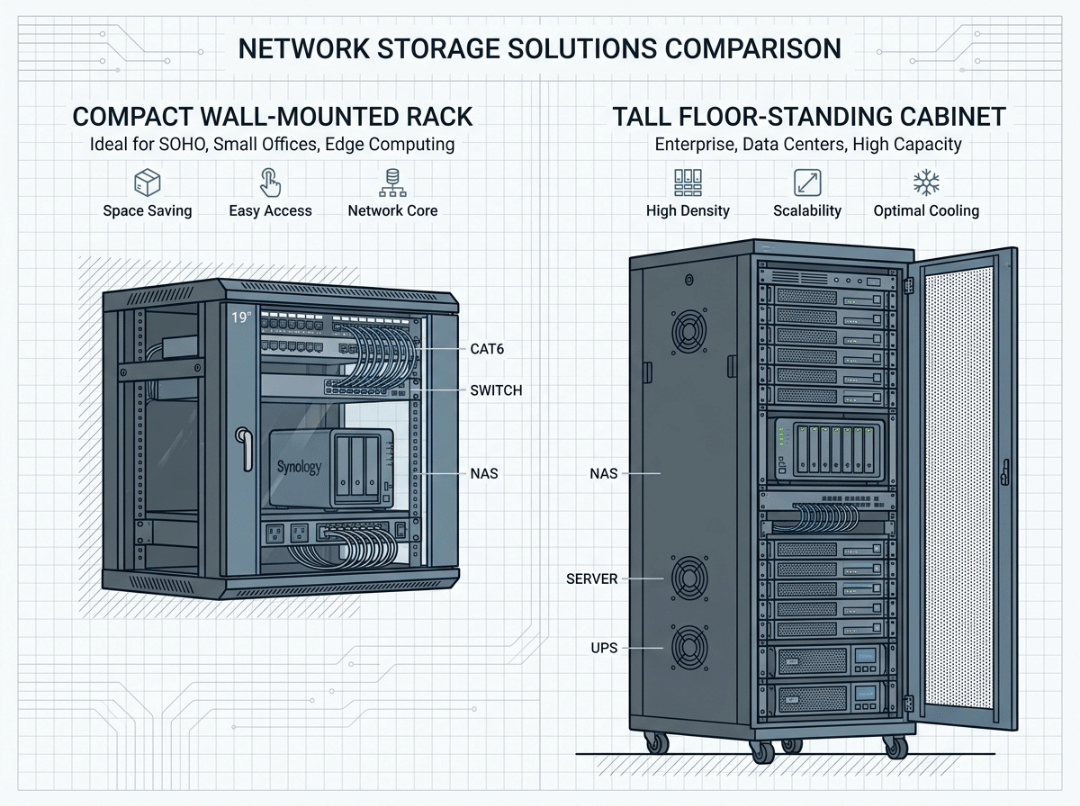
Choose a wall mount rack when you’re housing light network gear—switches, patch panels, small routers—in a tight space like a network closet or small office. Choose a floor-standing rack when you’re deploying servers, UPS units, GPU chassis, or anything you’ll grow over time.
The decision comes down to three things: weight, depth, and future growth. Get those right, and the choice usually makes itself.
Here’s the fast rule:
- Light gear + limited floor space → wall mount rack
- Servers, UPS, deep chassis, or expansion plans → floor-standing rack
That sounds simple, but the wrong pick is one of the most expensive mistakes in IT hardware planning. After years of building server chassis and helping teams fit heavy hardware into demanding spaces, we’ve seen the same pattern repeat: a buyer grabs a wall rack because it looks space-saving, then finds out the server won’t fit—or the wall can’t carry the load. Now they’re buying a second rack and redoing the whole install. This guide shows you how to get it right the first time.
What Is a Wall Mount Rack?
A wall mount rack is a compact enclosure or bracket that attaches directly to a wall. The whole point is saving floor space. Instead of taking up floor space, your gear hangs on a vertical surface—ideal for offices, network closets, and rooms where every square foot counts.
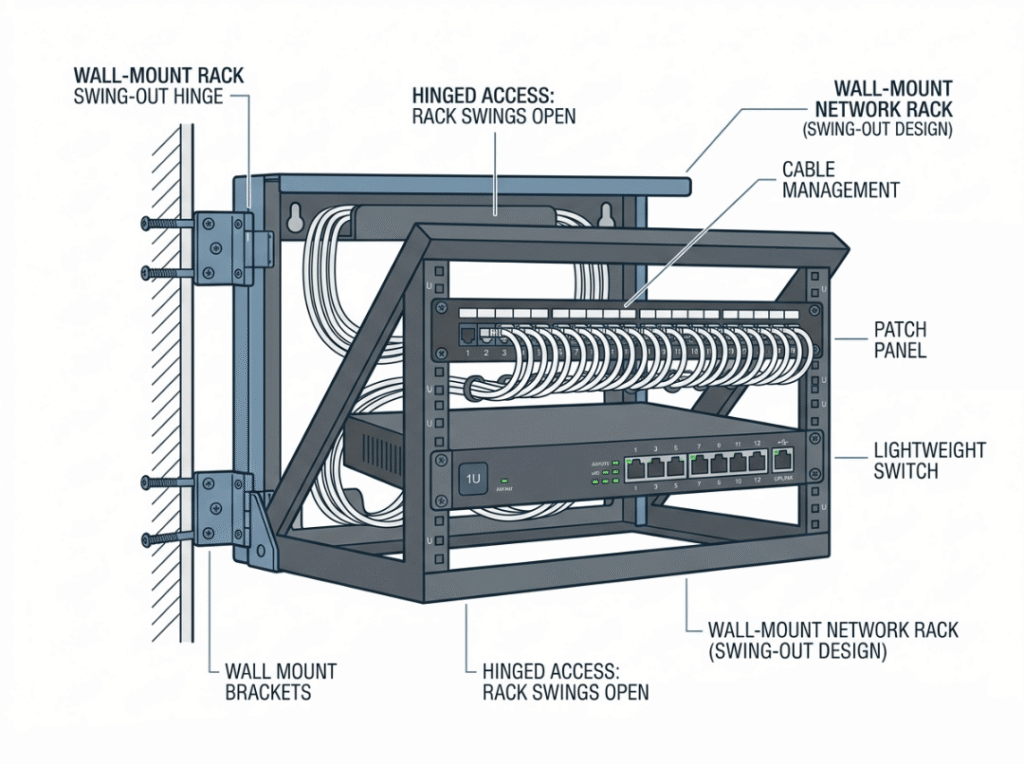
Typical sizes run 6U, 12U, and 24U. One rack unit (U) equals 1.75 inches of vertical mounting space, so a 12U wall rack holds roughly a dozen units of stacked gear. That’s plenty for a switch, a patch panel, and a router—but a fraction of what a floor cabinet handles.
You’ll choose between two designs. Fixed wall racks mount flat against the wall and cost less, but you can’t easily reach the rear. Swing-out (hinged) wall racks open away from the wall so you can access cabling and connections from behind. If you’ll ever re-wire or troubleshoot, that rear access saves real headaches.
One thing to say plainly: wall racks are rated for light loads only. They are not built for full servers or heavy chassis switches.
What Is a Floor-Standing Rack?
A floor-standing rack—also called a rack-mounted cabinet or freestanding rack—is the bigger, heavier-duty option. It sits on the floor and carries dense, heavy deployments no wall could safely hold.
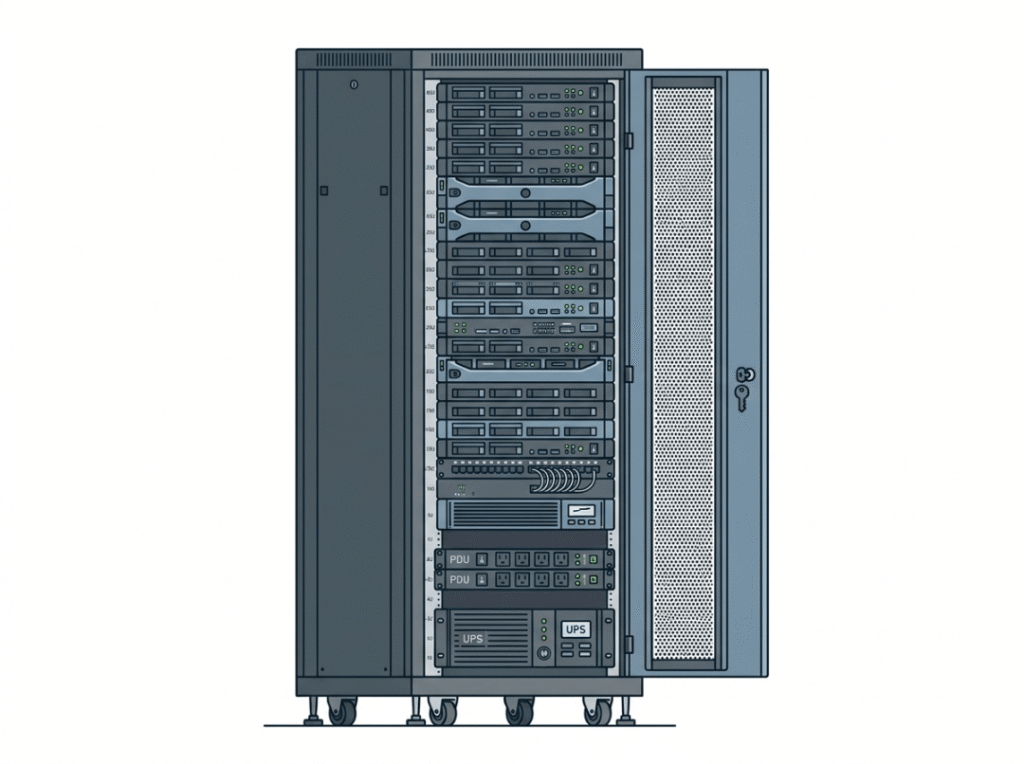
Typical sizes run 36U, 42U, and 45U, and these cabinets can support hundreds of pounds of equipment.
You’ll see two main styles. Open frame racks have no side panels—just a frame—so airflow and cable access are easy, but you give up security and dust protection. Enclosed cabinets have lockable doors and side panels for better security, dust control, and quieter operation. When you weigh open frame vs enclosed rack options, think about who can access the room and how much cooling control you need. (We cover this in depth in our open frame vs enclosed rack guide.)
Floor-standing racks are made for the heavy stuff: full-size and multi-node servers, UPS and battery backup units, chassis switches, PDUs, storage arrays, and GPU server chassis. This is the environment we build our chassis for every day, and it’s where hot, power-hungry hardware belongs—especially if you expect to grow.
Wall Mount Rack vs Floor Rack: The Key Differences
When you compare a server rack vs wall mount rack side by side, the gap is dramatic. Here’s where the two actually differ—these are the points that drive your decision.
|
Factor |
Wall Mount Rack |
Floor Standing Rack |
|---|---|---|
|
Installation |
Attaches to wall studs or masonry |
Sits on the floor, may be anchored |
|
Typical sizes |
6U, 12U, 24U |
36U, 42U, 45U |
|
Weight capacity |
Light loads (often dozens of lbs) |
Heavy loads (hundreds of lbs) |
|
Rack depth |
Shallow—for switches and panels |
Deep—fits full server chassis |
|
Cooling |
Limited, relies on room airflow |
Managed front-to-back, internal fans |
|
Scalability |
Best for short, stable equipment lists |
Built to grow over time |
|
Security |
Some lockable models |
Lockable enclosed cabinets available |
|
Accessibility |
Front or swing-out access only |
Walk-around front-and-rear access |
|
Budget |
Lower upfront cost |
Higher cost, more capacity |
The differences that matter most are weight, depth, and growth—not just the U number on the box. One quick structural note: you’ll also choose between 2-post and 4-post designs. Two-post works for light patch panels and switches; four-post adds stability for heavier servers and deep chassis. If you’re mounting anything substantial, go four-post. (See our 2-post vs 4-post rack guide for the full breakdown.)
Now let’s dig into the three factors that decide most deployments.
When Does a Wall Mount Rack Make Sense?
A wall rack is the practical, cost-effective pick when you have:
- A small office or branch location with limited floor space
- A network closet, utility room, or other crowded spot
- A retail or residential setup with light networking needs
- Only patch panels, switches, and small routers to mount
- A short, stable equipment list with no heavy expansion planned
- A tight budget where overbuilding makes no sense
When floor space is tight, and the gear is light, there’s no reason to buy a full cabinet for three pieces of network equipment.
When Is a Floor-Standing Rack the Better Choice?
Go floor-standing when you’re:
- Running full-size servers, multi-node systems, or GPU chassis
- Deploying a UPS or other heavy power equipment
- Working with long, deep enterprise server chassis
- Planning for growth and adding hardware over time
- Building a higher-density setup where managed airflow matters
- Securing sensitive equipment behind lockable doors
If weight, depth, cooling, or future growth are real factors, the choice is easy. You’ll thank yourself when you add hardware later and still have room.
Weight Capacity and Wall Safety: The Limit Most Buyers Miss
This is where wall racks fail people, and it’s the single most dangerous mistake in the whole decision.
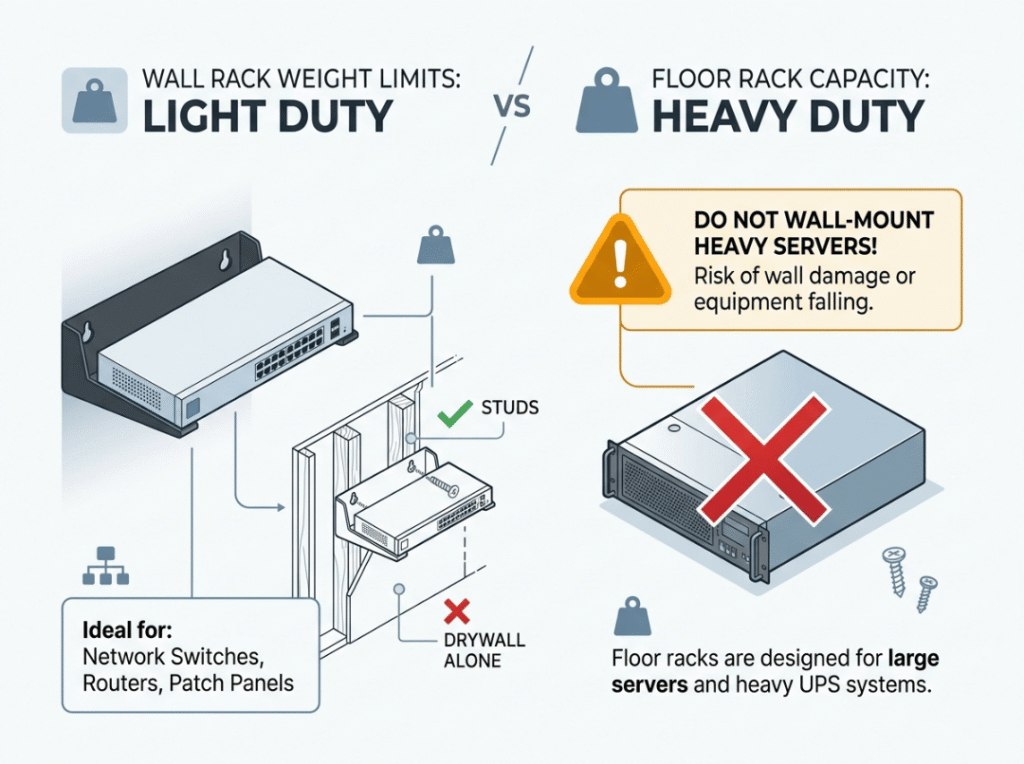
Wall racks are built for light loads. Ratings vary by model, but many top out in the range of dozens of pounds, not hundreds. That comfortably covers switches, patch panels, and small routers. It does not cover a loaded server or a heavy chassis switch.
Here’s the part buyers overlook: two limits work against you at once.
- The rack’s own rating. Every wall rack has a manufacturer weight limit. Understanding your wall mount rack weight limit before you buy is non-negotiable.
- The wall’s structural strength. A strong rack bolted to a weak wall is still a failure waiting to happen. Mount into structural studs or solid masonry—never drywall alone. Then confirm the wall can carry the combined weight of the rack plus every piece of equipment inside it.
From what we see across real deployments, populated weight is what catches teams off guard. A rack that feels light when empty can more than triple in weight once you load it with drives, redundant power supplies, and cabling. Even a heavy managed switch or a small UPS can push past what’s safe on a wall. When in doubt, move to the floor. A floor-standing rack removes the weight question entirely, because it carries the load on the ground, not on your drywall anchors.
The takeaway: if your total load climbs past light network gear, weight alone tells you to go floor-standing.
Rack Depth: Will Your Equipment Actually Fit?
Depth is the other silent dealbreaker, and it’s exactly where rack depth for servers trips people up.
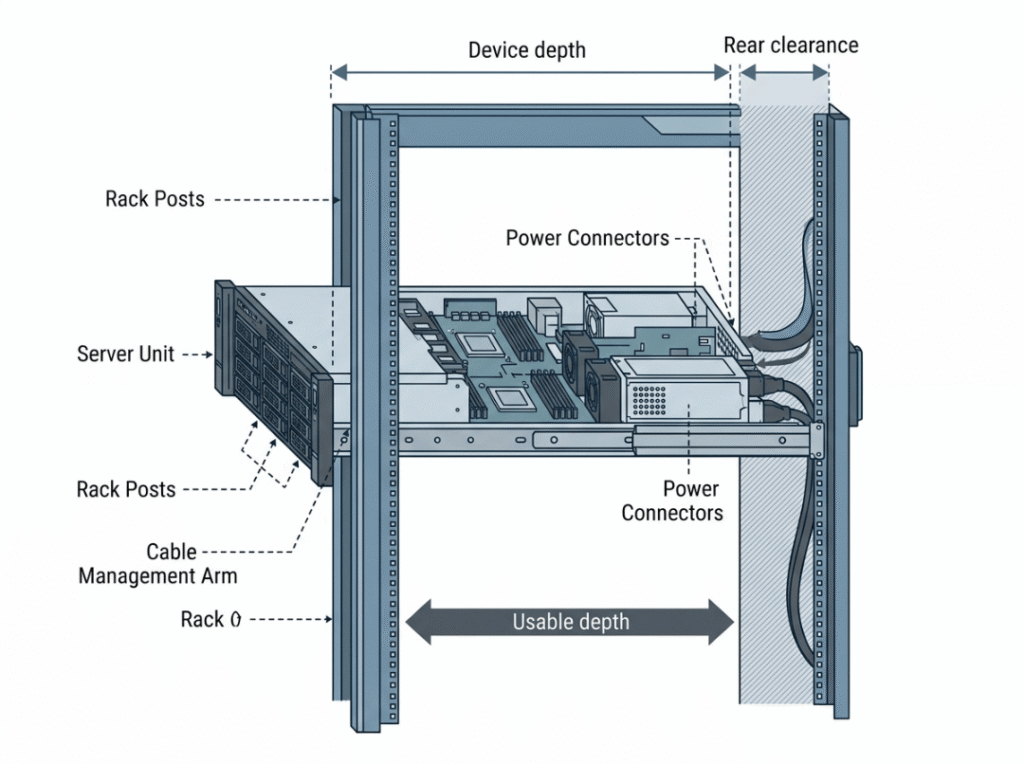
Wall racks are shallow by design. That’s fine for switches and patch panels, but a real problem for anything longer. Many enterprise servers run deep—often far deeper than a shallow wall rack allows. If you force it, your gear won’t seat properly, or the door won’t close.
Here’s how to measure the depth you actually need:
- Measure your deepest device from front to back.
- Add rear clearance for cables and connectors—usually a few inches.
- Compare that total to the rack’s usable depth (not its outer dimension).
A common mistake is comparing your server to the rack’s overall size instead of its usable mounting depth. Rails, doors, and cable space all eat into that number—which is why we spec usable mounting depth on our own chassis rather than outer dimensions alone.
This is why full servers almost always belong in floor cabinets. A deep 2U or 4U server needs the room a floor-standing rack provides, plus space at the rear for cable managers and airflow. If depth is a question for your equipment, that’s another clear signal to go floor-standing.
How Growth and Scalability Should Shape Your Choice
This is the factor buyers underestimate most—and it’s often the deciding one.
If you expect to add equipment within the next 12 to 24 months, sizing too small now is expensive. Outgrowing a wall rack usually means buying a floor rack later anyway, so you pay twice and redo the install. Starting with a small floor cabinet is often cheaper over the life of the deployment.
Growth affects more than available U space, too. As you add hardware, you also add:
- Power demand—more PDUs and possibly a UPS
- Heat—denser gear needs managed front-to-back airflow
- Cabling—more connections mean more rear clearance and vertical cable runs
- Service access—technicians need room to work front and rear
This matters even more with GPU and compute-dense hardware, where each new node raises both the thermal and power load fast. Wall racks can’t scale on any of these fronts the way floor cabinets can. So if your equipment list is likely to grow—or if you’re deploying servers and GPU chassis that tend to expand—plan for the floor rack now. Match the rack to your future load, not just today’s gear.
How to Choose: A 3-Question Quick Selector
Short on time? Answer these three, and you’ll have your answer:
- Do you need to mount a server (or GPU chassis)? Yes → floor-standing. No → keep going.
- Will your total load exceed a few dozen pounds? Yes → floor-standing. No → keep going.
- Will you expand within two years? Yes → floor-standing (or a small floor rack). No → wall mount is fine.
If you hit a single “yes,” lean floor-standing. It’s cheaper than buying twice.
Rack Selection by Scenario
Here’s how the choice plays out across the setups our team sees most often.
|
Scenario |
Recommended Choice |
Why |
|---|---|---|
|
Small office network closet |
Wall mount |
Saves floor space, handles light network gear |
|
Branch office (switch + patch panel) |
Wall mount |
Compact, cost-effective, stable equipment list |
|
Retail or residential setup |
Wall mount |
Light gear, tight space, no heavy expansion |
|
SMB server room |
Floor standing |
Better for servers, airflow, and future growth |
|
GPU server deployment |
Floor standing |
Needs depth, load capacity, and managed cooling |
|
Mixed IT + power equipment (UPS, PDUs) |
Floor standing |
Safer for heavy, dense hardware |
|
Growing startup infrastructure |
Floor standing |
Room to scale power, cooling, and cabling |
Notice the pattern: the moment servers, heavy power gear, or growth enter the picture, the recommendation shifts to floor-standing every time.
Pre-Buy Checklist: 7 Things to Confirm Before You Order
Run through this list before you commit to a purchase. It’s the same set of checks we walk customers through, and it cuts confusion faster than any spec sheet.
- Equipment type — Are you mounting servers, or only network gear? Servers mean floor-standing.
- Total weight — Add up everything you’ll install, then check it against the rack’s rating and the wall’s capacity.
- Deepest device depth — Measure front to back, add rear clearance, and confirm it fits the rack’s usable depth.
- Access needs — Will you re-cable or troubleshoot often? You want walk-around or swing-out access.
- Growth over 12–24 months — If you’ll expand, size up now.
- Cooling — Does the room remove enough heat? Dense gear needs managed airflow.
- Mounting surface — For wall racks, confirm structural studs or solid masonry. Drywall alone won’t hold.
Common Mistakes to Avoid
These errors show up over and over in real IT deployments. Each one is avoidable.
- Choosing by U size alone. Height tells you nothing about whether your gear fits by weight or depth. A 12U rack that’s too shallow is useless for a deep server.
- Ignoring usable depth. Comparing your server to the rack’s outer size, not its mounting depth, leads to gear that won’t seat or doors that won’t close.
- Overlooking wall strength. The rack’s rating means nothing if the wall behind it can’t carry the load. Check both, every time.
- Treating network gear and servers the same. They have completely different rack requirements. Don’t put server-class hardware on a wall.
- Underestimating cable clearance. Forgetting rear space for connections turns every future change into a struggle. Leave room to work.
- Buying for today only. Sizing exactly for current needs means buying again next year. Plan for the next couple of years now.
The cheapest option today is rarely the cheapest over the life of the deployment.
Frequently Asked Questions
Can a wall mount rack hold a server?
Usually no, and we’d advise against it. Wall racks have two limits working against you—weight and depth. Full servers are heavy and deep, and most wall racks aren’t rated to hold that load or fit that chassis. Forcing it risks the rack pulling off the wall or the server not seating at all. For servers, use a floor standing rack.
Is a 12U wall mount rack enough for a small office?
Often, yes. A 12U wall rack comfortably holds a switch, a patch panel, and a router or two—plenty for many small offices and branch locations. But if you expect to add heavier equipment or a server later, start with a small floor rack so you don’t have to buy again.
What rack depth do I need for a 2U server?
Measure your specific 2U server front to back, since depth varies widely between models. Many enterprise 2U servers run deep, and you’ll add several inches for cables at the rear. Compare that total to the rack’s usable depth. A shallow wall rack rarely fits a full-depth 2U server, which is why floor cabinets are the standard choice.
How much weight can a wall mount rack hold?
It varies by model, but wall racks are built for light loads—often dozens of pounds rather than hundreds. Always check the manufacturer’s rating, and just as important, confirm the wall itself can carry that weight. A strong rack on a weak wall is still a failure waiting to happen.
Is an enclosed rack better than an open frame rack?
It depends on your environment. Enclosed cabinets give you security, dust control, and quieter operation—ideal for shared or public spaces. Open frame racks offer easier airflow and quick cable access—ideal for secured server rooms where cooling matters most. Neither is universally better; match the style to your room and security needs.
Conclusion: Match the Rack to Your Equipment and Your Future
Here’s the whole comparison in one line. Floor-standing racks win on capacity, depth, cooling, and growth. Wall mount racks win on saving space for light network gear. Everything else follows from those two truths.
Before you buy, do three things:
- Measure your deepest piece of equipment, with room for cables.
- Add up the total weight of everything you’ll install, then check it against the rack’s rating—and the wall’s.
- Plan for growth over the next few years, not just today.
Get those three right and the choice usually makes itself.
Still weighing your options? List your equipment with weights and depths, then compare real rack configurations against those numbers instead of guessing. And if you’d like expert help sizing the right rack—or matching a GPU server chassis to your deployment—the team at GPU Server Case is here to help. We build rackmount chassis and server hardware for exactly these environments, so reach out for a personalized recommendation. It’s a lot cheaper than buying the wrong rack twice.
