


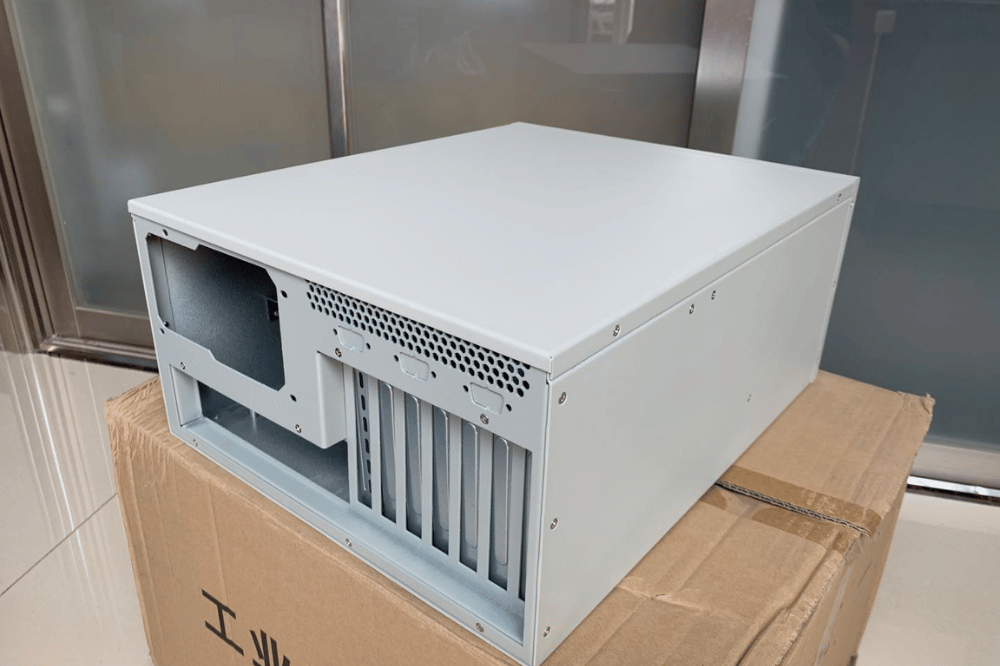
An industrial computer chassis is a ruggedized enclosure engineered to protect electronics in harsh conditions—extreme heat, dust, vibration, moisture, and continuous 24/7 load. The right choice depends on your environment (IP/NEMA rating), thermal design (fanless, active, or sealed), form factor, and lifecycle expectations. For climate-controlled server rooms, a standard chassis is usually enough. For factory floors, outdoor edge sites, or vehicle-mounted compute, industrial-grade protection pays for itself in avoided downtime.
Picking the wrong chassis rarely fails you on day one. It fails you eight months in—when dust chokes a fan, a temperature swing cracks a solder joint, or vibration slowly backs out a drive connector. By then, the cost isn’t the enclosure. It’s the truck roll, the downtime, and the emergency retrofit.
This guide is written for system integrators, industrial computing project managers, and OEM/ODM buyers who need to specify the right industrial computer chassis the first time. You’ll learn how industrial chassis differ from standard enclosures, how to read IP and NEMA ratings against your actual environment, which cooling and form factor to pick, and how GPU and edge AI workloads change the equation. Decision tables and a buying checklist are included to help you spec with confidence.
What Is an Industrial Computer Chassis?
An industrial computer chassis is a ruggedized enclosure designed to house and protect computing components in environments where standard hardware would be degraded or destroyed. It is the housing—not the full computer—but the chassis you choose directly governs thermal performance, environmental sealing, vibration tolerance, I/O expansion, and serviceability.
Where a consumer or standard server enclosure assumes a clean, temperature-controlled room, an industrial chassis assumes the opposite: heat, particulates, moisture, mechanical shock, and a deployment site where sending a technician is expensive. That single assumption drives every design difference that follows.
An industrial computer chassis is an environmental and reliability decision first, and a mechanical form factor second.
Industrial Chassis vs Standard Enclosures
The gap between an industrial pc chassis and a standard enclosure is not cosmetic. It shows up in materials, thermal range, sealing, and the hardware’s longevity under stress.
| Factor | Standard Enclosure | Industrial Computer Chassis |
|---|---|---|
| Construction | Thin-gauge steel or plastic | Heavy-gauge steel or aluminum, reinforced mounts |
| Operating temperature | 0°C to 40°C | -40°C to +85°C (component-dependent) |
| Ingress protection | Minimal or none | IP54 to IP69K / NEMA 4X to 6P |
| Vibration & shock | Not rated | Locked fasteners, dampened mounts, tested to spec |
| Cooling design | Basic fans, cool-ambient assumption | High-airflow, fanless, or sealed heat-exchanger designs |
| I/O flexibility | USB, standard Ethernet | Serial (RS-232/422/485), CAN bus, industrial Ethernet, DIO |
| Mounting options | Desktop or 19-inch rack | Rackmount, DIN rail, wall, panel, embedded |
| Product lifecycle | 1–3 years | 5–7+ years with spare-part commitment |
| Duty cycle | Intermittent use | Continuous 24/7 operation |
| Cost | Lower | Premium (justified by environment and uptime) |
A standard enclosure moves electrons efficiently in a clean room. An industrial chassis does the same job while surviving the environment when conditions turn hostile.
When Do You Actually Need an Industrial Chassis?
Industrial hardware carries a real cost premium. Spec it where the environment demands it—not because the spec sheet sounds impressive.
You likely need an industrial chassis if:
- Equipment runs continuously in ambient temperatures above 40°C
- Dust, debris, moisture, or chemical exposure is present
- Vibration or mechanical shock is a factor (manufacturing, transport, and outdoor)
- You need a guaranteed hardware lifecycle beyond five years
- Downtime carries a high operational or financial cost
- The site makes on-site service slow, difficult, or expensive
A standard chassis is likely enough if:
- Equipment lives in a climate-controlled server room or data center
- Ambient conditions stay clean and consistent
- Hardware refresh cycles run under five years
- On-site support is available within a reasonable window
- The workload does not run 24/7 at a sustained load
The middle ground: ruggedized commercial
Between consumer-grade and full industrial sits a ruggedized commercial tier—with sturdier construction and better thermal performance than standard hardware, without the full industrial premium. For semi-controlled sites (a dusty warehouse with no wash-down, or an outdoor shelter with HVAC), this tier often hits the right balance.
Use the table below to match project conditions to the appropriate hardware class.
| Project Condition | Standard Chassis | Ruggedized Commercial | Industrial Chassis |
|---|---|---|---|
| Clean server room | Best fit | Possible | Usually unnecessary |
| Dusty warehouse | Risky | Often suitable | Strong |
| Outdoor cabinet | Not recommended | Limited | Recommended |
| High vibration (transport, machinery) | Not suitable | Limited | Recommended |
| Wash-down / chemical exposure | Not suitable | Not suitable | Required |
| 10-year deployment lifecycle | Weak | Moderate | Strong |
IP and NEMA Protection Ratings
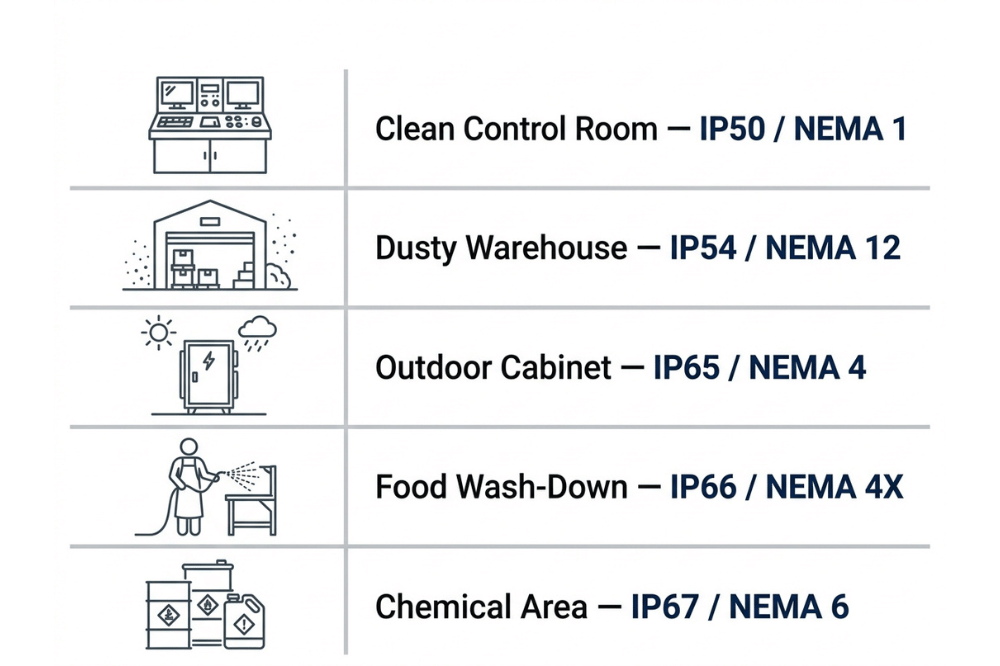
Environmental protection is where specifications turn concrete. Two standards matter: IP (Ingress Protection) under IEC 60529, and NEMA ratings used across North America.
How to read an IP rating
An IP rating uses two digits. The first (0–6) rate protects against solids, where 6 means fully dust-tight. The second (0–9K) rate protects against liquids, where 9K means resistance to high-pressure, high-temperature wash-down.
- IP50 / NEMA 1: Dust protection, no liquid protection. Clean but dusty indoor spaces.
- IP66 / NEMA 4X: Fully dust-tight, resists strong water jets, corrosion-resistant. Outdoor and wash-down areas.
- IP69K / NEMA 6P: Highest tier, resists high-pressure steam cleaning. Food, pharmaceutical, and chemical processing.
Match the rating to the environment
Don’t over-buy protection you’ll never use, and don’t under-spec for the hazards that are actually present. Map your site conditions to the table below.
| Environment | Recommended Rating | Why |
|---|---|---|
| Clean indoor control room | IP50 / NEMA 1 | Basic dust protection is sufficient |
| Dusty warehouse or workshop | IP54–IP65 | Guards against airborne particulates |
| Outdoor equipment cabinet | IP66 / NEMA 4X | Dust-tight and water-jet resistant |
| Food or beverage wash-down | IP69K / NEMA 4Xâ6P | Handles sanitation and high-pressure cleaning |
| Corrosive or chemical area | NEMA 4X | Adds corrosion resistance to sealing |
Identify the real hazards first, then match the rating. An IP66 enclosure is wasted in a server room and undersized in a seafood plant.
Cooling Options: Fanless, Active, and Sealed
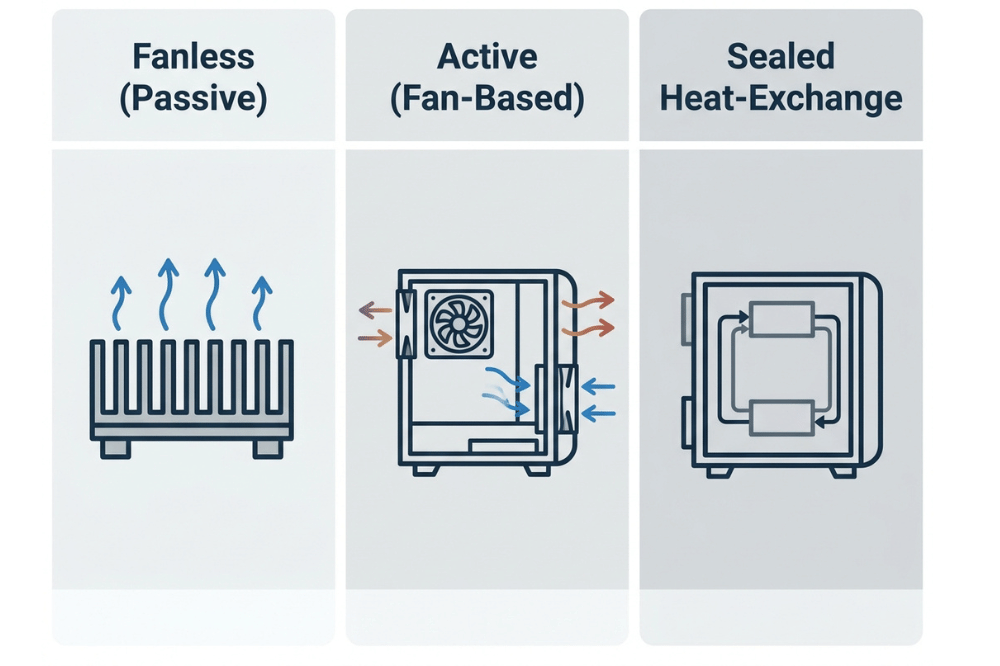
Thermal design is where industrial deployments most often succeed or fail. Three approaches dominate, each suited to a different heat load and environment.
Fanless (passive) cooling
Fanless industrial chassis rely on large heatsinks and natural convection—no moving parts. That means no fan bearings to fail in extreme cold and no intake points to pull in dust or moisture. The tradeoff is limited thermal headroom, so passive designs suit lower-TDP processors and moderate workloads. They shine in sealed, dusty, or vibration-heavy sites.
Active (fan-based) cooling
Active cooling uses high-airflow fans rated for wide temperature ranges to move real heat. It handles higher TDP loads than fanless designs but introduces moving parts that wear out and intake points that need filtering. Best for higher-performance compute in environments where filtered airflow is manageable.
Sealed with internal heat exchange
For the harshest sites—outdoor, wash-down, or high-particulate—a sealed enclosure with an internal heat exchanger or air-to-air cooler keeps the internal air isolated from the outside environment while still rejecting heat. This is the go-to when you cannot let ambient air touch the electronics.
Mini takeaway: Fanless for clean-but-sealed, low-heat; active for higher heat with manageable airflow; sealed heat exchange when the outside air is the enemy.
Which Form Factor Fits Your Deployment?
Industrial chassis come in several form factors. Match the form to the deployment, not the other way around.
| Form Factor | Best For | Typical Cooling | Notes |
|---|---|---|---|
| Rackmount (1U–4U) | Control rooms, industrial server cabinets, edge micro data centers | Active or liquid | Same rack compatibility, added environmental protection |
| DIN rail | PLC cabinets, automation control, and electrical panels | Passive or light active | Mounts on a 35mm rail, keeping the computer near the control hardware |
| Wall mount | Branch sites, utility rooms, space-constrained areas | Active or passive | Saves floor space; lower power density than floor cabinets |
| Panel PC | HMI, machine control, operator interfaces | Fanless (most common) | Sealed front panel (often IP65+), display + compute in one unit |
| Box PC | Embedded, vehicle-mount, compact edge inference | Fanless | Smallest and most flexible; ideal for edge AI at the source |
- Choose rackmount when you’re deploying into a rack, but the ambient environment is harsh.
- Choose DIN rail when the computer needs to live inside the automation cabinet alongside PLCs.
- Choose a wall-mounted option for branch or utility spaces where floor space is scarce.
- Choose a panel PC when an operator interacts directly with the system.
- Choose a box PC for cramped, embedded, or vehicle-mounted edge inference.
Special Considerations for GPU and Edge AI Workloads
Industrial articles usually stop at ruggedness. If you’re running vision systems, real-time analytics, or edge inference, GPU thermal and power constraints matter just as much as environmental sealing—and they don’t relax because the enclosure is industrial-rated.
- Full-length GPU clearance. Confirm the chassis internal depth accommodates full-length, full-height cards (often 267–340mm) plus connector and cable clearance. Ruggedization is useless if the card physically won’t fit.
- Airflow path under sealed conditions. Sealed enclosures restrict airflow by design. A high-TDP GPU inside a sealed box needs a heat-exchange strategy, not just a bigger fan—otherwise it thermal-throttles.
- Power delivery headroom. GPU cards draw 300–600W each. Verify the PSU rating and industrial power input can sustain peak GPU load, not just the CPU baseline.
- Fanless rarely fits high-TDP GPUs. Passive cooling is excellent for low-power edge inference, but it seldom keeps a 400W+ GPU in spec under sustained load. Match cooling to the real thermal envelope.
- Edge vs central architecture. For edge AI vision, a compact box PC running a trained model near the data source often beats hauling data back to a central GPU server. Decide where inference should physically happen before you pick the chassis.
For GPU workloads, thermal and power design win. Ruggedness protects the hardware; airflow and power keep it performing.
Industrial Chassis Buying Checklist
Before you finalize any industrial chassis order, confirm the following:
- Ambient temperature range at the deployment site (min and max)
- Dust, moisture, and chemical exposure documented
- Vibration and shock level for the location (machinery, transport, static)
- Required IP and/or NEMA rating matched to actual hazards
- Cooling approach selected (fanless, active, or sealed heat-exchange)
- Mounting method confirmed (rackmount, DIN rail, wall, panel, box)
- GPU or PCIe expansion clearance verified for card length and slots
- Power input and PSU capacity cover peak load with headroom
- Product lifecycle and spare-part availability meet the deployment horizon
- Service access frequency and difficulty were factored into the design
- I/O requirements (serial, CAN bus, industrial Ethernet, DIO) supported
- Certifications (CE, RoHS, relevant regional standards) confirmed
Common Mistakes to Avoid
| Mistake | Why It Matters | What to Do Instead |
|---|---|---|
| Choosing an IP rating without checking wash-down needs | Over- or under-protected; wasted budget or failed sealing | Map real site hazards to the rating table before ordering |
| Assuming fanless means maintenance-free | Passive designs still throttle if the heat load exceeds capacity | Match fanless only to low/moderate TDP workloads |
| Buying industrial hardware for an office environment | Paying a premium for protection you'll never use | Use standard or ruggedized commercial for controlled spaces |
| Ignoring internal heat load in a sealed enclosure | Sealing traps heat; components cook | Specify heat-exchange or air-to-air cooling for sealed builds |
| Ruggedizing the chassis but not the components | The enclosure survives; the board doesn't | Confirm component temperature ratings and conformal coating |
| Overlooking GPU depth and power in industrial builds | The card won't fit or can't sustain the load | Verify depth clearance and PSU headroom for full-length GPUs |
| Skipping lifecycle and spare-part planning | Parts vanish mid-deployment, forcing redesign | Confirm 5–7+ year lifecycle commitment from the vendor |
Frequently Asked Questions
What is an industrial computer chassis?
An industrial computer chassis is a ruggedized enclosure designed to protect computing components in harsh environments—including extreme temperatures, dust, moisture, vibration, and shock. Unlike standard enclosures made for offices and data centers, it uses heavy-gauge materials, environmental sealing, and specialized cooling to run reliably 24/7 over long lifecycles.
What is the difference between IP66 and IP69K ratings?
IP66 means the enclosure is fully dust-tight and resists powerful water jets from any direction—suitable for outdoor and wash-down areas. IP69K adds resistance to high-pressure, high-temperature steam cleaning, making it the correct choice for food, pharmaceutical, and chemical environments where aggressive sanitation is routine.
Can I use a standard server chassis on a factory floor?
Usually not. Standard chassis aren’t rated for the dust, temperature swings, moisture, or vibration common on factory floors. When running unrated hardware, there is a risk of accelerated failure, contamination, and voided warranties. At minimum, use an enclosure rated NEMA 4/IP66 with components rated for the expected temperature range.
How long should an industrial computer chassis last?
A well-specified industrial chassis with matching industrial-grade components should last 10+ years in appropriate conditions. Industrial motherboard vendors typically commit to 5–7 year product lifecycles for spare-part availability, and MTBF figures commonly exceed 100,000 hours—useful for fleet maintenance planning, though not a guarantee for any single unit.
What is the difference between a fanless and an active-cooled industrial chassis?
Fanless chassis use passive cooling with no moving parts—quieter, more reliable in dusty environments, and better suited to sealed enclosures, but with limited thermal headroom for low-to-moderate TDP loads. Active cooling uses fans to handle higher heat loads, but adds moving parts that can fail and intake points that need filtering.
When should I choose a panel PC over a separate chassis and monitor?
Choose a panel PC when an operator interacts directly with the system, space is tight, and a sealed front panel is an advantage. It simplifies installation to one unit, one cutout, one power connection. For pure compute with no operator interface, a box PC or rackmount chassis is usually more cost-effective and thermally capable.
Do industrial chassis support GPU and edge AI workloads?
Yes, but with constraints. Verify the chassis has sufficient internal depth for full-length GPU cards, a cooling strategy capable of sustaining the GPU’s thermal load (often not fanless for high-TDP cards), and a power supply sized for the GPU’s peak draw. For edge AI, compact fanless box PCs handle low-power inference well; high-performance training needs active or liquid-assisted cooling.
Get the Environment Right, and the Chassis Does the Rest
An industrial computer chassis solves a real problem: keeping electronics alive where standard hardware fails within months. But it’s not the answer to every deployment. Spec it against the actual environment—temperature range, ingress hazards, vibration, runtime, and the true cost of failure—then match that to the right IP/NEMA rating, cooling design, and form factor.
Three takeaways to carry into your next spec:
- Environment first. Rating and cooling follow the hazards, not the marketing.
- Match the tier. Standard, ruggedized commercial, or full industrial—choose by need, not by instinct.
- Don’t forget the workload. GPU and edge AI builds still demand depth, airflow, and power headroom.
Need help choosing between fanless, rackmount, wall-mount, panel PC, or GPU-ready industrial chassis? OneChassis Technology can help you evaluate enclosure rating, thermal design, expansion needs, and lifecycle fit for your deployment—with OEM/ODM customization, CE and RoHS certification, and reliable lead times.
Contact OneChassis Technology:
- 📧 sales@onechassis.com
- 📱 WhatsApp: +86 138 2378 2297
