


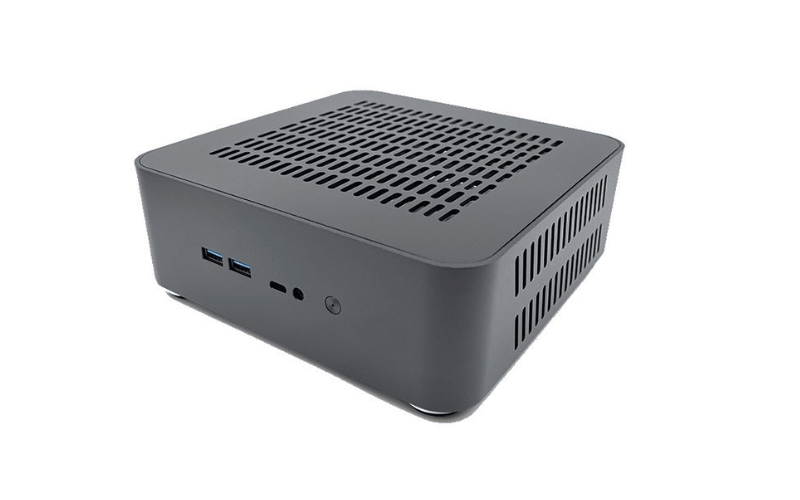
This article delves into the world of ITX cases, exploring the crucial role they play in building compact, efficient systems. From shoebox-style to console layouts, we’ll examine different designs and discuss key considerations, including component compatibility, cooling performance, and footprint. This article is worth reading because it provides a comprehensive overview of ITX cases, helping you understand their importance and choose the right one for your specific needs, whether you’re building a portable gaming rig, a discreet home theater PC, or something in between. We will also look at how to maximize performance in a small-form-factor environment.
What is an ITX Case and Why is it Important?
An ITX case is a specialized enclosure that houses the essential components of a compact system, such as the Mini-ITX motherboard, power supply, storage drives, and graphics card. It’s the physical foundation of your small-form-factor build, providing structural support, power distribution, cooling, and protection for your tightly packed hardware. It also plays a part in cable management. The ITX case is essential to keep components safe.
The importance of an ITX case cannot be overstated. Here’s why:
- Protection: An ITX case safeguards sensitive components from physical damage, dust, and other environmental factors that could compromise their performance and longevity during travel or daily use.
- Organization: It provides a standardized way to mount and organize small-form-factor components, simplifying installation, maintenance, and upgrades in confined spaces.
- Cooling: High-performance Mini-ITX builds generate significant heat. A well-designed ITX case incorporates fans, vents, and other cooling features to ensure proper airflow and prevent overheating, which is crucial for maintaining optimal performance and preventing thermal throttling.
- Power Distribution: The ITX case often accommodates specific power supply units (such as SFX or Flex ATX) that efficiently distribute power to the various components.
- Portability: ITX cases are designed to fit into small footprints, making them easy to transport to LAN parties or to fit into tight entertainment centers. This makes it easy to move your high-performance setup wherever you go.
- Security: Many ITX cases offer security features, such as sturdy panels and Kensington locks, to prevent unauthorized access to the internal components.
Choosing the right ITX case is a critical decision when building a small-form-factor PC. It directly impacts the thermal performance, component compatibility, and portability of your system.
ITX Cases vs Larger Cases: Key Differences
Computer cases come in two primary size categories for consumer builds: ITX (Small Form Factor) and larger formats like ATX or Micro-ATX. Each has its own advantages and is suited for different environments and applications.
ITX Cases:
- Design: ITX cases are compact and space-efficient, often minimizing footprint on a desk or entertainment center. They are typically measured in volume (liters), with many popular models ranging from under 10 liters to around 20 liters. For example, a “sandwich-style” ITX case might be only a few inches wide.
- Applications: Ideal for home theater PCs, portable gaming rigs, minimal desk setups, and other environments where space is at a premium and aesthetics are crucial. ITX builds are easily portable, as you can often fit the entire system into a backpack or small carry-on bag.
- Cooling: ITX cases require careful planning to ensure optimal airflow in a confined space. Cool air is often drawn in directly onto components via vented side panels, and hot air is exhausted out the top or rear, relying heavily on specific, more extraordinary heights and fan placements.
- Management: ITX systems often feature integrated solutions on the motherboard, allowing users to manage Wi-Fi, Bluetooth, and audio without needing extra expansion cards.
Larger Cases (ATX/Micro-ATX):
- Design: Larger cases resemble traditional desktop towers and are designed to offer maximum internal space and component flexibility. The ATX tower case is an excellent option for high-end workstations or gaming PCs.
- Applications: Suitable for content creators, serious gamers, or enthusiasts who do not need or prefer a compact size. Larger towers are often used for multi-GPU setups, extensive water cooling loops, or systems requiring massive storage arrays that don’t fit in an ITX setup.
- Cooling: Larger cases rely on multiple intake and exhaust fans for cooling. While they may not offer the same portability as ITX cases, they provide superior airflow potential and room for massive heatsinks or radiators for high-wattage components.
- Cost: Larger cases can be more cost-effective than premium ITX cases, mainly because standard ATX components (like power supplies and motherboards) are often cheaper than their ITX counterparts.
Here’s a table summarizing the key differences:
|
Feature |
ITX Cases |
Larger Cases (ATX/Micro-ATX) |
|---|---|---|
|
Form Factor |
Designed to be compact and space-saving |
Designed to stand upright with ample internal volume |
|
Size |
Measured in liters, typically compact and dense |
Standard tower sizes, significantly larger footprint |
|
Applications |
Portable gaming, HTPC, minimalist setups |
High-end gaming, workstations, servers, multi-GPU builds |
|
Scalability |
Less scalable, usually limited to one PCIe slot |
Highly scalable, easy to add more cards and drives |
|
Cooling |
Relies on optimized, specific airflow paths |
Relies on high-volume airflow and large heatsinks |
|
Management |
Features integrated motherboard solutions |
Typically managed via multiple expansion cards |
|
Cost |
Can be more expensive due to specialized parts |
Generally, more cost-effective for standard builds |
|
Power |
Power is optimized for size (SFX PSUs) |
Power is not size-constrained (ATX PSUs) |
The choice between an ITX case and a larger case depends on your specific needs, budget, available desk space, and the scale of your performance requirements.
Common Sizes and Dimensions of ITX Cases
ITX cases come in various sizes, measured in internal volume (Liters). Each size represents a different approach to balancing footprint and component compatibility. Here are the most common sizes:
- Ultra-Compact ITX Cases (Under 10L): The smallest standard ITX size, these cases are often under 10 liters. They are ideal for maximizing space-saving in minimalist environments, as you can fit them into a backpack for ultimate portability. However, their compact size severely limits the space available for internal components, cooling options, and expansion.
- Compact ITX Cases (10-15L): With slightly higher volume, these cases offer a good balance between a small footprint and expandability. They provide more room for larger graphics cards, more storage drives, and more effective cooling fans compared to ultra-compact models. This size is a popular choice for a wide range of high-performance small-form-factor builds.
- Mid-Size ITX Cases (15-20L): Measuring between 15 and 20 liters, these cases provide even more space for components and cooling. They are suitable for applications that require larger AIO liquid coolers, multiple storage drives, or the most potent air coolers.
- Large ITX Cases (20L+): These “ITX” cases are over 20 liters in volume and offer ample space for a large number of storage drives, full-length graphics cards, and robust cooling systems. They are often used for storage-heavy media centers or high-performance gaming rigs where a user wants ITX compatibility without significant component compromises.
- Specialized Designs: While less common, specialized ITX cases are available for unique applications that require even more specific layouts, such as console-style cases for entertainment centers or vertically-oriented “sandwich” layouts for a minimal desk footprint.
Here’s a table summarizing the common ITX case sizes:
|
Size (Liters) |
Dimensions |
Advantages |
Disadvantages |
|---|---|---|---|
|
<10L |
Very Small |
Maximum portability, space-saving |
Limited space for components, cooling, and expansion |
|
10-15L |
Small |
Good balance of size and expandability, more space for storage, GPUs, and cooling compared to <10L models |
Less compact than ultra-small cases, it requires careful component selection |
|
15-20L |
Medium |
More space for components and cooling, suitable for builds requiring more storage or powerful cooling |
Less portable than smaller cases, larger desk footprint |
|
20L+ |
Large |
Ample space for storage, full-size components, and robust cooling, suitable for powerful gaming or storage builds |
Lower portability, requires significantly more space, and may be more expensive. |
|
Specialized |
Varies |
Maximum optimization for a specific use case (e.g., HTPC, vertical desk setup) |
Minimal component flexibility, often expensive |
The choice of ITX case size depends on your specific needs, including the number and type of components you need to install, your storage requirements, cooling considerations, and the available space on your desk or in your travel bag.
How to Choose the Right ITX Case for Your Build
Choosing the right ITX case is a crucial decision that will impact the performance, component compatibility, and thermal management of your compact PC build. Here’s a guide to help you make the right choice:
1. Assess Your Component Needs:
- Motherboard Form Factor: All ITX cases require a Mini-ITX motherboard. This is the foundational component that dictates the case size.
- GPU Size: Measure the length, height, and width of the graphics card you plan to use. This will determine the maximum GPU clearance you need in the case.
- Storage Requirements: Consider the number and size (2.5-inch or 3.5-inch) of hard drives or SSDs you need. Ensure the case has enough drive bays to meet your storage needs. The number of 2.5-inch bays is important for SSDs.
- Cooling Requirements: High-performance components generate more heat. If you’re building a powerful gaming PC with a high-end CPU and GPU, you’ll need a case with ample clearance for a capable CPU cooler (air or liquid).
2. Consider Your Desk Space:
- Available Footprint: Determine how much desk or shelf space you have available.
- Volume Requirements: If you need to maximize portability or fit the PC in a small space, like an entertainment center, opt for a smaller case with a volume under 15L. If portability is less of a concern, you can consider larger ITX cases with a capacity over 20L that offer more flexibility.
3. Think About Future Expansion:
- Scalability: If you anticipate needing to add more storage or upgrade to a larger GPU in the future, choose a slightly larger ITX case that offers more expansion room. It’s generally better to have some extra space than to be constrained by a case that’s too small.
4. Evaluate Cooling and Airflow:
- Fan Mounts: Look for cases with multiple fan mounts to ensure adequate airflow. Larger ITX cases typically offer more fan options.
- Ventilation: Ensure the case has sufficient vents or mesh panels to allow proper airflow, especially around the CPU and GPU.
5. Power Supply Considerations:
- Compatibility: Check the power supply form factor supported by the case (e.g., SFX, SFX-L, or even ATX in some larger ITX models).
- Wattage: Ensure the case can accommodate a power supply with sufficient wattage to power all your components, especially if you have a high-end GPU.
6. Special Features:
- I/O Ports: If you need easy access to USB-C, multiple USB 3.0 ports, or audio jacks, look for a case with a well-equipped front panel.
- Cable Management: Good cable management features can improve airflow and make building and maintenance much easier in a tight space.
By carefully considering these factors, you can choose the proper ITX case that meets your current and future needs, ensures optimal performance, and fits perfectly into your desired setup.
Key Features to Look for in an ITX Case
When selecting an ITX case, several key features can impact its suitability for your specific build. Here are some essential factors to consider:
- Build Quality: Look for a case constructed from durable materials like thick aluminum or steel. This will ensure the case feels premium, can withstand travel, and protects your valuable components. The quality of the ITX case is essential.
- Cooling: Adequate cooling is essential for maintaining performance and reliability in a compact build. Consider the number and size of fan mounts, the presence of mesh panels or air filters, and support for liquid cooling if needed. An ultra-compact ITX case will have less cooling capability than a larger 20L+ model.
- Component Compatibility: Evaluate the clearance for your specific components. Consider GPU length and thickness, CPU cooler height, and power supply form factor (SFX, SFX-L, or ATX). Limited space is the biggest challenge in ITX builds.
- Expansion Slots: The single PCIe slot on a Mini-ITX motherboard determines how many expansion cards you can install, which is typically just one graphics card. Ensure the case has the correct number of physical slot covers (usually 2-3) for your chosen GPU.
- Power Supply: Check the type and wattage of the power supply you plan to use. Ensure it’s compatible with the case’s mounting and provides enough power for all your components. You will need to purchase a separate power supply.
- Front Panel Connectivity: Consider the availability of front-panel ports, such as USB-C or USB 3.0, to enable easy access for connecting peripherals. A modern I/O with USB-C is a common and desirable option.
- Aesthetics and Design: ITX cases come in a wide variety of styles, from minimalist aluminum boxes to console-like designs. Choose one that matches your personal taste and desk setup.
- Cable Management: Features like cable routing channels, tie-down points, and removable side panels can help keep cables organized, improve airflow, and simplify the building process. You need good cable management in an ITX case.
- Motherboard Compatibility: Ensure the case is specifically designed for the Mini-ITX motherboard form factor.
- Tool-less Design: Some cases offer tool-less features, such as tool-less drive sleds and pop-off side panels, which can simplify installation and upgrades.
By carefully evaluating these features, you can choose an ITX case that meets your specific requirements, provides optimal performance and thermals, and offers a convenient building experience.
Storage Options in ITX Cases
Storage is a critical consideration when choosing an ITX case, as space is limited. ITX cases offer various storage options to accommodate different needs:
- 2.5-inch Drive Bays: These smaller bays are the most common type in ITX cases and are used for solid-state drives (SSDs). 2.5-inch drives offer an outstanding balance of speed and capacity for compact builds. Most ITX cases support at least one 2.5-inch SSD.
- 3.5-inch Drive Bays: These larger bays are less common in minimal ITX cases but can be found in larger ITX models (often over 20L). They are used for high-capacity hard disk drives (HDDs) and offer the best cost per gigabyte for bulk media storage.
- Hot-Swappable Drive Bays: While rare in the consumer ITX space, some specialized ITX cases designed for home servers or Network Attached Storage (NAS) builds may offer hot-swappable drive bays. This feature allows you to remove and replace drives without powering down the system.
- NVMe M.2 Support: The primary and often fastest storage option in an ITX build is an NVMe M.2 SSD. These ultra-fast drives connect directly to the motherboard, requiring no extra space within the case itself or additional data/power cables. Most modern Mini-ITX motherboards feature at least one M.2 slot.
- Internal Drive Mounts: In addition to dedicated drive bays, many ITX cases provide creative internal mounting points for additional 2.5-inch drives, such as behind the motherboard tray or on internal brackets. These are useful for expanding storage without taking up space on the primary component.
Here are some examples of storage options in different ITX case styles:
|
Case Style |
Volume (Approx.) |
3.5″ Bays |
2.5″ Bays |
M.2 Support |
|---|---|---|---|---|
|
Ultra-Compact |
<10L |
0 |
1-2 |
Motherboard Dependent |
|
Sandwich Layout |
10-15L |
0 |
2-3 |
Motherboard Dependent |
|
Shoebox Style |
15-20L |
1 |
2-4 |
Motherboard Dependent |
|
Large ITX Tower |
>20L |
2+ |
3+ |
Motherboard Dependent |
When choosing an ITX case, consider your current and future storage needs. If you only need one or two fast drives, relying on motherboard M.2 slots and a couple of 2.5-inch bays is perfect. If you need bulk storage, you will need to select a larger ITX chassis that supports 3.5-inch HDDs.
Expansion Slot Options in ITX Cases
Expansion slots in an ITX case allow you to add a graphics card to your system. Due to the Mini-ITX motherboard standard, the number and type of expansion slots are essential considerations when choosing a compact case.
- PCIe Slot: PCIe (Peripheral Component Interconnect Express) is the single expansion slot available on a Mini-ITX motherboard. This slot is almost always a full-length x16 slot, designed to provide the maximum bandwidth for a modern graphics card. The motherboard standard fixes the slot size.
- Slot Width: The physical slots on the back of the case determine the thickness of the GPU you can install. This is measured in the number of slots a card occupies (e.g., single-slot, dual-slot, triple-slot). Ensure the case has enough physical slots for your GPU.
- Number of Slots: A Mini-ITX motherboard only has one PCIe slot. This means you can only install one primary expansion card, which is almost always a graphics card. Larger ITX cases may have more physical slot openings, but only one is usable by the motherboard.
- Slot Configuration: Pay attention to the case layout, as some ultra-compact designs use a PCIe riser cable to position the graphics card behind the motherboard. This “sandwich” layout can have different length and width restrictions compared to a traditional design. A typical configuration for ITX cases supports a 2-slot or 3-slot GPU.
Here are some examples of expansion slot options in different ITX cases:
|
Case Style |
Volume (Approx.) |
Expansion Slots |
|---|---|---|
|
Ultra-Compact |
<10L |
1-2 slots (Low-profile or short GPU) |
|
Sandwich Layout |
10-15L |
2-3 slots (Full-length GPU via riser) |
|
Shoebox Style |
15-20L |
2-3 slots (Full-length GPU, direct mount) |
|
Large ITX Tower |
>20L |
3-4 slots (Largest GPUs, direct mount) |
When choosing an ITX case, consider the specific graphics card you plan to install. Ensure the case not only has enough physical slots in the back but also the internal length and height clearance to accommodate your chosen model.
Cable Management in ITX Cases
Proper cable management is crucial in an ITX case for several reasons:
- Airflow: Unmanaged cables can severely obstruct airflow, leading to increased temperatures and thermal throttling of components.
- Maintenance: A tangle of cables can make it extremely difficult to identify and access components for maintenance or upgrades in a tight space.
- Aesthetics: While not always the primary concern, well-managed cables create a cleaner and more professional appearance, which is often a key goal of a compact ITX build.
Here are some tips for managing cables in your ITX case:
- Plan Ahead: Before you start installing components, plan out your cable routing. Consider the locations of the power supply, motherboard headers, and drives. This is especially important in ITX builds where space is at a premium.
- Use Cable Ties or Straps: Bundle cables together using small zip ties, Velcro straps, or other cable management accessories. This will keep them organized and prevent them from getting caught in fan blades or blocking airflow.
- Route Cables Through Channels: Many ITX cases have built-in channels, cutouts, or pathways for routing cables. Utilize these features to keep cables neatly tucked away and out of the main airflow path.
- Utilize Any Available Space: Most ITX cases have small pockets of space, like behind the front panel or under the power supply shroud. This is an excellent way to keep excess cable length hidden from view and improve airflow.
- Modular Power Supplies: If possible, use a modular SFX power supply. These allow you to connect only the cables you need, drastically reducing clutter and improving airflow. Custom-length cables can take this a step further.
- Install in Order: Consider the order of operations. It’s often easier to route and connect cables before installing larger components like the graphics card, which can block access.
By implementing these cable management techniques, you can improve airflow, simplify maintenance, and create a more organized and efficient ITX system.
ITX Cases for Specialized Applications
The versatility of the Mini-ITX form factor enables a wide range of specialized builds that are not practical in larger cases. These systems are tailored for specific environments, blending high performance with a compact and often stylish footprint.
Key applications of specialized ITX cases:
- Home Theater PCs (HTPCs): These builds focus on creating a silent, powerful media hub that fits seamlessly into a living room setup. ITX cases designed for HTPCs are often console-style or cube-shaped, featuring a clean, minimalist aesthetic. They prioritize low-noise operation and have enough space for a CPU with integrated graphics or a low-profile GPU for 4K media playback.
- Compact Gaming Rigs: For gamers who want maximum performance in a minimal footprint, ITX cases offer the perfect solution. These cases are engineered for excellent thermal performance, supporting full-sized graphics cards and featuring robust cooling solutions. Their portability also makes them ideal for LAN parties or moving between locations without sacrificing gaming power.
- Portable Workstations: Professionals who need high computational power on the go can build potent yet portable workstations using ITX cases. These builds often feature high-core-count CPUs and professional-grade GPUs. The cases selected for this purpose balance thermal performance with a durable, travel-friendly design, enabling creators and engineers to work from anywhere.
Specialized ITX cases are a simple and effective way to build a PC for a specific purpose. They allow users to create robust, purpose-built systems that are optimized for their environment, whether it’s a living room, a competitive gaming event, or a mobile office.
How to Choose the Best ITX Case for Your Needs
Choosing the right ITX case is a critical decision that can significantly impact the performance, compatibility, and build experience of your compact PC. Here’s a summary of the key factors to consider:
- ITX vs. Larger Cases: Decide whether a compact ITX case or a larger ATX/Micro-ATX tower is better suited to your environment and application. ITX is ideal for portability, minimalist setups, and HTPCs, while larger cases are better for maximum expansion and cooling.
- Size (Volume): Choose the appropriate size based on your component needs, storage requirements, cooling considerations, and available space. Standard ITX sizes range from ultra-compact sub-10L cases to larger 20L+ models.
- Component Compatibility: Ensure the case is compatible with your Mini-ITX motherboard, the length and thickness of your GPU, the height of your CPU cooler, and the dimensions of your power supply (SFX, SFX-L, or ATX).
- Storage Options: Consider the number and type of drive bays (3.5-inch for HDDs, 2.5-inch for SSDs). Don’t forget to account for M.2 SSDs mounted directly on the motherboard.
- Cooling: Evaluate the case’s cooling capabilities, including the number and size of fan mounts, airflow design (mesh vs. solid panels), and support for liquid-cooling AIOs, if needed.
- Expansion Slots: Ensure the case has enough physical expansion slots (typically 2-3) to accommodate your chosen graphics card’s thickness.
- Power Supply: Choose a case that can accommodate a power supply with sufficient wattage and the correct form factor for your components.
- Cable Management: Look for features such as cable routing channels, tie-down points, and smart layouts to facilitate clean, easy cable management in tight spaces.
- Build Quality and Materials: Opt for a case made from durable, premium materials such as aluminum or thick steel to ensure long-term reliability and a satisfying aesthetic.
- Special Features: Consider features like a tool-less design, front-panel connectivity (USB-C), aesthetics, and portability based on your specific requirements.
- Brand and Budget: Research reputable ITX case manufacturers and compare prices, but don’t solely base your decision on cost. Consider the overall value, including features, quality, and community support.
By carefully evaluating these factors and considering your current and future needs, you can choose the proper ITX case to build a powerful, compact, and reliable system that meets your specific requirements. This will ensure that you make the right choice.
Summary
Here are the 10 most important things to remember about ITX cases:
- An ITX case is a compact enclosure that houses and protects the components of a Mini-ITX system, providing cooling, organization, and portability.
- ITX cases are significantly smaller and more portable than larger ATX or Micro-ATX cases, but offer less room for components and cooling.
- Common ITX case sizes are measured in liters (e.g., <10L, 10-15L, 15-20L+), each offering different levels of space, compatibility, and cooling.
- Choose the right size ITX case based on component needs, storage requirements, cooling, desk space, and portability goals.
- Key features to consider include build quality, cooling design, component clearances (GPU, CPU cooler), power supply compatibility, cable management, and aesthetics.
- Storage options primarily include motherboard-mounted M.2 SSDs and 2.5-inch drive bays, with 3.5-inch bays available in larger ITX models.
- Expansion is limited to a single PCIe slot on the Mini-ITX motherboard, which is almost always used for a graphics card.
- Proper cable management is crucial for airflow, easy maintenance, and aesthetics within the tight confines of an ITX case.
- ITX cases enable specialized builds like silent HTPCs, powerful portable gaming rigs, and compact workstations.
- Carefully evaluate your needs, check all component clearances, and choose a reputable brand to select the best ITX case for your specific build.
By keeping these points in mind, you can confidently navigate the world of ITX cases and make an informed decision that will provide a solid foundation for your compact PC build.
