

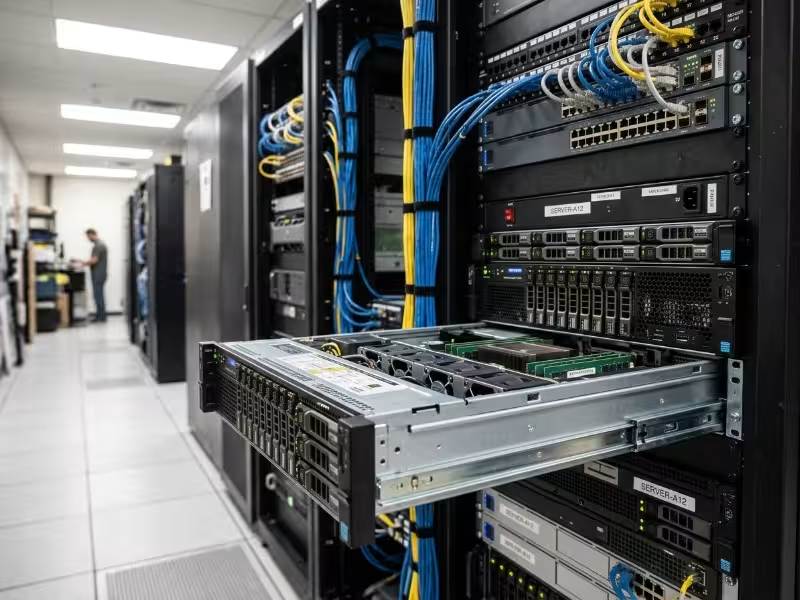
A rack mount case is a standardized metal enclosure that holds computing hardware and mounts into a 19-inch equipment rack. It houses the motherboard, power supply, storage, and expansion cards, and it stacks with other equipment in a fixed footprint. Its value comes from the system it fits into: predictable density, directed airflow, and fast service access.
In a factory control room, a telecom shelter, or a data center row, the enclosure matters more than most spec sheets suggest. A poor chassis choice rarely fails on day one. It shows up months later as throttled GPUs, drives that wear out early, or a technician spending half an hour on a fan swap that should take two minutes.
In this guide, you’ll learn:
- How the EIA-310 standard and rack units define what fits
- The main form factors and the trade-offs each one forces
- Which features separate an industrial-grade chassis from a generic one
- How to choose the right rack mount case for your workload and site
What Is a Rack Mount Case?
A rack mount case is an enclosure built to EIA-310 dimensions, so it fits any compliant rack regardless of vendor. It attaches to the rack posts with mounting ears, slide rails, or both. It is the physical, thermal, and electrical platform for a server or industrial computer. Every component inside depends on decisions the chassis has already made: how air moves, where cables run, and how much load the tray can carry before it flexes.
The 19-Inch Rack Standard and Rack Units Explained
EIA-310 sets the front panel width at 19 inches (482.6 mm). Mounting holes sit 18.31 in (465.1 mm) apart, center to center. The clear opening between rails is about 17.75 in (450 mm), so most chassis bodies are roughly 17 in (around 430 mm) wide. The mounting ears make up the difference.
Height is measured in rack units:
1U = 1.75 in (44.45 mm). A 2U chassis is 3.5 in tall, and a 4U chassis is 7 in tall.
In practice, front panels are made about 1/32 in shorter than the nominal height so that neighboring units don’t bind during installation.
Depth is the variable the standard leaves open. Chassis depth ranges from under 300 mm for short-depth units to well over 650 mm for full servers. Cabinets usually come in 600, 800, 1000, or 1200 mm depths. Rack type matters too. Two-post racks suit lighter, shallower gear held by its ears. Heavy chassis belong in four-post racks, where rails carry the load at both front and rear. Also check the hole type: square, round, or threaded posts each need a matching rail kit.
Core Components of a Rack Mount Case
Every rack mount case is built from the same functional blocks, and each one affects reliability:
- Chassis body and top cover: the structural shell, which also provides EMI shielding
- Front panel or bezel: carries power controls, status LEDs, and an optional lock
- Mounting ears and slide rails: hold the unit and let it extend for service
- Fan wall or fan bracket: pulls air in a single, controlled direction
- Drive bays and backplane: hold storage and connect drives to the board
- PSU bay: fits a single supply or redundant hot-swap modules
- Motherboard tray and standoffs: fix board position and electrical grounding
- Rear I/O and PCIe slot openings: set connector access and card orientation
Rack Mount Case vs Rack Server: Clearing Up the Confusion
These terms get used interchangeably, but they describe different things. A rack server is a finished, validated system: board, processors, memory, storage, firmware, and support, sold as one unit. A rack mount case is the enclosure that integrators and OEMs build that system into.
The difference matters when standard servers don’t fit the job. Start with the chassis, and you control the board choice, the cooling layout, the I/O placement, and the front-panel design. That is why appliance makers, industrial PC builders, and system integrators buy chassis instead of finished servers.
Why Rack Mount Cases Matter in Industrial and Enterprise Deployments
The value of a rack mount case doesn’t come from the hardware inside it. It comes from three structural advantages: how it uses space, how it moves air, and how quickly people can service it.
Space Density and Standardized Integration
Racks turn floor space into vertical space. A standard 42U cabinet holds dozens of systems in roughly the footprint of two office desks. Because every compliant chassis shares the same width and mounting pattern, you can mix servers, switches, storage, and UPS units from different vendors in one rack.
Standardization also makes planning predictable. Engineers can calculate power per U, cable runs per U, and weight per rack before any hardware arrives. Scaling means adding units to open rack space, not redesigning a room.
Controlled Airflow and Thermal Management
Server rooms rely on one rule: every device moves air in the same direction. Most rack mount cases pull cool air in through the front and push hot air out the back. That matches hot-aisle/cold-aisle layouts, where rows of racks face each other to share cold intake air and exhaust into a shared hot aisle.
Inside the chassis, a fan wall creates directed pressure across the CPUs, GPUs, and drives in sequence. A single unit that breathes side-to-side, or front-to-back in reverse, recirculates exhaust into its neighbors’ intakes. In an enclosed cabinet, one misaligned chassis can raise inlet temperatures for every unit above it.
Serviceability, Security, and Lifecycle Maintenance
Downtime costs more than hardware. Rack mount cases are designed to shorten mean time to repair (MTTR):
- Slide rails let a technician pull the unit forward and open it without disconnecting it from the rack.
- Hot-swap drives, fans, and PSUs can be replaced while the system keeps running.
- Lockable bezels and intrusion switches protect drives and log unauthorized access.
At scale, consistency matters most. When 200 field sites run the same chassis, technicians learn one layout, carry one set of spares, and follow one service procedure.
Common Rack Mount Case Form Factors
Height sets the hard limits on cooling, expansion, and storage. Depth decides whether the chassis fits the cabinet at all. Pick both together, because a chassis that suits the workload but not the cabinet is still the wrong chassis.
|
Form Factor |
Height |
Typical Fan Size |
Expansion Cards |
Common Use |
|---|---|---|---|---|
|
1U |
1.75 in |
40 mm |
Low-profile via riser |
Network appliances, compute nodes |
|
2U |
3.5 in |
60–80 mm |
Low-profile, or limited full-height via riser |
Storage servers, general compute |
|
3U |
5.25 in |
80 mm |
Full-height, mounted vertically |
Industrial PCs, control systems |
|
4U |
7.0 in |
80–120 mm |
Full-height, full-length, multi-GPU |
Edge AI, GPU servers, high-capacity storage |
1U and 2U Rack Mount Cases
A 1U chassis gives you maximum density, but physics charges for it. Small 40 mm fans must spin fast to move enough air, which raises noise and power draw. Expansion cards lie flat on risers, usually one or two. 1U works best for firewalls, gateways, and lean compute nodes.
A 2U chassis is the most common middle ground. It uses larger fans, has room for more drive bays, and can take riser-mounted PCIe cards, including some full-height ones. It is the usual choice for storage servers and general-purpose compute.
3U and 4U Rack Mount Cases
At 3U, full-height cards stand vertically with no riser, and the board layout looks much like a standard industrial PC. That simplifies integration and makes card swaps easier.
4U is where serious acceleration lives. It has room for several double-width GPUs, 80–120 mm fans that move more air at lower speed, redundant PSUs, and dense drive cages. The trade-off is fewer systems per rack. For high-TDP workloads, that trade is almost always worth it, because a cramped GPU that throttles wastes more money than the rack space you saved.
Short-Depth and Specialized Rack Mount Chassis
Not every site has a full-depth data center cabinet. Telecom closets, wall-mount enclosures, and edge sites often offer only 450–600 mm of total depth. Short-depth chassis fit these spaces, and many move all I/O to the front so technicians never need to reach behind the cabinet.
Specialized variants include storage-focused units with front-loading drive arrays and wall-mount designs. One rule applies to all of them: measure the cabinet’s usable depth, after rear cables, PDUs, and the bend radius of power and fiber cables. That number is often 100 mm less than the cabinet spec.
Key Features to Evaluate in a Rack Mount Chassis
A spec sheet tells you more than a product photo. These four areas separate a chassis built for years of continuous operation from one built to hit a price point.
Thermal Design
Start with the fan configuration: count, size, placement, and whether the fans are hot-swappable. Then look at what directs the air. Air ducts and shrouds force airflow through heatsinks instead of letting it take the easy path around them. A good shroud can matter as much as an extra fan. Finally, confirm the airflow direction matches your rack layout.
What to check on the spec sheet:
- Supported CPU and GPU TDP, per socket and per slot
- Fan redundancy, meaning the system keeps running safely if one fan fails
- Dust filter access from the front, without removing the chassis
- Rated operating temperature range
Material and Structural Durability
Most industrial chassis use SGCC galvanized steel. It is strong, inexpensive, corrosion-resistant, and provides good EMI shielding. Aluminum cuts weight and resists corrosion well, but it costs more and needs thicker sections to match steel’s stiffness.
Sheet thickness and reinforcement matter more than the base material. A fully loaded 4U GPU chassis can be heavy enough that a thin tray sags when the unit is extended on its rails. For factory floors and vehicles, look for reinforced brackets, locking drive carriers, and fasteners that resist loosening under constant vibration.
Expansion and Component Compatibility
Confirm the motherboard form factor first: Mini-ITX, Micro-ATX, ATX, E-ATX, or SSI EEB for dual-socket server boards. Next, check PCIe slot count and card height support. For GPUs, verify card length, slot width, and clearance for the power connectors. A card that fits but leaves no room for its power cable doesn’t fit.
Power supply format shapes uptime. Standard ATX supplies are cheap but have no redundancy. Redundant CRPS modules or 1U/2U redundant supplies run in a 1+1 setup, so one module can fail or be swapped while the system keeps running. For telecom sites, check whether a −48 V DC input option is available.
Storage, Cable Management, and Serviceability
Decide between hot-swap front bays and internal fixed bays. Hot-swap bays cost more but avoid downtime for drive replacements. Check the backplane interface, whether SATA, SAS, or NVMe, because it determines which drives the chassis can run at full speed.
Cable management directly affects cooling. Routing channels and tie points keep cables out of the airflow path behind the fan wall. Tool-less top covers, drive trays, and fan modules turn routine maintenance into a task that takes minutes instead of a scheduled outage.
When Do You Need a Rack Mount Case?
A rack mount case makes sense when hardware must be dense, serviceable, and reliable over long duty cycles. The five scenarios below show where those needs are sharpest, and which chassis features actually meet them.
Industrial Computing and Factory Automation
Environment: Control rooms and electrical cabinets near production lines, running SCADA, MES servers, and machine vision systems.
Requirement: Steady operation despite dust, vibration from nearby machinery, and heat from motors and drives, often for ten years or more.
What the chassis must provide: Front-accessible dust filters, reinforced steel construction, positive-pressure airflow, and a product line with long availability so replacement units match the originals.
Edge AI and GPU Computing
Environment: Inference servers at factories, logistics hubs, retail sites, and campuses, often in rooms never designed for computing.
Requirement: Multiple high-TDP GPUs running continuously without a data center’s cooling infrastructure.
What the chassis must provide: 2U–4U designs with multi-GPU support, GPU-specific air shrouds, high-wattage redundant PSUs, and short-depth options for sites with shallow cabinets.
Telecom and Network Appliances
Environment: Central offices, cell sites, and branch locations running firewalls, gateways, SD-WAN boxes, and 5G edge nodes.
Requirement: Compact units deployed by the hundreds or thousands, often in shallow racks with front-only access.
What the chassis must provide: 1U short-depth builds, front I/O, slots for NICs and accelerator cards, DC power options, and tight build consistency across production runs.
Server Integration and Data Center Deployment
Environment: System integrators and OEMs building branded servers, storage appliances, or vertical-specific platforms.
Requirement: A repeatable platform that passes validation once and ships unchanged across production volumes.
What the chassis must provide: Broad board and backplane compatibility, matched rail kits for common cabinets, hot-swap components, and custom front panels for brand identity.
Surveillance, Security, and Transportation Systems
Environment: NVR and video analytics storage in monitoring centers, plus control systems in rail, vehicle, and transit applications.
Requirement: Continuous 24/7 recording, high drive counts, and resistance to shock and vibration in moving vehicles.
What the chassis must provide: Dense hot-swap drive arrays, locking drive carriers, lockable front bezels, and structural reinforcement rated for vibration.
Rack Mount Case vs Tower and Desktop Chassis
Both enclosure types can house the same board, CPU, and storage. The real difference is the deployment model: a tower stands alone, while a rack mount case becomes part of a shared infrastructure.
|
Factor |
Rack Mount Case |
Tower / Desktop Chassis |
|---|---|---|
|
Footprint and density |
High density in a fixed footprint; requires rack space |
Uses floor or desk space; spreads out quickly at scale |
|
Scalability |
Add units into open U; limited by rack power and cooling |
Easy to add one more; hard to manage beyond a few units |
|
Airflow management |
Directed front-to-back flow; depends on proper rack layout |
Flexible, room-level cooling; no coordinated airflow between units |
|
Serviceability |
Rails, hot-swap parts, consistent layouts; needs rack access |
Open side panels; usually needs a shutdown for service |
|
Noise |
Louder, especially 1U and 2U with small high-RPM fans |
Quieter, with larger, slower fans |
|
Deployment cost |
Lower cost per unit at scale; needs a rack, rails, and PDUs |
No infrastructure needed; costs more per unit as fleets grow |
|
Best fit |
Multi-unit, remote, or controlled-environment sites |
Single systems in offices, labs, or sites without a rack |
A tower still makes sense for a single standalone system or a site with no rack. Once a deployment reaches several units, or needs controlled airflow, remote service, and physical security, the rack mount case becomes the practical standard.
How to Choose the Right Rack Mount Case
Start from the workload and the site, not the chassis catalog. The right enclosure comes from your constraints, not from the longest feature list.
A Step-by-Step Selection Checklist
- Define the workload. List CPU and GPU counts, total TDP, memory, and storage capacity. This sets your thermal and power baseline.
- Measure the rack. Record usable depth after cables, the post type (two- or four-post), the hole style, and the weight rating per U.
- Pick the height. Balance density against cooling and expansion. If high-TDP GPUs are involved, start at 4U and justify any step down.
- Confirm compatibility. Check the motherboard form factor, PCIe slot layout, GPU length and power clearance, and PSU format against your parts list.
- Assess the environment. Note the ambient temperature range, dust, vibration, and humidity, and decide whether service will happen from the front only.
- Plan for scale and lifecycle. Estimate volumes, custom panel or I/O needs, and how many years you’ll need identical replacement units.
Common Selection Mistakes to Avoid
- Measuring width but not usable depth. The chassis fits the rails but blocks the rear PDU or crushes fiber cables.
- Putting high-TDP GPUs in a 1U chassis. Small fans can’t keep up, so the GPUs throttle and you lose the performance you paid for.
- Skipping redundant PSUs in 24/7 systems. One failed supply takes down a system that was never supposed to stop.
- Ignoring airflow direction. One reversed unit recirculates hot exhaust into the rest of the rack.
- Assuming rails fit any cabinet. Square, round, and threaded holes need different rail kits, and the mismatch is usually found on installation day.
Why Onechassis for Industrial Rack Mount Cases
Onechassis designs and manufactures rack mount cases and server chassis for industrial, edge, and data center applications. We work with system integrators, OEMs, and solution providers who need an enclosure that fits the workload and the site, not just the rack.
- Form factor range: 1U to 4U rack mount cases, plus short-depth options for telecom closets, wall cabinets, and edge sites.
- Thermal engineering: Fan wall layouts, air shrouds, and airflow planning designed around high-TDP CPUs and multi-GPU builds.
- Compatibility: Support for mainstream industrial and server motherboards, GPUs, redundant PSUs, and SATA, SAS, or NVMe backplanes.
- Customization and OEM/ODM: Custom front panels, I/O layouts, branding, and structural changes for appliance and platform builders, through our OEM service.
- Deployment support: Engineering help from the first specification through validation and volume production.
Share your workload, rack dimensions, and site conditions with the Onechassis team. We’ll recommend a standard chassis or design a custom one that fits your deployment.
FAQs About Rack Mount Cases
What does “U” mean in a rack mount case?
“U” stands for rack unit, the standard measure of vertical rack space. One U equals 1.75 in (44.45 mm) under EIA-310. A 2U chassis takes 3.5 in, and a 4U chassis takes 7 in.
Can a rack mount case hold a full-size GPU?
Yes. A 4U chassis is the most reliable choice for full-height, full-length, double-width GPUs, and some 2U designs fit them with risers. Check card length, slot width, power connector clearance, and whether the chassis can cool the card’s full TDP.
What depth rack mount case do I need?
Choose a chassis shorter than your cabinet’s usable depth, which is total depth minus space for rear cables, PDUs, and cable bend radius. For shallow wall cabinets or telecom closets, short-depth chassis with front I/O are usually the right choice.
Is a rack mount case suitable for harsh environments?
Yes, when it is built for them. Look for reinforced steel construction, front-access dust filters, locking drive carriers, vibration-resistant mounting, and a thermal design rated for the site’s full temperature range, not just a climate-controlled room.
What is the difference between a rack mount case and a server chassis?
The two terms are often used interchangeably, but they mean different things in practice. A rack mount case is the bare enclosure — the chassis body, fan wall, drive bays, and PSU bay — without any computing hardware installed. A server chassis typically refers to the same enclosure evaluated or validated against specific boards, CPUs, and components, often as part of a finished or semi-finished server build. When integrators and OEMs talk about a “server chassis,” they usually mean a rack mount case that has already been matched to a hardware configuration. If you are sourcing the enclosure first and specifying the hardware yourself, “rack mount case” is the more accurate term.
What motherboard sizes fit in a rack mount case?
It depends on the chassis height and tray design. Most 1U and 2U rack mount cases support Mini-ITX and Micro-ATX boards, with some 2U designs accommodating standard ATX. At 3U and 4U, full ATX and E-ATX boards fit without restriction, and larger 4U chassis often support SSI EEB — the form factor used by dual-socket server motherboards. Always check the chassis spec sheet against the exact board dimensions, not just the form factor name, since E-ATX boards vary in size across manufacturers and a few millimeters of overhang can block drive bays or PSU clearance.
How long do industrial rack mount cases typically last?
The chassis itself, if well-made, is rarely the first thing to fail. Industrial rack mount cases built from galvanized steel with proper coating and reinforcement routinely stay in service for ten years or more. The limiting factors are usually the fans, which wear out first and should be treated as consumables, and the front-panel switches, which can degrade in high-cycle environments. Choosing a chassis from a manufacturer that guarantees long-term parts availability matters more than the initial build quality alone — a chassis that becomes impossible to service or match after three years creates more operational risk than one that was slightly cheaper to buy.
Conclusion
A rack mount case is more than a box that fits a rack. It is the standardized platform that makes dense, serviceable, long-running deployments possible. Getting it right comes down to three points:
- The EIA-310 standard fixes width and height, but depth and rack type are yours to verify.
- Form factor sets your limits. Height decides cooling and expansion, and short-depth designs open up edge and telecom sites.
- Selection starts with the workload and the environment, then works back to the chassis.
Before you compare models, write down your workload, rack dimensions, and site conditions. Then contact Onechassis for a chassis recommendation or a custom build that matches all three.
