

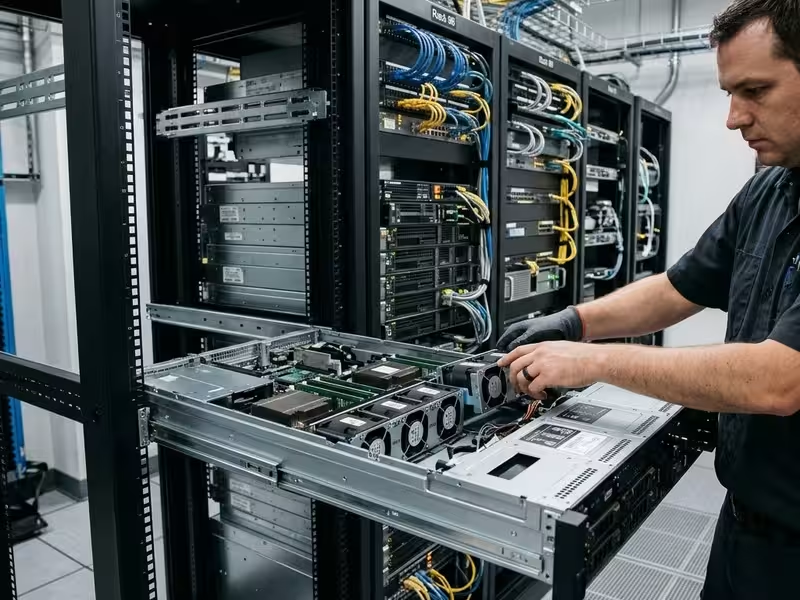
Infrastructure teams rarely buy servers in the abstract. They buy them for a specific job: an edge node that has to fit a shallow telecom cabinet, a storage appliance that needs 20-plus drive bays, or an inference host with enough PSU headroom and PCIe bandwidth for two double-width accelerator cards. Fully configured servers seldom match those jobs exactly. You either pay for components you will never use, or you get locked into vendor-qualified parts you are not allowed to substitute.
A barebone server resolves that mismatch. It ships as a validated base platform—chassis, board, power, and cooling already integrated—and your team or integration partner completes the configuration. The buyer gains control over three things that matter most in enterprise deployments: the bill of materials (BOM), component cost, and hardware lifecycle. For specialized and repeat deployments, that control is the whole point.
This guide covers:
- What a barebone server includes and what it does not
- How it compares with a fully configured OEM server
- Where it creates measurable business value
- Which industrial and enterprise workloads it suits best
- When you should not choose one
- How to evaluate both the platform and the supplier
What Is a Barebone Server?
A barebone server is a pre-integrated server platform. The supplier combines the chassis, server motherboard, power supply, and cooling subsystem into one tested assembly. The buyer adds the compute, memory, storage, and expansion components the workload requires.
The critical word is integrated. Board-to-chassis fit, thermal design, power delivery, and backplane wiring are all resolved before the unit ships. That engineering work is what separates a barebone platform from a pile of parts you source independently.
What’s Included and What You Add
Inclusions vary by supplier and by model. Mismatched expectations here cause more procurement errors than any other step in a barebone order. Confirm every line item on the spec sheet before issuing a PO.
Typically included:
- Chassis (1U–4U rackmount, short-depth, tower, or wall-mount)
- Server motherboard with integrated baseboard management controller (BMC)
- Power supply, single or redundant
- Drive backplane and carriers
- System fans, fan shrouds, and CPU heatsinks
- Rail kit for rack installation
Typically added by the buyer:
- CPUs
- Memory (DIMMs)
- SSDs or HDDs
- Network interface cards and RAID/HBA controllers
- GPUs or other accelerators
- Operating system and management software
Never assume heatsinks, rails, riser cards, or a second PSU are in the box. A missing riser card can stall a 50-unit rollout just as effectively as a missing CPU.
Barebone vs. Whitebox vs. Self-Sourced Builds
These terms are often used loosely, and conflating them leads to real procurement mistakes.
A self-sourced build means you purchase chassis, board, PSU, and cooling from different vendors and own every compatibility risk yourself. Mounting holes may not align. Airflow paths may not suit the board layout. Power connectors may not match. A barebone platform ships with those questions already resolved and validated.
A whitebox server is a fully built system sold under a generic or reseller brand. It often starts life as a barebone platform. The difference is that by the time it reaches you as a whitebox, the component decisions have been made for you. With a barebone, they haven’t—and that is intentional.
Barebone Server vs. Fully Configured OEM Server
The real choice here is control versus convenience.
A fully configured OEM server is a single-vendor package. The vendor selects the components, prices them as a bundle, and stands behind the whole system. A barebone server shifts component selection, sourcing, and upgrade timing to the buyer. In return, the buyer takes on integration and validation work.
|
Factor |
Barebone Server |
Fully Configured OEM Server |
|---|---|---|
|
Component choice |
Buyer selects CPU, memory, storage, and cards |
Limited to vendor-qualified options |
|
Upfront cost |
Lower base cost; components sourced competitively |
Bundled pricing, often with parts markup |
|
Proprietary parts |
Usually industry-standard components |
May require vendor-branded drives or modules |
|
Integration effort |
Buyer or integrator assembles and validates |
Ships ready to deploy |
|
Support model |
Platform warranty plus separate component warranties |
Single point of support |
|
Upgrade path |
Swap components freely |
Often tied to vendor upgrade kits |
|
Best fit |
Integrators, repeat deployments, specialized workloads |
Teams without dedicated integration staff |
Neither option wins universally. OEM servers make sense when single-vendor accountability matters most—a small IT team managing a handful of general-purpose hosts, for example, with no bench space and no spare technicians to handle assembly.
Barebone platforms pull ahead when you are deploying the same build across dozens or hundreds of sites, when workload requirements fall outside what OEM catalogs cover cleanly, or when you need to control the BOM across a multi-year fleet.
One option many buyers miss: some barebone suppliers, including Onechassis, offer pre-integration and burn-in services. You retain BOM control and still receive systems that are ready to rack.
Key Benefits of Barebone Servers for Enterprise Infrastructure
Vague benefit statements don’t help you make a decision. Here is how each advantage translates into hardware and operational reality.
Configuration Flexibility
A barebone platform lets you size every subsystem to the actual workload. Two nodes built on the same 2U server chassis can look completely different inside. A storage node might pair a mid-range CPU with high-capacity SAS drives and an HBA. A virtualization node might use a high-core-count processor, a full DIMM population, and a few NVMe drives. An OEM catalog pushes both toward the same preset SKU. A barebone platform does not.
You pay for the capacity your workload will use, not the nearest available bundle.
Scalability and Upgrade Path
Scalability in a barebone platform is physical, not a marketing claim. Spare drive bays, open DIMM slots, and free PCIe slots allow in-place upgrades. You add an accelerator, expand storage, or double memory without replacing the server.
Many enterprises go further and standardize on one chassis family across hardware generations. Rack layouts, rails, cabling, and spare inventories stay consistent while the compute inside progresses. That consistency compounds over time.
Total Cost of Ownership
Barebone platforms reduce cost through several concrete channels:
- Competitive component sourcing instead of bundled pricing
- Leveraging existing volume agreements with memory and drive vendors
- Reusing compatible drives or DIMMs from retired systems
- Avoiding proprietary vendor-branded parts at a premium
The honest caveat: integration labor, validation time, and spares management all belong in the TCO calculation. Teams that skip those line items are often surprised by them. Lifetime cost drops when integration is planned and budgeted—not improvised on a schedule.
Component Standardization and Lifecycle Control
When you own the BOM, you control fleet consistency. Every deployed unit runs the same parts, the same firmware baseline, and the same spare kit. For industrial deployments that run for five or more years, this is not a secondary consideration. A forced component change mid-lifecycle can trigger requalification, recertification, or field rework across the entire fleet. BOM ownership lets you lock down long-life components and manage transitions on your own schedule.
Industrial and Enterprise Use Cases
Barebone servers appear wherever standard configurations fall short. Workload, operating environment, and deployment volume determine the fit. Each scenario below identifies the hardware requirement and explains why a barebone approach addresses it better than a preset system.
Edge Computing and Industrial Automation
Factory-floor controllers, telecom roadside cabinets, and machine vision stations don’t resemble data centers. Racks are shallow, ambient temperatures swing, and dust exposure is continuous.
These environments require short-depth chassis, wide operating temperature tolerance, filtered airflow, and front-access I/O. Forcing a standard-depth data center server into a 400mm-deep industrial cabinet is not a workaround—it is a maintenance problem waiting to happen. A barebone platform sized for the environment solves this at the design stage.
Private Cloud and Data Center Expansion
Virtualization clusters and hyperconverged nodes benefit from uniformity at scale. Standardized 1U and 2U barebone platforms let teams expand cluster by cluster using an identical build. Automation scripts, firmware policies, and spare inventories transfer directly to each new node. Memory and drives flow through existing supply contracts, keeping procurement predictable.
AI Inference and Accelerated Workloads
Inference servers and vision analytics nodes have three hard requirements: PSU capacity for the accelerators, a PCIe layout that physically fits the cards, and airflow that keeps GPU junction temperatures below throttling thresholds. A GPU-ready barebone chassis provides that validated foundation. The buyer selects accelerators based on model size, latency budget, and cost—rather than accepting whatever a preset SKU happens to include.
Storage, Backup, and Video Surveillance
Archive tiers, backup targets, and NVR deployments are capacity-driven. Drive count, backplane type, and RAID or HBA path are the defining specs. A city-wide surveillance system retaining 90 days of footage at multiple camera streams has fundamentally different storage requirements than a branch office backup target. A barebone platform lets the drive configuration reflect the actual retention policy.
OEM Appliances and System Integrators
Security appliance manufacturers, medical imaging vendors, and test-and-measurement companies embed servers inside products that carry their own brand, certifications, and product lifecycle. They need a chassis platform that remains available for years, accepts custom front panels and branding, and passes unchanged through product certification cycles. A consistent barebone platform lets their engineering team focus on differentiation instead of hardware maintenance.
When Should You Choose a Barebone Server?
Price alone should not drive this decision. A cheaper platform your team cannot integrate is not a saving.
A barebone server fits your situation if you:
- Have in-house staff or an integration partner who can assemble, validate, and support hardware
- Deploy the same configuration repeatedly across sites, customers, or product lines
- Run workloads with storage, I/O, thermal, or accelerator requirements that standard SKUs don’t cover cleanly
- Need long-term BOM control and consistent spares across a multi-year fleet
- Already hold supply agreements for CPUs, memory, or drives
- Build branded appliances or embedded systems on a server platform
A fully configured server is the better fit if you:
- Lack the staff to assemble, test, and troubleshoot hardware
- Require a single point of support covering every component
- Are deploying a small number of general-purpose units with no scaling plans
If your situation aligns with the first list, the next step is selecting the right platform and supplier.
How to Evaluate a Barebone Server and Supplier
The platform and the supplier carry equal weight. A well-engineered chassis from a supplier with weak lifecycle commitments will cost you in year three. Use these criteria as a working evaluation framework.
Form Factor and Deployment Environment
Start with where the server will physically live. Options include 1U through 4U rackmount, short-depth rackmount, tower, and wall-mount. Match form factor to:
- Rack or cabinet depth
- Ambient operating temperature range
- Vibration and shock exposure
- Dust and particulate levels
- Required service access direction, front or rear
A 4U chassis offers more room for drives and expansion cards. That advantage only holds if the site has the rack depth and cooling capacity to support it.
Platform, Expansion, and I/O
Evaluate these specifications against both your current workload and your three-year plan:
- CPU socket and platform generation
- Memory channel count and maximum supported capacity
- PCIe lane count and physical slot layout
- Drive bay mix across NVMe, SAS, and SATA
- OCP mezzanine or standard NIC support
Lane count matters more than slot count. A board with many slots but constrained lanes will bottleneck NVMe drives and accelerators before you fill every bay.
Power, Cooling, and Manageability
Uptime depends on the subsystems that rarely appear in product photography. Look for:
- Redundant hot-swap power supplies with appropriate efficiency ratings
- Airflow direction compatible with your hot-aisle and cold-aisle layout
- Thermal headroom sized for the accelerators you plan to install
- BMC remote management via IPMI or Redfish, so a technician does not need to drive to a remote site to perform a power cycle
Supplier Evaluation Checklist
- Engineering and customization capability: OEM/ODM services for modified layouts, custom front panels, or branding
- Published compatibility lists: Validated CPUs, memory, drives, and cards—these cut your own qualification time substantially
- Lifecycle commitments: Clear product availability windows and advance end-of-life notice periods
- Certifications: CE, FCC, UL, ISO 9001, or other marks relevant to your market—verify these per model, not just per supplier
- MOQ, lead times, and supply stability: Critical for phased rollouts where delivery timing drives project milestones
- Pre-integration and burn-in services: This option removes bench work from your side entirely
- RMA process, technical support, and documentation quality: Good documentation and fast RMAs recover more deployment time than most spec sheet comparisons would suggest
Building Your Server Platform with Onechassis
Onechassis designs and manufactures server chassis and barebone platforms for industrial and enterprise deployments. The product range covers 1U through 4U rackmount, short-depth, wall-mount, and GPU-optimized form factors—matching the deployment environments described throughout this guide.
The supplier checklist above applies directly to us. Onechassis supports OEM/ODM customization for integrators who need a platform tailored to their product’s mechanical, thermal, or branding requirements. Our engineering team works from your workload and environment constraints, not from a generic catalog. We document compatibility, certifications, and lifecycle commitments, and we can support pre-integration and burn-in if that reduces overhead on your end.
If you are standardizing a private cloud fleet, deploying edge nodes for a production line, scaling surveillance storage, or preparing a chassis for accelerator cards, start with your requirements—not with a datasheet. Contact the Onechassis team with your workload, deployment environment, and volume, and we will respond with a specific platform recommendation and a quote.
Frequently Asked Questions
What should I look for when evaluating a barebone server supplier?
Focus on five areas: compatibility documentation, lifecycle commitments, customization capability, certifications, and support responsiveness. A reliable supplier publishes validated component lists covering CPUs, memory, drives, and expansion cards—this directly reduces your internal qualification time. Lifecycle commitments matter as much as hardware specs; you need to know how long a platform will remain available and how much notice you will receive before end-of-life. If you are building an appliance or deploying across multiple sites, ask whether the supplier offers OEM/ODM services, pre-integration, and burn-in. Certifications such as CE, FCC, and ISO 9001 should be verifiable per model, not just claimed at the company level. Finally, evaluate the RMA process and documentation quality before you commit—both have a direct impact on how quickly you can recover from a hardware issue in the field.
Can a barebone server be used for AI inference workloads?
Yes, provided the chassis is designed to support it. The key requirements are PSU capacity rated for the accelerator cards you plan to install, a PCIe slot layout that physically accommodates full-length, double-width GPUs, and an airflow design with enough thermal headroom to keep those cards below throttling temperatures under sustained load. A barebone platform built for accelerated workloads lets you select the accelerator based on your model size and latency budget, rather than accepting whatever a preset OEM SKU bundles in. For teams running inference at the edge or in private cloud environments, this configuration flexibility is often the deciding factor.
Is a barebone server always cheaper than a fully configured OEM server?
Not necessarily, and the distinction matters for budgeting. The base platform typically costs less, and you can source CPUs, memory, and drives through competitive channels or existing supply contracts—which often brings the total component cost down. However, you also need to account for integration labor, internal validation time, and spares inventory management. For small or one-off deployments, those costs can close the gap quickly. The real TCO advantage of a barebone server shows up in repeat deployments at scale, where a standardized BOM, reused components, and competitive sourcing compound into meaningful savings over the fleet’s lifetime.
Does a barebone server come with a CPU and memory installed?
No. A barebone server ships with the chassis, motherboard, power supply, cooling hardware, and drive backplane already integrated and validated as a unit. CPUs, memory modules, storage drives, network cards, and accelerators are purchased and installed separately by the buyer or their integration partner. This is by design—it gives you the freedom to spec those components to your workload and source them through your own supply agreements.
Conclusion
Barebone servers trade some out-of-the-box convenience for control over configuration, cost, and hardware lifecycle. That trade pays off when you have integration capability in-house or a capable platform partner, and it pays off most in repeat deployments, specialized workloads, and industrial environments where standard configurations do not fit.
Work through the decision checklist, then run shortlisted platforms against the evaluation criteria above. If your requirements point toward Onechassis, bring them to us directly.
