

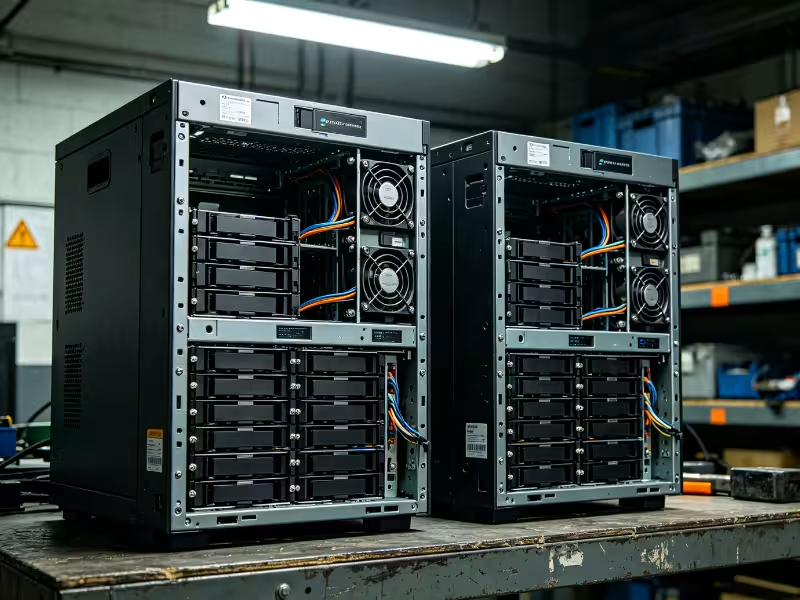
Fixed storage appliances make many decisions for you. They set the drive count, the controller, the network options, and the upgrade path, and they often add per-terabyte or per-feature licensing. That works until your workload needs a specific bay density, a faster network, or a server that handles both storage and compute. Then your team either overbuys capacity or works around the limits of the appliance.
A TrueNAS storage server avoids that trap. TrueNAS gives you an enterprise-grade OpenZFS storage operating system that runs on hardware you choose. It comes in two editions, TrueNAS CORE and TrueNAS SCALE. Both use the same ZFS foundation. They differ in operating system base, workload scope, and roadmap, and those differences should shape the hardware you build.
This guide covers what each edition does well, the differences that affect a purchase, how your choice translates into chassis, CPU, memory, and controller specifications, and when a vendor appliance is still the better buy.
TrueNAS CORE: A Storage-First Platform for Stable, Focused Deployments
TrueNAS CORE is the FreeBSD-based edition of TrueNAS, built around OpenZFS. It delivers file storage over SMB and NFS and block storage over iSCSI. It also includes snapshots, replication, and end-to-end data integrity checks. Its main strength is focus: CORE is a mature, storage-centric system that runs very little beyond the storage service itself.
That focus makes CORE a strong fit for clearly defined roles:
- Dedicated file servers and backup targets with a single, fixed job
- Off-site replication targets in a multi-site backup design
- Sites with in-house FreeBSD expertise or long-validated CORE configurations
- Deployments that value a frozen, proven software stack over new features
There are two caveats to plan around. First, FreeBSD has narrower driver support than Linux, so you need to check network cards, HBAs, and newer server platforms against FreeBSD compatibility lists before you order. Second, CORE’s development has moved into a maintenance phase. That does not make it unreliable, but it does affect how long a new deployment can expect feature updates, as we cover below.
TrueNAS SCALE: Storage Plus Virtualization and Applications on One Platform
TrueNAS SCALE runs the same OpenZFS storage engine on a Debian Linux base. On top of storage, it adds KVM-based virtual machines and a container-based application platform. As a result, one system can serve files and blocks while also hosting the services that support them. SCALE is also where iXsystems now focuses active development. Recent releases of the Linux-based edition carry the unified TrueNAS name, with the free version labeled Community Edition, but most buyers and integrators still call it SCALE.
SCALE takes on jobs that go beyond pure storage:
- Storage nodes that also host monitoring, backup software, or edge analytics VMs
- Sites that need the broader hardware and driver support of the Linux kernel
- Deployments that need GPU passthrough for virtual machines or applications
- New builds that expect several years of feature updates and platform support
The hardware implication is straightforward. When storage shares a chassis with VMs and apps, CPU cores, memory, and PCIe lanes are split across workloads. So you have to size a SCALE server for everything it runs, not for storage alone.
CORE vs. SCALE: The Differences That Change Your Server Plan
Both editions protect data with the same ZFS engine, so neither one stores data “better.” The real differences sit around ZFS: the operating system, the range of workloads, and the development roadmap. Here is how the two compare on the factors that matter for planning.
|
Factor |
TrueNAS CORE |
TrueNAS SCALE |
|---|---|---|
|
OS base |
FreeBSD |
Debian Linux |
|
Storage engine |
OpenZFS |
OpenZFS |
|
Virtualization |
bhyve (basic) |
KVM (broader options) |
|
Applications |
Jails and plugins |
Container-based apps |
|
Hardware driver coverage |
Narrower (FreeBSD) |
Broader (Linux kernel) |
|
Development status |
Maintenance-focused |
Active development |
|
Primary server role |
Dedicated storage |
Storage plus compute services |
Three of these differences drive most real-world decisions.
Workload Scope: Storage Appliance or Converged Node?
This is the most important fork in the road. CORE suits a server that does one job well. SCALE suits a server that handles storage plus nearby services. For example, a plant-floor data historian that also runs a local analytics VM fits SCALE. An off-site replication target, by contrast, works on either edition, because it only needs to receive and protect data.
Ask yourself one question: will this box ever need to run anything besides storage? If the answer is “probably,” start with SCALE.
Hardware Compatibility and Driver Support
Linux usually supports newer NICs, NVMe platforms, and GPUs sooner than FreeBSD does. On CORE, every add-in card on the bill of materials needs a FreeBSD support check before purchase. In practice, this narrows your choice of 25GbE or faster network cards and rules out most accelerator use cases. On SCALE, the compatibility window is wider, which gives procurement more sourcing options and less qualification work.
Lifecycle and Roadmap Risk
Storage platforms often stay in service for five to seven years. Deploying a new multi-year system on an edition in maintenance mode builds a future migration into your plan, whether you schedule it or not. Existing, stable CORE fleets can keep running as they are. For new builds, however, SCALE should be the default unless you have a specific reason to choose CORE.
What this means: the edition choice is less about features and more about scope and lifecycle. Once you know both, you can turn them into hardware specifications.
How Your TrueNAS Choice Shapes a Custom-Built Storage Server
A fixed appliance makes every hardware decision for you. A custom build lets you match each subsystem to your edition, your workload, and your growth plan. Here is how to approach the four decisions that matter most.
Chassis and Drive Density
Start with bay count. It should reflect your target capacity, your vdev layout, and how you expect the pool to grow. A 2U server chassis with 12 hot-swap 3.5-inch bays suits compact storage nodes and branch-site replication targets. For archive tiers, video surveillance retention, and large backup pools, a 4U chassis with 24 bays gives you the density to grow without adding nodes.
Whatever size you choose, look for hot-swap bays, a SAS/SATA backplane, and airflow designed for drives running 24/7. The most common mistake is buying for today’s capacity with no spare bays for the next vdev. Recent TrueNAS releases support RAIDZ expansion, but you can only add disks if you have bays to put them in.
CPU and Memory
ZFS uses system RAM for its ARC read cache, so memory capacity has a direct effect on read performance. ECC memory is strongly recommended for any production storage server, because it protects data in memory before ZFS writes it to disk.
A storage-only CORE build needs only modest CPU power, unless you run heavy compression, encryption, or serve many clients at once. A SCALE build that hosts VMs needs extra cores and memory reserved for those guests on top of the storage baseline. Avoid treating the old “1 GB of RAM per TB of storage” rule as a hard requirement. Instead, size memory to your active working set and the features you enable, such as deduplication, which is far more memory-hungry than standard storage.
Storage Controllers and PCIe Expansion
ZFS needs direct access to every disk to detect and repair errors. That means you should use an HBA running in IT mode, not a hardware RAID controller that hides the disks behind its own logic. This one decision prevents the most damaging and most common TrueNAS build error.
Next, budget your PCIe lanes. The HBA, high-speed NICs, NVMe devices for a SLOG or special vdev, and, on SCALE, an optional GPU all compete for lanes. Count lanes, not slots. A board with plenty of physical slots but limited lanes will bottleneck your NVMe devices or network card long before the slots are full.
Networking and Scaling Path
In most deployments, network bandwidth limits throughput before the disks do. Plan for 10GbE as a floor and 25GbE or faster for busy file servers, virtualization storage, or video ingest. Your chassis needs low-profile or full-height slots to match the cards you choose.
For growth, you have two paths. You can scale up by attaching JBOD expansion shelves to an existing head unit. Or you can scale out by adding more standardized nodes and linking them through replication. Either way, standardizing on one chassis family keeps rails, spare parts, and service procedures consistent across the fleet.
Which Path Fits Your Deployment? A Decision Checklist
Choose the edition first, then decide whether a custom build or a vendor appliance should run it. Use these lists to check your situation.
Choose TrueNAS CORE if you:
- Run an existing, validated CORE fleet you want to keep consistent
- Need a storage-only replication or backup target
- Have hardware already confirmed on FreeBSD support lists
Choose TrueNAS SCALE if you:
- Are starting a new multi-year deployment
- Want storage and VMs or applications on one node
- Need broader NIC, NVMe, or GPU support
- Plan GPU passthrough or edge analytics workloads
A custom-built storage server makes sense if you:
- Need a specific bay count, chassis depth, or network speed
- Deploy the same build repeatedly across sites or customers
- Have in-house staff or an integration partner who can assemble and validate hardware
A vendor appliance may be the better choice if you:
- Need one support contract that covers both hardware and software
- Lack the staff to validate and maintain hardware over its lifecycle
- Face compliance rules that require a vendor-certified system
If most of your answers land in the custom-build list, the next step is choosing a chassis platform that fits your edition and workload.
Building a TrueNAS-Ready Storage Platform with Onechassis
Onechassis designs and manufactures rackmount server chassis for industrial and enterprise storage deployments. Our 2U models offer up to 12 hot-swap 3.5-inch bays or up to 25 2.5-inch bays, and our 4U server chassis range scales to 24 hot-swap bays with 12Gb/s SAS/SATA backplanes and redundant power supply options. Those platforms map directly to the density, airflow, and expansion points covered above.
For system integrators building branded storage appliances, our OEM/ODM services cover custom front panels, modified internal layouts, and branding, so your TrueNAS-based product ships on a platform built for it.
Share your TrueNAS edition, target capacity, and network plan with our team, and we will recommend a chassis and provide a quote.
Conclusion
TrueNAS CORE and TrueNAS SCALE share the same ZFS data protection, so the decision comes down to scope and lifecycle. CORE remains a solid choice for stable, storage-only roles and existing validated fleets. SCALE is the better default for new builds, converged nodes, and any deployment that needs broader hardware support or several years of updates.
Whichever edition you choose, a custom-built storage server pays off when the hardware is sized to that choice. Get the bay count right for pool growth, plan memory around your working set, use an HBA in IT mode, and budget PCIe lanes for every card you intend to add. Those decisions matter more over a five-year service life than any single spec on a datasheet.
As a next step, run your requirements through the decision checklist above. Then use the hardware planning points to build a bill of materials before you compare chassis platforms.
Frequently Asked Questions
Can I migrate an existing TrueNAS CORE system to TrueNAS SCALE?
Yes. iXsystems provides a migration path from CORE to SCALE, and your ZFS pools carry over because both editions use OpenZFS. However, jails, plugins, and some network and service settings do not transfer directly and must be rebuilt. Before migrating a production system, confirm that every NIC, HBA, and add-in card is supported on Linux, and test the process on a non-critical node first.
Is TrueNAS suitable for enterprise and industrial production environments?
Yes, provided the hardware and operating model match the role. TrueNAS runs on OpenZFS, which offers checksumming, snapshots, and replication suited to production data. For enterprise use, pair it with ECC memory, an HBA in IT mode, redundant power, and a tested backup and replication plan. Teams that need vendor-backed support for both software and hardware can choose a commercially supported option rather than the free edition.
Should I use a hardware RAID controller in a TrueNAS storage server?
No. ZFS needs direct access to each disk to detect and correct data errors. A hardware RAID controller hides individual disks behind its own logical volumes, which weakens ZFS’s self-healing and makes recovery harder. Use an HBA running in IT mode, or a backplane connected directly to the motherboard’s SATA or SAS ports.
How many drive bays should a custom TrueNAS server have?
Plan bays around your vdev layout and growth rate, not just today’s capacity. A useful rule is to leave room for at least one additional vdev of the same width. For compact nodes and replication targets, a 2U chassis with 8 to 12 bays often works well. For archive, surveillance, and large backup pools, a 4U chassis with 16 to 24 bays gives you headroom to expand without adding servers.
Does TrueNAS SCALE need more powerful hardware than TrueNAS CORE?
For storage alone, the requirements are similar. The difference appears when SCALE runs virtual machines or containerized applications alongside storage. Each of those workloads needs its own CPU cores, memory, and sometimes PCIe devices such as GPUs or extra NICs. Size a SCALE server for the storage baseline plus every additional workload you plan to host.
