

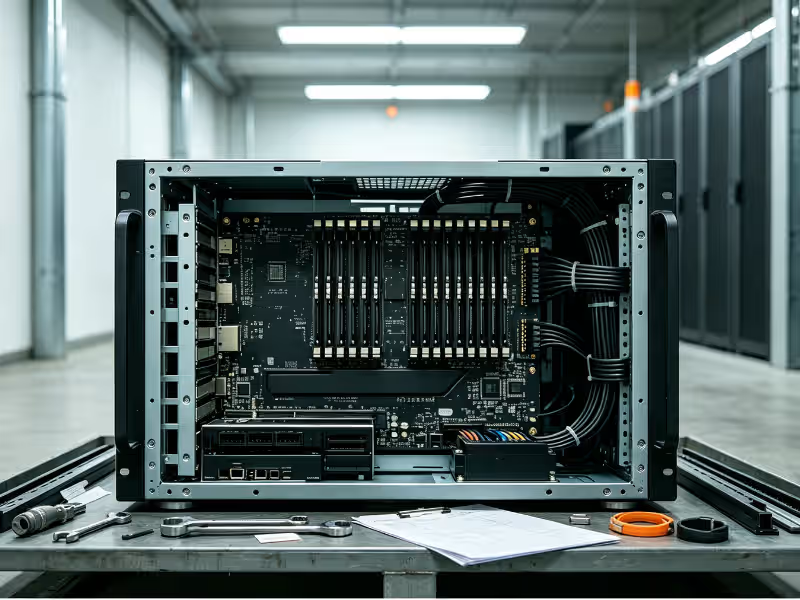
The Supermicro NVIDIA HGX B200 is a family of rack-mount GPU servers built around NVIDIA’s HGX B200 baseboard—a board that connects eight Blackwell B200 GPUs through fifth-generation NVLink and NVSwitch into one tightly coupled compute unit. The workloads these systems are built for—large-scale model training, domain fine-tuning, and high-throughput inference—have outgrown what single-GPU or PCIe-class servers can deliver.
The teams evaluating this hardware are rarely shopping for “a server.” They are AI platform engineers, infrastructure leads, data center planners, and system integrators making a multi-year commitment to a power envelope, a cooling strategy, a network fabric, and a software stack. What Supermicro brings is a range of chassis, cooling, and host-CPU combinations built around that same NVIDIA baseboard—and the option to deliver it as a fully integrated, pre-validated rack.
This guide covers what the platform actually is, how the architecture affects both performance and facility planning, which workloads genuinely justify it, where deployments tend to stall, and how to run a disciplined evaluation before committing.
What Is the Supermicro NVIDIA HGX B200 Platform?
The name has two layers, and separating them matters in procurement. NVIDIA provides the HGX B200 baseboard—eight B200 GPUs with roughly 1.4 TB of combined HBM3e memory, joined by NVSwitch into a single NVLink domain. Supermicro wraps a full server around it: chassis, dual host CPUs, system memory, NVMe storage, network adapters, power, cooling, and management firmware. Two OEMs delivering the same NVIDIA board can differ substantially in thermal headroom, serviceability, lead time, and how much integration complexity falls on your team.
Supermicro offers the HGX B200 in two physical forms. Air-cooled systems sit in roughly a 10U chassis—you need the height to push enough airflow across eight GPUs drawing close to 1,000W each. Direct liquid-cooled (DLC) systems drop to around 4U, since cold plates handle most of the heat at the chip. Both are available with Intel Xeon 6 or AMD EPYC host processors. In a standard rack, that works out to roughly four air-cooled systems (32 GPUs) or eight liquid-cooled systems (64 GPUs). The cooling decision can double GPU density per rack, which matters significantly once you are planning 50 or more nodes.
Here is where B200 sits relative to the current GPU platform lineup:
|
Platform |
GPU generation |
NVLink domain |
Typical cooling |
Best-fit scale |
|---|---|---|---|---|
|
HGX H200 |
Hopper |
8 GPUs |
Air or liquid |
Existing Hopper clusters, cost-sensitive inference |
|
HGX B200 |
Blackwell |
8 GPUs |
Air or liquid |
Enterprise training, fine-tuning, large-model inference |
|
HGX B300 |
Blackwell Ultra |
8 GPUs |
Primarily liquid |
Memory-heavy reasoning and inference at higher power |
|
GB200 NVL72 |
Blackwell + Grace |
72 GPUs |
Liquid only |
Frontier-scale training, very large MoE serving |
HGX B200 is the standard-rack Blackwell tier. The absence of rack-scale complexity is a genuine advantage for most enterprise deployments, not a limitation.
Why HGX B200 Matters for Enterprise AI Infrastructure
The case for B200 is not about raw FLOPS. It is about four architectural changes that move specific cost and capacity variables—and understanding which of those changes applies to your workload is what the buying decision turns on.
Larger Models Per Node
Each B200 carries about 180 GB of HBM3e, giving an 8-GPU node roughly 1.44 TB of GPU memory—more than twice the 640 GB on an HGX H100 node. A 405B-parameter model in BF16 needs around 810 GB for weights alone. It does not fit on a single H100 node. It fits on a single B200 node, with memory remaining for KV cache. When a full model replica fits in one node, you eliminate cross-node traffic from every forward pass, simplify parallelism, and reduce node count per replica. This matters most when your target models fall in the 70B–700B range, which is where most serious enterprise LLM programs sit today.
Lower-Precision Inference Economics
Blackwell’s second-generation Transformer Engine adds native FP4 support alongside FP8. Halving bits per weight roughly halves memory consumption and bandwidth per token—which translates to more concurrent users or larger batches from the same hardware. The constraint is accuracy. Some models quantize to 4-bit cleanly; others lose meaningful quality on reasoning tasks or domain-specific outputs. FP4 is worth pursuing in high-volume serving environments where cost per token is a real budget pressure—but only after validating output quality against your own evaluation benchmarks.
Faster Intra-Node Scaling
Fifth-generation NVLink delivers about 1.8 TB/s of bandwidth between GPUs—double Hopper’s figure. In tensor and expert parallelism, GPUs exchange intermediate data at every layer. When the interconnect is the bottleneck, GPUs wait. Doubling bandwidth directly reduces those stalls. This pays off most in MoE architectures, long-context inference, and large-batch training where communication overhead sets the ceiling rather than raw compute.
Standardized Building Block
The HGX form factor has stayed consistent across vendors and GPU generations. Rack layouts, power distribution designs, and operational runbooks that work for one HGX generation carry forward with manageable changes. CUDA, NCCL, and NVIDIA AI Enterprise continue across generations, and you can source from multiple OEMs without rebuilding your platform layer. For enterprises planning a second or third GPU refresh cycle, this continuity compresses the time and effort each cycle demands. Proprietary rack-scale systems cannot offer the same.
Inside the Architecture: How a Supermicro HGX B200 System Is Built
An HGX B200 system is best understood as five interacting layers. The bottleneck shifts between them depending on the workload. The right question for each layer is not what spec it hits, but where it limits you.
Blackwell B200 GPUs and HBM3e Memory
Each B200 is a dual-die chip connected by a 10 TB/s chip-to-chip link that software treats as a single GPU. Each GPU pairs roughly 180 GB of HBM3e with about 8 TB/s of memory bandwidth. The Transformer Engine adds FP4 and FP6 alongside FP8 and BF16. Memory capacity is the hard ceiling—it determines the largest model, context length, and batch size a node can hold before computation spills to another node. Memory bandwidth sets token generation speed during inference. For most LLM serving, bandwidth becomes the binding constraint before compute does.
NVLink and NVSwitch Fabric
NVSwitch chips on the baseboard create an all-to-all connection among all eight GPUs, with roughly 14.4 TB/s of aggregate node-level bandwidth. For most enterprise model sizes, this 8-GPU NVLink domain is sufficient—tensor parallelism does not scale efficiently beyond eight ways in practice. The limitation appears with very large MoE models whose expert layers span more than eight GPUs, forcing traffic onto the much slower external network. That specific scenario is where a 72-GPU rack-scale NVLink domain earns its added cost and operational overhead.
Host CPUs, System Memory, and Storage I/O
Supermicro pairs the HGX baseboard with dual-socket Intel Xeon 6 or AMD EPYC processors, multiple terabytes of DDR5, and PCIe Gen5 connections to NVMe drives and network adapters. The host rarely bottlenecks steady-state training. Where it causes problems is in data loading—where slow preprocessing or tokenization starves GPUs waiting for the next batch—and checkpointing, where writing large model states to undersized local NVMe or a slow storage network stalls training. Size host memory and local NVMe around your checkpoint size and data pipeline, not around what looks respectable on a spec sheet.
Networking: Compute Fabric and Front-End
A multi-node B200 cluster runs two separate networks, and conflating them in design is a common planning error. The east-west compute fabric typically assigns one 400G-class adapter per GPU—ConnectX-7 or the 800G ConnectX-8—running InfiniBand or Spectrum-X Ethernet. This carries gradient and activation traffic between nodes and sets the multi-node scaling ceiling. The north-south front-end, often handled by BlueField-3 DPUs, carries storage I/O, user requests, and management traffic. DPUs can also enforce tenant network isolation without loading the host CPU. The practical implication is direct: excellent GPUs behind an oversubscribed fabric will train as though the cluster were much smaller than it is.
Power and Cooling: Air vs. Direct Liquid Cooling
Each B200 GPU draws up to roughly 1,000W. With CPUs, memory, NICs, and fans, an 8-GPU system runs around 14 kW at full load. Air-cooled systems manage this through tall chassis and high-capacity fans—fan power itself takes a meaningful share of total draw, and rack density stays near four systems. Direct-to-chip liquid cooling moves most heat into a water loop through cold plates and coolant distribution units, enabling 4U systems at up to eight per rack and total rack loads exceeding 100 kW.
The choice is a genuine engineering trade-off with no universally correct answer. Liquid cooling buys density and power efficiency; it costs facility work that most enterprise data center teams have not done before. Teams comparing chassis options across both cooling approaches will find the selection of GPU server cases meaningful at this stage—the range of 4U to 10U configurations reflects exactly this trade-off between footprint and thermal headroom.
Workload Fit: Where HGX B200 Delivers and Where It Doesn’t
The right question is not which industry a customer is in. It is which workloads they are actually running. The same energy company might need B200 for one program and a smaller GPU tier for another.
Foundation Model Training and Large-Scale Fine-Tuning
Clusters of B200 nodes suit continued pretraining of open models on proprietary data, full-parameter fine-tuning above roughly 70B parameters, and training mid-size foundation models from scratch. The sizing question comes down to total training tokens and target wall-clock time—those two numbers define GPU-hours, which define node count. Consider an energy company adapting a 70B open model to decades of internal engineering reports, drilling logs, and safety documentation. On a 64-GPU B200 cluster, that work takes days or weeks rather than months, runs entirely within the company’s own infrastructure, and requires no proprietary data to leave the building.
High-Throughput LLM and Multimodal Inference
For inference, B200 often makes a stronger case than for training. High per-GPU memory accommodates large models and long KV caches; FP4 and FP8 throughput raises tokens per second per GPU substantially. Sizing correctly requires three inputs: peak tokens per second, latency targets (time-to-first-token and per-token latency), and expected concurrent sessions. Consider a manufacturer operating an internal engineering assistant for 20,000 employees. A single B200 node can host a 400B-class model in FP8 with enough context window for detailed technical documentation. Teams that size GPU clusters by node count rather than token throughput targets consistently overpay or underspec.
Industrial AI, Simulation, and Digital Twins
B200 handles training of vision and vision-language models for automated inspection, physics-informed neural network training, and the AI and rendering workloads of digital twin platforms built on NVIDIA Omniverse. An automotive supplier that trains a weld inspection model on millions of labeled images and retrains weekly as new defect types emerge is a natural fit. One important caveat applies to classical simulation: if your CFD or structural analysis solvers depend heavily on FP64 throughput, verify B200’s double-precision performance against your solver’s actual requirements. Blackwell’s architectural improvements are concentrated in lower precision. For teams running mixed AI and HPC workloads, HGX B200 is the stronger Blackwell-generation choice over B300, which reduces FP64 performance significantly.
Private AI Cloud and Multi-Tenant GPU Services
Enterprises are increasingly consolidating shared GPU capacity across business units rather than provisioning isolated clusters per team. B200 supports Multi-Instance GPU (MIG) partitioning, which allows a single GPU to be subdivided into isolated slices for smaller jobs. BlueField DPUs enforce network-level tenant isolation without burdening the host CPU. The critical variable here is utilization: a shared cluster sustaining 60–70% utilization makes on-premises ownership economically defensible in a way that a dedicated, underutilized cluster typically cannot.
B200 is the wrong choice in three clear situations. For small-model inference—7B to 13B models, embeddings—L40S or RTX PRO-class hardware costs substantially less per useful token. For frontier-scale MoE training or serving that needs more than eight GPUs in a single NVLink domain, GB200 NVL72 is the appropriate tier. And for any site that cannot support the power and cooling demands described below, no amount of GPU performance will compensate.
Deployment and Operational Challenges
Most B200 deployment delays originate in the facility and integration process—not in the servers themselves. The five issues below appear repeatedly across enterprise deployments, and all of them are easier to resolve before you sign a purchase order than after one arrives.
Power density. Most enterprise racks are provisioned for 10–20 kW. Four air-cooled B200 systems draw roughly 55–60 kW; eight liquid-cooled systems exceed 100 kW. Few existing data center halls can supply that to a single rack position without new busways, PDUs, and upstream electrical upgrades. Before ordering: confirm available kW per rack position, PDU and breaker ratings, and whether your power redundancy model holds at the new load.
Cooling and facility readiness. Liquid cooling requires a facility water loop or in-row CDUs, leak detection, an approved coolant type, and operations staff comfortable working with wet systems. Air cooling sidesteps plumbing but caps density and raises hot-aisle temperatures and fan power. Before ordering: verify facility water supply temperature and flow rates, floor loading capacity for heavier liquid-cooled racks, and CDU redundancy. If your team is evaluating the transition to liquid-cooled infrastructure for the first time, reviewing the specifications of a purpose-built liquid-cooled GPU server case gives a useful reference point for what that cooling integration actually requires.
Network fabric design. Multi-node training requires a non-blocking or low-oversubscription fabric. A rail-optimized topology—each GPU’s NIC connected to its own leaf switch—is standard practice. Switch counts, cable runs, and optics quantities scale quickly, and transceiver lead times frequently exceed server lead times. Before ordering: finalize your topology, confirm transceiver and cable availability, and calculate storage bandwidth per GPU for data loading and checkpointing.
Software stack and operations. Driver versions, CUDA, NCCL, container images, and framework builds must be consistent across every node. A single version mismatch can silently reduce training throughput with no obvious error. Teams also need a job scheduler (Slurm or Kubernetes), GPU health monitoring, and a firmware lifecycle process. Before ordering: map in-house skills against the vendor support scope, and determine whether NVIDIA AI Enterprise licensing is included or needs to be budgeted separately.
Supply, lead time, and integration. GPU system allocation still constrains delivery timing. A complete cluster also depends on switches, optics, storage, and racks landing in the right sequence. Rack-level integration—where systems are cabled, burned in, and validated before shipment—moves most debugging out of your data center. Before ordering: get a committed delivery schedule, confirm the scope of factory testing, and define written on-site acceptance criteria tied to payment milestones.
How to Evaluate and Procure a Supermicro HGX B200 Deployment
Work through these steps in order. Each one produces a concrete output that feeds the next. Skipping ahead is the most common reason clusters end up oversized, underpowered, or stalled at acceptance testing.
- Define the workload profile. List the models you will run, their parameter counts, target precisions, and your training-to-inference ratio. Add throughput and latency requirements, data residency rules, and compliance constraints. Specificity matters: “serve a 405B model at FP8 for 2,000 concurrent users with time-to-first-token under two seconds” is a requirement. “Run large language models” is not. Output: a workload requirement sheet that every downstream decision can trace back to.
- Size the cluster. Convert requirements into GPU memory per model replica, replica count needed to hit throughput targets, and the resulting GPU and node totals. Add network bandwidth for multi-node traffic and storage capacity for datasets and checkpoints. Build in growth headroom and failure tolerance equivalent to at least one full node. Output: a draft bill of materials across compute, fabric, and storage.
- Choose the configuration. Select air or liquid cooling, Intel or AMD hosts, InfiniBand or Ethernet fabric, and whether DPUs are justified. Anchor each decision to a specific constraint. Liquid cooling makes sense if facility water is available or rack density is a binding limit. InfiniBand makes sense if multi-node training efficiency is the top priority. Ethernet makes sense if your operations team already runs it reliably at scale and training job sizes do not push against fabric limits. Output: a target system and rack configuration.
- Model total cost of ownership. Use realistic utilization rates, not nameplate power. Include hardware capex, cooling overhead via PUE, software licensing, support contracts, floor space, staff time, and the intended depreciation period. Compare the result against reserved cloud GPU capacity at your actual expected utilization. Cloud is typically the better answer below roughly 40% sustained utilization; on-premises ownership typically wins above 60%. Output: a three- to five-year TCO model that finance and procurement can review independently.
- Run a proof of concept and define acceptance criteria in advance. Benchmark the target configuration against your actual models—not MLPerf reference numbers. Write acceptance tests before anything ships: multi-day burn-in under production workloads, NCCL all-reduce bandwidth across nodes, thermal stability at sustained load, and node failover behavior. Confirm in writing what the vendor validates at the factory versus what gets validated on-site. Output: signed acceptance criteria linked to payment milestones.
|
Step |
Key question |
Output |
|---|---|---|
|
Workload profile |
What must this cluster run, at what speed? |
Requirement sheet |
|
Sizing |
How many GPUs, nodes, and how much network bandwidth? |
Draft bill of materials |
|
Configuration |
Which cooling, host, and fabric suit our facility? |
Target configuration |
|
TCO |
Does ownership beat cloud at our utilization level? |
3–5 year cost model |
|
PoC and acceptance |
Does it perform on our models, and can we prove it? |
Acceptance criteria |
Making the HGX B200 Decision
HGX B200 is the right platform when four conditions hold: your models need more than a terabyte of GPU memory per node or benefit meaningfully from FP4/FP8 serving, your parallelism fits within an 8-GPU NVLink domain, your utilization justifies on-premises ownership, and your facility can support roughly 60–120 kW per rack. If any one of those conditions does not hold, a different tier—smaller GPU servers, a rack-scale system, or cloud GPU capacity—will serve you better.
Newer options are available. Blackwell Ultra B300 adds memory at a higher TDP. Rack-scale GB200 and GB300 systems extend NVLink domains to 72 GPUs or more. Even so, HGX B200 regularly wins on availability, pricing within its tier, FP64 throughput for mixed AI and HPC workloads, and straightforward facility compatibility. The HGX standardization also makes the next hardware refresh considerably less painful—treat it as a three- to five-year platform asset with that lifecycle in mind.
The most productive next step does not start with a vendor call. Document your workload profile, then audit your facility’s available power and cooling capacity. With both of those in hand, the conversation about chassis configuration, cooling approach, and integration scope becomes an engineering discussion grounded in real constraints—not a sales process shaped around whatever you are prepared to hear.
Frequently Asked Questions
Is HGX B200 a good fit for mixed AI and HPC workloads, or does it only make sense for LLM training and inference? B200 handles mixed workloads reasonably well, with one important condition. Its strength is in low-precision AI compute—FP4, FP8, and BF16—where the second-generation Transformer Engine delivers substantial throughput gains. For classical HPC solvers that depend on FP64, B200’s double-precision performance does not exceed Hopper’s, and Blackwell Ultra (B300) cuts FP64 further still. If your workload splits between LLM training and, say, physics simulation or CFD, B200 is the stronger Blackwell-generation choice over B300. If FP64 is your primary bottleneck rather than AI compute, a different platform tier is worth modeling before you commit.
What is the difference between HGX B200 and GB200 NVL72, and how do I know which one my workload needs? HGX B200 connects eight Blackwell GPUs inside a standard rack-mount server chassis, with x86 host CPUs and a facility footprint most enterprise data centers can support. GB200 NVL72 scales that NVLink domain to 72 GPUs across a full liquid-cooled rack with Grace CPUs tightly integrated. For most enterprise model sizes—including models in the 70B–400B range—an 8-GPU NVLink domain is sufficient, and the added complexity of NVL72 does not pay off. NVL72 earns its cost when you are training or serving very large MoE models where experts must communicate across more than eight GPUs simultaneously, or when you are running frontier-scale pretraining that genuinely benefits from a 72-way NVLink domain. If you are not certain your workload needs it, it probably does not.
When does it make more sense to use cloud GPUs instead of deploying HGX B200 on-premises? The crossover point is utilization. At sustained GPU utilization below roughly 40%, reserved cloud capacity usually costs less when you account for hardware depreciation, power, cooling, and staff time. Above 60%, on-premises ownership typically wins over a three- to five-year horizon. If your workloads are bursty, early-stage, or tied to models that change frequently, cloud gives you flexibility you will actually use. If you are running continuous training or serving high-concurrency inference around the clock, that utilization profile makes ownership defensible. Build the TCO comparison before you commit to either path.
How much power does a Supermicro HGX B200 server draw, and what does that mean for my data center? Plan for roughly 14 kW per 8-GPU system at full load, with each B200 GPU drawing up to about 1,000W. A rack of four air-cooled systems lands near 55–60 kW; eight liquid-cooled systems exceed 100 kW. Most legacy enterprise racks are provisioned for 10–20 kW, so new busways, PDUs, and upstream electrical work are almost always part of the project. Confirm available kW per rack position and your redundancy model before you finalize any configuration.
