

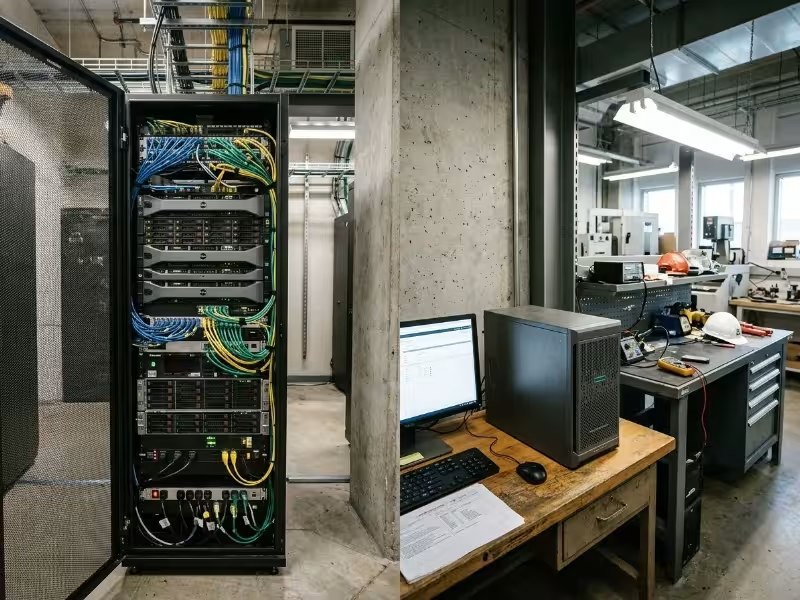
The difference between a rack and tower server comes down to how each is built to be deployed. A rack server mounts horizontally in a standard 19-inch cabinet and shares power, cooling, and cabling with the other equipment around it. A tower server stands alone in an upright chassis and needs no rack infrastructure at all.
That physical difference drives decisions you will live with for five years or more. It affects how much floor space you give up in a control room, how hot a cabinet runs, how long a technician spends on a failed drive, and what it costs to add capacity when a new production line comes online. This guide explains both form factors, compares them on the factors that matter most in enterprise and industrial settings, and gives you a decision framework you can defend in a procurement review.
Rack vs. Tower Server: The Short Answer
Rack servers belong in multi-server, density-driven, centrally managed environments where infrastructure already exists or is being planned. Tower servers belong in standalone, low-count deployments where there is no rack, no dedicated cooling, and people work nearby. Neither is universally “better.” Each fits a different site profile.
|
Attribute |
Rack Server |
Tower Server |
|---|---|---|
|
Form factor |
Horizontal, 19-inch rack-mounted |
Upright, freestanding chassis |
|
Typical deployment |
Server rooms, data centers, edge cabinets |
Plant offices, labs, sites without racks |
|
Density |
High; many servers per footprint |
Low; one server per footprint |
|
Scalability |
Scale out by adding units |
Scale up inside one chassis |
|
Cooling model |
Front-to-back airflow, room or cabinet cooling |
Self-contained, larger internal airflow |
|
Noise |
High; small, fast fans |
Lower; larger, slower fans |
|
Remote management |
Standard on enterprise models |
Available on enterprise models; verify per model |
|
Redundancy options |
Hot-swap PSUs, fans, drives; A/B power feeds |
Redundant PSUs and RAID on many models |
|
Upfront infrastructure cost |
Higher (rack, PDUs, rails, cooling) |
Lower (power outlet and floor space only) |
|
Best fit |
Data center, colocation, control room cabinet, edge enclosure |
Branch site, plant office, lab, remote site with one or two servers |
The sections below go deeper on each row, then turn the comparison into a practical decision checklist.
What Is a Rack Server?
A rack server is built to mount in a standard 19-inch equipment rack. Its height is measured in rack units, where 1U equals 1.75 inches (44.45 mm). Common heights are 1U, 2U, and 4U. A 1U server maximizes density, while a 2U or 4U server trades some of that density for more drive bays, more expansion slots, and better thermal headroom.
Rack servers share a consistent set of design traits shaped by their shared-enclosure environment:
- Front-to-back airflow that aligns with hot-aisle/cold-aisle layouts and cabinet cooling systems
- Front-accessible hot-swap drives so storage can be replaced without powering down or removing the server
- Rear cabling and slide-out rails that keep power and network connections organized and accessible
- A dedicated baseboard management controller (BMC) supporting IPMI or Redfish for out-of-band management
Most enterprise models ship with hot-swap redundant power supplies, which makes A/B power feeds straightforward to wire.
Two variants matter especially for industrial deployments. Short-depth rackmount servers fit the shallow wall-mount and network cabinets common in plant control rooms and telecom rooms, where a standard-depth chassis will not allow the cabinet door to close. Multi-node chassis fit two or four independent server nodes, each with its own CPU, memory, and storage, inside a single 2U enclosure — multiplying compute density without multiplying footprint. If you are evaluating rackmount cases or server chassis for a dense deployment, understanding these variants helps narrow the right configuration before the first quote.
What Is a Tower Server?
A tower server is a standalone server built into an upright, pedestal-style chassis. It needs no rack, cabinet, or rails. You set it on the floor or a shelf, connect power and network, and it runs.
The tower chassis provides more internal volume. That pays off in three concrete ways: more drive bays and PCIe expansion slots per unit, clearance for full-height and full-length cards, and room for larger fans running at lower speeds. Slower fans mean less noise, which is why towers work in occupied offices and labs where rack servers would be disruptive.
One point worth stating directly: “tower” describes a chassis form factor, not a hardware class. Enterprise towers can include dual CPU sockets, ECC memory, hardware RAID, redundant power supplies, and a BMC with full remote management. Treating tower servers as small-business hardware is a mistake. In a plant office, quality lab, or remote facility without rack infrastructure, an enterprise tower is often the most practical and reliable option available.
Why Both Form Factors Still Matter in Enterprise IT
Rack servers dominate wherever server counts are high and floor space carries a cost. Virtualization, centralized data centers, and colocation all reward density and standardization. Once a site runs more than a handful of servers, consolidating them into racks with shared power, networking, and cooling becomes the operationally sound choice.
Towers persist because not every site looks like a data center. Many industrial operations run one to three servers per location: a historian at a pumping station, a file and MES server at a satellite plant, a lab system next to test equipment. These sites often lack a conditioned server room and need quiet operation near staff. As operations become more geographically distributed, demand for self-contained, easy-to-deploy servers continues alongside the broader shift toward rack infrastructure.
Rack vs. Tower Server: Key Differences Compared
Five factors drive most rack-versus-tower decisions in enterprise and industrial projects: density, scalability, thermal management, serviceability, and lifecycle cost. Each is explained once below, with the site conditions under which it tips the decision.
Density and Space Utilization
Rack servers deliver substantially more compute per square foot. A standard 42U rack offers 73.5 inches of usable mounting height on a footprint of roughly 24 by 42 inches. After reserving space for top-of-rack switches, patch panels, PDUs, and a UPS, that rack can still accommodate dozens of 1U or 2U servers. Multi-node 2U chassis push density further, fitting four independent nodes where a single 2U server would otherwise sit.
Towers consume floor or shelf space for every unit and do nothing to consolidate cabling or power distribution. With a single tower, that tradeoff is acceptable. With four or five, you get scattered power strips, loose network runs, and a corner of the room that is difficult to secure and harder to service. For most sites, that is the practical tipping point: beyond three or four servers, dispersed towers waste space and add operational risk.
One caveat: density only pays off when the site can support it. A fully loaded rack concentrates heat and electrical load. Before committing to a dense configuration, verify the available circuit capacity per rack and the cooling capacity of the room or cabinet.
Scalability and Expansion Paths
Towers scale up well. The larger chassis provides more internal drive bays, more PCIe slots, and clearance for full-height cards such as GPUs, capture cards, or industrial I/O hardware. If growth means a larger single machine, a tower absorbs that expansion without requiring new infrastructure.
Rack servers scale out well. You add identical units, connect them to shared top-of-rack switching, and extend a virtualization cluster or storage pool one rack unit at a time. Configuration, spare parts, and management stay consistent across nodes as the deployment grows.
|
Growth Pattern |
Better Fit |
Why |
|---|---|---|
|
Scale up (more capacity in one server) |
Tower |
More internal bays, slots, and card clearance |
|
Scale out (more servers over time) |
Rack |
Shared power, networking, and standardized units |
The planning implication is straightforward. If your 3–5 year roadmap includes adding servers at the same site — additional production lines feeding a historian, edge analytics expanding across cells — plan for rack infrastructure from day one. Migrating from dispersed towers to a rack later consistently costs more than starting there.
Thermal Management and Airflow
Rack servers use small, high-RPM fans that push air front to back through a tightly packed chassis. This works well when the environment supplies cool air to the front intake and removes hot air from the rear, through hot-aisle/cold-aisle layouts, cabinet cooling units, or in-row cooling. Without that support, a closed rack recirculates its own exhaust heat and fails. The same high-RPM fans also make rack servers loud enough to rule out placement near workstations or occupied spaces.
Towers use larger, slower fans inside a roomier chassis. They run quieter and tolerate rooms without dedicated cooling better, provided ambient temperature stays within the server’s rated operating range. That makes them practical in plant offices and labs where staff share the space.
Industrial sites complicate the thermal picture for both options. Most enterprise servers are rated for inlet air of roughly 10–35°C (50–95°F). Factory heat, airborne dust, oil mist, and sealed enclosures can push real conditions outside that envelope. Before settling on a form factor, check:
- The server’s rated operating temperature range and any extended-temperature options
- Whether the enclosure provides filtered intake or closed-loop cooling
- The enclosure’s ingress protection rating against dust and moisture
- How much heat the cabinet can reject with its doors closed
Serviceability, Remote Management, and Uptime
Rack servers are engineered for fast service. Slide-out rails give technicians full top-cover access without unplugging the server. Front-mounted hot-swap drives, hot-swap power supplies, and hot-swap fans allow replacement of the most common failure points while the system stays online. Tool-less internal access shortens repair windows further.
Remote management is most critical at unstaffed sites. A BMC supporting IPMI or Redfish enables out-of-band power control, remote console access, firmware updates, and hardware health alerts — even when the operating system is unresponsive. This capability is standard on enterprise rack servers. Enterprise towers can include it too, but not every tower model does. Treat out-of-band management as an explicit line item on every quote, not an assumed feature.
Uptime depends on redundancy, and rack infrastructure makes redundancy easier to implement. Redundant power supplies can connect to separate PDUs fed from independent circuits, with UPS units sharing the same rack. Pair that with RAID and dual network interfaces, and a single component failure no longer forces the workload offline.
Before approving any server quote, confirm these uptime-critical features:
- Redundant, hot-swap power supplies
- Hot-swap drive bays with hardware or software RAID
- Dual network interfaces
- BMC with IPMI or Redfish support
- Hot-swap fans or a clearly documented fan replacement procedure
On a production line, an hour of unplanned downtime typically costs more than the server itself. At a remote site hours from the nearest technician, out-of-band management and hardware redundancy are the difference between a five-minute remote fix and a lost shift.
Lifecycle Cost and Total Cost of Ownership
Towers cost less to start. A single tower requires a power outlet, a network drop, and floor space. With no rack, rails, PDUs, or cabinet cooling to provision, a one-server deployment has the lowest upfront cost of any configuration.
Racks cost less to operate at scale. Shared power distribution, shared cooling, consolidated cabling, and faster service lower the effective cost per server as the count grows. Shorter repair windows reduce downtime exposure, which is frequently the largest cost component in an industrial setting.
|
Cost Component |
Rack |
Tower |
|---|---|---|
|
Server hardware |
Comparable for equivalent specs |
Comparable for equivalent specs |
|
Infrastructure |
Rack, rails, PDUs, cabinet cooling |
Minimal |
|
Power and cooling at scale |
Lower per server |
Higher per server |
|
Maintenance labor |
Lower; faster, standardized access |
Higher at scale; units are dispersed |
|
Downtime exposure |
Lower with redundancy and remote access |
Varies by model and feature set |
|
Expansion |
Add units within existing rack |
Requires additional floor space per unit |
To find the break-even point, estimate how many servers the site will carry across its full operational lifecycle, then compare total cost rather than unit price. Industrial hardware typically stays in service longer than office IT equipment, so vendor support windows and long-term spare parts availability should factor into that comparison.
Rack vs. Tower Servers in Industrial and Edge Environments
Industrial sites impose constraints that conventional office IT planning ignores: elevated ambient heat, airborne particulates, vibration, shallow cabinet depths, and no on-site IT staff. These physical realities often determine the form factor before any workload or performance requirement enters the conversation. Here is how the choice plays out across five common environments.
- Plant control room: Control rooms typically have existing 19-inch cabinets shared with PLCs, managed switches, and HMI systems. A short-depth rackmount server slides into that cabinet without consuming new floor space and keeps cabling consistent with surrounding OT gear. Always measure usable cabinet depth before ordering — standard-depth servers frequently prevent the cabinet door from closing.
- Factory floor edge node: Servers installed near production equipment face heat, particulates, and mechanical vibration. A standard tower in open air is usually the wrong call; it draws dust directly through its cooling path. Use a short-depth rackmount or ruggedized system inside a sealed or positively pressured, filtered enclosure, and verify the extended operating temperature specification explicitly. For wall-mount or compact edge deployments, wallmount chassis can be a practical fit in tight spaces where floor or rack space simply isn’t available.
- Remote site or substation: Unstaffed sites require full out-of-band management capability, redundant power, and hardware rated to survive electrical transients and wide temperature swings. Rackmount servers integrate cleanly with the equipment racks already in place at most substations. For utility environments, verify that the hardware meets relevant substation hardening standards.
- Plant office or lab without a server room: When one or two servers must sit near staff in a space without a rack or dedicated cooling, an enterprise tower is the practical answer. It operates quietly, requires no additional infrastructure, and can still carry redundant power supplies and remote management if specified.
- Central or colocation data center: Space is billed by the rack unit and the room cooling is designed for front-to-back airflow. Standard-depth or multi-node rack servers are the only logical choice; towers waste paid footprint and disrupt the airflow design.
The pattern across all five scenarios is consistent: match the chassis to the physical site first, then optimize CPU, memory, and storage. A capable server in the wrong enclosure will fail faster than a modest one in the right one.
How to Choose Between a Rack and Tower Server
The right form factor follows from the site — not the workload alone. Work through these five questions in order, because each one narrows the decision before the next.
- How many servers will this site run within 3–5 years? Three or more points strongly toward rack infrastructure. One or two keeps tower as a viable option.
- Is rack infrastructure already in place? Existing cabinets, PDUs, and cooling make rack the lower-cost path even at low server counts.
- What are the physical conditions? Document ambient temperature range, dust and particulate exposure, noise limits, and available cabinet depth.
- Will staff be on site? If not, out-of-band remote management and hot-swap redundancy are not optional features — they are requirements.
- What does downtime cost for the hosted workloads? High downtime cost justifies redundant power, A/B feed wiring, and fast-service chassis design across the entire server selection.
Choose a rack server if:
- The site will run several servers or has a credible growth plan
- Cabinets, PDUs, or a dedicated server room already exist
- The site operates unattended or has limited on-site technical staff
- Downtime affects production output, process continuity, or safety systems
Choose a tower server if:
- The site runs one or two servers with no near-term growth planned
- There is no rack infrastructure or dedicated cooling to leverage
- The server must operate quietly in a space occupied by staff
- The workload needs internal expansion — more drives, more cards — rather than additional nodes
Can a Tower Server Be Rack-Mounted?
Some enterprise tower models support rack conversion. Vendors offer conversion kits that orient the tower horizontally and mount it on rails, typically occupying 4U–5U of rack space. Not every model supports this, so confirm with the vendor’s documentation before building your design around it.
The trade-off is real: a converted tower takes more rack space than a purpose-built rack server of comparable capability, and its internal airflow may not match the front-to-back direction the cabinet expects. Use conversion as a migration path for a site starting with one server that later moves into a cabinet — not as a density strategy.
Rack vs. Tower Server FAQs
Is a rack server more powerful than a tower server?
Not inherently. Both form factors can carry equivalent CPUs, memory, and storage. Rack servers win on density and horizontal scale-out. Towers often provide more internal expansion capacity within a single chassis.
Are tower servers quieter than rack servers?
Generally, yes. Towers use larger, slower fans in a roomier enclosure. Rack servers depend on small, high-RPM fans that are noticeably louder and unsuitable for placement near occupied workstations.
What is the difference between a 1U and 2U rack server?
A 1U server is 1.75 inches tall; a 2U server is 3.5 inches. The 1U model prioritizes density. The 2U model adds drive bays, expansion slots, and thermal headroom at the cost of one additional rack unit.
Which is better for a small industrial site?
It depends primarily on what infrastructure the site already has. A site with an existing control cabinet should use a short-depth rackmount server. A site with only office space and one or two servers, and no plans to grow, is a reasonable fit for an enterprise tower.
Do I need a dedicated server room for a rack server?
No. Wall-mount enclosures and enclosed network cabinets with adequate cooling work for small deployments. The critical requirement is that the enclosure can supply cool intake air and exhaust hot air effectively — without that, the server will throttle or fail regardless of form factor.
Matching the Chassis to the Site
The site profile decides the form factor. Server count, existing infrastructure, environmental conditions, staffing model, and downtime cost should drive the choice — not purchasing habit or headline unit price. A rack server in a well-planned cabinet and an enterprise tower in a quiet plant office are both right answers when each matches its site.
If your deployment involves shallow control cabinets, factory-floor heat and particulates, or unstaffed remote locations, a configuration review before procurement saves considerable cost and risk downstream. Share your site conditions, server count projections, and environmental constraints with our engineering team, and we will recommend a chassis configuration built for that environment with long-term lifecycle support behind it.
