


Rack servers are a great investment for any organization, serving as the computational backbone that powers applications, storage, and critical business data. Given their central role in IT infrastructure, it is worth learning some basic maintenance tips to help you protect that investment over the long term. Neglecting these systems can lead to performance degradation, unexpected downtime, and a significantly shortened hardware lifespan.
Luckily, we’ve got you covered here with our guide to rack server maintenance. By implementing a routine care schedule, you ensure that your hardware operates efficiently and remains reliable. This guide will walk you through the essential components that require attention, from the power systems that keep them running to the cooling solutions that prevent them from melting down. Understanding these maintenance requirements helps you make informed decisions about resource allocation and protects your business from the high costs associated with emergency repairs and data loss.
Maintenance Tips
Power Supply and Battery
Taking care of your power infrastructure will maximize your servers’ lifespan and keep your IT environment running smoothly for longer. But what causes power systems to fail in the first place?
Most rack environments rely on an Uninterruptible Power Supply (UPS), which utilizes batteries that naturally deteriorate over time due to the chemical processes involved in charging and discharging. Temperature can also significantly impact battery life, both ambient room temperature and heat generated by the equipment itself.
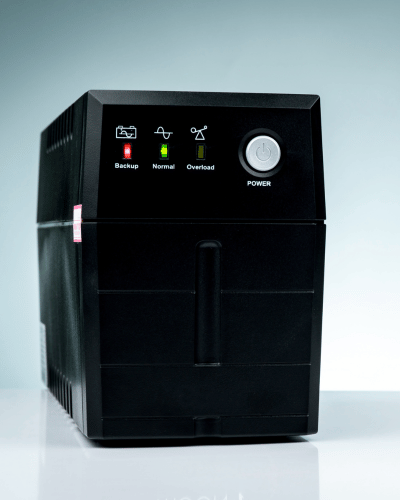
There are a couple of things you can do to help overcome these issues. First, regularly test your UPS batteries and power distribution units (PDUs). Try to avoid overloading any single circuit; balancing the electrical load across your rack is crucial to prevent tripping breakers and stressing the power supplies. Monitor the load levels and ensure you have redundancy (A and B power feeds) where possible.
Second, try to avoid storing or using your backup batteries in areas exposed to extreme heat. High temperatures accelerate the degradation of battery chemicals, leading to premature failure. The same is true of the server power supply units (PSUs) themselves—ensure their intake vents are clear of dust to prevent overheating, which might cause you to see a drop in efficiency or unexpected shutdowns.
Always ensure you use the power cables supplied with your server, or high-quality, gauge-appropriate replacements, to prevent overheating and potential fire hazards. When managing power cables, avoid routing them near sharp edges or in areas where they could be pinched by rack doors or rails. Lastly, never ignore a warning light on a PSU or UPS. If a battery indicator shows a fault, replace it immediately to prevent a total power loss during a utility outage.
Cooling and Airflow
Your cooling systems will be doing a lot of hard work during your servers’ operation, and you can help them by monitoring airflow and ambient temperatures.
Let’s start with airflow paths. Blocked vents are at greater risk of causing thermal throttling, have a weaker ability to dissipate heat, and can cause excessive wear on internal fans. So, it’s important to check your air intake and exhaust grilles before each major maintenance cycle to ensure airflow is unobstructed and free of dust.
We’d also strongly recommend picking up some blanking panels to help reduce the risk of hot air recirculation. These panels act as a barrier in empty rack spaces and force cold air through the active equipment, rather than letting it bypass the servers, minimizing hot spots and allowing your cooling system to operate more efficiently. Whether you install these yourself or hire a data center technician, proper airflow management is a cost-effective way to maximize the lifespan of your processors and drives.
If you end up with a thermal alarm and aren’t comfortable diagnosing the airflow issue yourself, professional help is available. Data center cooling experts can analyze your hot- and cold-aisle containment to get your temperatures back in the green in no time.

Now let’s look at the fans themselves, which are critical for both rack-mount servers and the rack enclosure. Given that your fans are the primary mechanism for dissipating heat from sensitive electronics, it’s not surprising that they’ll accumulate dust and grime over time. There’s not much you can do to prevent dust entirely, so you just need to keep an eye on your fans, clean them with compressed air regularly, and be prepared to replace them when they start making grinding noises or fail to spin at the required RPM.
Cables and Connections
Speaking of the physical environment, cables are arguably the most overlooked part of your rack server and are essential to keep in top condition. All rack installations have different cabling requirements depending on the network topology and power density, so consult your infrastructure diagrams for specific details and guidance on routing your connections.
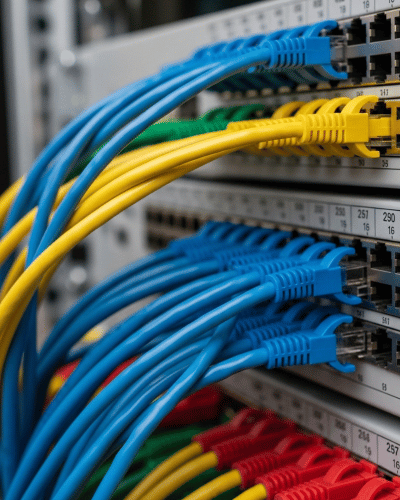
As a general rule, it’s a good idea to check your cables on a regular basis – particularly if your rack utilizes sliding rails. Pulling a server out for service can stress connected cables. Cables that are too tight may pull loose or damage the ports, while cables that are too loose can sag and block airflow.
Inspect the connectors for signs of wear, such as bent pins or cracked locking tabs, and replace any damaged cables immediately. It is also vital to ensure that your cable management arms or Velcro ties are secure but not overtightened, as this could pinch the internal wires. Proper labeling is essential; ensure both ends of every cable are clearly tagged, making it easier to trace connections without physically tracing the wire through a crowded rack.
Software and Firmware Updates
Server care is another essential part of infrastructure maintenance. Just taking the time to give your system a digital health check every now and then will help to prevent security vulnerabilities and compatibility issues. Use the manufacturer’s management tools rather than manual checks to ensure you are seeing the latest available versions.
Another general point: don’t ignore firmware updates for subcomponents. As we’ve already mentioned, hardware relies on software instructions to operate; outdated BIOS, RAID controller firmware, or iDRAC/IPMI versions can lead to instability. Add in the risks to your data security from unpatched vulnerabilities, and you’re better off keeping everything up to date.
Schedule regular maintenance windows to apply these updates and ensure you have a rollback plan in place in case of issues. Keeping the software stack healthy is just as critical as cleaning the fans: ensuring the operating system communicates effectively with the hardware and that performance optimizations are applied.
Rack Server Maintenance Plan
One of the best ways to keep your servers in top condition while keeping operational costs down is to implement a comprehensive Rack Server Maintenance Plan. This structured approach moves you from reactive fire-fighting to proactive management. A solid maintenance plan typically includes:
- Scheduled Health Checks: Regular audits of error logs and hardware status indicators.
- Deep Cleaning: Removal of dust and debris from chassis internals and intake vents to prevent thermal throttling.
- Component Verification: Testing of power supplies, backup batteries, and redundant fans to ensure failover systems are ready.
- Cable Management Optimization: Re-organizing and securing cables to improve airflow and serviceability.
- Firmware Management: Systematic application of security patches and performance updates.
- Thermal Analysis: Reviewing environmental sensors to identify and remediate hot spots.
By adhering to a maintenance plan, you avoid the “set it and forget it” trap. You ensure that small issues, like a single failing fan or a degrading battery, are caught and resolved before they cascade into catastrophic system failures. This consistency not only secures your data but also stabilizes your budget by reducing the likelihood of expensive emergency hardware replacements.
Regular maintenance is the key to a healthy IT infrastructure. By understanding the needs of your rack servers—from power and cooling to cabling and software—you can significantly extend their operational life. We encourage you to implement these tips immediately or consider a professional maintenance plan to ensure your servers continue to support your business goals reliably for years to come.
