



The word “node” shows up everywhere, and the definitions rarely agree. Search the multi node meaning and you’ll bounce between a JavaScript runtime, a networking diagram, and a database cluster in the same afternoon. Here’s the short version: a server node is a single machine that runs part of a larger system, and “multi-node” just means several of those machines working together as one. This post explains what a server node is, what multi-node means in practice, and when your setup actually needs one.
First, Let’s Kill the Confusion: Node.js vs. a Server Node
When engineers ask “what is a server node,” they usually mean one thing but get pointed to another. Let’s fix that first.
A server node is a single machine — physical, virtual, or a container — that runs part of a larger system and coordinates with other machines to share the work. That’s the meaning this article uses throughout.
Now the hard line: Node.js is a JavaScript runtime for building applications. Same word, zero relation to server nodes. If you landed here from a backend tutorial, that’s the one you’re thinking of, and it has nothing to do with clusters or distributed servers.
One more trap. In networking, a “node” is any device that sends or receives data — a router, a switch, a laptop. In distributed systems, a “node” is a member of a cluster doing coordinated work. This post means the second one: a machine that teams up with others to run a service.
So a server node is one working member of a bigger system. Everything below builds on that.
What Does “Multi-Node” Actually Mean?
Multi-node means two or more machines working together as one logical system. Instead of forcing a single oversized server to handle everything, you spread the work across several machines that coordinate with each other.
Picture the difference. A single-node (or monolithic) setup runs your application, your database, and your traffic on one box. It’s simple to build and simple to reason about. But when that box hits its limit — or fails — everything stops. A multi-node setup splits those jobs across machines, so capacity grows by adding hardware and one failure doesn’t take the whole system down.
Multi-node isn’t a product you buy. It’s a pattern that repeats across the stack: database clusters, web application tiers behind a load balancer, message queues, and container orchestration platforms like Kubernetes. Each applies the same core idea in a different shape.
For a closer look at multi-node server hardware and real deployment use cases, see our guide to what a multi-node server is.

Server Node vs. Server: What’s the Difference?
These two terms get used interchangeably, and that habit muddies everything downstream. They overlap, but they aren’t synonyms.
A server is a machine, physical or virtual, that provides a service. A node is one member of a larger cluster or network. The distinction matters because a single physical server can host several nodes at once — through virtual machines or containers — each acting as an independent member of a cluster.
|
Term |
What It Is |
Scope |
|---|---|---|
|
Server |
A machine that provides a service |
Standalone; can exist on its own |
|
Node |
One member of a cluster or network |
Always part of a larger group |
|
Server node |
A server acting as one node in a cluster |
The intersection of both |
People conflate the terms because in a small setup, one server often is one node — so both words point at the same box. The gap only shows up at scale, when one server hosts multiple nodes or a cluster spans dozens of machines.

Why Teams Run Multi-Node Setups
Before the mechanics, know what problem this solves. Teams move to multi-node for five reasons, and each answers a real operational pain:
- High availability — one node dies, the others keep serving traffic. No single point of failure takes down the service.
- Horizontal scaling — add machines to handle more load instead of buying one bigger, pricier server.
- Performance under load — requests spread across multiple CPUs, memory pools, and network interfaces, so no single machine becomes the bottleneck.
- Rolling updates — patch and reboot one node at a time while the rest keep running. Users never see downtime.
- Geographic reach — nodes placed in different regions cut latency for users far from your primary data center.
The through-line: multi-node trades simplicity for resilience and scale. You take on more complexity in exchange for a system that survives failure and grows without a forklift upgrade.
How Multi-Node Systems Work
Three things make a cluster function: coordination, consistency, and recovery. Get them right and a group of separate machines behaves like one dependable system. Get them wrong and you’ve built something more fragile than the single server you replaced. This is where the real engineering lives.
The Control Plane and Worker Nodes
“Nodes talk to each other” is true but useless. What actually runs the show is a command structure.
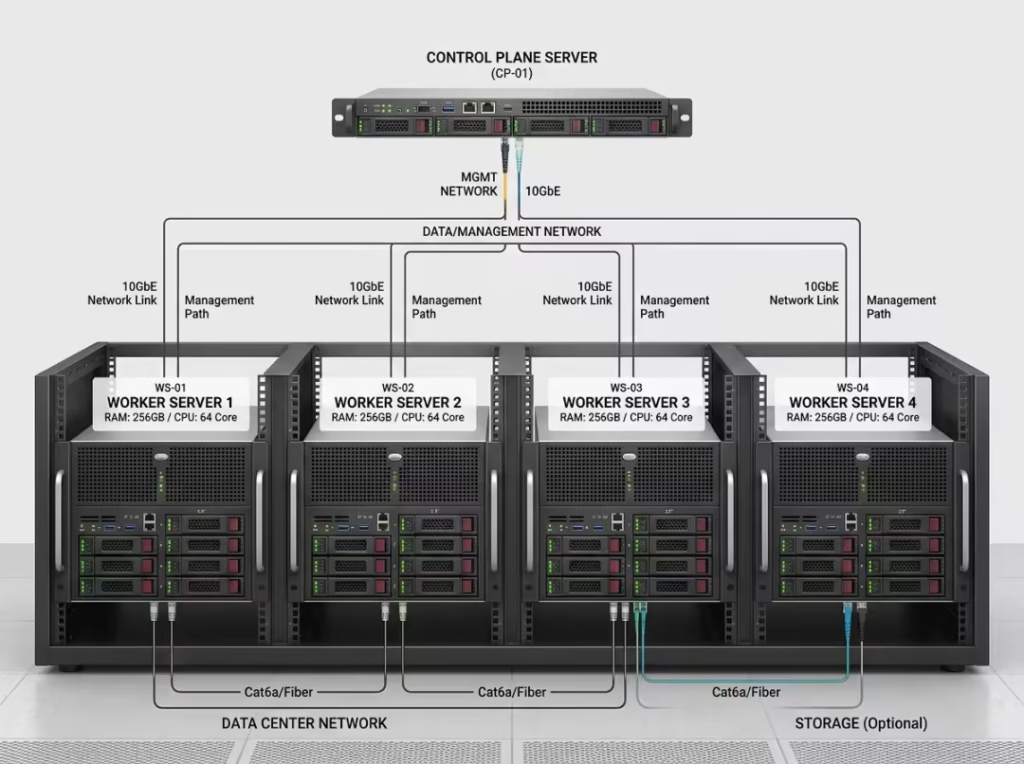
Most clusters split into two roles. The control plane makes decisions — where to schedule work, which nodes are healthy, how to place workloads. The worker nodes run the actual application code. The control plane is the brain; the workers are the hands.
Kubernetes is the clearest example. Its control plane schedules containers and watches cluster state, while a pool of worker nodes runs the containerized workloads. When you deploy an app, you don’t pick a machine — the control plane decides where it fits. That’s distributed computing in practice: the system places and moves work without you micromanaging each box.
Underneath, coordination systems like etcd or ZooKeeper hold the shared state every node relies on. They store the single source of truth about what’s running and where, and they let nodes agree even when several try to change things at once.
The control plane tracks who’s alive through heartbeats — small, regular status signals from each node. Miss a few heartbeats and the control plane assumes that node is gone, then acts on it.
Data Consistency and the CAP Theorem, Simplified
Coordination handles where work runs. Consistency handles whether every node agrees on the data. This is the part people nod along to and quietly misunderstand, so let’s make it concrete.
Two mechanisms do most of the work. Replication keeps copies of the same data on multiple nodes, so one failure loses nothing. Sharding splits a dataset into slices and hands each slice to a different node, so no single machine holds everything. Copies for safety, slices for scale — many systems use both at once.
The hard part is keeping replicas in agreement. That’s where quorum comes in: a majority of nodes must confirm a change before the cluster commits it. In a three-node cluster, at least two nodes have to agree. This stops two halves of a split cluster from accepting conflicting writes.
The CAP theorem sounds academic but reduces to one sentence: when the network splits and nodes can’t reach each other, you must choose consistency or availability — you can’t keep both. Either the system refuses writes until it’s sure they’re consistent, or it accepts writes and reconciles later.
Which one you pick depends on the workload. A banking ledger favors consistency; you’d rather reject a transaction than record a wrong balance. A social media feed favors availability; a slightly stale post beats an error message. There’s no universally correct answer, only the right one for what you’re building.
How Failover Actually Happens
“It fails over automatically” is where a lot of production incidents hide. The real sequence has moving parts worth understanding.
When a node stops responding, the orchestrator notices the missed heartbeats and marks that node unhealthy. Traffic reroutes to the remaining healthy nodes, and any workloads the dead node was running get rescheduled elsewhere. For a stateless web tier, this is nearly seamless.
Databases are trickier because data has a home. When a primary database node fails, a replica gets promoted to primary so writes can continue. That promotion takes a moment, and how smoothly it happens depends on how the cluster was configured.
Then there’s leader election. Some clusters need exactly one node in charge — a single coordinator making decisions. When that leader dies, the surviving nodes vote and elect a new one, usually through the same quorum logic that governs data writes. Until the vote settles, the cluster may pause certain operations.
The honest part: depending on the design, clients might see a brief blip during failover, or nothing at all. Anyone who promises zero interruption in every scenario is selling something. Good design shrinks that window; it rarely erases it.

The Two Main Multi-Node Architectures
Once the concept clicks, the next question is which shape to pick. Most multi-node systems follow one of two patterns.
Active-active puts every node to work at once, with a load balancer spreading traffic across all of them. It maximizes throughput and uses your hardware fully. Active-passive (also called active-standby) runs the workload on one node while a standby sits ready to take over the instant the primary fails.
|
Architecture |
How It Works |
Best For |
Watch Out For |
|---|---|---|---|
|
Active-active |
All nodes serve traffic simultaneously, load balanced |
Read-heavy, scale-first workloads |
Harder to keep data consistent across nodes |
|
Active-passive |
One node works, standby waits to take over |
Strict consistency; simple, predictable failover |
Standby hardware sits idle, so you pay for capacity you don’t use |
Managed cloud services hide much of this machinery. Amazon RDS Multi-AZ, Google Kubernetes Engine, and Azure SQL handle replication, failover, and coordination for you. The trade-off is control: you get resilience without the operational burden, but you give up fine-grained tuning and lock into a provider’s way of doing things.
Real-World Examples of Multi-Node Systems
The pattern sticks once you tie it to systems you already know:
- Web application tiers — several app servers behind a load balancer, each handling a share of requests.
- Distributed databases — Cassandra, sharded MongoDB, and CockroachDB spread data and queries across nodes.
- Kubernetes worker node pools — containerized workloads scheduled across a fleet of machines.
- CDNs — content cached on edge nodes close to users, so requests never travel to a single origin.
- Kafka — a message queue that splits partitions across multiple brokers for throughput and durability.
Different domains, same underlying idea: spread the work, survive the failures.
When You Should Stay Single-Node
Almost every article assumes multi-node is the goal. It isn’t always. Adding nodes to a system that doesn’t need them buys you complexity and a bigger bill, nothing more.
Work through this before you scale out:
- Start with the requirement. Do you genuinely need high availability, more scale, or both? If neither, stop here.
- Count the real cost. More nodes mean more surface to monitor, patch, and debug. Distributed bugs are harder to chase than anything on a single box.
- Weigh the network dependency. Once nodes must talk to each other, partitions and latency stop being performance issues and become correctness issues.
- Consider a single well-sized node with solid backups. For small apps, dev environments, and low-traffic services, one strong machine with a tested restore plan often wins.
Stay single-node if: your traffic is modest, your data fits comfortably on one machine, a short downtime window is tolerable, and you run in a single region.
Go multi-node if: downtime costs real money, traffic outgrows what one server can handle, or you need a presence in multiple regions.
The rule is plain: add nodes when you have evidence you need them, not on principle.

Frequently Asked Questions
What is the difference between a node and a server?
A server is a machine that provides a service. A node is one member of a larger cluster. One server can host several nodes through virtual machines or containers, so the terms overlap but aren’t identical.
Is multi-node the same as distributed computing?
They’re closely related. Distributed computing is the broad field of coordinating multiple machines; a multi-node setup is a concrete way of doing it. Every multi-node system is distributed, but “distributed computing” also covers ideas that reach beyond a single cluster.
How many nodes do you need for high availability?
Three is the common baseline. Quorum-based systems need a majority to agree, and three nodes tolerate one failure while still forming a majority. Two nodes can’t break a tie, which is why odd numbers win.
What is the difference between multi-node and multi-tenant?
Multi-node is about how many machines run a system. Multi-tenant is about how many customers share one system. They’re unrelated axes — you can have either, both, or neither.
Does going multi-node guarantee zero downtime?
No. Multi-node lowers the risk of downtime and shrinks failure windows, but failover still takes time and clients may see a brief interruption. Good design minimizes it; nothing eliminates it entirely.
What is a multi-node database?
A database that runs across multiple servers, using replication and sharding to stay available and scale. Cassandra and CockroachDB are examples.
Can a laptop run a multi-node cluster for development?
Yes. Tools like kind, k3d, or Docker let you run several nodes as containers on one machine. It’s ideal for learning and testing, though it won’t reproduce real network failures.
Conclusion
Multi-node systems solve three concrete problems: uptime, scale, and speed. They deliver by trading simplicity for resilience — you accept more moving parts in exchange for a system that survives failure and grows without a rip-and-replace. That trade isn’t free, and it isn’t always worth it.
The right call comes down to your actual traffic, how much downtime you can absorb, and whether your team can run a distributed system with confidence. Start with a single well-built node when you can, and move to multi-node when the requirements genuinely demand it. Managed services make that jump easier, but you still need to understand how nodes coordinate, fail over, and stay consistent before you trust one with production.
