


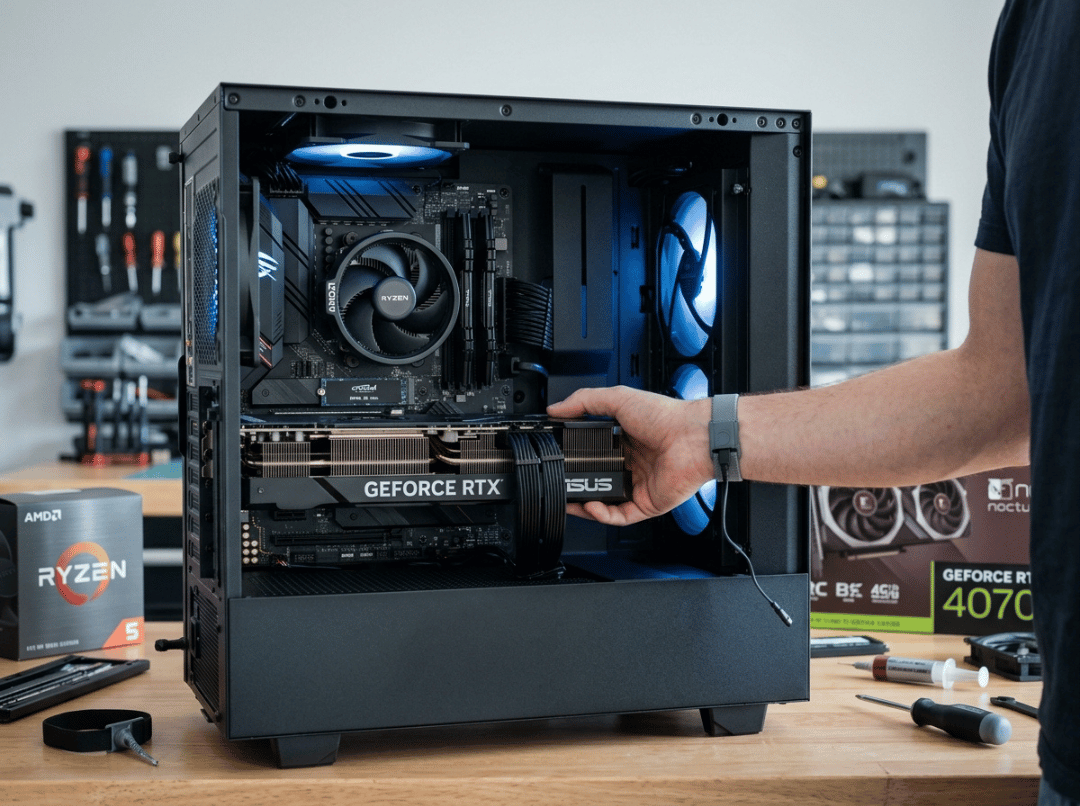
If you built a machine around the Ryzen 5 5600X a few years back, you’ve probably had the same nagging thought lately: is it time to swap the graphics card, or has the whole platform run its course? It’s a fair question. Games look heavier every year, and it’s easy to assume the CPU is what’s holding you back. Most of the time, though, it isn’t. For the majority of 5600X owners, a smart GPU upgrade is still the best money you can spend—as long as you match the card to the resolution you actually play at and don’t throw cash at frames the chip can’t deliver.
This guide walks through that decision the way I’d think it through if a friend handed me their build. We’ll look at whether the 5600X still earns its spot in 2026, where it genuinely chokes, which class of card fits each resolution, and the handful of cases where the CPU—not the GPU—is the thing you should replace first. And because a great card on a spec sheet still has to fit inside a real case and stay cool, we’ll cover length, power, and airflow too.
This is written for you if you own a 5600X and want to upgrade the GPU without tearing the platform apart, you’re deciding between 1080p, 1440p, or 4K on a fixed budget, or you want to know the point where a bigger card stops paying you back. If you’re building fresh from scratch, or you’ve already committed to AM5 or something newer, most of this won’t apply to you.
The Short Version
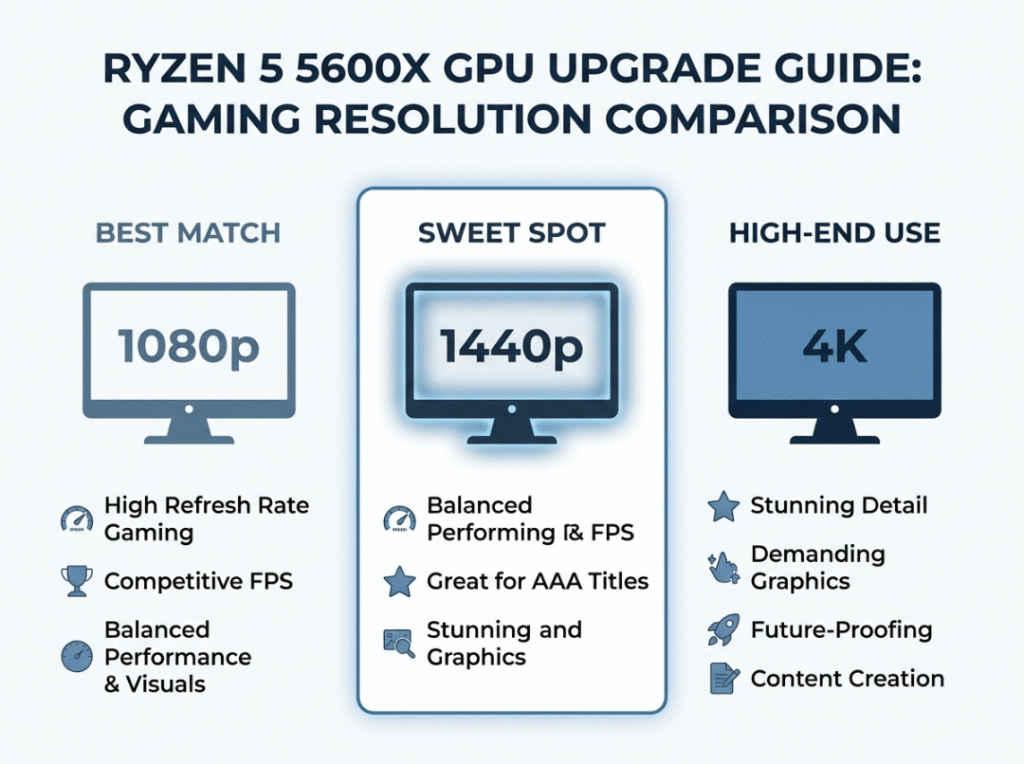
Here’s where I land for most people running a 5600X in 2026: target 1440p, and buy something in the RTX 4070 or RX 7800 XT class. At that resolution the CPU comfortably keeps up, the card gets room to stretch its legs, and every dollar you spend shows up on screen.
The picture shifts as you move around the resolution ladder. At 1440p you’re in the pocket—this is the balance point where a strong card and the 5600X work together without either one dragging its feet. Drop down to 1080p and start chasing high refresh, and the CPU becomes the ceiling; anyone hunting 240 fps and up in competitive shooters will run into that wall before the GPU is anywhere near maxed out. Climb up to 4K and the situation flips entirely—the card does nearly all the work, the CPU almost never gets in the way, and spending more on the GPU genuinely pays off. As for the flagships like the RTX 4080 Super or 4090, save those for a 4K panel or a build you’re planning to move to a faster CPU soon. Anywhere else, they’re wasted potential.
If you take one thing from this whole guide, let it be this: figure out your resolution before you look at a single price tag. The 5600X handles far more than people give it credit for, especially once you’re above 1080p.
Is the Ryzen 5 5600X Still Good in 2026?
Short answer, yes—provided you’re using it for the right things.
The 5600X is a 6-core, 12-thread chip with genuinely strong per-core speed, and that’s still what most games in 2026 care about. Titles lean on fast individual cores far more than they lean on sheer core count, and that’s exactly the lane this processor was built for. Push it to 1440p or 4K and it feeds a modern card without fuss. Across the vast majority of popular AAA releases and multiplayer titles, you’ll get smooth, playable frame rates with the CPU sitting quietly in the background rather than tripping things up.
That said, the chip does show its age in a few specific spots. The first is high-refresh competitive esports at 1080p—when you’re reaching for 240 or 360 fps, the CPU is under real strain, and newer chips visibly pull ahead. The second is streaming while you game. Encoding video in the background eats into core headroom the 5600X simply doesn’t have spare. And the third is simulation and other CPU-hungry titles: anything with heavy physics, huge unit counts, or complicated AI can expose the processor long before the GPU breaks a sweat.
So who should hold onto it? If you play at 1440p or 4K, spend most of your time in AAA or single-player games, and want the most performance for the least outlay without touching the platform, keep the 5600X and put your money into a card. If instead you’re a competitive player chasing the highest possible frame rates at 1080p, you stream heavily, or you simply want a platform with years of headroom left in it, that’s when the CPU or the whole platform deserves a hard look first. For most people, though, this chip remains a perfectly good foundation, and the right card will change how your games feel.
Will the 5600X Bottleneck a New GPU?
This is the question that freezes people mid-purchase, and the honest answer is that it depends—on your resolution, the kind of games you play, and the frame rate you’re aiming for. Bottlenecking isn’t a fixed tax you pay. It moves around depending on what you’re asking the system to do.
All a bottleneck really means is that one part is limiting another. Turn the resolution up and the GPU has to work harder, so the CPU matters less. Turn it down and frames start flying by faster, which means the CPU has more work to push through every second. A little bit of bottlenecking shows up in every system ever built, by the way—so don’t let a scary number from an online calculator talk you out of a sensible upgrade. What counts is whether you’d actually notice the limit in the games you play, not whether a website says it exists.
At 1080p, this is where the 5600X is most likely to hold a strong card back. The GPU finishes each frame in a hurry and then waits on the CPU to keep feeding it. Once you’re deep into high-refresh competitive play, that gap turns real, and you may not see everything a high-end card is capable of. My advice here is to spend deliberately—a mid-range card is a better match than a flagship at 1080p on this chip.
At 1440p, the math tilts back in your favor. The GPU shoulders more of the load, the CPU keeps stride without complaint, and pairing a strong card here gives you most of what you paid for. Honestly, this is the resolution the 5600X was practically made for in 2026, and most of the bottleneck worry just evaporates.
At 4K, the GPU is almost always the limiting piece, and the 5600X rarely holds anything back at all. Drop in a powerful card and you’ll see nearly all of its performance. This is the resolution where spending up on the graphics card makes the most sense, because the CPU won’t be your problem.
Put simply, the bottleneck story really only bites at 1080p high-refresh. At 1440p it’s minor, and at 4K it barely registers.
How to Choose the Right GPU for a 5600X
Before you get lost comparing model numbers, a few questions will narrow the field faster than any spec sheet.
Start with resolution, because it’s the single biggest input into this whole decision—it changes how hard the card works and how much the CPU matters. At 1080p, stick to mid-range cards; anything fancier gets capped by the CPU. At 1440p, mid to upper mid-range is the sweet spot. At 4K, upper mid-range to high-end makes sense, since the card is carrying the load and the extra money actually lands on screen.
Your game library matters too. Competitive esports players care about frame rates, but remember the 5600X may be the thing capping you at 1080p rather than the card, so think hard about where the real limit sits. If you mostly play AAA and single-player games, lean toward raw GPU power and features like ray tracing—the 5600X keeps up nicely there. And if your playtime is a mixed bag, a solid mid-range card covers almost everything without overspending.
From there, set a budget tier that’s tied to your resolution rather than just what your wallet allows. Dropping flagship money into a 1080p build with a 5600X is a genuinely bad trade. It’s also worth thinking about your upgrade plans: if you expect to move to a new CPU platform within a year or two, you can justify a stronger card now, because that future chip will unlock what the 5600X can’t. If you’re staying put long-term, buy for what the 5600X can realistically use today.
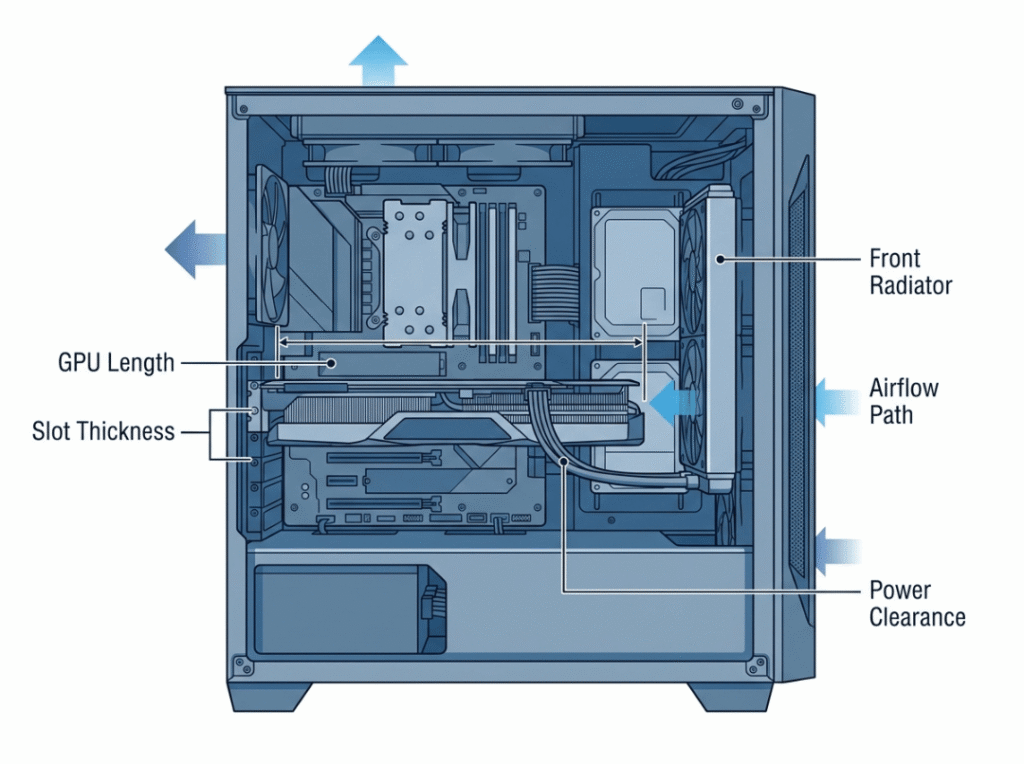
And then there’s the step people love to skip, which then bites them the moment the box arrives—physical compatibility. Modern GPUs are big and thirsty, and “it’ll probably fit” has ended a lot of upgrade evenings. Measure your case’s maximum GPU clearance first; plenty of current cards run past 320 mm. Check slot thickness too, since high-end cards routinely eat three or even four expansion slots. Look at your power supply’s wattage and connectors—many recent GPUs want a 16-pin (12VHPWR) adapter, and your PSU needs to comfortably cover the card’s TDP. If you’ve got a front-mounted radiator, watch for it clashing with a long card or its tubing. And finally, give some thought to airflow: a more powerful card runs hotter, and a case that can’t move air will throttle even an excellent GPU under a sustained load.
Get the resolution and upgrade plan sorted and you’ll know which tier to aim for. The physical checks decide whether the card you want can actually live in the build you have.
Best GPU for a 5600X by Resolution
Think of these less as a leaderboard and more as the right tool for a specific job. Find the way you actually play, then find your card.
1080p gaming — AMD Radeon RX 7600 or NVIDIA RTX 4060. At this resolution you genuinely don’t need more. Both cards push high, smooth frame rates in most titles, and stepping up spends money on performance the 5600X can’t fully hand you anyway. If you’re staying at 1080p, resist the urge to go bigger—the CPU will simply clip the wings of a pricier card.
1440p gaming — NVIDIA RTX 4070 or AMD Radeon RX 7800 XT. This is the strongest pairing you can make with a 5600X, full stop. At 1440p both cards run close to their ceiling and the CPU keeps pace without meaningfully getting in the way. If you want the best blend of price, performance, and CPU headroom, this is where I’d point most readers.
4K gaming — NVIDIA RTX 4070 Ti Super or AMD Radeon RX 7900 XT. At 4K the card is doing the heavy lifting, and here the extra spend rewards you—the 5600X won’t hold these back in any way you’d feel. If you’ve got a 4K panel and want a real 4K experience, this is the one resolution where stepping up a tier genuinely earns its keep with this CPU.
Esports and high-refresh play — NVIDIA RTX 4060 Ti. For competitive titles at high frame rates, this card throws out plenty of frames without the excess of a higher tier. Just keep in the back of your mind that at very high refresh rates and 1080p, the limit shifts to the 5600X rather than the card. It’s a smart pick if you’re playing esports at 1080p or 1440p and don’t want to overpay.
AAA gaming and ray tracing — NVIDIA RTX 4070 Super. For those big, visually dense, story-driven games, this card brings excellent detail, strong ray tracing, and solid upscaling through DLSS 3. Paired with the 5600X at 1440p, it chews through modern AAA titles with headroom left over. If most of your time goes into single-player showpieces and you want great image quality without moving up to 4K, this is the one.
If you’re still on the fence after all that, the RTX 4070 or RX 7800 XT at 1440p is the pick I’d make nine times out of ten. Only climb higher if you’re gaming at 4K or already planning a CPU swap.
Best GPU for a 5600X by Budget
Same reasoning, viewed through the lens of price. If you shop by what you can spend rather than by resolution, here’s how to put that money to work.
At the budget end, the RX 7600 or RTX 4060 covers 1080p gaming cleanly. Strong value, no real bottleneck worry, and neatly matched to what the 5600X can use at that resolution—there’s little reason to spend more here.
Stepping into the mid-range, the RTX 4060 Ti or RX 7700 XT gets you comfortably into 1440p across most popular titles. It’s the natural move if 1080p has started to feel a bit tight.
The upper mid-range is where the 5600X is happiest overall: the RTX 4070 or RX 7800 XT gives you full 1440p performance plus some light 4K capability. The CPU keeps up and you pocket most of the card’s potential, which is why this is the value sweet spot for the platform.
Above that sits the “buy now, upgrade the CPU later” bracket—the RTX 4070 Ti Super or RX 7900 XT. These are aimed at 4K gaming or at people building ahead of a platform change. The 5600X may hold them back a touch at lower resolutions today, but they’ll be ready the day you move to a faster chip. Only go here if you’re actually gaming at 4K or you’ve genuinely committed to that upgrade path; otherwise you’re paying for headroom the 5600X can’t unlock yet. For straightforward value, the mid to upper mid-range is the zone to live in.
GPUs That Are Overkill for a 5600X
More spending doesn’t always buy more performance, and with the 5600X some cards run into a wall fast.
At 1080p, anything beyond an RTX 4070-class card is hard to justify. The CPU caps how many frames it can deliver, so you end up paying for performance you’ll never see on screen—the card sits partly idle while the processor tries to catch up. Take that money and put it toward a resolution bump or a future platform instead.
The flagships are a more nuanced case. Cards like the RTX 4080 Super or RTX 4090 are more GPU than the 5600X can fully feed, with one exception: 4K. At that resolution the sheer pixel count keeps the card busy enough that the CPU limit fades into the background. So yes, a flagship at 4K will perform beautifully—you just won’t wring out every last frame the card is capable of until you pair it with a quicker CPU.
There are still real reasons to buy ahead of your CPU, mind you. If you plan to upgrade the platform in the next 12 to 18 months and want the card to carry over, if you game exclusively at 4K, or if you’d rather not buy two cards in two years, a stronger GPU now can absolutely make sense. Outside of those situations, a flagship on a 5600X is mostly money left on the table.
When to Upgrade the CPU Instead
A new graphics card is usually the faster, cheaper route to better performance. But every so often the CPU is the actual problem, and no amount of new GPU will paper over it.
Reach for a CPU or platform upgrade first if you’re chasing 240 fps and beyond at 1080p in competitive titles—frame rates that high at low resolution are CPU-bound long before the graphics card is the constraint, so a new card won’t close the gap you’re after. The same logic applies if you already own something like an RTX 3070 or better and performance still disappoints; at that point the CPU is very likely your real ceiling. Streamers and content creators fall into this camp too, because encoding video steals cores, and the 5600X doesn’t have the thread budget to absorb that without a hit. And if you live in simulation, strategy, or other CPU-heavy games—think Factorio, Cities: Skylines, Total War, or flight sims—the processor is carrying far more of the load than the GPU, and more VRAM won’t rescue you. There’s also the long-view argument: moving to AM5 buys you years of future CPU headroom on the same socket, and if that runway matters to you, that’s where to start.
For everyone else, the graphics card is still the answer. If you play at 1440p or 4K and want better visuals or higher frame rates in AAA and multiplayer games, you’re not running heavy background tasks, and you want the biggest jump for the least money, the GPU wins. It’s really the competitive 1080p crowd, the heavy streamers, and the long-term platform builders who should be looking at the CPU first.
Common Mistakes When Pairing a GPU With a 5600X
Almost every regrettable upgrade traces back to one of a handful of errors, and they’re easy to sidestep once you know them.
The classic one is overspending for 1080p—dropping a flagship into a 1080p build with a 5600X just buys frames the CPU can’t produce, so match the card to the resolution instead. Closely related is chasing the bigger model number for its own sake; a higher number isn’t automatically better value for your particular setup, and resolution and use case matter far more than where a card sits in the marketing stack. People also lean too hard on bottleneck calculators, treating a theoretical figure as a real-world verdict. At 1440p, plenty of the warnings those tools throw up simply won’t be visible when you’re actually playing.
Then there are the physical oversights. Forgetting about PSU headroom catches a lot of builders—a modern high-end card may want more wattage or different connectors than your current supply provides, so check both before you order. Skipping case clearance is just as common; current flagships can push past 330 mm and swallow three or more slots, so measure before you assume it fits. And don’t assume airflow is handled just because you’ve got liquid cooling installed. The GPU still needs fresh air coming in and hot air going out, and a case that doesn’t breathe will throttle even a top-tier card under sustained load. Sort out resolution fit and physical compatibility first, and the rest of the decision tends to fall into place on its own.
FAQ
What is the best GPU for a Ryzen 5 5600X in 2026?
For most people, the RTX 4070 or RX 7800 XT is the best overall match. It delivers strong 1440p performance, and the 5600X keeps up without meaningfully getting in the way. Only step up to an RTX 4070 Ti Super or RX 7900 XT if you’re gaming at 4K.
Will the 5600X bottleneck a high-end GPU?
At 1080p, yes—especially for high-refresh competitive play. At 1440p the effect is minor in most games, and at 4K the card carries the load while the CPU rarely matters. Your resolution decides how much any of this actually touches you.
Is the 5600X still good for 1440p gaming?
It is. 1440p is the sweet spot for this chip—the GPU handles most of the workload at that resolution, and the CPU stays right with it alongside mid-range and upper mid-range cards.
What GPU is too much for a 5600X?
Anything beyond an RTX 4070-class card is overkill at 1080p. At 1440p, an RTX 4080 Super or RTX 4090 hits diminishing returns. Those cards earn their price at 4K, or as a bridge toward a faster CPU down the road.
Should I upgrade my GPU or my CPU first?
Go GPU first if you play at 1440p or 4K and want better visuals or frame rates. Go CPU first if you chase high-refresh 1080p, stream while gaming, play CPU-heavy titles, or want a longer upgrade runway ahead of you.
Does GPU physical size matter for a 5600X build?
Yes, and it’s overlooked constantly. Many current cards run past 320 mm, take up three slots, and demand more airflow than older ones. Before you buy, confirm your case handles the length and slot width, that your PSU has the right connectors, and that there’s enough airflow to keep the card from throttling under load.
Final Word
Choosing a graphics card for a 5600X really comes down to three questions: what resolution do you play at, are you planning to move to a new CPU platform later, and can your case, power supply, and airflow actually support the card you have in mind?
For most people the answer sorts itself out quickly. At 1440p, an RTX 4070-class card or RX 7800 XT sits right in the sweet spot—strong performance, no meaningful CPU limit, and real value for what you pay. At 1080p, keep it mid-range and hold that extra budget for a future platform. At 4K, spend up with confidence, because the card carries the load and the 5600X won’t be the thing standing in your way. The only time I’d flip that order and go after the CPU first is if you’re chasing high-refresh competitive play, streaming heavily, or specifically want years of headroom on the same platform.
And before anything gets shipped, take five minutes on the physical side. A powerful modern GPU is long, power-hungry, and hot, and it needs room for its length and slot thickness, a power supply with the right wattage and connectors, and a case that genuinely moves air rather than just looking good behind tempered glass. Nail that part and you protect your investment—the card runs at full tilt for years instead of quietly throttling itself. Get the resolution right, respect the physical limits, and this upgrade will hold up long after you’ve forgotten you ever worried about it.
