


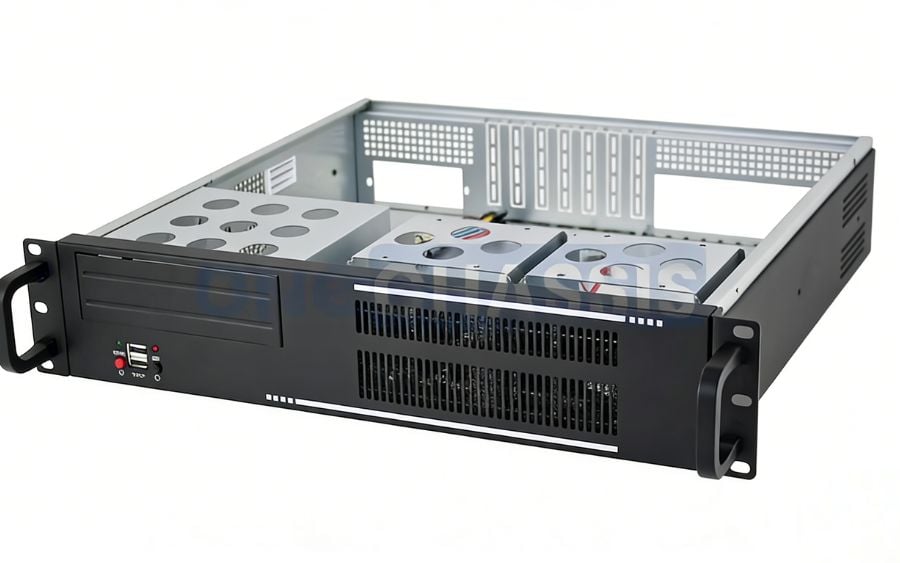
Imagine a world where your critical IT equipment—servers, network switches, and storage arrays—is no longer a tangled mess of cables on a shelf, but a highly organized, protected, and efficient system. This isn’t just a fantasy for large corporations; it is an accessible reality for businesses and enthusiasts alike. Rack mount cases have revolutionized how we organize, protect, and manage electronic hardware. These standardized enclosures not only bring order to chaos but also enhance performance and longevity. However, is investing in a rack-based system the right move for you? What are the real-world advantages and disadvantages? Before committing to this solution, let’s explore the pros and cons to help you make an informed decision.
What Are The Pros of Rack Mount Cases?
Rack mount cases offer numerous distinct advantages, including exceptional space efficiency, robust equipment protection, seamless scalability for future growth, streamlined cable management, and vastly improved airflow for optimal performance.
Space Efficiency
Say goodbye to sprawling server towers and cluttered equipment shelves that eat up valuable floor space. Rack mount cases are designed to maximize spatial efficiency by organizing hardware vertically within a standardized frame. This allows you to stack multiple servers, network switches, patch panels, and other components in a compact footprint, which is invaluable in environments where space is at a premium, such as data centers, server rooms, or even home labs. Instead of having individual units spread out across a room, a single rack can securely house dozens of devices. This vertical approach not only frees up the floor for other uses but also centralizes your infrastructure, making it easier to manage and monitor all your critical systems in one consolidated location.
Equipment Protection
For any organization, protecting sensitive and expensive electronic equipment is a top priority. Rack mount cases provide a secure, enclosed environment that shields your hardware from a multitude of physical threats. The sturdy metal construction acts as a physical barrier against accidental bumps, spills, and unauthorized access, with many racks featuring lockable doors for enhanced security. Furthermore, a sealed rack case helps protect internal components from dust, debris, and other environmental contaminants that can cause overheating and premature failure. By housing your servers and networking gear inside a dedicated, protective chassis, you significantly reduce the risk of physical damage and extend the operational lifespan of your critical infrastructure, ensuring business continuity and peace of mind.
Scalability
As your business or home lab grows, your technology needs will inevitably expand. Rack mount cases are inherently designed for scalability, allowing you to seamlessly add, remove, or upgrade components with minimal disruption. The standardized “U” unit measurement system (one rack unit, or 1U, is 1.75 inches high) ensures that any rack-mountable equipment from any manufacturer will fit perfectly into your existing setup. Need to add a new server? Simply slide it into an empty slot. Time to upgrade a network switch? The old one comes out, and the new one goes in. This modular, “plug-and-play” approach eliminates the need to reconfigure your entire setup every time you make a change, providing a flexible and future-proof foundation that can easily evolve alongside your changing requirements.
Cable Management
A chaotic “spaghetti” of tangled cables is not only unsightly but also a significant operational headache. It makes troubleshooting, maintenance, and upgrades incredibly difficult and can even obstruct critical airflow. Rack mount cases are designed to simplify and organize cable management. Most racks include built-in features like vertical cable channels, lacing bars, and routing holes that allow you to neatly run power and data cables from your equipment to their destination. This organized approach makes it easy to trace a specific cable when troubleshooting, reduces the risk of accidental disconnection, and presents a clean, professional appearance. By taming cable clutter, rack systems improve maintenance efficiency, reduce downtime, and create a safer, more manageable IT environment for your technicians.
Improved Airflow
Electronic components, especially high-performance servers, generate a significant amount of heat. If this heat is not properly dissipated, it can lead to performance throttling, system instability, and permanent hardware damage. Rack mount cases are specifically engineered to facilitate optimal airflow and thermal management. The design promotes a front-to-back or bottom-to-top cooling pathway, allowing cool air to be drawn in from the front of the rack, flow over the hot components, and be exhausted out the back. Many racks also support the installation of dedicated fan trays, vented panels, and other cooling accessories to further enhance air circulation. This carefully managed airflow prevents “hot spots” from forming, ensuring that your equipment operates within safe temperature ranges for maximum longevity and peak performance.
What Are The Cons of Rack Mount Cases?
Despite their numerous organizational and protective benefits, rack mount cases come with some notable drawbacks, including a high initial cost, specific maintenance requirements, potential noise issues, and a complete lack of portability.
High Initial Cost
The upfront investment required to purchase and implement a rack mount system can be substantial, especially for small businesses or home users. The cost includes not only the rack enclosure itself but also the specialized rack-mountable versions of servers and networking gear, which often carry a premium over their standard tower-style counterparts. Additionally, you will need to budget for accessories like shelves, blanking panels, cable management arms, and a power distribution unit (PDU). When all these components are added up, the initial expense can be significantly higher than simply placing tower servers on a wire shelf. This high entry cost requires careful financial planning and a clear understanding of the long-term benefits to justify the investment.
Maintenance Requirements
While racks simplify many aspects of IT management, they also introduce their own set of maintenance tasks. To ensure optimal performance, the rack environment needs regular attention. This includes routine cleaning to prevent dust buildup on components and inside filters, which can impede airflow. Cable management must be diligently maintained; as new equipment is added, it is easy for organized cables to devolve into a tangled mess if not managed properly. Technicians must also periodically check that all cooling fans are operational and that airflow pathways are unobstructed. Accessing a server at the bottom of a fully loaded rack can also be physically demanding, sometimes requiring the removal of several other components to reach it.
Noise Levels
A concentration of high-performance computing equipment in a single rack can generate a considerable amount of noise. The primary culprits are the small, high-RPM fans used to cool servers, switches, and power supplies. While a single server might be tolerable, the combined sound of multiple devices running simultaneously in an enclosed space can be incredibly loud. In a dedicated data center, this noise is expected and managed with soundproofing. However, if the rack is located in or near an office space, a recording studio, or a living area in a home, the constant fan noise can be highly disruptive and distracting. This often necessitates placing the rack in an isolated closet or room, which may not always be feasible.
Limited Portability
Rack mount cases and the equipment they house are designed for stationary, long-term installation. The entire system is heavy, bulky, and not intended to be moved frequently. Once a rack is fully populated and cabled, relocating it is a major undertaking that requires significant planning and physical effort, often involving multiple people and specialized equipment. This lack of portability is a stark contrast to individual tower servers or portable workstations that can be moved with relative ease. If your operations require frequent relocation or if you need to transport equipment to different sites, a traditional rack mount setup is highly impractical. They are built to be a permanent fixture of your IT infrastructure, not a mobile solution.
Complex Setup
Setting up a rack mount system for the first time can be a complex and intimidating task for those without prior experience. It involves more than just placing equipment on shelves. You must understand rack unit measurements, ensure proper weight distribution to maintain stability, and plan for efficient power and data cabling. Installing heavy servers on sliding rails can be physically awkward and requires precision. Configuring cooling systems and ensuring proper airflow from front to back is critical and requires careful planning. This complexity means that a proper installation often requires technical expertise or a significant amount of research, presenting a steep learning curve for beginners who are used to the simplicity of plugging in a standard tower PC.
Rack Mount Cases vs. Other Storage Solutions
When planning your IT infrastructure, it is important to compare rack mount cases with alternative solutions like individual tower cases or wall-mounted racks to find the best fit for your needs. Each solution offers a distinct balance of space, cost, scalability, and convenience.
Tower cases are the most common form factor for individual servers and desktop PCs. They are self-contained, easy to set up, and generally less expensive than their rack-mountable equivalents. However, they are highly inefficient in terms of space. A small business with several tower servers will quickly find them consuming a large amount of floor or shelf space, creating a disorganized and cluttered environment with a messy tangle of cables. They offer no centralized management or optimized airflow for multiple units.
Wall-mounted racks offer a compromise between a full-sized rack and no rack at all. They are great for small businesses or home networks with only a few pieces of equipment, like a switch, a patch panel, and a small server. They save floor space and provide better organization than shelves. However, they are severely limited by weight capacity and depth, making them unsuitable for housing multiple full-sized servers or heavy UPS batteries. They offer limited scalability and less robust physical protection than a fully enclosed rack case.
Full-sized rack mount cases provide the ultimate solution for density, scalability, and management. While they have a higher initial cost and a larger physical footprint than a wall rack, they allow you to house a massive amount of equipment efficiently. They offer superior protection, cooling, and cable management, creating a professional and maintainable infrastructure that can grow with your needs.
FAQ
What are the complaints about rack mount cases?
Common complaints about rack mount cases center on their high initial cost for both the enclosure and the specialized equipment. Users also frequently mention the significant noise generated by concentrated cooling fans, which can be disruptive in office or home environments. Other common issues include their complete lack of portability, the complexity of the initial setup, and the physical difficulty of performing maintenance on heavy equipment installed at the bottom of a fully populated rack.
What are the pros and cons of rack mount cases?
The primary pros of rack mount cases are excellent space efficiency, robust protection for equipment, easy scalability, and superior airflow and cable management. The main cons are the high upfront investment, the ongoing maintenance requirements, significant operational noise, and their bulky, stationary nature. Weighing these benefits against the drawbacks is crucial for deciding if a rack system is a worthwhile investment for your specific infrastructure needs.
How do rack mount cases work?
Rack mount cases are standardized enclosures designed to house electronic equipment in a vertically stacked configuration. They use a standard width (19 inches) and a height measurement unit called a “U” (1.75 inches). Equipment is secured into the rack frame using screws or rails. This system provides physical support, protection, and organization, while features like cable managers and cooling fans facilitate a clean, efficient, and thermally stable operating environment for all the housed components.
How to choose a rack mount case?
Choose a rack mount case based on your current and future needs. Consider the total “U” height required for all your equipment, plus at least 25% extra space for future expansion. Determine the necessary depth to accommodate your longest server. Decide between an open-frame rack for easy access and better cooling in a secure room, or an enclosed, lockable case for added security and dust protection. Also, factor in cooling options, cable management features, and weight capacity.
Should I invest in a rack mount case?
Deciding to invest in a rack mount case depends on the scale of your operation. If you are managing multiple servers and network devices for a business, or if you are a serious home lab enthusiast, the organizational, protective, and efficiency benefits make it a wise long-term investment. However, if you only have one or two computers and minimal networking gear, the cost and complexity are likely unnecessary, and a simpler solution like a tower case or a small wall rack would be more practical.
Conclusion
Choosing the right way to house your critical technology is a foundational decision that impacts efficiency, security, and future growth. As we have explored, rack mount cases offer a powerful, professional solution for anyone looking to bring order, protection, and scalability to their IT infrastructure. By maximizing space, optimizing airflow, and simplifying management, these systems provide a robust framework that supports the demands of modern computing, from large data centers to sophisticated home labs.
However, it is vital to acknowledge their drawbacks, including the significant initial cost, the noise they produce, and the complexity of setup and maintenance. By carefully considering your budget, space, and technical expertise, you can determine if the long-term benefits of a centralized, rack-based system align with your goals. Ultimately, weighing these pros and cons thoughtfully will empower you to make an informed decision, building an IT environment that is not only powerful today but also ready for the challenges of tomorrow.
