


Quick Answer
Not sure which to pick? Here’s the short version.
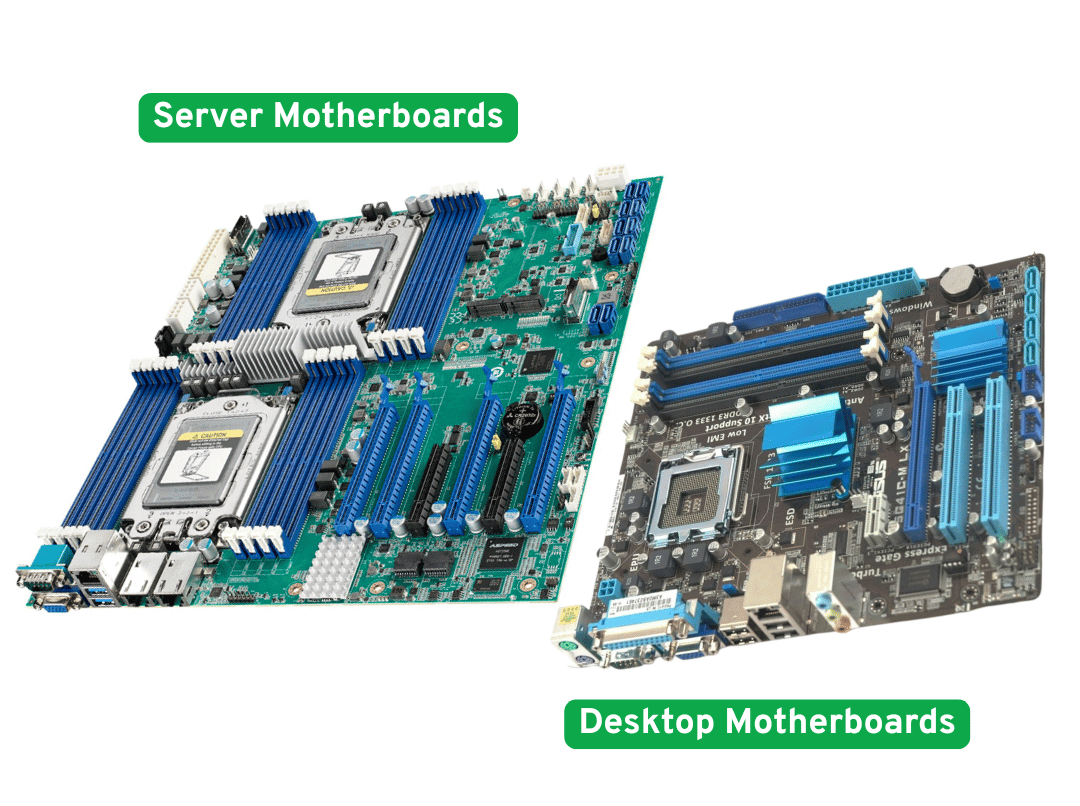
A server motherboard is built for reliability, continuous uptime, and demanding multi-user workloads. It supports ECC memory, dual CPU sockets, more PCIe lanes, and remote management via IPMI/BMC.
A desktop motherboard is built for a single user. It prioritizes value, ease of setup, and consumer-friendly features like overclocking support, onboard audio, Wi-Fi, and RGB.
Choose a desktop board if you’re building a gaming PC, office workstation, content creation rig, or a light home server. It costs less and gets you up and running faster.
Choose a server board if you need 24/7 uptime, ECC data protection, high memory capacity, multi-GPU PCIe expansion, or remote management for a business-critical or compute-heavy system.
If you’re still unsure, read on. The real differences aren’t always obvious, and choosing wrong in either direction costs you money.
What Is a Server Motherboard?
A server motherboard is the backbone of systems designed to run without interruption. Its job is to protect data, maximize uptime, and support demanding workloads that a single-user desktop board was never designed to handle.
Here’s what sets server boards apart in practice:
- Dual or quad CPU sockets. Many server boards support two or four processors working in parallel, enabling more cores, more memory channels, and more PCIe lanes for workloads like virtualization, large databases, and parallel compute.
- ECC memory support. Error-Correcting Code RAM automatically detects and fixes single-bit memory errors. For a server, this isn’t optional—silent memory corruption can take down services or destroy data integrity without warning.
- High memory capacity. Eight, twelve, or sixteen RAM slots are common, supporting hundreds of gigabytes to multiple terabytes depending on the platform.
- More PCIe lanes. Server platforms provide significantly more high-speed expansion bandwidth for NICs, HBAs, RAID cards, NVMe drives, and multiple GPUs running simultaneously.
- IPMI/BMC remote management. A baseboard management controller lets administrators power cycle, monitor sensors, and access the console remotely—even when the OS has crashed or the machine is off.
- Enterprise-grade build quality. Higher-grade capacitors, stronger VRMs, and thermal designs validated for years of nonstop operation.
Server boards pair with Xeon or EPYC processors and require ECC RAM, both of which cost more than their consumer equivalents. They skip features like RGB lighting and premium audio because those have no place in a rack or data center.
What Is a Desktop Motherboard?
A desktop motherboard is designed for one person and one machine. It prioritizes versatility, budget flexibility, and the features that actually matter in a personal computing environment.
What defines desktop boards:
- Wide range of prices and form factors. From compact Mini-ITX to full-size E-ATX, there’s a board for nearly every build and budget.
- Consumer CPU compatibility. Built for Intel Core and AMD Ryzen processors.
- User-oriented features. Onboard audio, Wi-Fi, Bluetooth, RGB headers, and M.2 slots tuned for gaming and creative workloads.
- Overclocking support. Enthusiast boards let you push CPU and RAM beyond stock speeds—a meaningful advantage for gaming and video editing.
- Beginner-friendly BIOS. Straightforward setup and configuration compared to server board firmware.
The limitations are real: one CPU socket, typically four RAM slots, no ECC support on most platforms, fewer PCIe lanes, and no built-in remote management. A desktop crash is an inconvenience. A server crash can mean revenue loss and corrupted data—that’s the fundamental design difference.
Server vs Desktop Motherboard: Comparison Table
This table isn’t just a feature list. Read the “Why It Matters” column—that’s where the real buying decisions live.
|
Feature |
Server Motherboard |
Desktop Motherboard |
Why It Matters |
|---|---|---|---|
|
CPU support |
Xeon / EPYC; dual or quad socket |
Core / Ryzen; single socket |
Dual socket only helps specific parallel workloads |
|
ECC memory |
Standard |
Rare / platform-dependent |
Critical for data integrity; unnecessary for gaming |
|
Memory capacity |
8–16+ slots, TBs possible |
4 slots, typically 32–128 GB |
Matters for VMs and in-memory databases |
|
PCIe lanes |
High—feeds multiple GPUs, NICs, NVMe |
Lower—optimized for one GPU |
Lane count determines multi-card scalability |
|
Remote management |
IPMI / BMC included |
Almost never |
Essential for headless or remote deployments |
|
Networking |
10GbE or faster, often dual-port |
1–2.5GbE; Wi-Fi optional |
High-speed NIC matters for storage and AI workloads |
|
Reliability |
Enterprise-grade, continuous duty |
Consumer-grade, daily use |
Matters most for always-on systems |
|
Power draw |
Higher baseline |
Lower, more efficient per user |
Running costs add up in home labs and small shops |
|
Consumer extras |
Minimal |
Audio, RGB, Wi-Fi, USB |
Irrelevant in a rack; important for desktop use |
|
Cost |
Significantly higher |
Lower and flexible |
Biggest factor for light workloads |
The Differences That Actually Matter for Buying Decisions
Not every spec gap between server and desktop boards changes what you should buy. These five are the ones that do.
1. ECC Memory: Do You Actually Need It?
ECC RAM catches and corrects single-bit memory errors before they can corrupt data or crash the system. On a server running a ZFS array, a production database, or a business application, this matters enormously.
For a gaming PC, a home media server, or a dev workstation? Probably not. Most consumer workloads run for years without hitting a memory error that ECC would have caught, and non-ECC RAM is faster and cheaper.
The rule: If losing data or service availability costs you money or trust, ECC is worth the premium. If the machine can reboot without consequences, skip it.
2. Dual CPU: When Does It Actually Help?
Dual socket means more cores, more memory channels, and more PCIe lanes. That helps workloads that scale well across many threads—think large virtualization clusters, in-memory databases, and parallel scientific computing.
But a modern single-socket Xeon or EPYC chip often outperforms older dual-socket configurations at lower cost, lower power draw, and less complexity. Dual socket is not automatically better. It’s a specific tool for a specific job.
The rule: Unless you’re running software that genuinely benefits from 64+ cores and distributed memory channels, single-socket is the smarter buy for most use cases.
3. PCIe Lanes: Why They Matter in GPU and Storage Builds
PCIe lanes determine how many high-speed cards you can run simultaneously at full bandwidth. A desktop platform might offer 24–48 lanes. A server platform can deliver 128 or more.
For a single GPU and a couple of NVMe drives, desktop lane counts are perfectly adequate. The moment you add a second GPU, a 100GbE NIC, an HBA, and additional NVMe storage to the same system, you’re fighting for bandwidth—and desktop boards lose that fight.
The rule: If you’re building a multi-GPU AI server, a dense storage node, or a system with multiple high-bandwidth add-in cards, server PCIe expansion is a non-negotiable requirement.
4. IPMI / BMC: Remote Management in the Real World
IPMI gives you out-of-band access to a server regardless of OS state. You can power cycle, view hardware sensors, mount virtual media, and open a console to a machine that’s completely locked up or sitting in a remote location.
If you manage a machine sitting next to you, this is a minor convenience. If you manage servers in a rack, a colocation facility, or an unmanned industrial deployment, IPMI is the feature that prevents an emergency site visit.
The rule: Any machine that will be headless, remote, or business-critical should have IPMI. For local desktop or workstation use, it’s unnecessary overhead.
5. Cost and Power: The Total Ownership Picture
Server boards, ECC RAM, and Xeon or EPYC CPUs cost significantly more than their desktop equivalents. Add higher idle power draw, and the total cost of running a server platform in a home lab or small office climbs quickly.
If your workload doesn’t demand what a server board provides, you’re paying for features you’ll never use. That money is better spent on faster storage, more memory, or a better GPU for the actual workload.
The rule: Right-size the platform. Overspending on server hardware for a light workload is just as costly as underspending on desktop hardware for a critical one.
Which Motherboard Should You Choose? A Use-Case Guide
|
Use Case |
Best Choice |
Key Reason |
|---|---|---|
|
Gaming PC |
Desktop |
Single-core performance, GPU tuning, value |
|
Office desktop |
Desktop |
Simpler, cheaper, no server features needed |
|
Content creation (single user) |
Desktop |
Fast RAM, good GPU support, easy setup |
|
Small home NAS (1–4 drives) |
Desktop |
Light load, no ECC needed, lower cost |
|
Large NAS or ZFS array |
Server |
ECC protects data; more SATA/SAS expansion |
|
Home lab (learning / testing) |
Either |
Desktop for budget; server for dense VMs |
|
Virtualization host |
Server |
ECC, RAM capacity, PCIe lanes, IPMI |
|
AI / GPU server |
Server |
Multi-GPU PCIe bandwidth, sustained power delivery |
|
Database / business server |
Server |
Uptime, ECC, IPMI, continuous duty rating |
|
Remote or industrial deployment |
Server |
IPMI, durability, long support lifecycle |
Gaming PC
Desktop is the right call. Gaming is single-threaded, GPU-bound, and latency-sensitive. ECC adds overhead without benefit. Server CPUs don’t overclock. You’d spend more and get a worse gaming experience.
Office Desktop and General Productivity
Desktop, no question. Email, documents, video calls, and light cloud apps don’t need ECC, dual sockets, or 128 PCIe lanes. A mid-range desktop board handles all of it at a fraction of the cost.
NAS and File Server
It depends on what’s at stake. A small Plex server or personal backup box runs fine on a desktop board with consumer RAM. But if you’re building a ZFS-based array with drives holding irreplaceable data, ECC support and additional SATA expansion ports make a server board worth the investment. The cost of a drive failure without ECC protection can exceed the price difference between the two platforms.
Home Lab
Either works—it comes down to goals. If you’re learning Linux, running a few containers, or testing configurations, a desktop board is cheaper and easier to manage. If you want to run a realistic virtualization environment with IPMI, dense memory, and multiple VMs competing for resources, a used server board is often the most cost-effective upgrade you can make.
Virtualization Host
Server is the right platform. Dense VM environments need high core counts, large RAM capacity, ECC protection against memory corruption, and PCIe lanes for storage and networking. Desktop boards hit their limits quickly when you start stacking VMs.
AI and GPU Compute Servers
Server, without compromise. Running multiple GPUs at full PCIe bandwidth requires a platform that can actually deliver it. Desktop boards lack the lane count, power delivery, and sustained thermal headroom for serious multi-GPU compute. Server platforms are built for exactly this workload.
Remote and Industrial Deployments
Server only. Any system that will sit in a rack, a remote facility, or an unmanned industrial environment needs IPMI for management, enterprise-grade durability for reliability, and a platform with a long support lifecycle. Consumer boards simply aren’t validated for these conditions.
When a Desktop Motherboard Is Enough
Don’t buy server hardware you don’t need. A desktop board is the right choice for:
- Home media servers running Plex, Jellyfin, or similar
- Small backup servers or personal cloud setups
- Low-drive-count NAS builds where data loss is recoverable
- Dev and test environments where occasional downtime is acceptable
- Gaming rigs, workstations, and creative editing machines
- Budget home labs focused on learning rather than production
If the machine can go offline for maintenance without a business consequence, a desktop board almost always delivers better value per dollar.
When a Server Motherboard Is Worth the Cost
The server premium pays off when:
- Downtime costs money. Revenue-generating applications, customer-facing services, and production databases need ECC and continuous-duty hardware.
- Data integrity is non-negotiable. Storage arrays, financial systems, and medical applications cannot tolerate silent memory corruption.
- You need dense memory or high VM counts. Sixteen RAM slots and terabytes of capacity change what’s possible.
- Multi-card PCIe expansion is required. GPU clusters, dense storage nodes, and high-speed networking demand server-grade lane counts.
- The machine is headless or remote. IPMI is not optional when physical access is inconvenient or impossible.
Using a desktop board for these workloads to save money upfront is a false economy. The cost of an outage, data recovery, or an emergency site visit almost always exceeds the price difference.
Common Buying Mistakes to Avoid
Buying a server board for a gaming build.
Server CPUs don’t overclock. ECC adds latency. You’ll spend more and get worse gaming performance than a mid-range desktop platform.
Assuming ECC is necessary for every home server.
A four-drive NAS running Plex or TimeMachine backups does not need ECC. Save the money unless your data genuinely can’t afford corruption.
Choosing dual socket when modern single-socket is enough.
A current-generation EPYC or Xeon processor often outperforms older dual-socket configurations in real-world workloads while using less power and requiring less maintenance.
Counting PCIe slots instead of PCIe lanes.
A board can have six slots sharing eight lanes. That’s a bottleneck, not flexibility. Check the platform’s total lane count and how those lanes are allocated before you buy.
Ignoring chassis, airflow, and power delivery.
The motherboard is only one part of the system. A server board in a poorly ventilated chassis, fed by an undersized PSU, with no thought given to cable management and PCIe spacing, will underperform and overheat. The platform choice and the physical build have to work together.
Building for remote use without IPMI.
If you plan to manage a system from another location, assuming you can SSH in is not a plan. IPMI is the fallback when the OS goes down, and it pays for itself the first time you avoid a physical trip to fix a locked system.
Frequently Asked Questions
Can a desktop motherboard run a server?
Yes. Home servers, small NAS builds, and test labs run on desktop boards regularly. You give up ECC, IPMI, dual sockets, and heavy expansion capacity. That’s an acceptable trade for non-critical, light-load roles.
Is ECC RAM necessary for a NAS?
Not always. For a small media or backup NAS, non-ECC RAM works fine. For a large array holding critical or irreplaceable data, ECC adds meaningful protection against silent corruption. The more data you’re protecting and the longer drives stay online, the more valuable ECC becomes.
Do server motherboards support GPUs?
Yes, and often more effectively than desktop boards. More PCIe lanes mean multiple GPUs can run at full bandwidth simultaneously, which is why server boards are the standard platform for AI inference, model training, and rendering farms.
Should I use a server motherboard for a workstation?
It depends on the workload. Simulation, CFD, large-scale 3D rendering, and EDA tools benefit from ECC and high memory capacity. For most creative workstations—video editing, photography, motion graphics—a high-end desktop or HEDT board is sufficient and significantly cheaper.
Why are server motherboards so much more expensive?
You’re paying for ECC memory support, additional CPU sockets, more RAM slots, higher PCIe lane counts, IPMI remote management, enterprise-grade components, and validation for continuous 24/7 operation. Each of those adds manufacturing cost and engineering overhead.
Do I need dual socket?
Only if your software genuinely scales across very high core counts and your memory requirements exceed what a single socket can address. For most virtualization hosts, AI inference servers, and storage nodes, a modern single-socket platform is the better value.
What is IPMI and do I need it?
IPMI is remote, out-of-band server management. It lets you access and control a machine independent of the operating system. Essential for rack servers, colocation setups, and any deployment where physical access is inconvenient. Unnecessary for a desktop or workstation sitting next to you.
Final Recommendation: Match the Board to the Job
The decision isn’t complicated once you’re honest about what the machine actually needs to do.
Desktop motherboard: gaming, office use, content creation, light home servers, budget home labs, and any single-user workload where occasional downtime is acceptable. You get better consumer performance per dollar, easier setup, and a massive ecosystem of compatible components.
Server motherboard: virtualization hosts, business-critical applications, large storage arrays, AI and GPU compute clusters, production databases, and any deployment that’s headless, remote, or simply cannot afford to go down. The premium pays for uptime, data integrity, and operational control.
Buying more platform than you need wastes money. Buying less platform than the job demands costs more in the long run.
One more thing worth noting: the motherboard sets the foundation, but it doesn’t complete the system. If you’re building a GPU server, a multi-drive storage node, or an industrial rackmount system, the chassis, airflow design, power delivery, and PCIe layout matter just as much as the board itself. A server-class motherboard in a poorly designed enclosure won’t perform like a server. Getting the full system right—from board to chassis to cooling—is what makes the difference between a build that works and one that actually holds up.
