


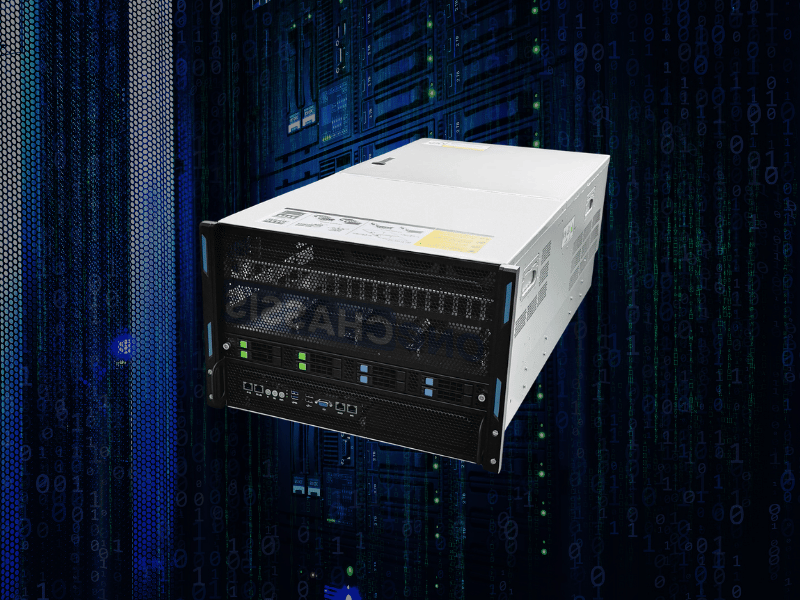
A GPU server barebone is a partially assembled platform that ships with the chassis, motherboard, power supply, and cooling hardware — but leaves the components that vary most between users, like GPUs, memory, storage, and sometimes CPUs, for you to add. It sits between a bare chassis and a fully built server.
This route suits teams that want to match hardware precisely to a workload, buy GPUs in phases, or keep upgrade flexibility over several GPU generations. It rewards buyers who can handle assembly, firmware checks, and thermal validation in-house.
It is not for everyone. If you need the fastest possible deployment, a single warranty, and one support number to call, a prebuilt server often wins. Barebones trade convenience for control.
This guide helps you decide four things: whether a barebone fits your situation, when a prebuilt or chassis-only path is smarter, how to choose a platform based on your actual workload, and which specifications genuinely affect performance. By the end, you’ll know how to avoid the compatibility, power, and cooling mistakes that quietly wreck GPU server builds.
Should You Buy a GPU Server Barebone?
If you read nothing else, read this.
Choose a barebone if:
- You want direct control over GPU, memory, and storage choices.
- You plan to add GPUs in phases as budget or supply allows.
- Your team can handle assembly, firmware updates, and stability testing.
- You want a lower upfront platform cost and easier upgrades later.
Choose a prebuilt server if:
- You need the fastest path to a running, racked system.
- You want one warranty and one support path for the whole machine.
- Your team has limited server integration experience.
- Uptime and reduced risk matter more than sourcing flexibility.
Choose a chassis-only or OEM/ODM route if:
- You need deeper customization than a standard barebone offers.
- You’re building at volume and want enclosure or board-level tailoring.
- You have strong in-house engineering to integrate from the ground up.
Still unsure? Answer two questions first: what workload is this for, and does your team have the skills to validate a multi-GPU build? Those two answers settle most decisions.
What Is a GPU Server Barebone?
A barebone is a partial build. You get the foundation, but not the parts that differ most between buyers. Think of it as a house with the frame, wiring, and plumbing done — you still choose the appliances and finishes.
What a bare-bones typically includes
- Chassis — the frame, drive bays, and mounting points, engineered for a specific GPU layout and airflow path.
- Motherboard or system board — with CPU sockets, PCIe slots, and memory channels in place.
- Power supply — often redundant and sized for high-draw GPU configurations.
- Cooling hardware — fans, shrouds, and sometimes liquid cooling support.
- Risers and mounting hardware where the layout requires them.
What it typically excludes
- GPUs
- Memory (RAM)
- Storage drives
- Sometimes CPUs
- Sometimes network cards or accelerators
Vendor packaging varies — verify before you compare
Here’s a detail many buyers miss: “barebone” is not packaged identically across manufacturers. Some include CPUs; others don’t. Some bundle basic networking; others leave it out. Before you compare two barebones on price, confirm exactly what each one includes. A cheaper unit that omits CPUs and NICs may cost more once fully configured.
Barebone vs chassis-only vs prebuilt
- Chassis-only gives you mostly the enclosure and infrastructure. It carries the heaviest integration burden.
- Barebone provides a more complete starting platform, balancing cost and control.
- Prebuilt ships ready to rack, with the least flexibility and the highest convenience.
When a GPU Server Barebone Makes Sense
Barebones shine in specific operational situations, not as a default choice. Here’s where they genuinely win.
You need an exact GPU choice
Not all AI and HPC workloads want the same GPU. VRAM, thermal envelope, slot width, and interconnect needs differ widely. Vendor-fixed server SKUs often force a compromise you don’t want. A barebone lets you install the exact cards the job demands.
You want phased procurement
Buy the platform now, populate GPUs later, and add memory or storage as the project matures. This flexibility helps when GPU supply is tight or budget arrives in stages. You lock in the foundation without committing to every expensive component at once.
You already have infrastructure skills in-house
BIOS tuning, firmware compatibility, thermal validation, and rack power planning are routine for experienced teams. If yours can bring up a multi-GPU system confidently, the barebone route turns that skill into real savings.
You want a longer platform life
A well-chosen platform can survive one or more GPU refresh cycles. When the next generation of cards drops, you swap GPUs instead of replacing the whole server. That upgrade path stretches your investment further.
When a Barebone Is the Wrong Choice
This section matters as much as the last one. Good buying decisions come from knowing when to walk away.
You need the fastest time to deployment
If a deadline is driving the project, a prebuilt server usually wins. Barebone validation — bring-up, firmware, stability testing — takes time you may not have. Procurement savings mean little if the machine ships two weeks late.
You want one support path
Prebuilt systems simplify escalation. When something fails, you call one vendor. With a barebone, responsibility splits across component manufacturers, and finger-pointing between vendors is a real risk during an outage.
Your team lacks integration experience
Multi-GPU bring-up is not “install the card and go.” Firmware settings, slot population, airflow, cable routing, and stability testing all matter. A team new to server hardware faces a genuine learning curve, and mistakes here get expensive.
You can’t tolerate compatibility delays
Lower component cost is often offset by debugging time. If your organization can’t absorb a few days of troubleshooting, the cheaper path may cost more overall. Weigh the savings against the risk honestly.
GPU Server Barebone vs Prebuilt vs Chassis-Only
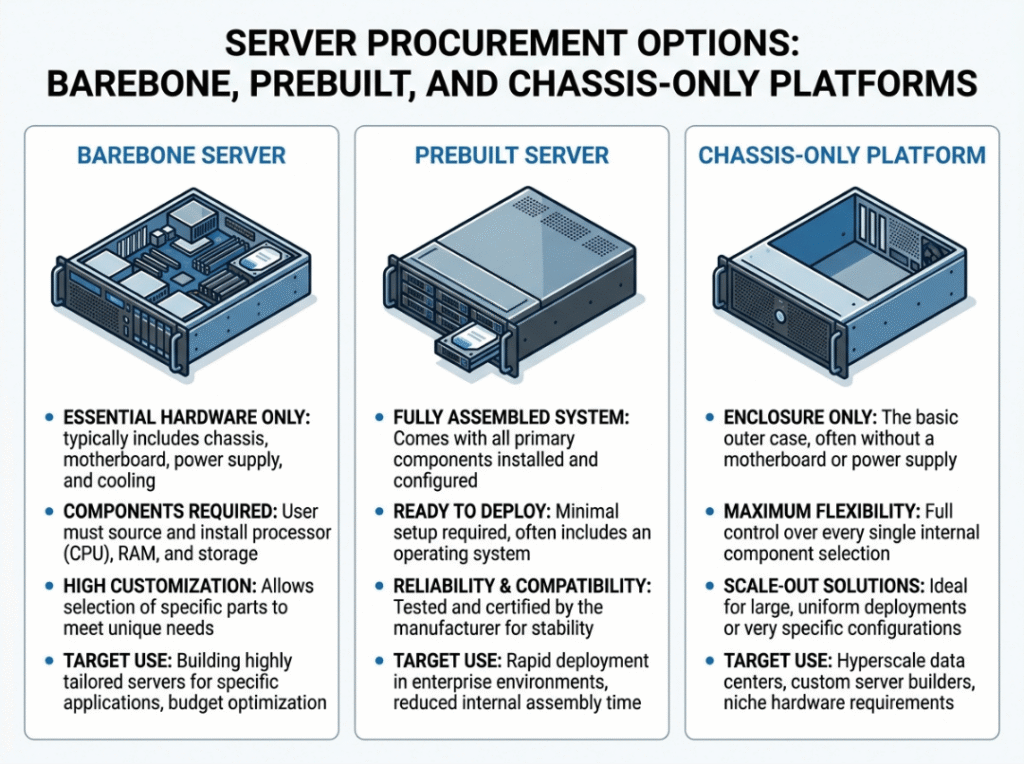
Both concept explanation and procurement path matter. This table moves you from “what is it” to “which should I buy.”
|
Factor |
Barebone |
Prebuilt Server |
Chassis-Only |
|---|---|---|---|
|
Upfront cost |
Lower — you source volatile parts |
Highest — includes vendor markup |
Lowest hardware cost, highest integration cost |
|
Deployment speed |
Moderate — assembly and validation needed |
Fastest — ready to rack |
Slowest — full integration required |
|
Flexibility |
High — you pick GPUs, RAM, storage |
Low — locked to vendor config |
Highest — board and layout freedom |
|
Support model |
Split across component warranties |
Unified single contract |
Split, plus your own integration ownership |
|
Validation effort |
Meaningful — bring-up and testing |
Minimal — vendor validates |
Heavy — full-stack validation |
|
Upgrade ease |
Easy — swap components |
Limited — vendor-dependent |
Easy but labor-intensive |
|
Best fit |
Teams wanting control and phased buying |
Teams needing speed and simple support |
Specialists building at volume or custom |
The takeaway: barebones balance cost and control, prebuilts win on speed and simplicity, and chassis-only suits highly specialized or volume builds with strong engineering behind them.
How to Choose a GPU Server Barebone by Workload
This is the most important section in the guide. Not all GPU servers should be designed the same way. Match the platform to the job first, and GPU count second.
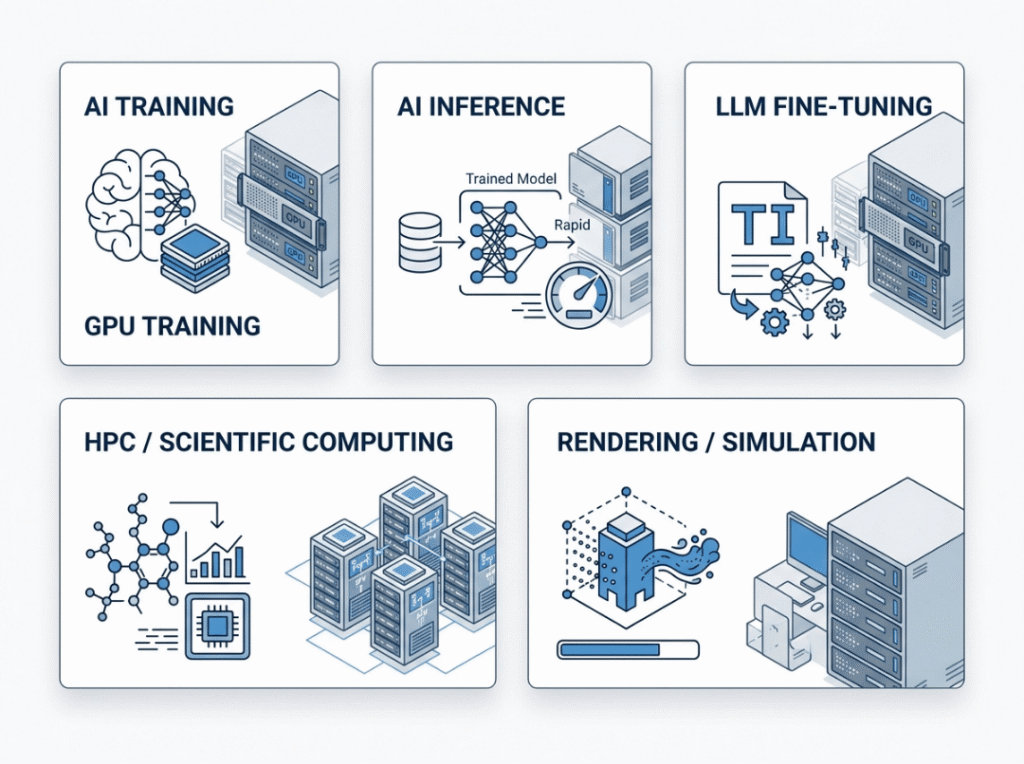
For AI training
Training hammers GPUs continuously, so sustained behavior matters more than peak specs. Prioritize high VRAM, strong GPU-to-GPU bandwidth, and PSU headroom that survives long runs. Cooling is critical — a chassis that throttles under sustained load erases the performance you paid for. Fast NVMe scratch space keeps expensive cards fed, and system memory matters more if your data pipeline is heavy. CPU is important, but rarely the star.
For AI inference
Inference rewards efficiency, latency, and deployment density — not raw GPU count. Many teams overspend here by copying training-style configs. Right-size the GPU count, then focus on power efficiency per node, network throughput, and thermal load across the rack. Often, several efficient nodes beat one very dense server. Overbuying GPU capacity for inference hurts your ROI without improving results.
For LLM fine-tuning and experimentation
Fine-tuning lives on VRAM and memory bandwidth, and toolchains change fast. Prioritize cards with enough VRAM headroom and a platform with room to upgrade GPUs as model sizes grow. This is exactly where barebone flexibility pays off — you can evolve the build as requirements shift. Keep storage fast and cooling solid, because experimentation cycles run long and unpredictable.
For HPC and scientific computing
Not every HPC job is GPU-dominant. Some remain CPU-heavy or sensitive to memory bandwidth. Here, CPU lane count, memory channel population, and CPU-to-GPU balance may matter more than in AI training. In clustered environments, storage architecture and high-speed networking become central. A server tuned for LLM training is not automatically the right node for every HPC workload.
For rendering and simulation
Some visual compute workloads care more about storage throughput, CPU balance, and per-task behavior than dense multi-GPU scaling. Before buying the densest platform, confirm your renderer or simulation engine actually scales across many GPUs. If it doesn’t, that eighth GPU is idle money.
Workload-to-platform priorities at a glance
|
Workload |
GPU Priority |
CPU Priority |
Memory Priority |
Storage Priority |
Cooling Priority |
Suggested Density |
|---|---|---|---|---|---|---|
|
AI Training |
Very high |
Medium |
High |
High (NVMe) |
Very high |
4–8 GPU |
|
AI Inference |
Medium |
Medium |
Medium |
Medium |
High |
2–4 GPU per node |
|
LLM Fine-Tuning |
Very high (VRAM) |
Medium |
Very high |
High |
High |
4–8 GPU |
|
HPC / Scientific |
Medium–High |
High |
High (bandwidth) |
Medium–High |
High |
Varies by job |
|
Rendering / Simulation |
Medium |
High |
Medium |
High |
Medium |
2–4 GPU |
The Hardware Specifications That Matter Most
Don’t treat every spec as equal. For each factor below, know why it matters and where buyers get it wrong.
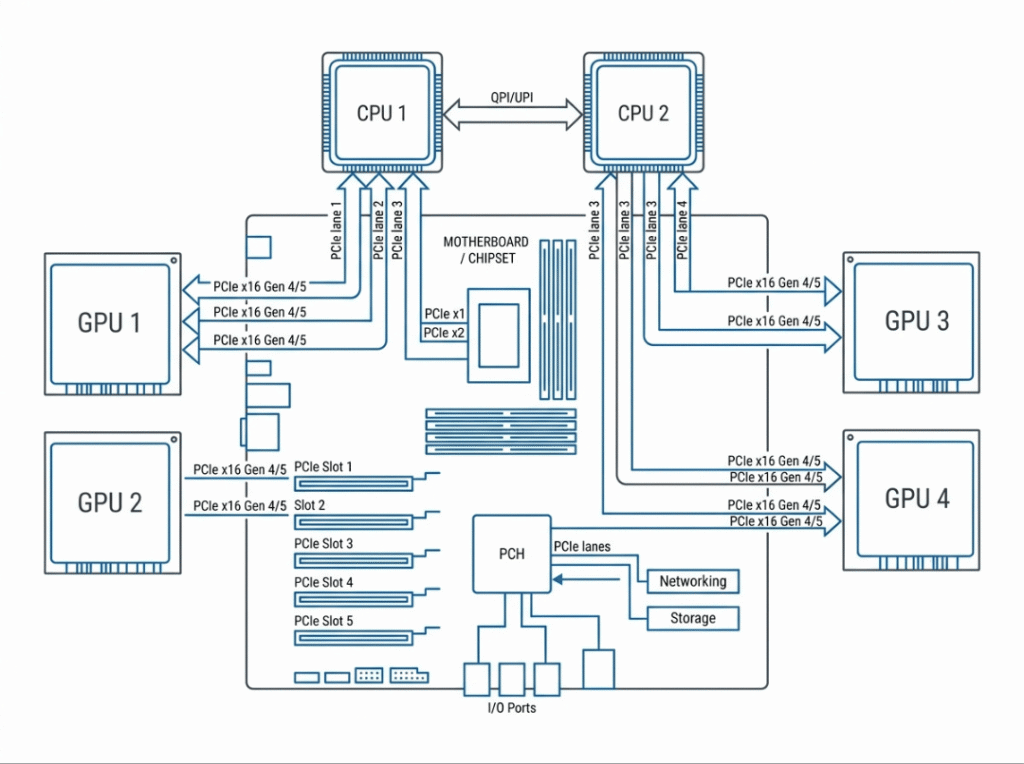
PCIe lanes, topology, and generation
Multi-GPU performance lives and dies on PCIe. Each GPU wants a full x16 slot, and the CPU has finite lanes to give. Look for Gen 4 or Gen 5 support with enough lanes for every card to run at full bandwidth. Topology matters as much as slot count — PCIe switches can expand density but add latency tradeoffs for bandwidth-heavy training jobs. A platform can “support” many GPUs on paper and still be a poor fit for interconnect-sensitive work.
CPU platform and socket choice
Your CPU sets the ceiling. AMD EPYC generally offers more PCIe lanes per socket, which helps dense GPU builds. Intel Xeon brings broad ecosystem support and strong single-thread performance. Confirm socket, chipset, and memory type before anything else. Not every build needs dual sockets — that complexity only pays off when lane count or core demand justifies it.
GPU form factor, dimensions, and TDP
Physical fit is one of the most avoidable and expensive mistakes. Check card length, slot width, and power connector clearance against the chassis before buying. A 700-watt card in a chassis built for 350-watt cards will throttle no matter how good the airflow looks. Server environments don’t tolerate workstation-style assumptions — plan for the real thermal envelope.
PSU capacity and redundancy
GPUs are power-hungry and spike hard during training. Size the PSU for peak draw plus 20–30% headroom, not average load. Prioritize redundant PSUs (N+1) so a single failure doesn’t kill the server, and choose 80 Plus Platinum or Titanium efficiency to cut heat and waste. There’s a difference between “boots successfully” and “runs reliably under sustained load.”
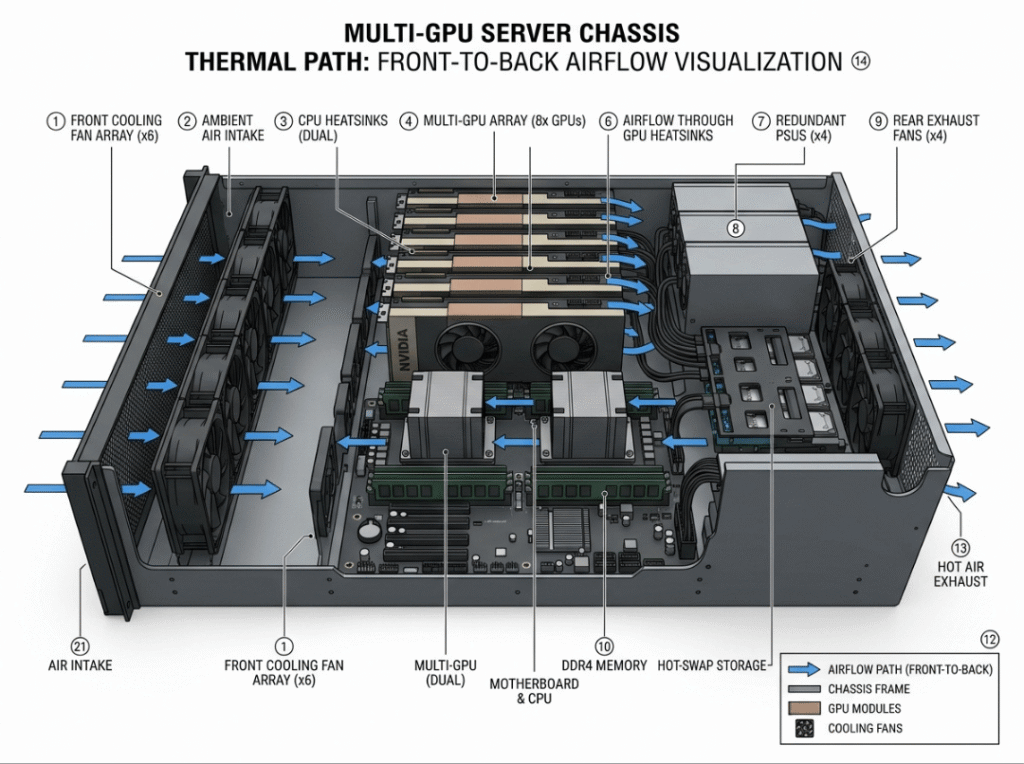
Thermal design and airflow path
Good chassis design controls airflow front to back with no dead zones. Fans should push cool air straight across the GPUs, not around them. Here’s the line worth remembering: “supports 8 GPUs” does not mean “sustains 8 high-TDP GPUs at full load without throttling.” For dense or always-on builds, plan for liquid cooling from the start — retrofitting it later is far more painful.
Memory population strategy
Server boards run memory in channels, often 8 or 12 per CPU. To hit full bandwidth, populate every channel evenly with a matched kit. Two common mistakes cost you bandwidth: mixing module sizes and leaving channels empty. Balance total capacity against bandwidth needs based on your workload.
Storage layout
Map storage tiers to the job. Use NVMe for datasets, scratch space, and anything GPUs read directly — the speed keeps cards fed. Use enterprise SATA for bulk and archival storage where raw speed matters less. In cluster environments, weigh local storage against shared or networked storage.
Networking and cluster integration
Distributed training and clustered HPC depend on high-speed networking — plan for it early. Confirm Ethernet speeds or InfiniBand needs, out-of-band management, and how the server integrates into your existing rack and cluster. Treat this as infrastructure planning, not an afterthought.
4-GPU vs 8-GPU Barebone: Which Should You Choose?
This is a high-stakes, real-world decision. More GPUs isn’t automatically better.
When 4 GPUs are enough
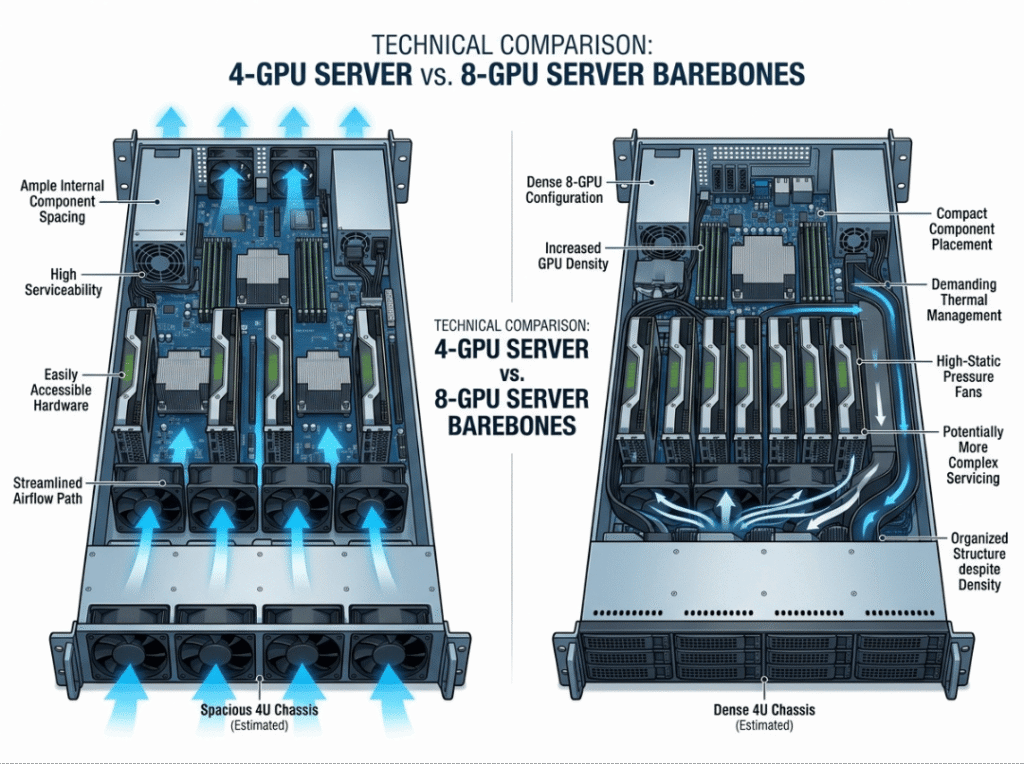
Four cards mean easier cooling, simpler serviceability, lower rack power draw, and less validation complexity. This suits smaller teams, inference-heavy workloads, and targeted training jobs. If your rack power or cooling is limited, four GPUs is often the smarter, more reliable choice.
When 8 GPUs make sense
Eight cards deliver denser compute per node and handle larger training jobs. But they assume infrastructure maturity — higher rack power availability, stronger cooling, and a team ready to manage the complexity. Density pays off only when the whole environment is ready for it.
Tradeoffs buyers underestimate
- Heat density rises sharply and demands serious airflow or liquid cooling.
- Cable complexity grows, and messy runs choke airflow.
- Serviceability drops as the chassis fills.
- Rack-level power budget can become the real constraint, not the server itself.
|
Factor |
4-GPU Barebone |
8-GPU Barebone |
|---|---|---|
|
Cost |
Lower |
Higher |
|
Rack power demand |
Moderate |
High |
|
Thermal complexity |
Manageable |
Significant — often needs liquid cooling |
|
Serviceability |
Easier |
Harder, tighter access |
|
Scaling potential |
Limited |
Strong |
|
Best fit |
Inference, smaller teams, targeted training |
Large training jobs, mature infrastructure |
Common Buying and Assembly Mistakes
Errors happen at two stages: choosing the platform and building it. Both cost money.
Buying by GPU count alone. Density looks impressive but ignores power, cooling, and workload fit. Match the count to the job, not the spec sheet.
Ignoring PCIe topology. Slot count isn’t bandwidth. Two GPUs sharing lanes or dropping to x8 will hurt interconnect-heavy training.
Underestimating GPU dimensions and clearance. The card may not physically fit, or it may block airflow. Confirm length, width, and connector clearance first.
Sizing the PSU for average load. GPUs spike during training. A PSU sized for typical draw causes mid-job shutdowns. Size for peak, plus headroom.
Underplanning rack power and cooling. The server may be fine, but the rack can’t feed or cool it. Confirm facility limits before ordering.
Treating training and inference as the same workload. They demand different platforms. Copying a training config for inference wastes money.
Choosing CPUs that bottleneck the build. Too few lanes or the wrong socket limits expansion and starves your GPUs.
Skipping firmware and BIOS validation. Enable Above 4G Decoding and Resizable BAR, update the BIOS, and boot one GPU before adding the rest. Most detection issues trace back to a loose part or outdated firmware.
Sample Configuration Paths for Different Buyers
These are configuration mindsets, not fixed part lists. Match one to your situation.
Budget-conscious AI inference node
Don’t overspend on density. Focus on a right-sized GPU count, strong power efficiency, and manageable thermals. Keep storage moderate and prioritize latency and cost per inference over raw compute. Two to four efficient GPUs often beat an oversized training-style box.
Balanced 4-GPU AI training server
Aim for balance: enough PSU headroom for sustained spikes, solid front-to-back airflow, fast local NVMe scratch, and memory sized for your data pipeline. This is the sweet spot for many teams — real training capacity without the thermal and power complexity of a dense build.
Dense 8-GPU training platform
Only go here when workloads justify it and infrastructure is ready. Validate thermals and serviceability up front, plan for liquid cooling, and confirm rack power can sustain full load. The payoff is compute density; the price is operational complexity.
HPC-focused compute node
Balance CPU and GPU rather than maximizing cards. Prioritize memory bandwidth, adequate PCIe lanes, and — in clustered setups — high-speed networking and shared storage. Tune the node to the specific HPC job, since not all of them are GPU-bound.
Frequently Asked Questions
What is included in a GPU server barebone?
Typically the chassis, motherboard, power supply, and cooling hardware — the foundation. You add CPUs (if not included), RAM, storage, and GPUs. Always verify the exact contents, since packaging varies by vendor.
Is a barebone GPU server cheaper than a prebuilt server?
Usually lower upfront, because you source GPUs and memory yourself at market prices and skip vendor markup. Factor in your team’s build time — that labor isn’t free.
Can I add GPUs later to a barebone system?
Yes. Phased GPU population is one of the main reasons to buy a barebone. Confirm the chassis has enough free x16 slots, clearance, and PSU headroom for the cards you’ll add.
How many GPUs can a barebone platform support?
Commonly 4 to 8 double-width cards, with dense designs going higher. Confirm the number of full x16 slots and physical clearance for your specific GPUs.
Do I need one CPU or two for a multi-GPU server?
It depends on lane count and core demand. Dual sockets can supply more PCIe lanes and cores for dense builds, but add cost and complexity. Many 4-GPU builds run fine on a single high-lane CPU.
How much PSU capacity does a 4-GPU or 8-GPU build need?
Add peak GPU draw plus CPUs, drives, and fans, then add 20–30% headroom. Four high-end GPUs can pull 1,400–2,800 watts, so many builds land in the 2,000–3,000-watt range with redundant PSUs.
Is liquid cooling necessary for dense GPU servers?
Not always, but it helps for the densest, hottest, always-on builds. If you’re running eight high-TDP cards continuously, plan liquid cooling from the start rather than retrofitting.
What is the difference between barebone and chassis-only?
A chassis-only product is mostly the enclosure and infrastructure, requiring full integration. A barebone adds the motherboard, PSU, and cooling — a more complete starting point with less integration burden.
When is a prebuilt GPU server the better choice?
When you need fast deployment, unified warranty and support, or your team lacks server integration experience. Prebuilt trades flexibility and upfront savings for speed and simplicity.
Final Pre-Purchase Checklist
Run through this before you commit. It’s a validation gate, not just a summary.
- ☐ PCIe slots — enough full x16 slots at Gen 4/5 for every GPU, with topology reviewed
- ☐ CPU socket — matches your chosen Xeon or EPYC, with adequate lanes
- ☐ GPU clearance — card length, slot width, and power connector clearance confirmed
- ☐ Memory plan — matched DIMM kit fills channels correctly
- ☐ PSU sizing — covers peak load plus 20–30% headroom, ideally redundant
- ☐ Rack power — facility can supply the server’s full draw
- ☐ Airflow — cooling path matches your GPU count and TDP
- ☐ Storage tiers — NVMe for hot data, bulk storage mapped to workload
- ☐ Networking — speeds and cluster integration requirements defined
- ☐ Firmware/BIOS — validation plan ready (Above 4G Decoding, Resizable BAR, updates)
- ☐ Upgrade path — next GPU refresh considered
- ☐ Warranty/support — ownership across components clearly understood
Check every box, and you’re set up for a build that runs cool, runs fast, and lasts.
Final Recommendation
A GPU server barebone gives you three things a locked-down prebuilt rarely will: lower upfront cost, full control over component quality, and easy upgrades down the road. For teams with the skills to build it right, that combination is hard to beat.
But choose deliberately. Pick a barebone when flexibility, workload matching, and upgrade control matter most. Choose a prebuilt when speed, simplified support, and reduced validation burden outweigh those gains. Move to dense 8-GPU platforms only when your power, thermals, and operations are genuinely ready.
Above all, match the platform to your workload first, and GPU count second. Get the airflow, power budgeting, and PCIe topology right, and the rest falls into place. Which workload are you building for — and does your current rack have the power and cooling to support it?
