


Choosing the right rackmount case is one of the most consequential decisions you’ll make when building or upgrading a server or workstation setup. Get it right, and you’ll have a system that runs efficiently, scales with your needs, and holds up for years. Get it wrong, and you may find yourself dealing with thermal bottlenecks, compatibility issues, cramped internals, and a frustrating rebuild down the line.
The market for rackmount cases is vast, spanning compact 1U chassis designed for space-constrained data centers to deep, multi-drive behemoths built for high-performance storage servers. Brands like Supermicro, Chenbro, Rosewill, and Silverstone each bring their own engineering philosophies and product lines to the table, and sifting through the options without a clear framework can feel overwhelming.
This guide walks you through the most important factors to consider—size and form factor, performance and cooling requirements, storage and expansion capacity, build quality, brand reputation, and where to actually buy—so you can make a confident, informed decision. Whether you’re outfitting a small business server room, building a home lab, or speccing out enterprise-grade infrastructure, understanding these considerations will save you time, money, and headaches.
What Size Rackmount Case Should You Get?
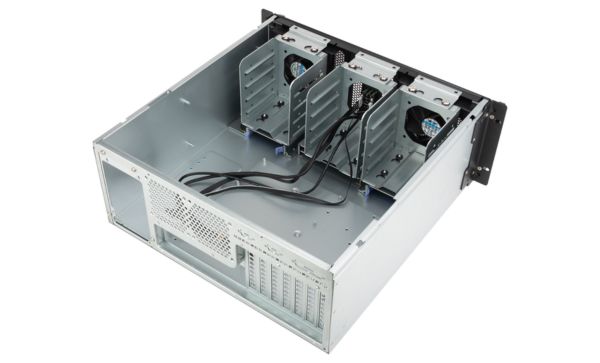
Size is the foundation of every rackmount build. Before you think about PSUs, drive bays, or airflow, you need to know what form factor you’re working with—because that single decision shapes everything else.
Rackmount cases are measured in rack units, abbreviated as “U.” One rack unit equals 1.75 inches of vertical space in a standard 19-inch equipment rack. From there, the most common configurations are 1U, 2U, 4U, and beyond, each with its own strengths and trade-offs.
1U cases are the slimmest option available. They’re ideal for high-density deployments where rack space costs money—think colocation facilities or large data centers where you might have dozens of servers stacked vertically. A 1U chassis can hold a server motherboard, a handful of 2.5-inch drives, and a compact power supply, but that’s roughly where the headroom ends. Cooling in a 1U enclosure typically relies on multiple small, high-RPM fans that move air quickly through a shallow chassis. Those fans are effective, but they’re also loud—a relevant consideration for any environment where acoustics matter. There’s also very little room for full-length expansion cards, which rules out 1U for most GPU-accelerated workloads.
2U cases strike a balance that makes them one of the most popular choices across enterprise and prosumer builds. With 3.5 inches of vertical space, a 2U chassis can accommodate larger fans, more drive bays (often up to 8 x 3.5-inch drives), and low-profile expansion cards. Cooling tends to be better than 1U, and the build is quieter. For most general-purpose server workloads—file storage, virtualization, web hosting, database services—a 2U chassis offers a sensible combination of density and flexibility.
4U cases are where things open up considerably. At 7 inches tall, a 4U enclosure has enough room for full-length PCIe cards, larger power supplies, robust cooling configurations, and double-digit drive counts. If you’re building a workstation-class machine that needs to live in a rack—think a rendering server, a deep learning node, or a high-capacity NAS—4U is often the minimum you’ll want. Some vendors even offer 4U cases specifically designed with extra depth to accommodate consumer-grade ATX motherboards and graphics cards, giving you the performance headroom of a tower in a rack-compatible form factor.
Beyond these three common options, you’ll also find 3U, 6U, and specialized chassis in the market. While 3U cases offer a middle ground between 2U and 4U, they’re less standardized, so component compatibility—particularly with mounting brackets and server rails—deserves careful attention.
Depth is another dimension that gets less attention than it deserves. Rackmount cases are typically listed with a depth measurement, often ranging from around 500mm to over 800mm. A deeper chassis can accommodate more drives, longer cables, and better cable routing, but it also requires a rack with sufficient depth clearance. Short-depth chassis are available for shallow racks or network closets, though they come with their own component limitations.
The right size ultimately comes down to your specific use case. For a single-purpose server—a dedicated firewall, a monitoring appliance, a lightweight web server—a 1U case does the job efficiently. For virtualization hosts, storage clusters, or anything requiring multiple PCIe devices, step up to 2U or 4U. If your workloads involve GPUs or high-drive counts, 4U should be your starting point, not your fallback. One practical tip: if you’re unsure between two sizes, go larger. Rack space can always be padded out with blanking panels; a chassis that’s too small cannot be expanded.
How to Navigate Performance Requirements?
Once you’ve settled on a size, the next major consideration is performance infrastructure—specifically, how your chassis handles heat, power delivery, and high-demand components. These factors don’t just affect how fast your system runs; they determine how reliably it runs over time.
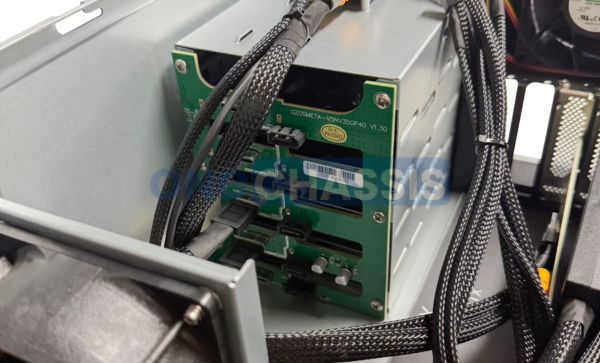
Cooling and airflow are where rackmount cases differ most dramatically from standard desktop or tower enclosures. In a typical tower, cool air enters from the front or bottom, flows over components, and exits through the rear or top. Rackmount cases follow a different logic: air almost always enters from the front and exhausts out the back, in a linear front-to-back airflow path. This design works well in server racks where hot and cold aisles are used to manage ambient temperature, but it means component placement matters enormously. Hard drives, which generate significant heat in dense arrays, need to be positioned so they don’t become a thermal barrier for the rest of the system.
Fan configurations vary widely. 1U cases often rely on four to six 40mm or 60mm fans spinning at very high RPMs—sometimes exceeding 20,000 RPM—which produces loud but effective cooling. 2U and 4U cases can accommodate larger 80mm, 92mm, or even 120mm fans, which spin more slowly, run more quietly, and often move more air. When evaluating a chassis, look at the number of fan bays, the maximum supported fan diameter, and whether the case ships with fans or requires you to source your own. Many server-grade cases use proprietary fan modules, which can complicate replacements down the line.
If your build includes high-performance components—particularly multi-core CPUs, RAID controllers with large caches, or NVMe SSDs running sustained workloads—you should also consider whether the chassis has dedicated thermal management for those areas. Some premium cases include separately ducted airflow zones or airflow shrouds that direct cool air precisely over the CPU or drive bays, preventing hot spots that can throttle performance or shorten component lifespan.
Power supply compatibility is another layer of complexity. Many rackmount cases are designed for proprietary or server-specific PSU form factors—SFX, TFX, or redundant hot-swap PSU bays using the SSI EPS or SSI CEB standard. Redundant power supply bays, common in 2U and larger cases, allow you to run two PSUs simultaneously. If one fails, the other takes over without any downtime. For production systems where availability is critical, this feature is worth the added cost. Consumer ATX PSUs, while widely available and affordable, often don’t fit standard server chassis without an adapter bracket, so verify compatibility before you commit.
For GPU workloads—machine learning inference, video transcoding, scientific computing—your chassis needs to support full-length, double-wide, or triple-wide expansion cards. Not all 4U cases accommodate these, even when they have the vertical space, because the chassis depth or the placement of drive cages can block PCIe slots. Some manufacturers offer purpose-built GPU server chassis with reinforced PCIe slots, additional power connectors, and dedicated GPU cooling zones. If you’re building a GPU-heavy node, these specialized cases are worth the premium.
How Much Storage and Expansion Do You Need?
Storage capacity and expandability are closely tied to chassis selection. It’s worth thinking carefully about current needs and realistic growth projections before committing, because upgrading to a larger chassis later is significantly more disruptive than planning ahead.
Drive bays come in two main sizes: 3.5-inch (for full-size hard drives) and 2.5-inch (for 2.5-inch HDDs or SSDs). Many cases include drive trays that support both sizes through an adapter bracket. The number of bays varies widely—from as few as two or four in a compact 1U case to 24, 36, or more in storage-dense 4U chassis. For bulk storage applications, look for cases that maximize the number of 3.5-inch bays. For performance-focused builds, prioritize 2.5-inch SSD support and NVMe M.2 slots on the motherboard.
Hot-swap drive bays are a feature you’ll find on many mid-range and enterprise-grade chassis. Hot-swap allows you to remove and replace drives without powering down the system—essential for storage arrays that must remain online during drive replacements or upgrades. Hot-swap backplanes connect to your system via SAS or SATA expanders and are typically managed through a RAID controller or HBA. If uptime is a priority, hot-swap bays should be a non-negotiable part of your spec.
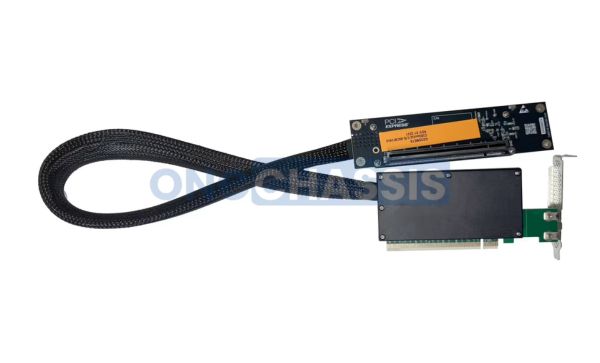
On the expansion card side, the number and type of PCIe slots available depend heavily on your motherboard, but the chassis needs to physically accommodate the cards you plan to use. Full-length cards require an appropriate chassis depth. Half-height cards fit in lower-profile slots but offer less performance headroom. For RAID controllers, 10GbE NICs, fiber channel HBAs, or GPU accelerators, verify slot availability, card-length compatibility, and whether the chassis provides riser cards or slot covers for the configuration you need.
Future-proofing deserves honest consideration. A chassis that feels spacious today may feel cramped two years from now, especially if your storage needs grow. Rather than building to current requirements, assess where your workload might be in three to five years and size accordingly.
What Kind of Building Material and Design Is Best?
Build material might seem like an aesthetic consideration, but it has real implications for durability, thermal performance, and ease of maintenance. The three primary materials used in rackmount cases are steel, aluminum, and composite materials.
Steel is the default choice in most server-grade chassis. It’s strong, relatively affordable to manufacture, and provides excellent shielding against electromagnetic interference—an important property in dense server environments where multiple systems are operating in close proximity. The downside of steel is weight. A full steel 4U chassis loaded with drives can weigh 30 to 50 pounds or more, making it difficult to slide in and out of a rack for maintenance. If you’re working in an environment where you’ll be frequently accessing the system, this is worth factoring in.
Aluminum chassis are lighter and often used in prosumer or high-end workstation applications where portability matters. Aluminum also dissipates heat effectively, which can contribute to passive cooling in some configurations. The trade-offs are cost—aluminum cases are typically more expensive than comparable steel models—and structural rigidity under heavy drive loads. For builds with 12 or more 3.5-inch drives, steel generally holds up better to the mechanical stress.
Composite and hybrid chassis use a combination of materials, often a steel frame with aluminum panels or plastic front bezels. These can offer a reasonable balance of weight and durability, though quality varies considerably by manufacturer. When evaluating a composite chassis, inspect the panel-to-frame connections and the rigidity of the drive bay area. Flimsy drive trays in a storage-heavy build lead to vibration, which accelerates drive wear.
Tool-less design features—quick-release drive trays, thumbscrews, and snap-in expansion card brackets—significantly reduce the time and effort required for maintenance and upgrades. In environments where components are changed frequently, these details add up. Cable management quality also plays a practical role: cases with routed cable channels, velcro tie points, and generous spacing between the drive bays and motherboard tray make wiring cleaner and airflow more efficient. A clean build isn’t just visually satisfying; it also makes troubleshooting faster and airflow more predictable.
For professional installations—office server rooms, client-facing environments, or anywhere appearance matters—consider the front panel design. Some rackmount cases have clean, minimal bezels that look appropriate in a visible rack. Others are functional but utilitarian in appearance.
What Are the Top Rackmount Case Brands?
Brand matters more in the rackmount space than in many other hardware categories. Server chassis involve tighter tolerances, more proprietary connections, and longer operational lifespans than consumer hardware, so build quality and vendor support are genuine differentiators.
Supermicro is the most prominent name in the server chassis market. The company designs and manufactures both chassis and server motherboards, and one of its biggest strengths is the integration between the two. A Supermicro chassis and a Supermicro motherboard are typically designed to work together, with matching backplane connectors, airflow alignment, and management interfaces. Supermicro’s SuperChassis line covers essentially every form factor—from ultra-dense 1U storage servers to wide-body 4U GPU workstations. Their products are used extensively in enterprise data centers, research institutions, and high-performance computing clusters. The trade-off is price: Supermicro chassis tend to cost more than equivalents from other brands, though the build quality and component ecosystem typically justify the premium.
Chenbro is a Taiwanese manufacturer with a strong reputation in the storage and industrial server space. Their chassis are known for clean airflow design, robust hot-swap backplanes, and sensible internal layouts. Chenbro products are popular in NAS builds, SAN appliances, and small- to medium-enterprise deployments. The RM series—a line of 2U and 4U rackmount cases—offers good value at a mid-range price point, with support for SAS and SATA expanders and flexible drive bay configurations. Chenbro also produces mini-tower and tower server cases that share design DNA with their rackmount line.
Rosewill occupies a different part of the market. As a brand owned by Newegg, Rosewill targets the prosumer, home lab, and small-business segments with more affordable chassis that don’t sacrifice much in build quality. Their RSV series—particularly the RSV-L4412 and RSV-R4000—has developed a loyal following among home lab enthusiasts building their first serious rack server. These cases support ATX motherboards, which makes them accessible to builders who want to start with consumer-grade components before transitioning to server-specific hardware. Rosewill cases are rarely used in production enterprise environments, but at this price point and for the target audience, they deliver solid value.
Silverstone is better known for its consumer and enthusiast PC cases, but the company has a dedicated server and rackmount line that’s worth considering for prosumer and workstation applications. Silverstone’s RM series includes 1U and 2U cases with clean aesthetics and solid construction. Their rackmount cases often support standard ATX PSUs, which simplifies builds for users migrating from desktop components. Silverstone also produces short-depth chassis and IPC (Industrial PC) cases for specialized applications. The brand’s strength is design quality and compatibility—they tend to do more work to ensure standard consumer components fit without adapter brackets.
Beyond these four, notable mentions include Ablecom (Supermicro’s sister company, specializing in server chassis), Inter-Tech (popular in Europe for dense storage builds), and iStarUSA (a budget-friendly option with a broad catalog of 1U through 4U chassis). Each has its niche, and it’s worth reading user reviews and community discussions—particularly on forums like ServeTheHome and r/homelab—to understand real-world experiences before committing.
Can You Use Alternatives to Rackmount Cases?
Rackmount cases are the standard for a reason—they’re efficient, scalable, and compatible with the ecosystem of server hardware that’s been built around the 19-inch rack form factor. But they’re not the only option, and depending on your situation, an alternative might actually serve you better.
Wall-mount cases and enclosures are designed for environments where you don’t have a full rack but still want organized, structured hardware deployment. Small network equipment, patch panels, and compact switches are often wall-mounted in residential or small office settings. Some wall-mounted enclosures are deep enough to accommodate a 1U or 2U server chassis, allowing you to run a small server without a full floor-standing rack. The limitations are cooling—wall-mount enclosures often have less airflow than open racks—and weight capacity. Heavy storage servers aren’t well-suited to wall mounts.
Tower servers are a practical alternative for environments where a rack isn’t available or desirable. Server-class tower cases—products like the Fractal Design Node 804 or the classic full-tower Corsair Obsidian—can accommodate EEB or EATX server motherboards, multiple drives, and full-length expansion cards without the constraints of a rackmount chassis. Tower servers are also quieter than 1U or 2U rack servers, making them more suitable for office environments where acoustics matter. The downside is density: a tower takes up floor space and isn’t stackable the way rackmount equipment is.
Open-frame rack cases occupy an interesting middle ground. These are essentially stripped-down chassis with a frame for mounting components but no side panels or enclosure. They’re popular in test environments and development labs where you need frequent access to internals without sliding a chassis out of a rack. Open frames run cool and provide excellent physical access, but they offer no dust protection, no EMI shielding, and no structural integrity for environments with significant vibration. They’re tools for the lab, not the production floor.
When choosing between these alternatives and a traditional rackmount case, weigh three factors: the environment (is there a rack, and is one appropriate?), the workload (what thermal and power demands does your hardware generate?), and the timeline (is this a permanent installation or a temporary development environment?). For long-term, production-grade deployments, a proper rackmount chassis in a standard rack remains the most reliable and scalable solution. For everything else, the alternatives offer genuine flexibility.
Where to Buy Rackmount Cases?
Knowing what you want is only half the equation. Buying from the right source ensures you get authentic hardware, reliable warranty support, and access to replacement parts when you need them.
Manufacturer direct purchasing is often the best option for enterprise-grade chassis, especially for Supermicro and Chenbro products. Buying directly from the manufacturer or their authorized distributors ensures you receive current-revision hardware with full warranty coverage and access to technical support. Supermicro’s website lists authorized resellers by region, and purchasing through these channels is important if you want access to their enterprise support contracts. Direct purchasing also gives you access to configure-to-order options, which can be valuable if you need a chassis with a specific drive bay count or PSU configuration that isn’t stocked in retail channels.
Specialty IT and server hardware retailers are the second-best option. Companies like ServerMonkey, WiredZone, and IT Creations specialize in server and enterprise hardware, and their staff typically have the product knowledge to help you verify compatibility and avoid ordering the wrong configuration. These retailers also tend to carry new, refurbished, and open-box inventory, which can significantly reduce chassis costs from brands like Supermicro that carry a premium price tag. Refurbished server chassis are often an excellent value—built to last, a well-maintained, refurbished Supermicro or Chenbro case is typically just as reliable as new.
Newegg is the primary retail destination for Rosewill and Silverstone rackmount cases, which makes sense given Rosewill’s ownership. Newegg also carries a broad selection from Chenbro, iStarUSA, and other brands, and their product pages often include detailed specifications, customer reviews, and Q&A sections that help verify compatibility. For home lab builders and prosumer builds, Newegg remains one of the most convenient one-stop options.
Amazon carries rackmount cases from a wide range of brands, but requires more caution. Third-party sellers on Amazon don’t always provide the same warranty support as manufacturer-authorized distributors, and it can be harder to verify product provenance—particularly for refurbished or open-box items. For established retail brands like Rosewill and Silverstone, Amazon is generally fine. For enterprise hardware from Supermicro or Chenbro, stick to authorized channels.
eBay is worth considering for used or refurbished chassis, especially if you’re building a budget home lab and don’t need warranty coverage. Older Supermicro and Chenbro chassis can be found in good condition for significantly less than retail price, and for non-production environments, this can represent excellent value. Check seller ratings carefully and look for listings that include photos of the actual unit, not stock images.
What to avoid: Unfamiliar brands selling chassis at suspiciously low prices through generic storefronts or marketplace listings. Rackmount cases require precise tolerances—backplane alignment, PSU mounts, drive tray fit—and low-quality chassis often fail to meet those tolerances. Components may not seat correctly, drive trays may rattle or flex, and PSUs may not align with rear panel cutouts. For hardware you’re planning to run continuously and rely on, the cost savings from a no-name chassis rarely offset the frustration and potential reliability risks.
Build your rack the right way
Choosing a rackmount case involves far more than picking a size and placing an order. Size dictates what fits inside and how much rack space you consume. Performance requirements determine the cooling and power delivery your chassis must support. Storage and expansion needs shape which drive configurations, and PCIe slots are essential. Material and design choices affect durability, ease of maintenance, and long-term reliability. Brand selection influences not just build quality but parts availability and support. And where you buy can be the difference between a smooth deployment and a support headache.
Work through each of these considerations methodically before committing to a chassis. Start with your use case and workload requirements, establish your physical constraints (rack depth, available U space), and then evaluate specific models against your checklist. The upfront research time is a small investment compared to the operational value of a well-chosen rackmount case that reliably serves your infrastructure for years to come.
