


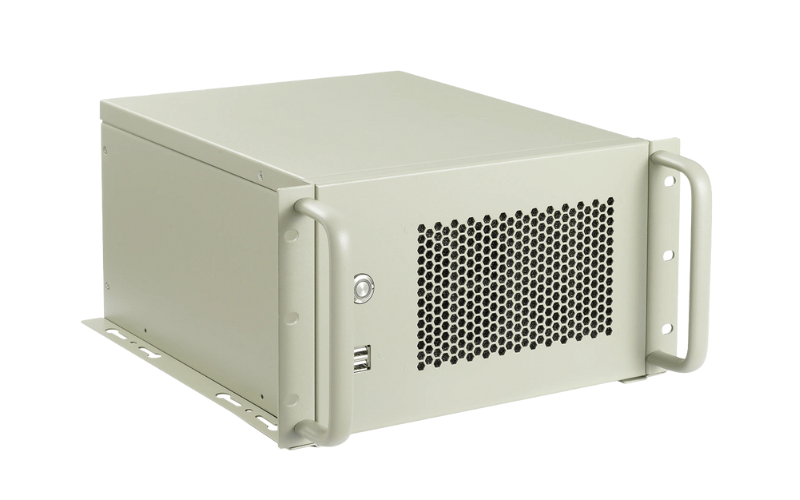
This article provides a comprehensive overview of wall-mount enclosures, the essential components for organizing, protecting, and securing your valuable electronic equipment when floor space is at a premium. We’ll explore various enclosure types, from compact designs to larger cabinets, including options for networking gear, servers, and AV equipment. Whether you’re setting up a small office, managing IT in a classroom, or optimizing a retail location, this guide will help you understand the different options and choose the proper enclosure for your needs. We will examine how these enclosures help you reclaim your floor space.
What is a Wall-Mount Enclosure?
A wall-mount enclosure is a specialized cabinet or frame designed to house electronic and networking equipment by mounting it directly onto a wall. Unlike traditional floor-standing racks, these enclosures save valuable floor space, making them an ideal solution for limited-space environments. The equipment is mounted securely inside the enclosure, which provides a compact, organized, and protected system. The wall-mount enclosure is essential for many modern IT and AV installations.
Wall-mount enclosures are commonly used in various environments, including:
- Small Offices/Home Offices (SOHO): To house networking gear, small servers, and patch panels without a dedicated server room.
- Retail Locations: For discreet mounting of point-of-sale systems, security cameras, and digital signage controllers.
- Classrooms and Conference Rooms: To organize and protect AV equipment like switchers, amplifiers, and control systems.
- Industrial Environments: To house control panels, PLCs, and other sensitive electronics, protecting them from dust and debris.
- Healthcare Facilities: To secure network hardware and other equipment in patient rooms or hallways.
The primary purpose of a wall-mount enclosure is to:
- Organize: Provide a standardized, tidy way to store multiple pieces of equipment off the floor.
- Protect: Shield sensitive electronic components from physical damage, dust, tampering, and other environmental factors.
- Secure: Offer locking mechanisms, often on the front door, to prevent unauthorized access to critical equipment.
- Cool: Facilitate proper airflow with vented panels or optional fan kits to prevent equipment from overheating.
- Save Space: Free up floor space by utilizing vertical wall space for equipment storage.
Wall-mount enclosures are essential for any application that requires the secure, organized, and space-efficient mounting of electronic equipment. They are also called wall-mount racks or wall-mount cabinets.
What are the Different Types of Wall-Mount Enclosures?
Wall-mount enclosures come in various types, each designed for specific applications and accessibility needs. Here are some of the most common types:
- Fixed Wall-Mount Enclosures: These are the most common and straightforward type, featuring a simple cabinet that mounts directly to the wall. They are cost-effective and provide secure housing for equipment. Access to the rear of the equipment is limited, making it best suited for installations that don’t require frequent cable changes or maintenance.
- Swing-Out Wall-Mount Enclosures: These enclosures feature a hinged design that allows the entire cabinet body to swing away from the wall-mounted rear panel. This provides complete, unobstructed access to the back of the equipment, which is invaluable for installations, wiring, and maintenance. They are ideal for dense networks or AV setups.
- Open Frame Wall-Mount Racks: These are simpler structures with vertical mounting rails, without doors or side panels. Open frame racks offer maximum accessibility and airflow but provide minimal physical protection or security. They are a lightweight and affordable option for secure rooms where easy access is prioritized over enclosure security.
- Outdoor Wall-Mount Enclosures: These are ruggedized cabinets built to withstand harsh environmental conditions. They typically feature sealed seams, weatherproof finishes, and NEMA ratings to protect against dust, water, and extreme temperatures. They are essential for housing sensitive electronics in outdoor or industrial settings.
- Low-Profile Enclosures: These enclosures mount equipment vertically or at an angle, resulting in a much slimmer profile that extends less from the wall. They are perfect for high-traffic areas like hallways and retail spaces where minimizing obstruction is critical.
- Desktop Rack Enclosures: While designed for desktop use, these smaller enclosures can often be mounted on the wall. They allow you to rack-mount a few pieces of equipment in a compact footprint, either on a workspace or a nearby wall.
Choosing the right type of wall-mount enclosure depends on factors such as the equipment you need to mount, the environment, your budget, and your specific security and accessibility requirements.
What are the Benefits of Using Wall-Mount Enclosures?
Wall-mount enclosures offer several advantages over traditional floor-standing racks, making them a wise choice for specific environments:
- Space-Saving Design: Wall-mount enclosures utilize vertical wall space, keeping equipment off the floor. This is particularly beneficial for small offices, retail backrooms, or classrooms where floor space is at a premium and a large cabinet would be intrusive.
- Improved Organization: These enclosures provide a dedicated, structured space for mounting equipment. This centralization simplifies cable management, reduces clutter, and makes it easier to identify connections during troubleshooting or maintenance.
- Enhanced Security: Most wall-mount enclosures feature lockable front doors and side panels. This adds a crucial layer of security, protecting sensitive network hardware and data from unauthorized access, tampering, or accidental disconnection.
- Versatility: Wall-mount enclosures are adaptable to a wide range of applications. They can house everything from standard networking gear like switches and patch panels to AV equipment, security DVRs, and even small servers.
- Protection: By enclosing equipment, you shield it from dust, debris, and accidental physical damage in open environments. This extends the lifespan of your hardware and ensures reliable operation.
However, wall-mount enclosures also have some limitations:
- Weight Capacity: Wall-mount racks generally have lower weight capacities than floor-standing models. They rely on the wall’s strength and the mounting hardware, so they are not suitable for cumbersome server stacks.
- Size Constraints: Due to their design, they are typically limited in depth and height (rack units). You generally cannot fit full-depth enterprise servers or massive amounts of equipment in a single wall-mount unit.
- Installation: Proper installation requires securely anchoring the enclosure to wall studs or concrete. Improper mounting can lead to safety hazards or equipment damage if the unit pulls away from the wall.
Despite these limitations, the benefits of wall-mount enclosures often outweigh the drawbacks, especially when space efficiency, security, and organization are the primary goals for smaller-scale deployments. OneChassis offers a range of solutions in this category.
How to Choose the Right Size Wall-Mount Enclosure?
Choosing the right size wall-mount enclosure is crucial for ensuring your equipment fits properly, is securely mounted, and functions reliably. Here’s a step-by-step guide:
- Measure Your Equipment:
- Width: Most rack-mountable equipment is designed for the standard 19-inch rack width.
- Height: Measure the height of each piece of equipment in rack units (U), where 1U = 1.75 inches.
- Depth: Measure the depth of your deepest device. Wall-mount enclosures are often shallower than floor-standing cabinets, so this measurement is critical.
- Calculate Total Rack Units (U): Add up the rack unit (U) requirements of all your equipment. For instance, if you have a 1U switch and a 1U patch panel, you will need at least 2U of rack space.
- Consider Future Expansion: It is wise to choose an enclosure with some extra U space for future growth. This prevents you from having to replace the entire enclosure if you need to add more equipment later. Leaving 1U-2U open also improves airflow.
- Check the Depth: Ensure the enclosure’s usable depth can accommodate your deepest piece of equipment, plus an extra 3 inches at the rear for cabling and proper airflow.
- Weight Capacity: Verify the enclosure’s maximum weight capacity. Crucially, you must also ensure the wall structure (studs, concrete, etc.) can safely support the combined weight of the enclosure and all your equipment.
- Cooling: Consider the heat output of your equipment. For devices that generate significant heat, choose an enclosure with vented panels or space to add cooling fans.
- Accessibility: Think about how you’ll access the equipment. If you need frequent access to the rear for wiring, a swing-out wall-mount enclosure is a much better choice than a fixed model.
- Consider the Location: Evaluate the physical space where the enclosure will be mounted. Low-profile models are available for high-traffic areas like hallways, where a standard depth enclosure would be an obstruction.
By following these steps, you can choose the right size wall-mount enclosure that securely accommodates your equipment, provides adequate cooling and accessibility, and allows for future growth.
What is the Difference Between 6U, 9U, and 12U Wall-Mount Enclosures?
The primary difference between 6U, 9U, and 12U wall-mount enclosures lies in their vertical height and, consequently, the volume of equipment they can house. The “U” stands for rack unit, a standardized unit of measurement for rack-mounted equipment, where 1U equals 1.75 inches (44.45 mm).
Here’s a breakdown of each standard size:
- 6U Wall-Mount Enclosure:
- Height: Approximately 10.5 inches (266.7 mm) of usable vertical space.
- Capacity: Designed for minimal installations, such as a single patch panel, a network switch, and a power strip.
- Advantages: Extremely compact and unobtrusive, perfect for tight spaces like above a doorframe or inside a small closet.
- Disadvantages: Minimal space for expansion, cable management can be tight, and cooling options are minimal.
- 9U Wall-Mount Enclosure:
- Height: Approximately 15.75 inches (400 mm) of usable vertical space.
- Capacity: A mid-sized option suitable for moderate setups, accommodating multiple switches, patch panels, and perhaps a small DVR or router.
- Advantages: Offers a versatile balance, providing enough room for essential networking gear without dominating the wall space.
- Disadvantages: May still struggle to house deeper equipment or extensive cable bundles compared to larger units.
- 12U Wall-Mount Enclosure:
- Height: Approximately 21 inches (533.4 mm) of usable vertical space.
- Capacity: Suitable for larger branch office setups, capable of housing servers, UPS battery backups, and extensive networking hardware.
- Advantages: Ample space for components, significantly better airflow and cooling potential, and room for future expansion.
- Disadvantages: Requires a significant amount of wall space and robust mounting support due to the potential weight load.
Here is a table to show the differences:
|
Size |
Height (Usable) |
Advantages |
Disadvantages |
|---|---|---|---|
|
6U |
10.5 inches |
Most space-efficient, ideal for minimal hardware |
severely limited space for expansion and cooling |
|
9U |
15.75 inches |
Good middle ground for standard SOHO networks |
May not fit larger components like UPS units easily |
|
12U |
21 inches |
Best capacity and cooling, fits diverse equipment |
Bulky, heavy, requires significant wall real estate |
|
Rack Unit |
1.75 inches |
Standard unit of measurement used to calculate capacity |
N/A |
Choosing the right size depends on balancing your current equipment load with the physical limitations of your installation site.
When to Use Wall-Mount Enclosures?
Wall-mount enclosures are specialized cabinets designed to be mounted directly to a wall, providing a space-saving and secure way to house rack-mounted equipment in environments where a traditional floor-standing rack is impractical or undesirable.
Key features of wall-mount enclosures:
- Wall Mounting: They come with brackets or mounting holes that allow them to be securely attached to a wall.
- Compact Size: Wall-mount enclosures are typically smaller than floor-standing racks, making them ideal for locations with limited space.
- Variety of Sizes: They are available in various sizes, typically ranging from a few rack units (U) up to 18U or more.
- Lockable Doors: Many wall-mount enclosures feature lockable doors (often with tempered glass or perforated metal panels) to provide security and prevent unauthorized access to the equipment. A lock is an important feature.
- Cable Management: They often include features for cable management, such as cable entry points and tie-down points.
When to use wall-mount enclosures:
- Small Offices/Home Offices (SOHO): When you need to mount a small amount of network equipment, a server, or AV gear, but don’t have space for a full-size rack.
- Retail Locations: To house network equipment, security systems, or digital signage controllers in a secure and out-of-the-way location.
- Classrooms/Training Rooms: To mount AV equipment, including amplifiers, switchers, and video conferencing systems.
- Branch Offices: To provide a compact and secure solution for housing essential IT equipment in remote locations.
- Areas with Limited Floor Space: When floor space is at a premium, mounting equipment on the wall can free up valuable real estate.
- Industrial Environments: Some ruggedized wall-mount enclosures are designed for use in industrial settings, protecting against dust, moisture, and other hazards.
Wall-mount enclosures offer a flexible, space-saving alternative to traditional floor-standing racks while still providing secure, organized mounting for your rack-mounted equipment. You can mount the enclosure with a bracket.
Key Features to Look for in a Wall-Mount Enclosure
When selecting a wall-mount enclosure, several key features can impact its functionality, security, and suitability for your specific environment. Here are some essential factors to consider:
- Lockable Doors for Security: Security is often a primary concern for equipment mounted in shared spaces. Look for enclosures with sturdy, lockable front doors and side panels. Some models feature tempered glass doors that allow visual monitoring without unlocking, while solid steel doors offer maximum physical protection and concealment.
- Cable Management Options: Effective organization is critical in compact spaces. Features such as dedicated cable-entry knockouts (top and bottom), internal lacing bars, and routing channels help keep cables organized, prevent accidental disconnections, and improve airflow efficiency.
- Ventilation and Cooling Capabilities: Electronics generate heat, even in small setups. Ensure the enclosure has adequate ventilation slots or perforated panels. For active equipment like switches and servers, look for models that support the installation of exhaust fans to prevent overheating and ensure reliability.
- Durable Construction Materials: The structural integrity of a wall-mount unit is vital. Look for enclosures made from high-quality materials, such as heavy-gauge cold-rolled steel (SPCC). A robust construction ensures the unit can safely support the weight of your equipment without warping or pulling away from the wall.
- Accessibility Features: Consider how easily you can reach the rear of your equipment for maintenance. Swing-out designs are particularly valuable; they allow the entire cabinet to swing away from the wall, providing full access to rear ports and cables without dismounting the unit.
By carefully evaluating these features, you can select a wall-mount enclosure that not only houses your equipment but also provides the necessary protection, cooling, security, and accessibility for your specific application.
Wall-Mount Enclosure Accessories
Wall-mount enclosure accessories are essential components that enhance the functionality, organization, and usability of your compact setup. Here are some common types:
Organization and Airflow:
- Cable Organizers and Lacing Bars: A wide range of cable management accessories is available, including horizontal cable managers, D-rings, and lacing bars. These tools help guide cables neatly from patch panels to switches, preventing tangles that can restrict airflow or make maintenance difficult.
- Blanking Panels: Also known as filler panels, these are used to cover empty rack units (U) in the enclosure. Beyond providing a clean, professional aesthetic, they are crucial for thermal management, preventing hot air from recirculating back to the front of the equipment.
Power and Installation:
- Power Distribution Units (PDUs): PDUs provide the necessary power outlets within the enclosure, ensuring all your devices connect to a single, manageable power source. For wall-mount units, 1U horizontal PDUs are common, often featuring surge protection to safeguard sensitive electronics.
- Mounting Brackets and Screws: These are the fundamental hardware required for installation. This category includes rack screws (typically M6 or 10-32 thread) and cage nuts for securing equipment to the rails. It also includes specific wall-mounting brackets or anchors designed to support the weight of the loaded enclosure on various wall surfaces.
These accessories can greatly enhance the efficiency, safety, and longevity of your wall-mount installation. Choosing the right components depends on your specific equipment density and power requirements.
How to Properly Install and Organize Equipment in a Wall-Mount Enclosure?
Properly installing and organizing equipment in a wall-mount enclosure is essential for ensuring safety, optimal performance, and easy maintenance. Here’s a step-by-step guide:
- Plan Your Layout: Before drilling any holes, plan the layout of your equipment. Consider the depth, weight, and cooling requirements of each device. Always plan to mount heavier equipment, like a UPS or a small server, at the bottom of the enclosure to ensure stability and proper weight distribution.
- Secure the Enclosure to the Wall: This is the most critical step. Locate the wall studs and use appropriate mounting hardware (e.g., lag bolts) to fasten the enclosure to the wall securely. Ensure it is level. For concrete or brick walls, use suitable anchors. Do not rely on drywall anchors alone.
- Mount Equipment from Bottom to Top: Start by installing the heaviest equipment at the bottom and work your way up. This makes the installation process safer and easier to manage.
- Secure Equipment Properly: Use the correct rack screws and cage nuts to fasten each piece of equipment to the mounting rails. Ensure all screws are tightened securely to prevent any movement or sagging.
- Cable Management: As you install each device, route the power and data cables neatly. Use cable management accessories like hook-and-loop ties or lacing bars to bundle cables and keep them away from fans and vents. This prevents airflow blockages and makes future maintenance much simpler.
- Install Blanking Panels: Cover any empty rack spaces with blanking panels. This improves cooling efficiency by preventing hot exhaust air from recirculating to the front of the enclosure and being drawn back into equipment intakes.
- Power Distribution: Connect your equipment to a rack-mounted power distribution unit (PDU). This keeps power cords tidy and allows you to manage power for all devices from a single source.
- Labeling: Label each piece of equipment and its corresponding cables. This small step will save you significant time and frustration during future troubleshooting or upgrades.
- Test and Verify: Once everything is installed and connected, power on your equipment. Check that everything is functioning correctly and monitor temperatures to ensure there is adequate cooling. Adjust fan speeds or cabling if you notice any hot spots.
By following these steps, you can create a well-organized, secure, and efficient wall-mount setup that protects your valuable equipment and simplifies its management.
Summary
Here are the 10 most important things to remember about wall-mount enclosures:
- Wall-mount enclosures are specialized cabinets designed to house and organize rack-mounted electronic equipment directly on a wall, saving valuable floor space.
- They are ideal for small offices, retail locations, classrooms, and industrial environments where traditional floor-standing racks are not practical.
- Different types of wall-mount enclosures include fixed cabinets, swing-out frames for rear access, open frame racks for airflow, and ruggedized outdoor enclosures.
- Wall-mount enclosures offer key benefits, including a space-saving design, improved organization, enhanced security with lockable doors, and versatility across various applications.
- Choosing the right size involves measuring your equipment’s dimensions, calculating total rack units (U), ensuring adequate depth, and checking the weight capacity of both the enclosure and the wall.
- Standard sizes like 6U, 9U, and 12U offer varying capacities, with larger models providing more room for equipment, better cooling potential, and space for future expansion.
- Key features to look for include sturdy construction, lockable doors for security, effective cable management, ventilation for cooling, and accessibility features such as swing-out hinges.
- Accessories such as cable organizers, blanking panels, power distribution units (PDUs), and mounting hardware are essential for a functional and tidy setup.
- Proper installation requires planning the layout, securing the enclosure to wall studs or concrete, mounting heavy equipment at the bottom, and managing cables neatly to ensure airflow.
- By keeping these key points in mind, you can confidently select and configure the ideal wall-mount enclosure solution to keep your critical equipment secure, organized, and running efficiently.
