


Choosing the proper rack-mount case is essential for protecting, organizing, and optimizing your electronic equipment, whether you’re managing a server room, setting up for a live event, or maintaining a home studio. With a variety of options available—ranging from fixed and portable cases to shock-mounted and wall-mount designs—understanding the features and benefits of each type is crucial. This guide will walk you through everything you need to know about rack-mount cases, from their types and key features to factors to consider when selecting the perfect one for your needs. By the end, you’ll be equipped to make an informed decision that ensures your equipment is secure, efficient, and ready to perform.
Understanding Rackmount Cases
What is a Rack Case?
A rack case is a standardized enclosure designed to house and organize electronic equipment, such as servers, audio gear, and networking devices. These cases are built to fit into a rack system, which typically follows the 19-inch width standard. The height of rack cases is measured in “rack units” (U), where 1U equals 1.75 inches. This modular design allows for efficient use of space and easy access to equipment.
Rack cases are commonly used in industries like IT, broadcasting, and live event production. They provide a secure and organized way to store equipment, ensuring it remains protected and accessible during operation or transport.
Benefits of Using Rackmount Equipment
- Space Efficiency: Rackmount cases allow you to stack multiple devices vertically, saving valuable floor or desk space.
- Improved Organization: With a standardized layout, cables and devices are easier to manage, reducing clutter and simplifying maintenance.
- Enhanced Protection: Many rack cases are built with durable materials to shield equipment from physical damage, dust, and environmental factors.
- Scalability: As your needs grow, you can easily add more equipment to your rack system without requiring additional space.
- Cooling and Ventilation: Rack cases often include built-in ventilation or cooling options to prevent overheating, ensuring optimal performance of your devices.
Types of Rack Cases
-
Fixed Rack Cases: These are stationary enclosures designed for permanent installations, such as server rooms or data centers. They provide robust protection and are ideal for equipment that doesn’t need frequent relocation.
-
Portable Rack Cases: Built for mobility, these cases are lightweight and often include handles or wheels. They are commonly used in live events or fieldwork where equipment needs to be transported safely.
-
Shock-Mounted Rack Cases: These cases feature internal suspension systems to protect sensitive equipment from vibrations and impacts. They are ideal for environments where equipment is exposed to rough handling or movement.
-
Open Frame Racks: Unlike enclosed cases, open frame racks provide easy access to equipment and are often used in controlled environments like server rooms. They are cost-effective and allow for better airflow.
-
Wall-Mount Rack Cases: Designed to be mounted on walls, these cases are perfect for small spaces or locations where floor space is limited. They are commonly used for networking equipment in offices or retail settings.
Each type of rack case serves a specific purpose, so choosing the right one depends on your equipment, environment, and operational needs.
What is the Difference Between a Shock Mount and Standard Rack Case?
Shock Mount Rack Case
A shock mount rack case is designed to protect sensitive equipment from vibrations, impacts, and rough handling. It features an internal frame that is suspended within the outer shell using shock-absorbing materials like rubber mounts or elastomeric isolators.
Key Features:
- Shock Absorption: The suspended frame minimizes the transfer of external shocks to the equipment.
- Durability: Built with rugged exteriors to withstand harsh environments.
- Best For: Mobile applications, live events, fieldwork, or any scenario where equipment is frequently transported or exposed to rough conditions.
Advantages:
- Protects delicate components like hard drives, audio processors, or servers.
- Reduces the risk of damage during transport or in high-vibration environments.
Considerations:
- Heavier and bulkier than standard cases due to the added suspension system.
- Typically more expensive because of the advanced protective features.
Standard Rack Case
A standard rack case is a basic enclosure designed to house and organize equipment in stable environments. It does not include shock-absorbing features but provides essential protection against dust, physical damage, and environmental factors.
Key Features:
- Simple Design: A fixed frame with no internal suspension system.
- Lightweight: Easier to handle and transport compared to shock mount cases.
- Best For: Stationary setups like server rooms, data centers, or offices where equipment remains in one place.
Advantages:
- Cost-effective and widely available.
- Lightweight and easier to install or move within controlled environments.
Considerations:
- Offers limited protection against vibrations or impacts.
- Not suitable for mobile or rugged applications.
Key Differences at a Glance
| Feature | Shock Mount Rack Case | Standard Rack Case |
|---|---|---|
| Protection | Absorbs shocks and vibrations | Basic protection against dust and damage |
| Best Use Case | Mobile setups, rough environments | Stationary setups, controlled environments |
| Weight | Heavier due to suspension system | Lightweight and easier to handle |
| Cost | More expensive | Budget-friendly |
| Durability | Rugged and impact-resistant | Durable but less suited for rough handling |
By understanding these differences, you can choose the right rack case based on your equipment’s sensitivity, environment, and mobility needs.
How to Choose the Right Rackmount Case
Factors to Consider
- Equipment Size and Compatibility
- Rack Unit (U) Height: Determine the total height of your equipment in rack units (U). Ensure the case has enough space to accommodate all devices, with room for future expansion if needed.
- Depth: Measure the depth of your equipment and choose a rack case that provides sufficient clearance. Standard depths range from shallow (less than 20 inches) to deep (over 30 inches).
- Weight Capacity: Check the weight of your equipment and ensure the rack case can support it without compromising stability or durability.
- Environment and Usage
- Stationary vs. Portable: For permanent setups like server rooms, a fixed rack case is ideal. If you need to transport equipment frequently, opt for a portable or shock-mounted case.
- Environmental Protection: Consider cases with dustproof, waterproof, or shock-resistant features if your equipment will be exposed to harsh conditions.
- Cooling and Ventilation
- Proper airflow is critical to prevent overheating. Look for cases with built-in ventilation panels, fan mounts, or active cooling systems.
- For high-performance equipment, consider cases with advanced cooling options like liquid cooling compatibility.
- Cable Management
- Choose a rack case with cable management features, such as cable routing channels, tie-down points, or rear access panels. This helps keep cables organized and reduces the risk of tangling or damage.
- Security Features
- If your equipment contains sensitive data or is in a shared environment, look for cases with lockable doors, panels, or tamper-proof designs.
- Some cases also offer advanced security options like biometric locks or keycard access.
- Material and Build Quality
- Rack cases are typically made from steel, aluminum, or composite materials. Steel offers durability, while aluminum is lightweight and corrosion-resistant.
- Ensure the case is sturdy enough to protect your equipment during operation or transport.
- Budget and Brand
- Set a budget that balances quality and features. While premium cases offer advanced options, there are cost-effective models that meet basic needs.
- Research reputable brands known for reliability and customer support to ensure long-term satisfaction.
- Aesthetic and Space Considerations
- For office or public-facing environments, consider cases with a sleek design that blends with the surroundings.
- Wall-mount or compact cases are great for small spaces, while open-frame racks work well in controlled environments.
By evaluating these factors, you can select a rackmount case that meets your specific requirements, ensuring your equipment is well-protected, organized, and optimized for performance.
Standard Sizes: 19-Inch Rack Cases
The 19-inch rack case is the industry standard for housing electronic equipment. This size refers to the width of the case, which accommodates most servers, audio gear, and networking devices. The height is measured in rack units (U), with 1U equaling 1.75 inches.
Why Choose a 19-Inch Rack Case?
- Compatibility: Most equipment is designed to fit this standard size, ensuring seamless integration.
- Scalability: Easily add or swap devices without needing a new case.
- Versatility: Available in various depths and configurations to suit different needs.
Shallow vs. Deep Rack Cases
- Shallow Rack Cases
- Depth: Typically less than 20 inches.
- Best For: Compact equipment like audio processors, small servers, or lightweight devices.
- Advantages: Space-saving, lightweight, and easier to transport. Ideal for tight spaces or mobile setups.
- Deep Rack Cases
- Depth: Usually over 30 inches.
- Best For: Large servers, storage arrays, or equipment with extended dimensions.
- Advantages: Provides ample space for larger devices and better cable management. Suitable for data centers or permanent installations.
Choosing Between Shallow and Deep Cases: Consider the depth of your equipment and the available space in your setup. Shallow cases are great for portability, while deep cases offer more flexibility for larger devices.
Key Features of Rack Cases
Shock Protection in Rackmount Cases
Shock protection is a critical feature for safeguarding sensitive equipment during transport or in environments prone to vibrations. Rackmount cases with shock protection typically include internal suspension systems or shock-absorbing foam. These features minimize the impact of sudden movements, ensuring your devices remain secure and operational.
When to Prioritize Shock Protection:
- Mobile Applications: Ideal for live events, fieldwork, or any scenario where equipment is frequently moved.
- Sensitive Equipment: Essential for devices like hard drives, servers, or audio processors that are vulnerable to physical shocks.
Types of Shock Protection:
- Shock-Mounted Frames: Internal frames suspended by elastomeric mounts to absorb vibrations.
- Foam Padding: Customizable foam inserts that cradle equipment and reduce impact.
Different Materials Used for Rackmount Cases
1. Aluminum
Aluminum is a lightweight and corrosion-resistant material commonly used for portable rackmount cases. It offers excellent durability while being easy to transport, making it ideal for mobile applications.
Key Features:
- Lightweight and easy to handle.
- Resistant to rust and corrosion.
- Provides a sleek, professional appearance.
2. Steel
Steel is a heavy-duty material known for its strength and durability. It is often used in stationary rack cases where maximum protection is required.
Key Features:
- Extremely strong and durable.
- Can support heavy equipment without bending.
- Resistant to physical damage like dents or impacts.
3. Plastic (ABS or Polycarbonate)
Plastic materials like ABS (Acrylonitrile Butadiene Styrene) or polycarbonate are used for lightweight and cost-effective cases. These materials are often reinforced for added strength.
Key Features:
- Lightweight and affordable.
- Resistant to water and chemicals.
- Provides decent impact resistance.
4. Composite Materials
Composite materials combine multiple layers of different materials, such as fiberglass and resin, to create a strong yet lightweight structure. These are often used for custom or high-performance cases.
Key Features:
- High strength-to-weight ratio.
- Excellent resistance to environmental factors like moisture and temperature changes.
- Often used in specialized applications.
5. Wood
Wood is occasionally used for custom or vintage-style rack cases. While not as common, it offers a unique aesthetic and decent protection for certain applications.
Key Features:
- Provides a classic, vintage look.
- Can be customized easily.
- Offers basic protection for lightweight equipment.
Comparison Table: Advantages and Disadvantages of Rackmount Case Materials
| Material | Advantages | Disadvantages |
|---|---|---|
| Aluminum | Lightweight, corrosion-resistant, sleek appearance | Less impact-resistant than steel, higher cost |
| Steel | Extremely durable, supports heavy equipment, impact-resistant | Heavy, prone to rust if not treated |
| Plastic (ABS/Polycarbonate) | Lightweight, affordable, water-resistant | Less durable, can crack under heavy impact |
| Composite Materials | Strong yet lightweight, resistant to environmental factors | Expensive, less common |
| Wood | Aesthetic appeal, customizable | Heavy, less durable, not water-resistant |
Roll Options for Mobility
Mobility is a key consideration for rack cases used in dynamic environments. Roll options, such as built-in wheels or casters, make it easier to transport heavy equipment without strain.
Types of Roll Options:
- Fixed Casters: Provide straightforward mobility for cases that need to be moved occasionally.
- Swivel Casters: Allow for greater maneuverability, especially in tight spaces.
- Locking Wheels: Ensure stability by preventing unwanted movement during operation.
When to Choose Roll Options:
- Live Events: Simplifies setup and teardown processes.
- Fieldwork: Makes it easier to transport equipment across various locations.
- Heavy Equipment: Reduces the physical effort required to move large or bulky devices.
By selecting the right roll option, you can enhance the practicality and ease of use for your rackmount case in any setting.
What Are The Benefits Of Using A 4u Rackmount Case?
A 4U rackmount case offers several benefits, particularly for businesses, IT professionals, and enthusiasts who need to house and manage servers, storage, or other hardware in a rack-mounted setup. Here are the key advantages:
1. Ample Space for Components
- A 4U rackmount case provides more vertical space (4 rack units, or approximately 7 inches) compared to smaller cases like 1U or 2U. This allows for the installation of larger components, such as:
- Full-sized GPUs
- High-performance cooling systems (air or liquid)
- Multiple hard drives or SSDs
- Full-sized power supplies
2. Improved Cooling and Airflow
- The larger size of a 4U case allows for better airflow and the inclusion of larger fans or advanced cooling solutions. This is especially important for high-performance systems that generate significant heat.
3. Ease of Maintenance and Upgrades
- With more internal space, it’s easier to access and replace components, making maintenance and upgrades more convenient compared to smaller rackmount cases.
4. Versatility
- A 4U case can accommodate a wide range of hardware configurations, making it suitable for various applications, including:
- Servers
- Network appliances
- Storage arrays
- Workstations
5. Compatibility with Standard Racks
- Like other rackmount cases, a 4U case is designed to fit into standard 19-inch server racks, ensuring compatibility with most data center or IT infrastructure setups.
6. Reduced Noise
- Compared to smaller rackmount cases, a 4U case can house larger, quieter fans, reducing overall noise levels while maintaining effective cooling.
7. Scalability
- The additional space in a 4U case allows for future expansion, such as adding more drives, PCIe cards, or other components, without needing to replace the entire case.
8. Durability and Protection
- Rackmount cases, including 4U models, are typically built with sturdy materials to protect internal components from physical damage, dust, and other environmental factors.
9. Cost-Effectiveness
- While larger than 1U or 2U cases, a 4U rackmount case is often more cost-effective than tower cases for housing multiple systems in a compact, organized manner within a rack.
10. Cable Management
- The additional space in a 4U case allows for better cable management, reducing clutter and improving airflow, which can enhance system performance and reliability.
In summary, a 4U rackmount case strikes a balance between size, expandability, and cooling efficiency, making it an excellent choice for users who need flexibility and performance in a rack-mounted environment.
| Product Images | Model | Dimensions (mm) | Material | Motherboard Support | Fan Configuration | Power Supply Support | Hard Drive Support | Product Links |
|---|---|---|---|---|---|---|---|---|
 | OC4650-Y | 650 x 430 x 178 | 1.0mm Galvanised Steel | ATX (305 x 244 max) | 3* 1225, supports 6* 1225 & 2* 8025 | ATX, 4U/2U Redundant | 10* 3.5" HDD, 3* 5.25" CD-ROM | View Products |
 | OC4480AP-Y | 505 x 428 x 172 | 1.2mm Galvanised Steel | ATX (305 x 244 max) | 1* 1225, supports 4* 8025 | ATX, 4U/2U Redundant | 12* 3.5" HDD, 2* 2.5" SSD | View Products |
 | OC4480AB-Y | 505 x 428 x 172 | 1.2mm Galvanised Steel | ATX (305 x 244 max) | 1* 1225, supports 4* 8025 | ATX, 4U/2U Redundant | 12* 3.5" HDD, 2* 2.5" SSD | View Products |
 | OC4480AG-Y | 505 x 428 x 172 | 1.2mm Galvanised Steel | ATX (305 x 244 max) | 1* 1225, supports 4* 8025 | ATX, 4U/2U Redundant | 8* 3.5" HDD, 2* 2.5" SSD, 3* 5.25" | View Products |
 | OC4450-Y | 450 x 427 x 172 | 1.0mm Galvanised Steel | M-ATX (244 x 244 max) | 1* 1225, optional 2* 8025 | ATX | 8* 3.5" HDD, 1* 5.25" Optical Drive | View Products |
 | OC4650-15-Y | 650 x 430 x 178 | 1.0mm Galvanised Steel | ATX (305 x 244 max) | 3* 1225, supports 6* 1225 & 2* 8025 | ATX, 4U/2U Redundant | 15* 3.5" HDD, 1* 2.5" SSD | View Products |
 | OCIPC510HW-T | 450 x 427 x 177 | 1.2mm SGCC | 12" x 9.6" and below | 1* 12025, 2* 8025 | PS2 | 8* 3.5" HDD | View Products |
 | OCIPC510HB-T | 450 x 427 x 177 | 1.2mm SGCC | 12" x 9.6" and below | 1* 12025, 2* 8025 | PS2 | 8* 3.5" HDD | View Products |
 | OC4630-T | 630 x 427 x 177 | 1.2mm SGCC | 12" x 13" and below | 1* 12025, optional 2* 8025 | PS2 | 12* 3.5" HDD | View Products |
 | OCIPC610M-T | 480 x 427 x 177 | 1.2mm SGCC | 12" x 9.6" and below | 1* 12025 | PS2 or Redundant | 2* 3.5" HDD | View Products |
 | OCIPC610F-T | 450 x 427 x 177 | 1.2mm SGCC | 12" x 10.5" and below | 1* 12025 | PS2 or Redundant | 2* 3.5" HDD | View Products |
 | OCIPC610L-T | 480 x 427 x 177 | 1.2mm SGCC | 12" x 10.5" and below | 1* 12025 | PS2 or Redundant | 1* 3.5" HDD | View Products |
 | OCIPC610P-T | 450 x 427 x 177 | 1.2mm SGCC | 12" x 10.5" and below | 1* 12025 | PS2 or Redundant | 2* 3.5" HDD | View Products |
 | OCIPC610H-T | 480 x 427 x 177 | 1.2mm SGCC | 12" x 10.5" and below | 2* 8025 | PS2 or Redundant | 1* 3.5" HDD | View Products |
 | OC4501-GD | 545 x 430 x 176 | 1.0-1.2mm SGCC | 12" x 10.5" and below | 1* 12025, optional 8025 | PS2 or Redundant | 4* 3.5" HDD | View Products |
 | OC4401P-GD | 446 x 430 x 176 | 1.0-1.2mm SGCC | 12" x 10.5" and below | 1* 12025, supports 2* 8025 | PS2 or Mini Redundant | 4* 3.5" HDD | View Products |
 | OC4401-GD | 446 x 430 x 176 | 1.0-1.2mm SGCC | 12" x 10.5" and below | 1* 12025, optional 8025 | PS2 or Redundant | 4* 3.5" HDD | View Products |
 | OC4139-Y | 650 x 430 x 178 | 1.0mm SGCC | 12" x 13" and below | 2* 12025, 4* 12025 | PS2 | 10* 3.5" HDD | View Products |
 | OC4129-Y | 650 x 430 x 178 | 1.0mm SGCC | 12" x 13" and below | 2* 12025, 4* 12025 | PS2 | 10* 3.5" HDD | View Products |
 | OC4128-Y | 650 x 430 x 178 | 1.0mm SGCC | 12" x 13" and below | 2* 12025, 4* 12025 | PS2 | 10* 3.5" HDD | View Products |
 | OC4098-Y | 480 x 427 x 177 | 1.0mm SGCC | ISA/PCI/PCIMG | 1* 12025, 2* 8025 | PS2 or Redundant | 8* 3.5" HDD | View Products |
 | OC4088-Y | 480 x 427 x 177 | 1.0mm SGCC | ISA/PCI/PCIMG | 1* 12025, 2* 8025 | PS2 or Redundant | 8* 3.5" HDD | View Products |
 | OC450-Y | 450 x 427 x 177 | 1.0mm SGCC | 12" x 9.6" and below | 1* 12025, 2* 8025 | PS2 | 8* 3.5" HDD | View Products |
 | OC445FW-M | 482 x 450 x 178 | 1.2mm SGCC | 12" x 9.6" and below | 1* 12025 | ATX | 8* 3.5" HDD, 4* 2.5" HDD | View Products |
 | OC445L-M | 482 x 450 x 178 | 1.2mm SGCC | 12" x 9.6" and below | 1* 12025, 1* 80mm | ATX | 8* 3.5" HDD, 4* 2.5" HDD | View Products |
 | OC439L5-M | 482 x 390 x 178 | 1.2mm SGCC | 12" x 13" and below | 1* 12025, 1* 8025 | ATX | 4* 3.5 | View Products |
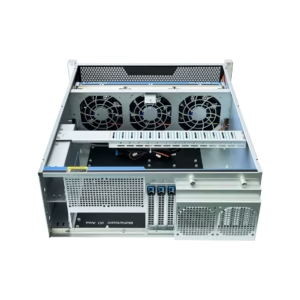 | OCG4U530A-L | 530 (L) x 435 (W) x 177 (H) (482mm with mounting ears) | SGCC 1.0mm (galvanized steel) | EEB, ATX, Micro-ATX, CEB | 3x 12038 fans, 2x 8038 fans | 1+1 redundant power supply | 4x 3.5″ HDD, 2x 2.5″ HDD/SSD | View Products |
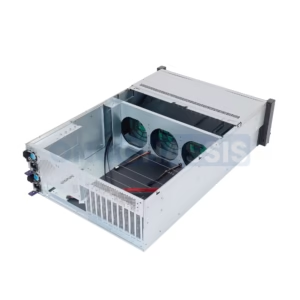 | OCG4680-4H4-H | 650 (D) × 430 (W) × 178 (H) | 1.2mm SGCC steel | EEB, ATX, CEB, Micro-ATX, ITX | 3 × 12038 hot-swappable fans | 2U, ATX, CRPS | 8 × 3.5” hot-swappable HDDs + optional 2 × 2.5” rear drives | View Products |


Maintenance and Care for Rackmount Cases
Cleaning and Upkeep
Regular cleaning is essential to keep your rackmount case in optimal condition and ensure the longevity of your equipment. Dust and debris can accumulate over time, potentially affecting ventilation and performance.
Steps for Cleaning:
- Exterior Cleaning: Use a soft, damp cloth to wipe down the case. Avoid harsh chemicals that could damage the finish.
- Interior Cleaning: Remove equipment and use compressed air to clear dust from vents, fans, and corners.
- Ventilation Maintenance: Check and clean air filters or mesh panels to maintain proper airflow.
Frequency:
- Clean monthly in dusty environments or quarterly in controlled spaces.
Inspecting for Damage
Routine inspections help identify potential issues before they escalate, ensuring your equipment remains safe and secure.
What to Check:
- Structural Integrity: Look for dents, cracks, or signs of wear on the case.
- Locks and Hinges: Test locks, latches, and hinges to ensure they function smoothly.
- Casters and Wheels: Inspect for loose or damaged wheels that could affect mobility.
- Shock Mounts: If your case has shock protection, check for wear or deterioration in the suspension system.
When to Inspect:
- Perform a thorough inspection every six months or after transporting the case.
Upgrading Case Features
As your needs evolve, upgrading your rackmount case can enhance its functionality and extend its usability.
Common Upgrades:
- Cooling Systems: Add or replace fans for improved ventilation.
- Cable Management: Install additional cable routing accessories to reduce clutter.
- Security Features: Upgrade to advanced locks or tamper-proof panels for added protection.
- Mobility Enhancements: Replace standard casters with heavy-duty or locking wheels for better stability.
Why Upgrade?
- To accommodate new equipment, improve performance, or adapt to changing environments.
By maintaining, inspecting, and upgrading your rackmount case, you can ensure it continues to meet your needs while protecting your valuable equipment.
Frequently Asked Questions
Q: What are rack-mount cases and their standard dimensions?
A: Rack-mount cases securely hold and transport electronic equipment within standard 19-inch rack frames. They come in various heights, such as 2U, 4U, and 12U, where 1U equals 1.75 inches. Depths vary to accommodate different types of gear and their specific requirements.
Q: How do aluminum and steel rack-mount cases differ in terms of protection?
A: Aluminum rack-mount cases are lightweight and ideal for portability, while steel cases offer greater durability and impact resistance. Both materials protect sensitive electronics from dust, temperature changes, and physical damage during transport or storage.
Q: What features should I look for in a high-quality rack-mount case?
A: Look for features like removable lids for easy access, front and rear access panels, and shock-mount capabilities. Robust locking mechanisms and rugged construction are also essential to keep your gear secure during transport.
Q: Are there specialized rack-mount cases for audio and pro audio equipment?
A: Yes, specialized rack-mount cases are available for audio and pro audio equipment, such as mixers and DJ workstations. These cases often include shock-mount systems to protect delicate components from impacts during transport and setup.
Q: How do I determine the right depth for my rack-mount case?
A: Measure the dimensions of your equipment, including any protruding cables or accessories, to determine the appropriate depth. Shallow cases work well for compact gear, while deeper cases are better suited for larger equipment.
Q: What are the benefits of using a shock-mount rack case?
A: Shock-mount rack cases protect sensitive electronics by absorbing impacts during transport. They use specialized mounting systems to secure equipment, reduce vibrations, and ensure reliable performance in demanding environments.
Q: Can I customize my rack-mount case for specific applications?
A: Yes, many manufacturers offer customization options, such as custom sizes, layouts, and features like drawers or caster wheels. These options help you create a case tailored to your specific needs.
Q: Why is durability important in rack-mount cases?
A: Durability is essential for protecting valuable equipment from damage during transport and storage. Cases made from rugged materials, like rotomolded plastics or heavy-duty aluminum, withstand frequent use and harsh conditions, keeping your gear safe and functional over time.
Concluding Summary:
Rack-mount cases are more than just enclosures—they are vital tools for safeguarding and organizing your equipment while enhancing its performance. By considering factors like size, material, cooling, mobility, and security, you can select a case that perfectly aligns with your operational needs. Whether you require a lightweight portable case for fieldwork or a robust fixed case for a data center, the right choice will provide long-term reliability and peace of mind. With proper maintenance and occasional upgrades, your rack-mount case will continue to protect your valuable equipment and adapt to your evolving requirements.
