


Many buyers see a server CPU price tag and assume they’re just paying for speed. They’re not.
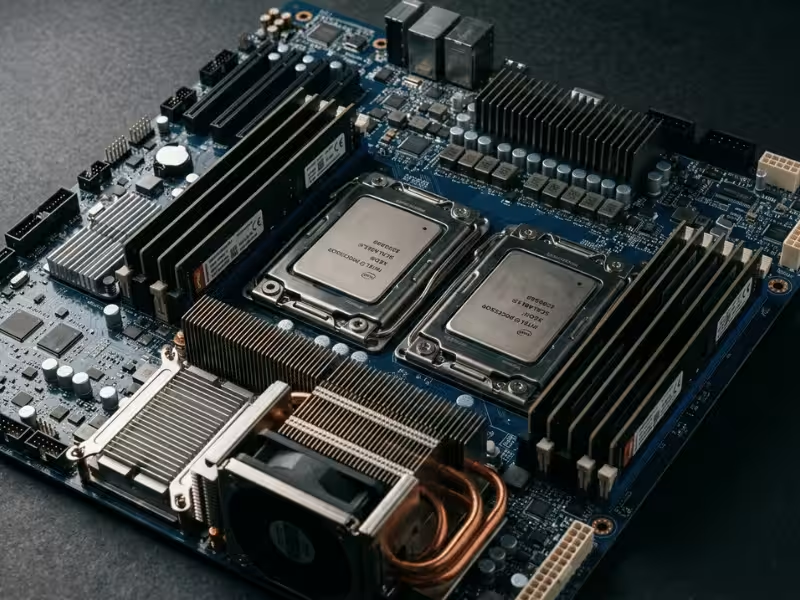
A desktop chip chases peak clocks and single-thread bursts. A server CPU answers to a completely different mandate. It has to feed more cores, drive far more memory channels, and push huge amounts of I/O through dozens of PCIe lanes.
It also has to stay up. Not for an afternoon of gaming, but for years of nonstop load.
That mandate shapes everything about the price. You pay for sustained stability under heavy workloads. You pay for deep validation that catches faults before they reach production. You pay for firmware, microcode updates, and long-term platform support that stretches across generations.
So the real question isn’t “why does this cost more than my desktop chip?” It’s “what job is this silicon actually built to do?”
Once you see the design goals clearly, the price starts to make sense. Let’s break down where that money really goes.
The Short Answer: What You’re Really Paying For
Here’s the honest answer: a server CPU costs more because it does far more than run fast.
Think of the price as a bundle. Raw performance is just one item in it.
You’re paying for what surrounds the cores. Wide memory bandwidth. Dozens of PCIe lanes. Support for huge memory pools and multi-socket setups. These let the chip move mountains of data without choking.
You’re paying for the ability to catch mistakes. RAS features and ECC spot memory errors and correct them on the fly. Deep validation weeds out faults long before the chip lands in a rack.
You’re paying for the long haul. Years of firmware and microcode updates. OS and hypervisor certification. A platform ecosystem that stays supported through multiple generations.
Add it all up, and the real product becomes clear.
A server CPU isn’t a faster desktop chip. It’s an insurance policy for workloads that can’t afford to stop. When downtime costs thousands per minute, buyers gladly pay a premium to avoid it.
So the price tag isn’t really about speed. It’s about managing risk and keeping the business running.
That’s the short version. The rest of this article shows you exactly where each dollar goes, and when you actually need to spend it.
Server CPU vs Desktop CPU: What Actually Changes
The word “server” on a chip doesn’t earn the higher price. The design behind it does. Once you look at what a server CPU has to feed and connect, the gap makes sense.
Cores Get the Headlines, But They’re Not the Whole Story
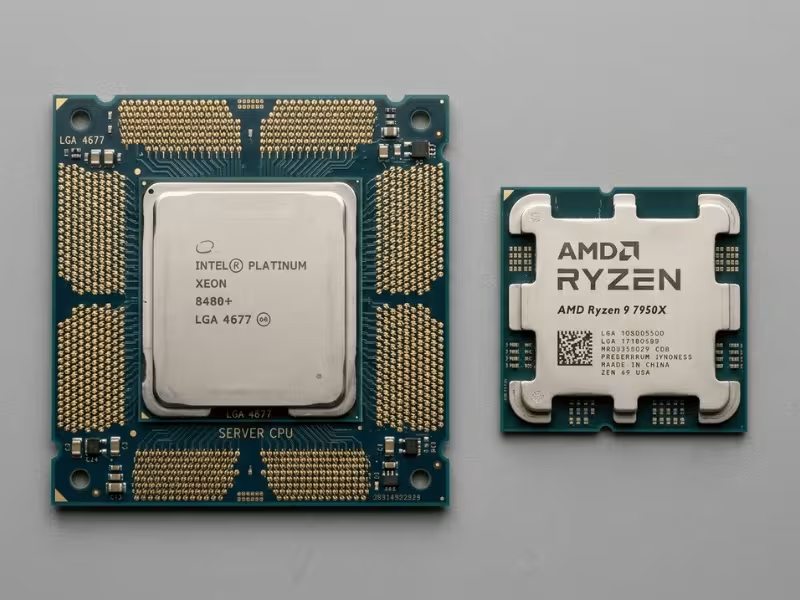
Yes, server CPUs pack more cores. A high-end desktop chip might give you 16 to 24 cores. A server part can push well past 64 or 96.
But core count alone doesn’t explain the price. Plenty of workloads never touch that many threads.
The real difference sits around the cores. It’s what keeps them fed and connected that matters most.
Memory and I/O: Where the Gap Really Shows
Look at memory channels first. A typical desktop CPU runs 2 channels. A server CPU runs 8 or 12.
More channels mean more bandwidth. That’s what a database or a busy virtualization host lives on. Twenty virtual machines all demand memory at once, and 2 channels choke fast. Twelve channels keep them flowing.
Now look at PCIe lanes. A desktop chip offers roughly 16 to 24 lanes. A server CPU delivers 60 to 128.
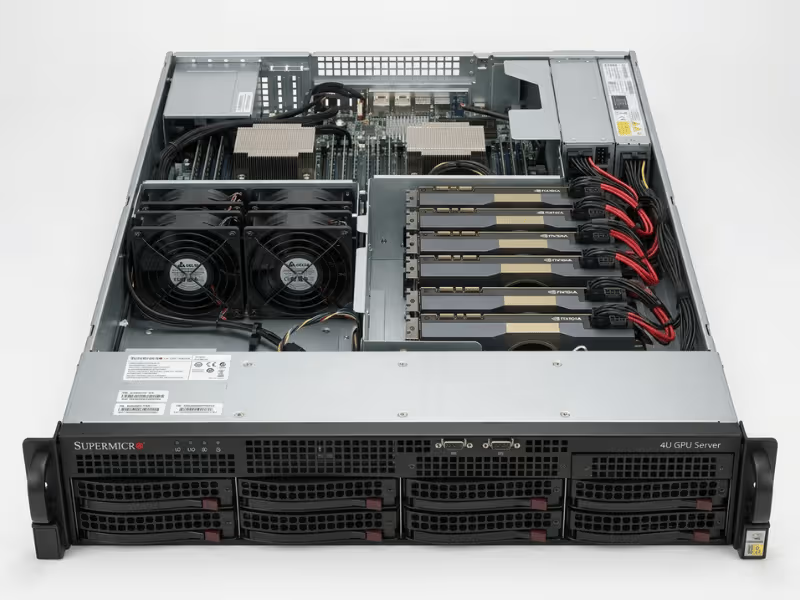
Those lanes connect GPUs, NVMe storage, and high-speed network cards. Pile several of each into one box, and desktop lane counts run out almost immediately. Server platforms have room to spare. This matters most in GPU-heavy builds, where a single node might carry four or more accelerators, each demanding its own generous slice of PCIe bandwidth.
Then there’s multi-socket support. Two or four CPUs can share work inside a single system, linked by a high-speed interconnect. Desktop chips simply can’t do this. For huge in-memory databases or dense compute nodes, that ability is the whole point.
Built to Run for Years, Not for an Afternoon
A desktop chip chases peak speed for short bursts. It sprints, then rests.
A server CPU runs a marathon. It has to hold steady throughput while pinned at heavy load, day after day, for years.
That changes the whole design. Engineers set power and thermal targets for nonstop operation, not for a two-hour gaming session. Clock speeds often sit lower than a desktop flagship, on purpose. Stability beats bragging rights here.
The chip also handles messy, mixed work. Dozens of tasks hit it at the same time, each pulling on memory and I/O. A server CPU stays predictable through that chaos. A desktop chip wasn’t built for it.
So when you compare a desktop and a server chip with similar clock speeds, you’re not comparing the same thing. One targets a quick burst on your desk. The other targets a workload that can’t afford to slow down or stop.
That different job is exactly what you pay for.
Why the Hardware Itself Costs More
Before anyone writes a line of firmware or runs a validation test, the raw silicon has already cost a fortune to make. Server CPUs are expensive at the chip level, and a few hard physics realities drive that.
Big Dies, Fewer Good Chips
Server CPU dies are huge. A desktop chip might measure under 200 square millimeters. A high-end server die can run several times larger.
That size hurts you twice.
First, a single 300mm wafer only yields so many chips. Bigger dies mean fewer of them fit. You cut fewer sellable units from the same expensive slice of silicon.
Second, defects punish large dies harder. Every wafer has random flaws scattered across it. On a tiny die, one flaw kills one small chip. On a massive server die, that same flaw can wipe out a much larger, more valuable piece.
Add it up, and your effective yield drops. The cost per working chip climbs fast, long before the part leaves the fab.
Leading Nodes and Fancy Packaging
Server parts also chase the newest process nodes, like 5nm and 3nm. Those nodes pack more transistors into less space and run more efficiently.
But early in a node’s life, they cost more per transistor, not less. The fab is still climbing the learning curve, yields are lower, and demand for that capacity is fierce. You pay a premium to be on the front edge.
Then comes packaging. Modern server CPUs rarely sit as one big slab of silicon anymore.
Instead, makers split the design into chiplets and stitch them together. Techniques like 2.5D and 3D stacking, plus hybrid bonding, connect those pieces with incredible precision. This approach helps yield and flexibility, but each extra step adds cost, equipment, and complexity.
So you’re not just paying for the transistors. You’re paying for the intricate assembly that binds them into one working processor.
Expensive Before a Single Test Runs
Here’s the part many buyers miss.
Everything above happens purely at the hardware level. No ECC logic tuning. No microcode. No support contracts. Just the physical act of making the chip.
By the time a server CPU comes off the line, it has already absorbed the cost of a giant die, a punishing yield curve, a bleeding-edge node, and multi-step packaging.
That’s the floor. The price only builds from there once reliability, validation, and long-term support enter the picture.
Why Reliability Adds So Much to the Price
A desktop chip can crash, reboot, and nobody loses money. A server CPU doesn’t get that luxury. Much of its price pays for one job: staying correct and staying up, even when hardware misbehaves. That commitment is expensive to build, and it’s the part buyers rarely see on a spec sheet.

ECC and RAS Do More Than Report Problems
People often reduce ECC to “error correction,” but that undersells it.
Cosmic rays and electrical noise flip bits inside memory and caches. It happens more than most admit. A desktop system with a single flipped bit might corrupt a file or crash. On a server running a bank ledger, one silent bit flip is a nightmare.
ECC catches those flips as they happen. It corrects the common ones on the fly and flags the rest before bad data spreads. That protection runs across caches, main memory, and the interconnects that link everything together.
RAS goes further. Reliability, Availability, and Serviceability isn’t one feature — it’s a whole toolbox aimed at survival.
Memory mirroring keeps a live copy, so a failing module doesn’t take the system down. Machine check architecture watches for faults and reacts before they cascade. Hot-swap support lets you replace parts while the machine keeps running.
The point isn’t to announce a failure. It’s to absorb the hit and keep working.
Validation Is Where the Real Money Burns
Building these features is hard. Proving they work under punishing conditions costs even more.
A server CPU goes through months of testing before it ships. Burn-in runs the chip flat out to weed out early failures. Thermal cycling heats and cools it thousands of times, hunting for weak spots that only show up over time.
Then comes error injection. Engineers deliberately force faults into the silicon to confirm ECC and RAS actually catch them. You can’t trust a safety net you haven’t tried to break.
Now multiply that by every platform combination.
Enterprise buyers run different OEM servers, different operating systems, and different hypervisors. Each pairing needs its own validation pass. The vendor certifies the chip against dozens of these configs, not just one lab setup.
That testing burns engineering hours, lab equipment, and calendar time. It’s a massive, unavoidable cost, and it lands squarely in the price you pay.
Why Buyers Gladly Pay for Prevention
Here’s the insight that ties it together: server CPUs aren’t priced only on what they cost to make. They’re priced against what failure costs.
Run the math from a real deployment. When a production system goes down, the loss isn’t measured in dollars per hour. It’s thousands of dollars per minute. Lost transactions. Idle staff. Broken SLAs. Sometimes reputational damage that lingers far longer than the outage.
Against that, the premium for a server CPU looks tiny.
I’ve watched teams agonize over a few hundred dollars per socket, then wave through a five-figure loss from one unplanned outage the same quarter. The chip that quietly corrected a memory error at 3 a.m. never sent them a bill. It just kept the business running.
That’s what the reliability premium buys. Not bragging rights. Not raw speed. It buys the boring, invaluable outcome of nothing going wrong.
So when a server CPU costs far more than a desktop chip with similar clocks, remember what the extra money defends against. You’re paying so the phone doesn’t ring at 3 a.m., and so the systems your business depends on simply stay alive.
You’re Also Paying for Platform Stability Over Time
Buy a desktop chip and the relationship pretty much ends at checkout. Buy a server CPU, and the vendor signs up for years of ongoing work behind the scenes. That commitment costs real money, and it lands in the price.
You’re not just buying silicon. You’re buying the ability to deploy, patch, and maintain a platform long after launch.
Firmware and Microcode That Keep Coming
A server CPU ships with a deep firmware stack, and the vendor keeps feeding it for years.
Security patches arrive as new vulnerabilities surface. Microcode updates fix errata and shore up weak spots found in the field. When a serious flaw hits the news, enterprise customers expect a response fast, not eventually.
Each of those updates takes engineers. They have to test the fix, confirm it doesn’t break existing deployments, then push it across every affected part. That work never really stops during the product’s life.
Certification Against Every OS and Hypervisor
A server CPU has to play nicely with the software your business already runs.
That means the vendor certifies the chip against multiple operating systems and hypervisors — different Linux distributions, Windows Server, VMware, and more. Each combination gets its own validation pass.
This isn’t a checkbox. It’s drivers, testing labs, and engineering hours spent proving the platform behaves under real conditions. Skip it, and customers hit strange bugs no one wants at 2 a.m.
You pay for that certification whether you notice it or not.
Availability You Can Plan Around
Here’s the part that quietly drives cost: enterprise buyers expect a CPU to stay available for 7 to 10 years.
They build fleets around a platform. When a node dies in year four, they need a matching replacement, not a “sorry, that’s discontinued.” They need the same firmware, the same behavior, the same support.
Honoring that promise locks the vendor into holding inventory and keeping engineering resources on standby long after most people stopped buying the part. Storing chips costs money. Keeping a support team ready costs more.
Consumer chips don’t carry that burden. They cycle out fast, and nobody expects otherwise.
An enterprise isn’t purchasing a processor for today. It’s purchasing a stable foundation it can run, update, and repair for the better part of a decade. That long tail of support feels invisible on day one. It becomes priceless the day you need a replacement three years in and the vendor still has your back.
Why Server CPUs Stay Expensive Even When the Specs Look Similar
Sometimes you’ll spot a server CPU and a desktop chip with matching core counts and clock speeds. The server part still costs several times more. That gap isn’t a mistake or pure greed. It comes from how these chips get sold, not just how they get built.
Fewer Units, Bigger Bills to Spread
Consumer CPUs ship by the tens of millions. Server CPUs ship in far smaller numbers, sold to a handful of hyperscalers, OEMs, and enterprises.
That volume gap matters. The same fixed costs — R&D, validation, firmware, long-term support — have to be recovered from a much smaller pile of units.
Divide a huge fixed cost across millions of chips and each one barely feels it. Divide it across a fraction of that, and every single unit carries a heavier load. The low volume alone pushes the price up before anything else enters the math.
Priced by What It Can Do, Not What It Cost to Make
Here’s a habit that trips people up: assuming price tracks manufacturing cost. In this market, it mostly doesn’t.
Vendors price by capability tiers. More cores, more memory bandwidth, more PCIe lanes, richer RAS features — each step up moves you into a higher price bracket.
Two chips might roll off nearly identical production lines. The one with extra memory channels unlocked or more cores enabled costs far more, because it does more for a demanding workload. You’re paying for the capability tier, not the sand and silicon.
That’s why “the specs look similar” can be misleading. A feature you can’t see on a quick glance — like validated multi-socket support or advanced fault handling — often explains the whole difference.
List Price Versus What People Actually Pay
Let me be honest about something the spec sheets won’t tell you: almost nobody big pays list price.
Hyperscalers buy in enormous quantities and negotiate hard. Their real cost per chip sits well below the published number, sometimes dramatically so.
Smaller buyers don’t have that leverage. An SMB or a mid-size enterprise ordering a few servers pays much closer to list. Same chip, very different invoice.
So when you compare a server CPU’s sticker to a desktop chip’s retail price, you’re not seeing the full picture. The market underneath is layered, and where you sit in it shapes what you actually pay.
The Most Common Cases Where You Don’t Need a Server CPU
I’ve talked plenty of buyers out of a server CPU they didn’t need. The features are real, but so is the waste when the workload never touches them. Here’s where a cheaper path does the job just as well.
Light Workloads That a Desktop or NAS Handles Fine
If your “server” mostly shares files, runs a few small apps, or backs up a handful of machines, you’re overpaying for a Xeon or EPYC.
A solid desktop CPU, or even a purpose-built NAS box, covers this easily. File sharing barely stresses a modern chip. Ten users pulling documents won’t come close to saturating a mid-range processor.
Small office tools follow the same pattern. A print server, a lightweight database, a local backup target — none of these demand 64 cores or 12 memory channels.
Ask yourself one question: does the box ever run flat out? If it idles most of the day, server silicon is dead weight. A good NAS with ECC support, if you want data protection, gives you most of the safety net at a fraction of the price.
Workstation and HEDT: The Middle Ground People Miss
Plenty of buyers jump straight to a full server platform when a workstation chip would fit perfectly.
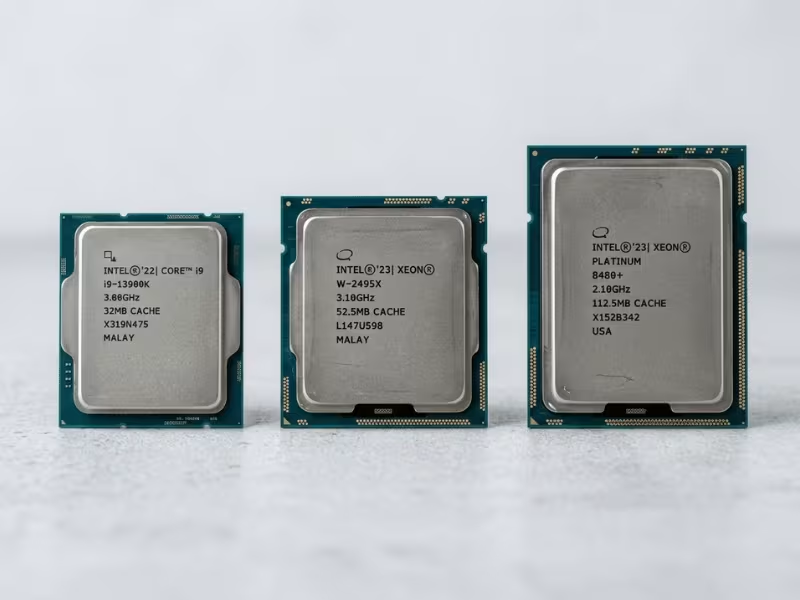
Threadripper Pro and Xeon W sit right in this gap. They hand you high core counts, lots of PCIe lanes, and ECC memory support — the parts that actually matter for heavy local work like rendering, simulation, and video editing.
What they skip is the full server tax. No mandatory multi-socket support. No dense rack thermals. No enterprise RAS stack you’ll never trigger on a single desk.
So if your work is demanding but lives on one machine, look here first. You get real muscle without paying for uptime guarantees a workstation doesn’t need. I’ve seen studios and engineering teams save thousands per seat just by choosing HEDT over a rack server they’d have parked under a desk anyway. Even a workstation chip that drives several GPUs can live comfortably in a well-cooled 4U GPU chassis without stepping up to full enterprise silicon.
When Renting Beats Buying
Sometimes the smartest move is to not own the hardware at all.
Cloud instances win in a few clear cases. If your load spikes hard but only now and then, renting means you pay for the peak when you need it and nothing when you don’t. Buying a server sized for that peak leaves expensive silicon idle most of the year.
Short projects tell the same story. Need heavy compute for three months? Rent it. Don’t sink capital into a box that gathers dust once the project ends.
Cloud also spares you the hidden bills — power, cooling, rack space, and the support contract that comes with owning gear.
The math flips when your load runs steady and high, day after day. At that point, owning usually wins over years. But for bursty, uncertain, or short-lived needs, renting keeps your money working instead of depreciating in a closet.
Match the tool to the job, and a server CPU often turns out to be the wrong tool entirely.
How to Tell Whether a Server CPU Is Worth the Price
Every buyer I talk to wants the same thing: a clear way to know if the premium is justified. So skip the spec-sheet worship. Work through these three steps in order, and the answer usually reveals itself.

Step 1: Find Your Real Bottleneck First
Before you shop for anything, figure out what’s actually holding your workload back. Most people guess wrong here.
Ask which resource runs out first:
- CPU-bound? Heavy compute like rendering, simulation, or parallel batch jobs pins the cores at 100%. More cores genuinely help.
- Memory-bound? Databases and busy virtualization hosts starve for bandwidth and capacity long before cores max out. Here, memory channels matter more than core count.
- I/O-bound? Lots of GPUs, NVMe drives, or fast network cards? Your limit is PCIe lanes, not clock speed.
- Reliability-driven? The work isn’t demanding, but it can’t stop. Now uptime is the whole point.
Watch a live workload before you decide. A simple CPU and memory monitor tells you more in an hour than any datasheet. Buy for the bottleneck you actually have, not the one you imagine.
Step 2: Do You Really Need Server-Only Features?
Once you know the bottleneck, check whether it demands features only a server CPU delivers. This is where a lot of money gets wasted.
Run down this short checklist:
- ECC memory — Do you run data you can’t afford to corrupt silently? If yes, you need it. Note that some workstation chips offer ECC too.
- 8 or 12 memory channels — Only worth it if your workload is genuinely memory-hungry. A light app server won’t notice.
- 60+ PCIe lanes — Justified when you’re stacking GPUs, NVMe, and high-speed NICs. Two devices don’t need 128 lanes.
- Multi-socket support — Rare requirement. Reserved for huge in-memory databases or dense compute nodes. Most buyers never touch it.
- Full RAS stack — Memory mirroring, hot-swap, machine check. Priceless for critical production. Dead weight for a box that reboots without consequence.
Be brutally honest on each line. If you check three or more, a server CPU earns its keep. If you check one or none, you’re paying for capability you’ll never use.
Step 3: Compare Total Cost, Not the Sticker
Here’s the mistake that costs the most: comparing CPU prices alone. The chip is a small slice of what you actually spend over the years you own it.
Add up the whole picture instead:
- Power — Server platforms draw more, every hour, for years. That electric bill compounds.
- Cooling — More heat means more cooling load, which means more power again.
- Rack space — Physical space in a data center or colo isn’t free. The right server chassis also shapes how efficiently that space and airflow get used.
- Support contracts — Enterprise support and warranties carry real annual cost.
- Downtime risk — This one flips the math. When an outage costs thousands per minute, the reliability premium becomes cheap insurance.
Now run the comparison honestly.
If you own a steady, high, mission-critical load, the total cost of a server CPU often wins over three to five years — even at a higher upfront price. The uptime alone pays for it.
If your load is light, bursty, or non-critical, a workstation chip or a cloud instance usually wins on total cost. You skip the power, the cooling, the rack, and the support bill entirely.
The Question That Settles It
When a client is still torn, I ask one thing: what does an hour of downtime cost you?
If the answer is “not much,” stop paying the server premium. If the answer makes you wince, you already know the CPU is worth it.
Quick Comparison: Desktop, Workstation, and Server CPU Tiers
By now you’ve seen why server CPUs carry the price they do. But when it’s time to actually buy, most people just want a quick map of where each tier fits.
So here’s the shortcut I give clients. Think of these three tiers as answers to three different questions: How fast on my desk? How much muscle for one heavy machine? How reliable at scale?
|
CPU Category |
Typical Strengths |
Key Limits |
Best For |
Price Tier |
|---|---|---|---|---|
|
Desktop / Consumer |
High clock speeds, strong single-thread, low price |
Few memory channels, limited PCIe lanes, no ECC |
Gaming, office work, light servers, everyday apps |
$ |
|
Workstation / HEDT |
High core counts, many PCIe lanes, optional ECC |
No multi-socket, not built for dense rack thermals |
Rendering, simulation, video editing, one heavy machine |
$$ |
|
Server |
Massive core counts, 8–12 memory channels, full RAS, multi-socket |
Lower clocks, higher power draw, priced for the tier |
Databases, virtualization, 24/7 mission-critical loads |
$$$ |
Read It as a Ladder, Not a Ranking
Notice that “more expensive” doesn’t mean “better for you.” Each tier wins at a different job.
A desktop chip beats a server CPU for gaming, every time. A workstation part often beats both for a single rendering rig. The server only pulls ahead when uptime and scale become the whole point.
Match the tier to your workload, and the right choice usually picks itself.
FAQ
Why are server CPUs more expensive than desktop CPUs with similar clock speeds?
Clock speed tells you almost nothing here. You’re paying for what surrounds the cores: 8 to 12 memory channels, 60-plus PCIe lanes, ECC, and a full RAS stack. Add months of validation and years of support, then spread all that across a tiny production volume. A desktop chip skips every one of those costs, so the same clocks land at a wildly different price.
Do server CPU prices drop over time?
Not much, and not fast. When a newer generation launches, the previous one softens somewhat, but never crashes the way consumer chips do. Enterprise demand, long-term availability guarantees, and lean supply keep prices sticky. Vendors also hold inventory for years to serve existing fleets, which props up value. Don’t wait for a fire sale. It rarely comes for parts still under active support.
Is a workstation CPU enough for many business workloads?
Often, yes. Threadripper Pro and Xeon W hand you high core counts, plenty of PCIe lanes, and ECC support — the parts that actually matter for rendering, simulation, and heavy local work. What you skip is the server tax: multi-socket support and enterprise RAS you’ll never trigger on one machine. If your demanding work lives on a single desk, a workstation chip usually does the job for far less.
Why do old server CPUs still hold value?
Because they still run production workloads reliably. A five-year-old Xeon or EPYC keeps serving virtualization hosts, databases, and file servers without complaint. Vendors back these parts with firmware and availability for 7 to 10 years, so fleets keep buying matching replacements. That steady demand, plus ECC and RAS features consumer chips lack, keeps prices firm on the used market long after a desktop chip would be worthless.
Are AMD EPYC and Intel Xeon priced differently for the same kind of workload?
Yes, and the gap moves constantly. For a given core count and memory bandwidth, EPYC has often undercut Xeon, especially on high-core parts. But don’t shop on list price alone. Compare price per core, price per memory channel, and platform cost including the motherboard. Intel sometimes wins on specific features or software optimizations. Benchmark both against your actual workload before you decide. The “cheaper” chip isn’t always cheaper for your job.
When is renting compute better than buying a server?
When your load is bursty, short-lived, or uncertain. If you need heavy compute for a three-month project, rent it. If demand spikes hard but only occasionally, cloud lets you pay for the peak and nothing after. Renting also spares you power, cooling, rack space, and support contracts. Buying wins only when your load runs steady and high for years. Match the commitment to how predictable your demand really is.
Before You Buy
Skip the spec sheet at first. Server CPU decisions go wrong when buyers shop features before they understand their own needs.
Start with the workload.
Watch what your system actually does. Is it starving for cores, memory bandwidth, or PCIe lanes? Or does it just need to never go down? Name the real demand before you name a chip.
Then test the features against that demand.
Do you truly need ECC, multi-socket support, a full RAS stack, or 12 memory channels? If your workload never leans on them, you’re buying weight you’ll never lift. If it does, they’re worth every dollar.
Last, add up the whole system over time.
The CPU sticker is a small slice. Count power, cooling, rack space, support, and what an hour of downtime costs you. Run that math across three to five years.
Do those three things in order, and the right choice stops being a guess. It becomes obvious.
