


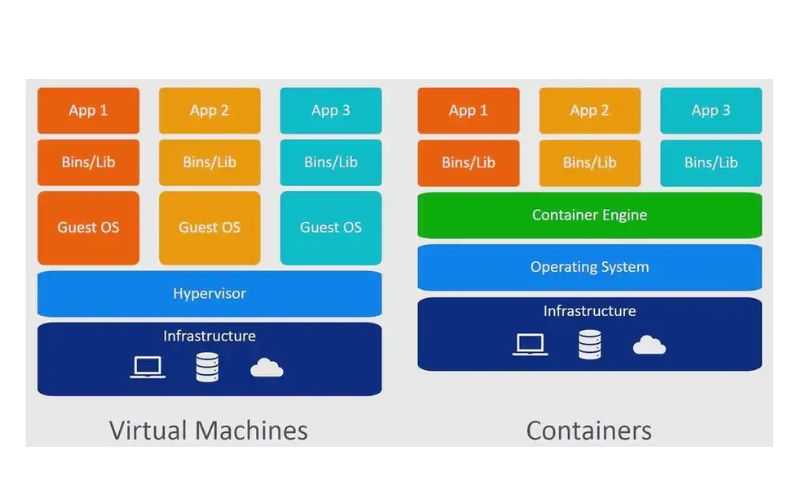
Virtual Machines are an essential foundational technology that enable the simultaneous operation of multiple isolated operating systems on a single physical machine, fundamentally changing how IT infrastructure is deployed.
By abstracting the physical hardware, virtual machines automate the configuration of your applications and maintain strict resource allocation boundaries. First introduced decades ago, virtualization has become a widely adopted standard for organizations to run enterprise applications and distributed services efficiently at scale, maximizing physical server utilization and drastically reducing hardware costs.
Virtual Machines: The Basics
A virtual machine (VM) is an isolated software environment that emulates a physical computer system, encapsulating the operating system, configuration, and application dependencies, allowing it to run independently. Each operating environment gets its own virtualized hardware allocation, which is managed alongside multiple other VMs on the same physical host.
Virtual machines operate by sitting on top of a hypervisor, which interacts directly with the physical hardware components of the host system. One of a virtual machine’s key advantages is that it can run on bare metal servers, across public cloud providers, in private data centers, and within hybrid cloud environments.
Virtual machines are designed to help users adhere to core enterprise IT design principles, providing unparalleled flexibility in infrastructure deployment. A well-designed virtual machine environment should be highly secure by isolating workloads, highly flexible by allowing disparate operating systems to run side-by-side, and highly scalable so resources can be dynamically adjusted based on workload demands.
Advantages of Using Virtual Machines
Virtual machines automate much of the tedious work of provisioning hardware and scaling applications, paving the way for more robust IT management methods that save time and bring new software to market faster. Some of the main benefits include:
- Resource optimization: A production environment running multiple applications traditionally required many physical servers, often heavily underutilized. Virtual machines provide the abstraction and management capabilities required to deploy multiple workloads onto a single physical server, maximizing hardware investments.
- Scalability for workloads: Virtual machines can be scaled vertically or horizontally based on your immediate needs, providing the precise computing capacity your applications require while intelligently saving resources and operational costs.
- Portability across environments: Virtual machines can run on-site in your own data center, in a public cloud, and in hybrid configurations that combine public and private instances. With standardized virtual machine formats, the same virtual hardware configurations can be migrated almost anywhere.
- Consistent deployments: Virtual machine deployments remain consistent across the underlying physical infrastructure. VM templates embody the concept of standardized infrastructure, where all the operating system dependencies, libraries, and setup instructions required to run an enterprise application are bundled together.
- Simplified operations and development: Virtual machines save developers massive amounts of time, empowering rapid iteration cycles and safe testing environments. At the same time, virtualization helps operations teams feel confident in the system’s stability, isolation, and rollback capabilities.
- Support for hybrid cloud strategies: Many organizations combine on-site data centers with public or private cloud solutions and balance workloads across multiple environments to capitalize on changes in pricing and service levels. The consistency and snapshot portability of virtual machines can fully support these complex hybrid strategies.
- Compatibility with legacy applications: Virtual machines can help you deliver and manage older, monolithic applications that require specific, outdated operating systems, as well as those being gradually refactored into microservices, without requiring dedicated legacy hardware.
- Enhanced security features: Virtual machine security practices can help organizations take effective steps toward better IT governance. Administrators can enforce strict network policies and isolate hardware between virtual machines. Because each VM runs its own operating system kernel, a security breach or vulnerability in one VM is significantly less likely to affect other VMs on the same physical host.
The Role of a VM Host
A working virtualization environment relies on a physical machine, called the host, which runs the hypervisor and provides physical resources to the virtual machines.
Administrators configure a virtual machine host, specifying which physical resources—such as CPU cores, RAM, and storage arrays—should be made available to the hypervisor for distribution among active virtual environments.
You can visualize the relationship between the host and the virtual machines as a provider-consumer model. The VM host manages the physical resources, while the guest virtual machines follow instructions from the hypervisor and do the actual work of running the operating systems and applications. Examples of popular VM host software and hypervisors include VMware ESXi and Microsoft Hyper-V, which expertly handle these demanding resource allocation tasks.
How Virtual Machines Work
Let’s take a deeper look at what’s happening inside a virtual machine architecture.
The hypervisor is the nerve center, home to the components that control hardware allocation and to data about the host’s state and configuration. Type 1 hypervisors run directly on bare-metal hardware, while Type 2 hypervisors run on top of a conventional operating system, both handling the work of ensuring virtual machines have the necessary resources.
Virtual hardware components are presented to the guest operating system as if they were real, physical devices. The hypervisor creates virtual CPUs, virtual memory, and virtual storage drives. The guest operating system determines how to use these virtual resources and processes requests just as it would on a dedicated physical motherboard.
Resource allocation and management ensure that multiple virtual machines can share the same physical components without interfering with one another. If a virtual machine requires more memory or processing power, the hypervisor can dynamically adjust allocation limits, provided the host machine has sufficient physical resources to share.
Networking in VMs relies on virtual switches and network interfaces to connect the isolated environments to the outside world. The hypervisor handles network communications inside or outside your host server, relying either on internal routing rules or on forwarding traffic directly to the physical network interface cards.
Beyond just managing the compute resources that run an application, virtual machine architectures also manage complex storage options. Virtual machines allow users to request storage resources, such as virtual hard disks, without having to know the intricate details of the underlying physical storage infrastructure. These virtual disks are stored as distinct files on the host, making them incredibly easy to back up, duplicate, or move.
Exploring Serverless Virtualization
Serverless virtualization is a cloud-native deployment model that allows developers to build and run applications without actively provisioning or managing underlying virtual machine instances. There are still virtual machines powering the serverless infrastructure, but they are entirely abstracted away from the application development and deployment process.
Once deployed, serverless environments respond to demand and automatically scale the underlying compute resources up and down as needed. These offerings from public cloud providers are usually metered on demand through an event-driven execution model. As a result, when an application is sitting idle, the underlying virtual infrastructure doesn’t consume billable resources.
Virtual machines are a popular foundational layer for securely running serverless environments. Traditional virtual machines require manual patching, scaling, and operating system management, but serverless virtualization utilizes lightweight VM technologies to spin up instantaneous, secure sandboxes that run a specific function and then immediately disappear, dramatically altering how developers approach infrastructure.
Managing VMs with Virtual Machine Managers
A virtual machine manager is an enterprise-level controller application that extends the basic functionality of a hypervisor to create, configure, and manage large fleets of virtual machines across multiple physical hosts. It builds on basic resource allocation concepts and incorporates advanced data center-specific knowledge to automate the entire life cycle of the infrastructure it manages.
A virtual machine manager can be utilized to perform almost any administrative action: scaling a complex application, migrating live virtual machines between physical servers without downtime, or managing automated disaster recovery protocols. Tools like VMware vCenter or XenCenter provide unified dashboards that grant administrators absolute visibility into their virtualized environments.
Key features of these management platforms include extensive automation, template provisioning, and deep performance monitoring. By leveraging these powerful management tools, IT teams can automatically balance workloads across dozens of physical servers, proactively identify hardware failures, and ensure that virtual machines remain highly available under heavy enterprise demand.
Virtual Machines vs. Containers
Virtual machines and containers both provide isolated environments for running applications, but their underlying architectures are fundamentally different. Put simply, virtual machines virtualize the physical hardware to run multiple complete operating systems, whereas containers virtualize the operating system itself to run multiple applications that share a single underlying kernel.
Virtual machines offer distinct advantages over containers when it comes to strict security and deep isolation. Because each virtual machine contains its own full operating system, a kernel panic or severe security vulnerability within one virtual machine will not bring down or compromise the neighboring environments on the same physical host.
Scenarios where virtual machines are preferred include running applications that require different operating systems, hosting legacy software that cannot be containerized, and providing dedicated infrastructure for heavy, monolithic databases. For most traditional enterprise workloads and environments requiring stringent regulatory compliance, the robust isolation of virtual machines remains the superior and necessary choice.
Exploring Open Source Virtualization Solutions
Open-source virtualization is a community-driven approach to infrastructure, providing packaged software components for running and managing virtual machines without expensive proprietary licensing. In addition to core hypervisors, open source ecosystems offer developer- and operations-focused tools that help teams efficiently deploy, scale, and maintain a long-term virtualization lifecycle.
Examples of powerful open source platforms include KVM (Kernel-based Virtual Machine) and Xen. KVM integrates virtualization capabilities directly into the Linux kernel, allowing administrators to create, test, and deploy high-performance virtual machines natively, while supporting a wide range of enterprise-grade operating systems and hardware configurations.
The primary benefit of open-source virtualization for businesses is the elimination of vendor lock-in and a significant reduction in licensing costs. Open source solutions provide incredible flexibility, allowing enterprises to customize the hypervisor source code, integrate validated third-party management tools, and build highly tailored, cost-effective infrastructure that perfectly matches their unique operational requirements.
The Case for Virtual Machines
Virtual machines remain a leading, foundational technology in modern IT, providing the essential infrastructure for securing, simplifying, and efficiently consolidating large-scale data center operations.
With virtualization, your IT departments can spin up new servers, host complex architectures, and deploy them in the cloud with the scalability, control, and orchestration that turns a massive hardware footprint into a streamlined, cost-effective operation. Whether you choose to run highly specialized legacy databases or deploy a modern hybrid cloud environment, virtual machines provide the diverse workload support and strict isolation required to keep your enterprise secure and resilient.
Final Thoughts on Virtual Machines
Properly implementing and understanding virtual machines is absolutely critical for anyone looking to build robust, scalable, and efficient IT environments. By abstracting physical hardware into flexible, isolated software constructs, virtual machines offer unparalleled cost savings, heightened security, and the operational agility necessary to succeed in today’s rapidly evolving technological landscape. As computing continues to shift toward hybrid and cloud deployments, mastering the fundamentals of virtual machine architecture, management, and integration will ensure your infrastructure remains highly resilient and capable of meeting future enterprise demands.
