


Industrial environments demand more than just a sturdy PC case—your operations depend on it. The right industrial computer chassis is not just a protective shell; it’s a critical component that ensures your sensitive hardware performs reliably in harsh conditions.
An industrial computer chassis is designed to safeguard essential components like motherboards, processors, and power supplies. It shields them from dust, moisture, extreme temperatures, and vibrations—factors that can easily disrupt operations. Unlike standard PC cases, these chassis are built to endure the challenges of industrial settings, ensuring uninterrupted performance.
These chassis safeguard essential components like motherboards, GPUs, power supplies, and storage devices, ensuring reliable performance even in the toughest industrial settings. They often feature rugged materials, advanced cooling systems, and certifications like IP ratings or MIL-STD-810G to meet specific operational needs.
Choosing the wrong chassis can lead to costly consequences. Downtime, component failure, and even data loss are common risks when the chassis fails to meet environmental demands. These issues not only affect productivity but can also result in significant financial losses.
This article offers more than just definitions. You’ll find actionable tips, real-world examples, and insights into the latest trends in industrial computer chassis design. Whether you’re upgrading your current setup or starting from scratch, this guide will help you make informed decisions to protect your operations.
Core Features of a Reliable Industrial Computer Chassis
When it comes to industrial computer chassis, reliability isn’t just a feature—it’s a necessity. As someone who has spent years in the GPU server chassis industry, I’ve seen firsthand how the right chassis can make or break operations. Let’s dive into the core features that define a dependable industrial computer chassis.
Durability and Materials
The backbone of any industrial computer chassis is its material. Heavy-duty steel, aluminum, and specialized alloys are the go-to choices. Steel offers unmatched strength, while aluminum provides a lightweight yet sturdy alternative. Specialized alloys, on the other hand, combine durability with resistance to corrosion.
Think of the chassis as the armor for your sensitive components. It must withstand the rigors of industrial environments, from accidental impacts to long-term wear and tear. Always prioritize materials that can handle the demands of your specific application.
Environmental Protection
Industrial environments are unforgiving, and your chassis needs to be ready for the challenge. Look for IP-rated designs that offer protection against dust and moisture. A sealed chassis design is essential for keeping out contaminants that could compromise your hardware.
For example, an IP65-rated chassis can handle dusty warehouses and occasional water exposure, while an IP67-rated one is better suited for environments with heavy moisture or even temporary submersion.
Shock and Vibration Resistance
Industrial settings are rarely gentle. Machines vibrate, floors shake, and impacts happen. A reliable chassis incorporates rugged construction, mounting hardware, and dampeners to absorb shocks and vibrations.
I’ve worked with clients in manufacturing plants where vibrations from heavy machinery caused frequent hardware failures. Switching to a chassis with built-in shock resistance solved the issue and saved them from costly downtime.
Thermal Management
Heat is the silent killer of industrial hardware. A good chassis doesn’t just house components—it actively manages their temperature. Fanless designs are ideal for environments with dust or debris, while active cooling systems with fans are better for high-performance setups.
Heat sinks and thermal pads are also critical for dissipating heat efficiently. If your operations involve extreme temperatures, ensure the chassis is rated for the full range of conditions it will face.
Electromagnetic Compatibility (EMC/EMI Shielding)
In industrial settings, electrical interference is a common problem. Without proper shielding, electromagnetic interference (EMI) can disrupt your hardware’s performance. A well-designed chassis includes EMC/EMI shielding to block unwanted signals and ensure stable operation.
This feature is especially important in facilities with high-powered equipment or multiple electronic systems operating in close proximity.
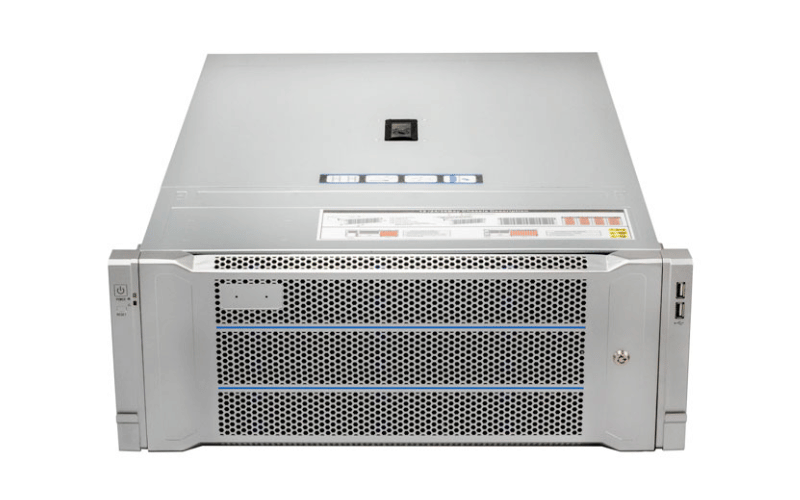
Checklist: Must-Have Features for Any Industrial Chassis
Here’s a quick-reference checklist to guide your selection:
- Material: Heavy-duty steel, aluminum, or specialized alloys.
- Environmental Protection: IP-rated, sealed design for dust and moisture resistance.
- Shock Resistance: Rugged construction with mounting hardware and dampeners.
- Thermal Management: Fanless or active cooling systems, heat sinks, and extreme temperature ratings.
- EMC/EMI Shielding: Protection against electrical interference.
By focusing on these core features, you’ll ensure your industrial computer chassis is up to the task, no matter how demanding the environment.
Types of Industrial Computer Chassis and Their Applications
Industrial computer chassis come in various forms, each tailored to specific environments and operational needs. Selecting the right type is not just about fitting components—it’s about ensuring seamless integration into your workflow. Let’s explore the key types of industrial computer chassis and their applications.
Rackmount Chassis
Rackmount chassis are the workhorses of server rooms and data centers. They come in standard sizes like 1U, 2U, and 4U, with the “U” representing the height of the chassis in rack units.
A 1U chassis is compact and ideal for high-density setups, while 2U and 4U options provide more space for additional components like GPUs, storage drives, and advanced cooling systems. These chassis are designed for scalability, making them perfect for industries that rely on centralized computing, such as telecommunications and cloud services.
Wall-Mount and Compact Chassis
When space is at a premium, wall-mount and compact chassis step in as the heroes. These chassis are designed to be mounted on walls or integrated into tight spaces, making them ideal for machine-level control in manufacturing plants or small-scale industrial setups.
For example, I’ve seen compact chassis used effectively in automated assembly lines, where every inch of space matters. Their small footprint doesn’t compromise durability, ensuring reliable performance in demanding environments.
Panel PC Enclosures
Panel PC enclosures combine a computer chassis with an integrated display, creating a seamless solution for human-machine interfaces (HMIs) and process visualization. These are commonly used in industries like food processing, pharmaceuticals, and energy management, where operators need real-time data at their fingertips.
The touchscreens are often ruggedized and sealed to withstand harsh conditions, including exposure to water, chemicals, and extreme temperatures. This makes them a versatile choice for environments where both computing power and user interaction are critical.
Vehicle-Mount Chassis
For mobile applications, vehicle-mount chassis are the go-to option. These are designed to endure the constant vibrations, shocks, and temperature fluctuations that come with being installed in trucks, forklifts, or other industrial vehicles.
I’ve worked with logistics companies that rely on vehicle-mount chassis to power their fleet management systems. These chassis ensure uninterrupted operation, even when navigating rough terrain or extreme weather conditions.
Comparison Table: Pros and Cons of Each Type
| Type | Pros | Cons | Best For |
|---|---|---|---|
| Rackmount Chassis | Scalable, standardized sizes, ideal for centralized setups | Requires dedicated rack space | Server rooms, data centers |
| Wall-Mount Chassis | Space-saving, durable, easy to install | Limited expandability | Machine-level control, small spaces |
| Panel PC Enclosures | Integrated display, ruggedized, user-friendly | Higher cost compared to standard chassis | HMIs, process visualization |
| Vehicle-Mount Chassis | Shock-resistant, mobile-friendly, operates in extreme conditions | Specialized design limits versatility | Fleet management, mobile applications |
By understanding the strengths and limitations of each type, you can choose the industrial computer chassis that aligns perfectly with your operational needs.
Industrial Chassis vs. Commercial PC Cases
When it comes to housing critical hardware, the choice between an industrial chassis and a commercial PC case is not just about aesthetics or price. It’s about performance, reliability, and the ability to withstand the challenges of demanding environments. Let’s break down the key differences and why industrial chassis are the superior choice for industrial applications.
Durability and Longevity
Industrial chassis are built to endure. Unlike commercial PC cases, which are often made from lightweight materials like plastic or thin steel, industrial chassis use heavy-duty steel, aluminum, or specialized alloys. These materials provide the strength needed to withstand impacts, vibrations, and extreme temperatures.
For instance, I’ve seen industrial chassis continue to perform flawlessly in environments where commercial cases warped or cracked under pressure. Their robust construction ensures they last longer, even in the harshest conditions.
Reliability
Industrial operations demand 24/7 uptime, and industrial chassis are designed to deliver just that. They feature advanced cooling systems, shock-resistant mounts, and sealed designs to protect components from dust and moisture.
Commercial PC cases, on the other hand, are not built for continuous operation. They often lack the thermal management and environmental protection needed for industrial settings, leading to higher failure rates. If your operations depend on uninterrupted performance, an industrial chassis is non-negotiable.
Security Features
In industrial environments, physical security is just as important as digital security. Industrial chassis often come with tamper-proof designs, physical locks, and intrusion detection systems to prevent unauthorized access.
I’ve worked with clients in the defense and healthcare industries who rely on these features to protect sensitive data and equipment. Commercial PC cases simply don’t offer the same level of security, leaving your hardware vulnerable to tampering.
Cost Efficiency
At first glance, industrial chassis may seem more expensive than commercial PC cases. However, their longer lifecycles, lower failure rates, and reduced downtime make them a cost-efficient choice in the long run.
For example, a manufacturing plant I consulted for switched to industrial chassis after experiencing frequent hardware failures with commercial cases. The initial investment paid off within a year, thanks to increased uptime and reduced maintenance costs.
Infographic: Key Differences Between Industrial and Commercial PC Cases
| Feature | Industrial Chassis | Commercial PC Cases |
|---|---|---|
| Durability | Heavy-duty materials, impact-resistant | Lightweight materials, prone to damage |
| Reliability | 24/7 operation, advanced cooling, sealed design | Limited to standard use, higher failure rates |
| Security | Tamper-proof, physical locks, intrusion detection | Minimal physical security features |
| Cost Efficiency | Long-term savings through durability and uptime | Lower upfront cost, higher maintenance costs |
By understanding these differences, you can make an informed decision that aligns with your operational needs and long-term goals. An industrial chassis isn’t just a purchase—it’s an investment in reliability and performance.
How to Choose the Right Industrial Computer Chassis
Selecting the right industrial computer chassis is not a one-size-fits-all decision. It’s a strategic process that requires careful evaluation of your environment, application, and future needs. Let me guide you through a step-by-step approach to ensure you make the best choice for your operations.
Step-by-Step Guide
Assess Your Operating Environment
Start by analyzing the conditions your chassis will face. Is your environment dusty, humid, or prone to extreme temperatures? For example, a chassis in a food processing plant may need an IP67 rating to protect against moisture, while one in a factory with heavy vibrations will require shock-resistant mounts.
Define Your Application Requirements
What will the chassis be used for? Automation, data acquisition, or GPU-intensive tasks like AI processing? Each application has unique demands. For instance, a GPU server chassis for AI workloads will need advanced cooling systems and space for multiple GPUs, while a compact chassis for machine-level control may prioritize space efficiency.
Consider Scalability for Future Upgrades
Think beyond your immediate needs. Will you need to add more components or upgrade hardware in the future? A rackmount chassis with multiple expansion slots can accommodate growth, saving you from costly replacements down the line.
Evaluate Power Supply Needs and Certifications
Power is the lifeblood of your system. Ensure the chassis supports a power supply that meets your hardware’s requirements. Look for certifications like 80 PLUS for energy efficiency and reliability. In industries with strict regulations, compliance with standards like CE or UL is non-negotiable.
Prioritize Maintenance Access
Downtime is expensive, so easy maintenance is a must. Look for features like hot-swappable components, tool-less access panels, and modular designs. These make repairs and upgrades faster, minimizing disruptions to your operations.
Checklist: Key Questions to Ask Before Making a Purchase
- What environmental conditions will the chassis face?
- What are the specific hardware and application requirements?
- Does the chassis allow for future upgrades or expansion?
- Is the power supply adequate and certified for industrial use?
- How easy is it to maintain or replace components?
Case Studies
Example 1: A Fanless Chassis in a Dusty Automotive Plant
An automotive plant needed a chassis for its production line monitoring system. The environment was filled with dust and debris, making traditional cooling systems prone to failure. A fanless chassis with a sealed design and heat sinks was chosen. This solution eliminated the risk of dust clogging the system and ensured reliable performance.
Example 2: A Rugged Rackmount Unit in a Railway Control System
A railway control center required a chassis to house its critical servers. The system had to endure constant vibrations and temperature fluctuations. A rugged 4U rackmount chassis with shock-resistant mounts and advanced cooling was selected. This setup provided stability and uninterrupted operation, even in the harsh conditions of a railway environment.
By following this guide and learning from real-world examples, you can confidently choose an industrial computer chassis that meets your needs and ensures long-term reliability.
Emerging Trends in Industrial Chassis Design
The industrial computer chassis industry is evolving rapidly, driven by advancements in technology and shifting operational demands. Staying ahead of these trends isn’t just about keeping up—it’s about future-proofing your operations. Let’s explore the key trends shaping the future of industrial chassis design.
Edge Computing: Compact, Rugged Designs for Real-Time Data Processing
Edge computing is transforming industries by bringing data processing closer to the source. This shift demands compact, rugged chassis that can operate reliably in remote or harsh environments.
For example, edge computing in oil rigs or wind farms requires chassis that can withstand extreme temperatures, vibrations, and even saltwater exposure. These designs often include fanless cooling systems and IP-rated enclosures to ensure uninterrupted performance.
AI and Machine Learning: Chassis Designed to House High-Performance GPUs
AI and machine learning applications are pushing the limits of hardware performance. Chassis designed for these workloads must accommodate high-performance GPUs, advanced cooling systems, and robust power supplies.
I’ve worked with clients deploying AI models in industrial automation, where a 4U rackmount chassis with space for multiple GPUs and liquid cooling systems proved essential. These designs ensure that the hardware can handle the intense computational demands without overheating or throttling.
Modular Designs: Flexibility to Adapt to Changing Needs
Modular chassis designs are gaining popularity for their adaptability. These chassis allow you to add or replace components without overhauling the entire system, making them ideal for industries with evolving requirements.
For instance, a modular chassis in a manufacturing plant can start with basic automation controls and later expand to include advanced data acquisition systems. This flexibility reduces long-term costs and ensures the system remains relevant as technology advances.
Sustainability: Energy-Efficient Materials and Designs
Sustainability is no longer optional—it’s a priority. Industrial chassis manufacturers are increasingly using energy-efficient materials and designs to reduce environmental impact.
Look for chassis made from recyclable materials or those with certifications like RoHS (Restriction of Hazardous Substances). Energy-efficient cooling systems and power supplies also contribute to lower operational costs and a smaller carbon footprint.
Miniaturization: Smaller, Lightweight Chassis for Embedded Solutions
As embedded systems become more powerful, the demand for smaller, lightweight chassis is growing. These designs are perfect for applications like IoT devices, robotics, and portable industrial equipment.
For example, a compact chassis used in a robotic arm must balance size with durability, ensuring it can fit into tight spaces while withstanding constant movement and vibrations.
Callout Box: How These Trends Can Future-Proof Your Operations
By embracing these emerging trends, you can ensure your operations remain competitive and adaptable:
- Edge Computing: Process data faster and closer to the source.
- AI and Machine Learning: Leverage high-performance GPUs for advanced analytics.
- Modular Designs: Scale and adapt your systems with ease.
- Sustainability: Reduce costs and environmental impact.
- Miniaturization: Optimize space without compromising performance.
Understanding and integrating these trends into your industrial computer chassis strategy will position your operations for long-term success in an ever-changing landscape.
FAQs
Q: What’s the difference between IP65 and IP67 ratings?
A: IP65-rated chassis protect against dust and low-pressure water jets from any direction. IP67-rated chassis offer a higher level of protection, guarding against dust and temporary immersion in water. Choose based on the specific environmental conditions your chassis will face.
Q: How do fanless designs manage heat effectively?
A: Fanless designs use heat sinks and thermal pads to dissipate heat. These components transfer heat away from sensitive hardware to the chassis, which acts as a radiator. This design is ideal for dusty or debris-filled environments where fans could clog.
Q: Are all industrial chassis compliant with MIL-STD-810G?
A: No, not all industrial chassis meet MIL-STD-810G standards. This certification ensures the chassis can withstand extreme conditions like shock, vibration, and temperature changes. Always check the specifications if your application requires military-grade durability.
Common Mistakes
Overlooking Environmental Factors
Ignoring the specific conditions your chassis will face—like dust, moisture, or temperature extremes—can lead to hardware failure. Always assess your environment before making a decision.
Choosing a Chassis Without Considering Future Scalability
Failing to plan for future upgrades can result in costly replacements. Opt for a chassis with expansion slots and modular designs to accommodate growth.
Ignoring Certifications and Compliance Requirements
Certifications like IP ratings, MIL-STD-810G, and RoHS are critical for ensuring reliability and safety. Skipping this step can lead to non-compliance with industry standards and potential operational risks.
Conclusion
An industrial computer chassis is more than just a protective shell—it’s the foundation of reliability and uptime in demanding environments. Choosing the right chassis ensures your hardware withstands harsh conditions, operates efficiently, and minimizes costly downtime.
By making an informed choice, you gain the benefits of durability, long-term cost savings, and the flexibility to scale as your needs evolve. Don’t leave your operations to chance. Consult with industry experts or explore tailored products to find the perfect solution for your specific requirements.
