



“Server node” gets used loosely across DevOps conversations, cloud job postings, and infrastructure docs — often as a stand-in for “server.” The two terms aren’t interchangeable. This article defines what a server node actually is, shows where the term appears in real systems, and draws a clear line between a server node and a standalone server.
What Is a Server Node?
A server node is a single machine — physical or virtual — that functions as one member of a coordinated cluster. Its defining trait isn’t hardware specs or software stack. It’s membership in a group of machines working together toward a shared goal: serving traffic, storing data, or processing distributed workloads.
The word “node” signals position and participation, not individual capability. A server sitting alone in a rack, handling client requests independently, isn’t a node in any meaningful sense — it’s just a server. The moment that machine joins a cluster, starts coordinating with peers, and takes on a defined role in a distributed system, it becomes a node.
One clarification worth making: not every node is a server node. Routers, switches, and IoT sensors are all nodes in networking terms — addressable devices that send or receive data. A server node specifically performs compute, storage, or service work as part of a clustered system. A smart thermostat is a node. It’s not a server node.
Server Node vs Server: What’s the Real Difference?
Every server node is a server, but not every server is a server node. That’s the core distinction, and everything else follows from it.
“Server” describes the job. Any machine that provides services or resources to clients — a web server, a database server, a file server — qualifies. The term tells you what the machine does, not where it sits in a larger architecture.
“Server node” describes the role inside a cluster. A server node still does server work — handling requests, storing data, running services — but it does so as one coordinated member of a distributed system rather than as a standalone unit.
The part that catches people off guard: the hardware doesn’t determine whether something is a server node. The relationship does. A standalone machine running a small web app is just a server. Add that same machine to a Kubernetes cluster or a distributed database, and it becomes a server node — nothing about the physical hardware changed. What changed is its role in the system.
A useful mental shortcut: “server” describes what a machine does; “server node” describes where it belongs. One is a job title. The other is team membership.
For a broader look at how “node” and “server” diverge across networking contexts — including routers, IoT devices, and peer-to-peer systems — see our full node vs. server comparison.

How a Server Node Works in Real Systems
Server nodes operate under a distributed computing model: workloads are split across multiple machines so no single node carries the full load. The system becomes more resilient — when one node fails, the cluster absorbs the impact rather than going down entirely.
Nodes stay coordinated through internal networking, heartbeat checks, and continuous health monitoring. Clusters track node status in real time; failing nodes get removed from rotation, and their workloads get redistributed. In systems with leader or controller roles, a new coordinator may be elected automatically.
Two concrete examples clarify how this plays out:
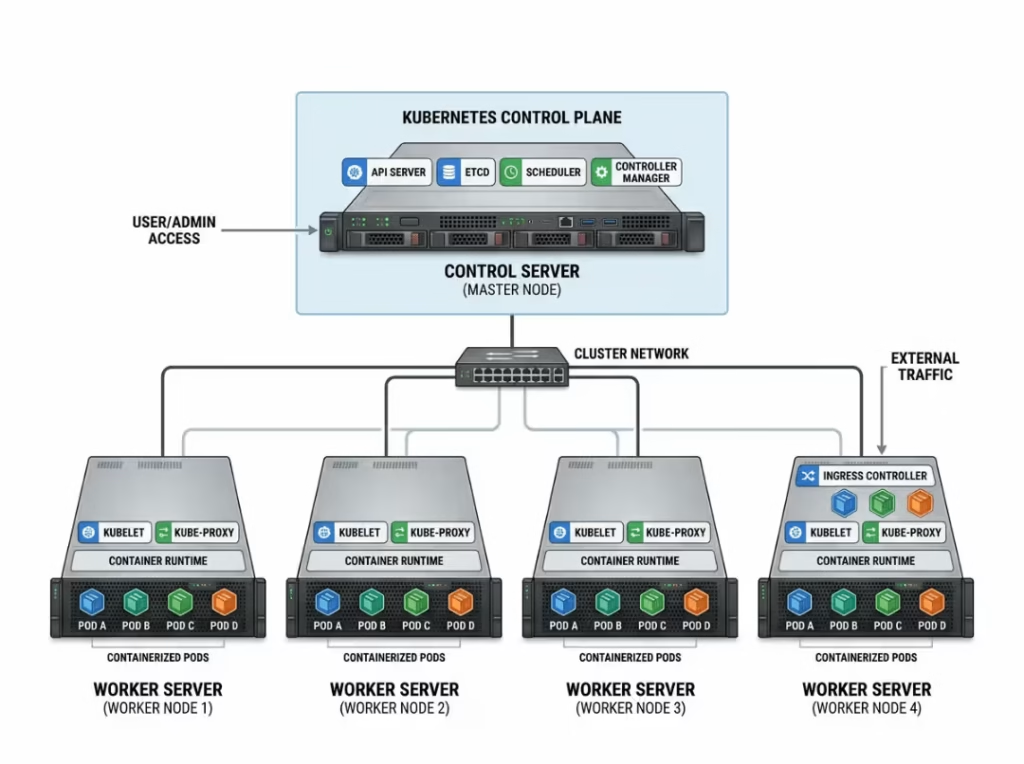
- Kubernetes: The control-plane node manages scheduling — deciding what workloads run where. Worker nodes execute those workloads, hosting the containers and applications that make up a deployment.
- Hadoop: The NameNode manages file system metadata, tracking where data lives across the cluster. DataNodes store the actual data blocks and handle read/write operations.
In both systems, “node” signals distributed responsibility. No single machine holds the entire system together, and that’s the point.
Where You’ll Commonly See “Server Node”
The term shows up most reliably in these contexts:
Kubernetes clusters. Worker nodes and control-plane nodes are standard vocabulary in container orchestration. If you work with Kubernetes at any level, you’ll hear “node” constantly.
Database and storage clusters. Distributed databases like Cassandra and distributed SQL systems use nodes to hold shards or replicas, distributing both storage and query load. Each participating machine is a server node.
Hadoop and large-scale data systems. DataNodes and NameNodes represent distinct server node roles in a Hadoop cluster, each responsible for a defined slice of the system’s overall function.
When you see “node” attached to any of these systems, it’s a reliable signal that you’re dealing with cluster architecture — not a single standalone machine.
Common Types of Server Nodes
By function:
- Compute nodes — handle processing and application execution
- Storage nodes — hold data, often as part of a distributed file system or object store
- Database nodes — manage queries and data access, typically holding shards or replicas
- Edge nodes — sit closer to end users to reduce latency for time-sensitive workloads
By cluster role:
- Control/master nodes — coordinate scheduling and manage cluster state (the Kubernetes control-plane node is the clearest example)
- Worker/data nodes — execute assigned tasks and store data (Kubernetes worker nodes, Hadoop DataNodes)
- Gateway/proxy nodes — route traffic and balance load across the cluster
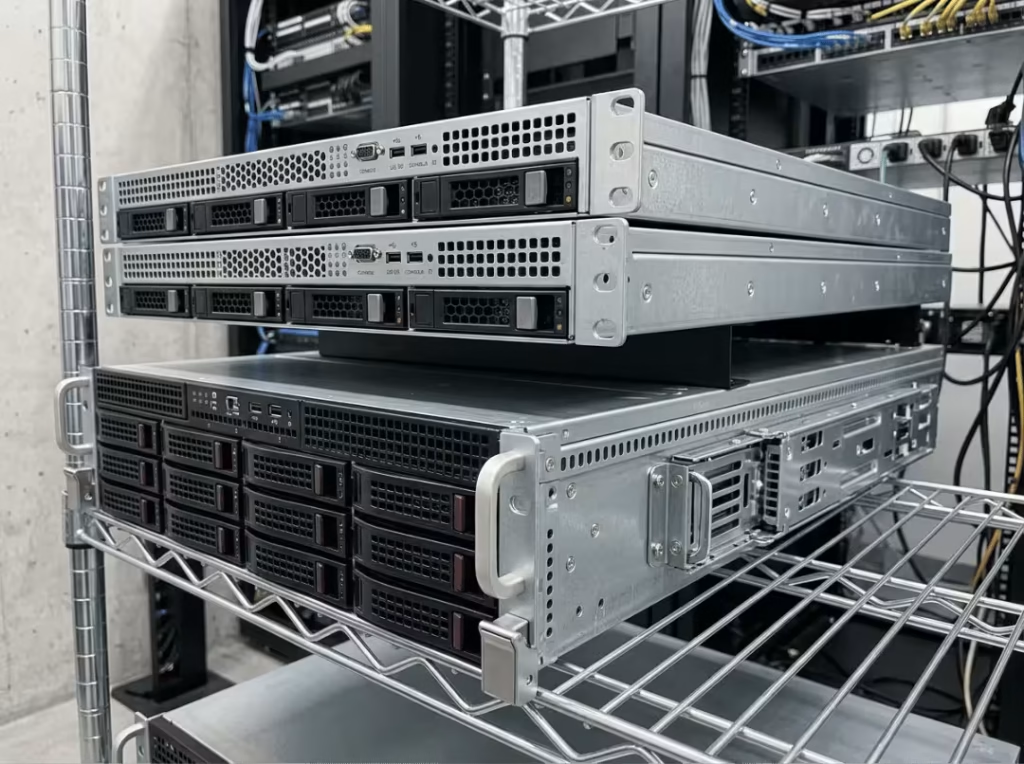
Server nodes can run on bare-metal hardware, virtual machines, or containers. The deployment model matters less than the role the node fills within the cluster. For organizations running bare-metal cluster deployments, the physical chassis housing each node directly affects thermal performance, density, and serviceability — worth considering when speccing hardware for multi-node builds. Browse our server case and rackmount case options if you’re evaluating enclosures for cluster infrastructure.
When to Say “Server Node” Instead of “Server”
Use “server node” when cluster membership or distributed role is the relevant point. If you’re discussing how a Kubernetes deployment schedules workloads, or how a distributed database replicates across machines, “node” is the precise term.
Use “server” when you’re speaking generally about a machine that provides a service — a web server, a file server, a mail server — without reference to cluster architecture.
This tends to follow audience lines. General IT conversation treats “server” as sufficient for most purposes. DevOps, SRE, and cloud infrastructure contexts expect “node” when the distributed role is what’s being discussed. Getting this right signals whether you understand what the system actually is.
In practice, you’ll see the terms blended — “Server Node Administrator” appears in real job postings, even though it stacks a general label on top of a specific one. That’s a documentation habit, not a technical standard.
FAQs
Is a server node the same as a virtual machine?
No. A virtual machine is a hardware abstraction — it can exist inside a cluster or outside one. A server node describes a role within a cluster and can run on a VM, a physical machine, or a container.
Can one physical server host multiple server nodes?
Yes. Through virtualization or containerization, a single physical machine can host multiple server nodes, each participating in the cluster as a distinct member.
What happens when a server node fails?
Health checks detect the failure, the node is pulled from rotation, and the cluster redistributes its workload to remaining nodes. In systems with leader or controller roles, a new leader may be elected if the failed node was coordinating others.
Are server nodes only used in cloud computing?
No. Server nodes are just as common in on-premises data centers and hybrid infrastructure. Clustering is an architectural decision, not a cloud-exclusive concept. Compute nodes in on-premises GPU clusters, for example, are server nodes — and the cases housing them matter for density and cooling. Our GPU server cases are designed for exactly these high-density, multi-node deployments.
Do all clustered servers count as server nodes?
Yes. Any server that’s part of a coordinated cluster — sharing workload, state, or coordination with peer machines — qualifies as a server node.
What is the difference between a node and a pod in Kubernetes?
A node is a machine — physical or virtual — that’s part of the cluster. A pod is a smaller unit that runs inside a node. One node can host many pods simultaneously, each running one or more containers.
Putting It Together
A server node is a server that belongs to a coordinated cluster. The term signals role and context, not a different class of hardware. When you encounter it, the first question to ask is: what system does this machine belong to, and what is its role within that system? That context defines everything else.
For a broader treatment of how “node” and “server” relate across networking and infrastructure contexts, read our full node vs. server comparison.
