


Wall-mounted PCs are redefining the way we think about computer setups, offering a unique blend of functionality, aesthetics, and efficiency. By moving components off the desk and onto the wall, this innovative approach caters to gamers, tech enthusiasts, and professionals who value a clean, organized workspace or a visually striking gaming rig. Beyond their sleek appearance, wall-mounted PCs provide practical benefits like improved airflow, easier maintenance, and space-saving solutions, making them an ideal choice for high-performance systems. As this trend continues to grow, it’s clear that wall-mounted PCs are not just a passing fad but a forward-thinking solution for modern computing needs.
Introduction to Wall-Mounted PCs
What Does It Mean to Wall-Mount a PC?
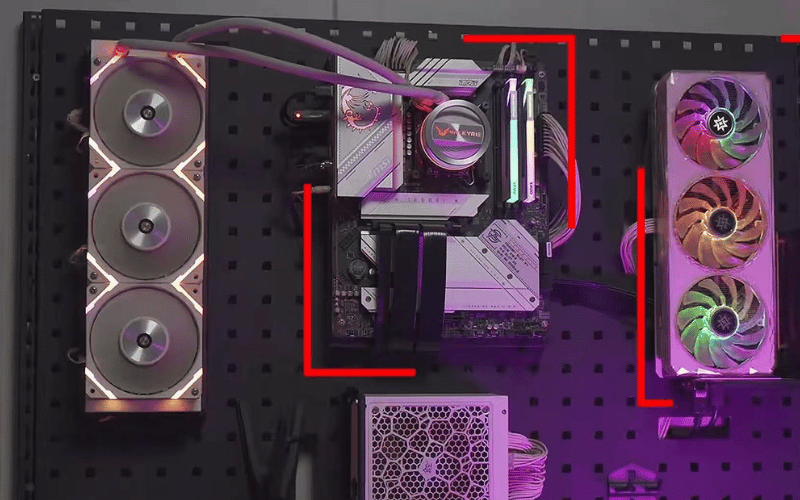
Wall-mounting a PC means attaching its components—like the motherboard, GPU, power supply, and storage drives—directly to a wall or a specially designed mounting bracket. Instead of being enclosed in a traditional case, these components are displayed in an open or semi-open layout. This setup often uses custom frames or VESA-compatible mounts to securely hold the hardware in place. Wall-mounted PCs are not just functional; they also serve as a visual showcase, allowing users to highlight their hardware and create a unique, personalized setup. This approach is particularly appealing to those who enjoy customizing their builds with RGB lighting, custom cables, and other aesthetic enhancements.
Wall-mounting also offers practical benefits. Removing the constraints of a traditional case provides better airflow, which helps keep components cool during intensive tasks like gaming or video editing. Additionally, the open layout makes it easier to access hardware for upgrades, cleaning, or repairs, saving time and effort compared to working within a confined case.

Overview of the Growing Trend and Its Practical Applications
The trend of wall-mounted PCs has gained significant traction among gamers, tech enthusiasts, and even professionals looking for a modern and efficient workspace. This rise in popularity is fueled by the desire for setups that are both functional and visually impressive. Wall-mounted PCs often become the centerpiece of a room, blending technology with interior design. They allow users to express their creativity by arranging components in unique layouts and incorporating custom lighting or decorative elements.
From a practical standpoint, wall-mounted PCs are ideal for those with limited desk space. By moving the PC off the desk and onto the wall, users can free up valuable surface area for monitors, peripherals, or other work essentials. This setup is also highly adaptable, making it suitable for high-performance systems that require enhanced cooling. The open design allows for better heat dissipation, reducing the risk of overheating during demanding tasks. Whether for gaming, content creation, or professional use, wall-mounted PCs offer a blend of style and functionality that appeals to a wide range of users.
Key Benefits of Wall-Mounting Your PC
Space-Saving Advantages
Wall-mounting your PC is an excellent way to reclaim valuable desk space, especially in compact work or gaming areas. By moving your computer off the desk and onto the wall, you create a cleaner, more organized environment that promotes focus and productivity. This setup is particularly beneficial for multi-monitor configurations or workspaces with limited surface area, as it eliminates the bulk of a traditional PC case. Additionally, the freed-up space can be used for other essentials, such as peripherals, notebooks, or decorative items, making your workspace both functional and visually appealing.
Improved Airflow and Cooling
One of the most significant functional advantages of wall-mounting is the improvement in airflow and cooling. Traditional PC cases can restrict ventilation, trapping heat and causing components to run hotter. In contrast, wall-mounted PCs often feature an open or semi-open layout, allowing air to circulate freely around the hardware. This design helps dissipate heat more effectively, reducing the risk of overheating during resource-intensive tasks like gaming, video editing, or 3D rendering. For high-performance systems, this enhanced cooling can lead to better overall performance and longer hardware lifespan. Additionally, the open layout makes it easier to install larger cooling solutions, such as custom water-cooling loops or oversized air coolers, further optimizing thermal management.
Aesthetic Appeal
Wall-mounted PCs are a favorite among tech enthusiasts and gamers for their ability to transform a functional machine into a work of art. By displaying components openly, you can showcase your hardware, such as RGB-lit GPUs, custom cooling systems, and premium motherboards. This setup allows for endless customization, from arranging components in creative layouts to adding LED strips or decorative panels that match your room’s theme. A well-designed wall-mounted PC can serve as the centerpiece of your workspace, blending technology with interior design to create a sleek, modern, and clutter-free aesthetic. Whether you prefer a minimalist look or a bold, colorful display, wall-mounting offers the flexibility to express your personal style.
Ease of Maintenance
Maintaining and upgrading a wall-mounted PC is significantly easier compared to traditional setups. With components spread out and fully visible, you can quickly identify and address issues, such as loose connections or dust buildup. Cable management is also simplified, as you can use cable sleeves, clips, or raceways to keep wires neatly organized and out of sight. This not only improves the overall appearance but also makes it easier to swap out components or add new ones. For example, upgrading your GPU or adding more storage becomes a straightforward process, as you don’t have to navigate the cramped interior of a standard case. Over time, the ease of access and organization can save you hours of effort, making wall-mounted PCs a practical choice for both beginners and experienced builders.
Considerations Before Wall-Mounting Your PC
Compatibility
Before you begin wall-mounting your PC, ensure that your case and components are compatible with this setup. Look for VESA-compatible cases or mounting brackets specifically designed to hold PC hardware securely. These brackets often come with adjustable arms or plates to accommodate different component sizes and layouts. If your current case isn’t designed for wall-mounting, you may need to switch to a compatible case or invest in custom mounting solutions. Additionally, check the weight of your components, as some mounts have specific weight limits. Overloading a mount can lead to instability and potential damage to your hardware.
Wall Strength and Material
The strength and material of the wall you choose are critical factors in ensuring a safe and stable setup. Drywall, for instance, may not be strong enough to support the weight of your PC components without additional reinforcements. In such cases, use heavy-duty anchors or mount your PC directly into wall studs for added stability. Concrete or brick walls are generally more reliable but may require specialized tools, such as masonry drills, for installation. Always double-check the weight capacity of your wall and mounting hardware to avoid accidents or damage. If you’re unsure about the wall’s strength, consult a professional to assess its suitability.
Cable Length and Management
Proper planning for cable lengths and routing is essential for a functional and visually appealing wall-mounted PC. Measure the distance between your PC and its peripherals, such as monitors, keyboards, and power outlets, to ensure your cables are long enough to reach without strain. If your cables fall short, consider using extenders or investing in longer, high-quality cables. For a clean look, use cable management tools like sleeves, clips, or raceways to bundle and route wires neatly along the wall. This not only improves aesthetics but also prevents tangling and makes future adjustments easier.
Accessibility
While wall-mounting your PC can create a sleek and organized setup, it’s important to maintain accessibility for upgrades, repairs, or cleaning. Plan your layout to ensure that all components are easy to reach without having to disassemble the entire setup. Quick-release mounts or modular brackets can make it easier to detach and reattach components when needed. Additionally, leave enough space around your hardware to allow for airflow and hands-on access. A well-thought-out design balances aesthetics with practicality, saving you time and effort in the long run.
How to Wall Mount Your PC: Step-by-Step Guide
Step 1: Choose the Right Wall Mount
Selecting the right wall mount is crucial for a secure and functional setup. Fixed mounts are ideal for a minimalist look, keeping your PC stationary and close to the wall. Articulating mounts, on the other hand, offer adjustable positioning, allowing you to tilt or swivel your PC for better access or aesthetics. For unique setups, custom-built solutions can be tailored to your specific hardware and design preferences. When choosing a mount, consider the weight capacity to ensure it can support your PC components. Check for compatibility with your case, especially if it’s VESA-compatible, and ensure the mount provides enough space for airflow and cable management.
Step 2: Prepare Your Workspace
Before installation, gather all the necessary tools and materials. You’ll typically need a drill, screws, wall anchors, a level, a measuring tape, and a pencil for marking. Clear the area where you’ll be working to avoid accidents and ensure you have enough space to maneuver. Measure and mark the wall to determine the ideal placement for your PC. Consider factors like height, alignment with your monitor, and accessibility for cables and peripherals. Use a level to ensure your markings are straight, as this will help you achieve a professional-looking setup.
Step 3: Install the Wall Mount
Follow the manufacturer’s instructions carefully to attach the mount securely to the wall. If you’re mounting on drywall, locate the wall studs using a stud finder and drill into them for maximum stability. For concrete or brick walls, use masonry anchors and screws. Start by attaching the mount’s base to the wall, ensuring it aligns with your markings. Use a level to confirm that the mount is straight before tightening the screws. Once installed, test the mount by applying light pressure to check for stability. If it wobbles or feels loose, recheck the screws and anchors to ensure they’re properly secured.
Step 4: Mount Your PC
With the wall mount securely in place, it’s time to attach your PC. If your case is VESA-compatible, align it with the mount’s brackets and secure it using the provided screws. For custom setups, ensure each component is firmly attached to the mount or frame. Double-check that all components are properly aligned and that the mount can support the weight without sagging or wobbling. Once mounted, test the setup by gently moving or adjusting the PC to ensure it remains stable. Make any necessary adjustments to improve alignment or stability. Finally, organize and route your cables neatly to complete the setup, ensuring both functionality and visual appeal.
Cable Management for Wall-Mounted PCs
Organizing Cables
A well-organized cable setup is essential for both functionality and aesthetics. Start by grouping cables based on their purpose—power, data, or peripherals. Use cable sleeves to bundle multiple wires together, reducing clutter and creating a streamlined appearance. Sleeves come in various materials, such as neoprene or braided fabric, and can be easily zipped or wrapped around cables. For routing cables along walls or furniture, use adhesive cable clips or raceways. Clips are ideal for holding individual cables in place, while raceways can house multiple wires, keeping them out of sight and protected from damage. Proper organization not only enhances the look of your setup but also prevents tangling and accidental disconnections.
Hiding Wires
To achieve a clean, professional look, consider hiding your cables. Wall-mounted cable raceways are a simple and effective solution for concealing wires while keeping them accessible. These raceways can be painted to match your wall color, blending seamlessly into your room’s design. For a more advanced approach, run cables through the wall. This requires cutting small openings in the drywall and using in-wall cable management kits to route wires between the openings. While this method provides a completely hidden appearance, it’s best suited for those comfortable with DIY projects or willing to hire a professional. Regardless of the method, ensure that hidden cables remain accessible for future adjustments.
Maintaining Accessibility
While it’s important to keep cables organized and hidden, accessibility should not be overlooked. Use Velcro ties instead of zip ties for bundling cables, as they are reusable and allow for easy adjustments. This is especially useful when upgrading hardware or adding new peripherals. Label each cable at both ends to quickly identify its purpose, saving time during troubleshooting or reconfiguration. Additionally, leave some slack in the cables to prevent strain on connectors and make it easier to reposition components if needed. By balancing organization, concealment, and accessibility, you can create a setup that is both visually appealing and practical for long-term use.
Enhancing Your Wall-Mounted PC Setup
Pairing with a Wall-Mounted Monitor
To create a cohesive and ergonomic workspace, pair your wall-mounted PC with a wall-mounted monitor. Start by selecting a monitor arm or bracket that supports your screen size and weight. Adjustable monitor arms are particularly useful, as they allow you to tilt, swivel, or extend the screen to achieve the perfect viewing angle. Position the monitor at eye level to reduce neck and eye strain, ensuring a comfortable setup for long hours of work or gaming. For multi-monitor setups, use dual or triple monitor arms to align the screens seamlessly, creating an immersive and efficient workspace. Additionally, consider cable management solutions for the monitor to maintain a clean and organized look.
Lighting and Aesthetics
Lighting plays a significant role in enhancing the visual appeal of your wall-mounted PC setup. Incorporate RGB lighting to highlight your PC components, such as the GPU, motherboard, or cooling system. LED strips can be placed along the edges of your PC frame or behind the monitor to create a glowing effect. Many RGB lighting systems are customizable, allowing you to sync colors and effects with your PC’s performance or your room’s theme. For a more immersive environment, add ambient lighting behind the monitor or along the wall. Smart lighting systems, such as Philips Hue, can dynamically adjust colors based on the content on your screen, enhancing your gaming or viewing experience. Decorative elements, like custom panels or themed backdrops, can further personalize your setup, making it a true reflection of your style.
Optimizing for Productivity
A well-organized workspace is key to maximizing productivity with a wall-mounted PC setup. Start by arranging your peripherals—such as keyboards, mice, and headphones—strategically for easy access. Use wall-mounted shelves or desk organizers to keep these items within reach while maintaining a clutter-free surface. Consider adding a charging station for devices like smartphones or tablets to streamline your workflow. If you use multiple peripherals, a USB hub mounted on the wall or desk can simplify connectivity and reduce cable clutter. Ergonomics should also be a priority; ensure your chair, desk, and monitor height are properly aligned to promote comfort and reduce strain. By combining thoughtful organization with ergonomic design, you can create a workspace that is both efficient and visually appealing.
Common Challenges and How to Overcome Them
Weight and Stability Concerns
Ensuring your wall and mount can support the weight of your PC is one of the most critical challenges. Start by assessing the type of wall you’re working with. Concrete and brick walls are ideal for heavy loads, while drywall may require additional reinforcements. If you’re mounting on drywall, locate the studs using a stud finder and secure the mount directly into them for maximum stability. For walls without accessible studs, use heavy-duty toggle bolts or anchors designed for high weight capacities.
When selecting a mount, check its weight rating to ensure it can handle the combined weight of your PC components. Opt for mounts made from durable materials like steel or aluminum for added reliability. During installation, use high-quality screws and double-check that all fasteners are tightened securely. After mounting, test the setup by applying light pressure to ensure it’s stable and doesn’t wobble. Regularly inspect the mount and wall for signs of wear or loosening over time to prevent accidents.
Cable Length Issues
Short cables can limit the flexibility of your wall-mounted PC setup, especially if your components are spread out or located far from power outlets and peripherals. To address this, measure the distance between your PC and all connected devices before installation. Invest in longer cables for power, monitors, and peripherals to ensure they can reach without strain. High-quality cable extenders are another option, particularly for HDMI, DisplayPort, or USB connections.
For a more streamlined solution, consider switching to wireless peripherals like keyboards, mice, and headphones. These devices eliminate the need for long cables and reduce clutter, making your setup cleaner and more functional. Additionally, plan your cable routing carefully to avoid tangling or unnecessary slack. Use cable management tools like raceways, clips, or Velcro ties to keep cables organized and out of sight.
Accessing Hardware
Wall-mounted PCs can make upgrades and maintenance more challenging due to their fixed position. To simplify access, choose a mount with quick-release features or modular brackets that allow you to detach the PC easily. These mounts often include sliding or hinge mechanisms, enabling you to remove the PC without disassembling the entire setup.
When planning your layout, leave enough space around the components for hands-on work. For example, ensure there’s room to remove the GPU or access the motherboard without obstruction. Keep essential tools like screwdrivers, cable ties, and cleaning supplies nearby for quick adjustments or maintenance. Labeling cables and connectors can also save time when troubleshooting or upgrading. By designing your setup with accessibility in mind, you can balance aesthetics with practicality, making it easier to maintain your wall-mounted PC over time.
Is Wall-Mounting Your PC Right for You?
Who Benefits Most from a Wall-Mounted PC Setup?
Wall-mounting your PC is an excellent choice for individuals who prioritize a clean, organized workspace and want to integrate their computer into their room’s overall design. Gamers and tech enthusiasts often find this setup appealing because it allows them to showcase their hardware, such as RGB-lit components, custom cooling systems, and high-end GPUs, turning their PC into a visual centerpiece.
This setup is particularly beneficial for those with limited desk space. By moving the PC off the desk and onto the wall, you free up valuable surface area for monitors, peripherals, or other work essentials. Wall-mounted PCs are also ideal for high-performance systems that generate significant heat, as the open layout improves airflow and cooling efficiency. Additionally, creative professionals, such as video editors or 3D designers, may appreciate the enhanced cooling and accessibility for frequent hardware upgrades.
Scenarios Where Wall-Mounting May Not Be Ideal
While wall-mounting offers many advantages, it’s not suitable for everyone. If you frequently move your setup—such as relocating between rooms or homes—wall-mounting can be impractical due to the fixed nature of the installation. The process of uninstalling and reinstalling the PC and mount can be time-consuming and may damage walls over time.
Renters may face additional challenges, as many landlords prohibit drilling into walls. Even if allowed, repairing holes and repainting walls when moving out can be inconvenient. For those with limited technical skills, the installation process—requiring tools, precise measurements, and secure mounting—might feel overwhelming.
Additionally, if you prefer a more traditional or portable PC case, wall-mounting may not align with your needs. Portable cases are designed for mobility, making them incompatible with fixed wall-mounted setups. Similarly, individuals who prioritize simplicity or minimal hardware exposure may find the open design of wall-mounted PCs less appealing. Before committing to wall-mounting, carefully evaluate your space, technical skills, and long-term needs to determine if this setup is the right fit for you.
Conclusion: The Future of Wall-Mounted PCs
How Wall-Mounted PCs Are Shaping Modern Workspaces and Gaming Setups
Wall-mounted computers are now establishing themselves as a defining element of productive and recreational environments, merging practical performance with refined aesthetic appeal. Within corporate and academic offices, these installations deliver an uncluttered, efficient workstation, enabling users to declutter their immediate area while inviting technology to harmonise with wider architectural design. The simplicity of wiring concealed along vertical surfaces and peripherals suspended a fingertip away adheres to the heightened preference for minimalist workspace technology. Concurrently, gaming installations leverage the same chassis to pivot performance hardware into a visible art form. With vastly coloured lighting and transparent housing on display, the wall-mounted gaming rig evolves into a statement of identity as much as it is a platform of play.
The form also complements systemic regard for sustainable design. Increased volume around the unit invites uninterrupted airflow, sharply lowering thermal build-up and thereby extending the practical life of GPUs, motherboards, and cooling solutions alike. User-service variations of the chassis enable iterative hardware enhancements, a formidable answer to standard-rate obsolescence. Furthermore, as companies pivot to hybrid work policies and as gaming culture becomes calculatedly omnipresent, the wall-mounted PC illustrates a masterclass of symbiotic endurance, embodying the craft of combining immediate utility with the foresight of progress.
Inspiring Users to Adopt Wall-Mounted Systems for a Neater, More Responsive Environment
The spreading popularity of wall-mounted PCs signals a deliberate move toward compact, individualized setups that optimise both aesthetics and utility. Whether the audience comprises gamers, professionals, or tech enthusiasts, such a configuration outperforms the conventional tower by freeing floors and desktops for creativity. Customisable mounting, coordinated RGB accents, and the spotlighting of high-end components empower users to curate environments that are both high-performance and visually arresting.
Choosing this design ethos reimagines any room as a design-forward, motivating workplace. From compact home offices and high-speed gaming stations to deliberate decluttering initiatives, wall-mounted systems fuse practicality with style. As mounting tech, connectivity, and accessory kits mature, this approach will shift from niche to norm, granting users a balanced fusion of cutting-edge capability, streamlined space, and deeply personalised vision.
