


Ever wondered if your server rack can handle the weight of your growing IT setup? As your data center expands, the weight of servers, switches, and other equipment adds up quickly, making it crucial to understand your server rack’s load capacity. Overloading a rack doesn’t just risk equipment damage—it can also compromise safety and efficiency. That’s why knowing the difference between static and dynamic load ratings is essential for making informed decisions.
Server rack load capacity isn’t just a technical specification; it’s a cornerstone of proper infrastructure planning. Static load capacity refers to the weight a rack can support when stationary, while dynamic load capacity accounts for movement, such as rolling the rack during installation or maintenance. Misjudging these ratings can lead to costly mistakes, from damaged hardware to operational delays.
This guide simplifies the complexities of server rack load capacities, breaking down the differences between static and dynamic ratings. You’ll also learn how to choose the right rack for your specific needs, ensuring your IT setup remains secure, scalable, and efficient. Let’s dive into the details and help you make the best choice for your data center.
Understanding Server Rack Load Capacity
Server rack load capacity is more than just a number on a spec sheet—it’s the foundation of a safe, efficient, and scalable IT environment. Misjudging load capacity can lead to equipment damage, operational downtime, or even safety risks. To make informed decisions, you need to understand the key terminology and the critical role that load capacity plays in your data center.
Key Terminology
When evaluating server rack load capacity, two terms stand out: static load and dynamic load. Each serves a distinct purpose and applies to different scenarios in your data center.
-
Static Load: This refers to the maximum weight a rack can support when it remains stationary. For example, if your rack is fully loaded with GPU server chassis, switches, and storage devices, the static load rating ensures the rack can handle the combined weight without buckling. Always account for the total weight of your equipment, including mounting hardware, to ensure you do not exceed this limit.
-
Dynamic Load: This measures the maximum weight a rack can support while in motion. Whether you’re rolling a rack into position during installation or moving it for maintenance, the dynamic load rating ensures the rack remains stable and secure. For instance, if you need to relocate a fully loaded rack, a dynamic load rating that matches or exceeds the total weight is essential to prevent tipping or structural failure.
Understanding these terms helps you choose a rack that aligns with your operational needs, but why does load capacity matter so much? Let’s explore its importance.
Why It Matters
Server rack load capacity isn’t just about numbers—it’s about ensuring the safety, reliability, and longevity of your IT infrastructure. Here’s why it matters:
-
Ensures Structural Integrity: A rack that exceeds its load capacity risks structural failure, which can lead to equipment damage or even collapse. For example, a GPU server chassis loaded with high-performance components can weigh significantly more than standard servers. Choosing a rack with the appropriate load rating ensures that it can handle the weight without compromising its structural integrity.
-
Protects Equipment: Overloading a rack can strain its frame and mounting points, potentially causing misalignment or damage to your equipment. This is especially critical for sensitive hardware, such as GPU servers, where even minor shifts can disrupt airflow or connections. An appropriately rated rack keeps your equipment secure and stable.
-
Prevents Safety Hazards: An overloaded or improperly rated rack poses serious safety risks, including tipping or collapsing during movement. For instance, if you need to roll a fully loaded rack across a data center floor, a dynamic load rating that matches the weight ensures it remains stable and safe to handle.
By understanding the static and dynamic load capacities and their importance, you can make more informed decisions when selecting server racks. This knowledge not only protects your equipment but also creates a safer and more efficient data center environment.
Static Load Capacity
Static load capacity is the backbone of a server rack’s structural integrity. It defines the maximum weight a rack can support when stationary, ensuring your equipment remains secure and your infrastructure stable. Understanding this capacity is crucial for selecting a rack that can accommodate your current setup while allowing for future expansion.
Definition
Static load capacity refers to the total weight a server rack can support when it is stationary. This includes the combined weight of all installed equipment, such as GPU server chassis, switches, storage devices, and any additional accessories like cable management arms or power distribution units (PDUs). A rack’s static load rating ensures it can bear this weight without bending, warping, or compromising its structure.
Transitioning from the definition, let’s explore the factors that influence a rack’s static load capacity and how to evaluate them effectively.
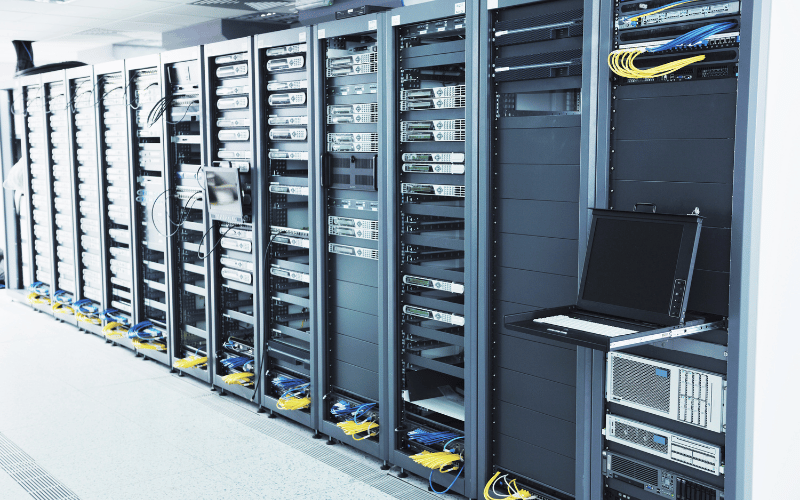
Factors Influencing Static Load
Several factors determine a rack’s static load capacity, and understanding these can help you choose a rack that meets your specific needs:
-
Rack Materials: The material used in the rack’s construction plays a significant role in its load capacity. Steel racks, for example, offer higher static load ratings due to their strength and durability, making them ideal for heavy, densely packed setups. Aluminum racks, while lighter and easier to move, typically have lower load capacities and are better suited for less demanding environments.
-
Construction: The design and build quality of the rack also impact its load capacity. Welded frames provide greater strength and stability compared to bolted or modular designs. For high-density GPU server deployments, opt for racks with reinforced frames and heavy-duty mounting rails to ensure they can handle the weight.
-
Mounting Feet: The type of mounting feet—whether fixed, adjustable, or equipped with leveling pads—affects how the rack distributes weight. Fixed feet provide the most stability for stationary racks, while adjustable feet allow for minor leveling adjustments on uneven floors.
With these factors in mind, calculating the static load capacity for your specific setup becomes a straightforward process.
How to Calculate
To determine the static load requirements for your rack, follow these steps:
-
Sum the Weight of All Equipment: Add up the weight of every device you plan to install, including GPU server chassis, switches, storage units, and accessories. For example, a single high-performance GPU server chassis can weigh between 50 and 80 pounds, so a rack housing multiple units will require a significant load capacity.
-
Include Accessories: Don’t forget to account for the weight of non-computing components, such as cable management systems, PDUs, and blanking panels. These may seem minor, but can add up quickly in a fully equipped rack.
-
Add a Safety Margin: Always include a safety margin—typically 20-30%—to accommodate future growth or unexpected additions. For instance, if your current equipment weighs 1,000 pounds, select a rack with a static load capacity of at least 1,200 to 1,300 pounds.
Now that you know how to calculate static load capacity, let’s look at real-world scenarios where this knowledge becomes critical.
Examples
Static load capacity is vital in data centers with heavy, densely packed racks. For example, a rack housing multiple GPU server chassis for AI workloads can easily exceed 1,000 pounds. In such cases, a steel rack with a static load rating of 2,000 pounds or more ensures the equipment remains secure and the rack maintains its structural integrity.
Another scenario involves racks used for high-density storage arrays. These setups often include dozens of hard drives, each adding to the overall weight. Choosing a rack with a sufficient static load capacity prevents sagging rails and ensures long-term reliability.
By understanding static load capacity, the factors that influence it, and how to calculate it, you can confidently select a rack that supports your equipment and provides room for growth. This proactive approach safeguards your infrastructure and ensures your data center operates efficiently.
Dynamic Load Capacity
Dynamic load capacity is a crucial consideration for any data center where racks must be relocated, whether during installation, maintenance, or reconfiguration. Unlike static load capacity, dynamic load accounts for the additional stresses that occur with motion, ensuring your rack and equipment remain safe and stable during transit.
Definition
Dynamic load capacity refers to the maximum weight a server rack can support while in motion. This includes scenarios like rolling a fully loaded rack on casters across a data center floor or repositioning it during installation. For example, suppose you’re pre-configuring a rack with GPU server chassis and other equipment before moving it to its final location. In that case, the dynamic load rating ensures the rack can handle the weight without tipping, bending, or causing damage to the equipment.
Understanding why dynamic load capacity is typically lower than static load capacity is key to making informed decisions about rack selection and usage.

Why It’s Lower
Dynamic load capacity is lower than static load capacity because movement introduces additional forces that can strain the rack’s structure. When a rack is in motion, it experiences:
-
Stress and Vibration: Rolling a rack, especially over uneven surfaces, generates vibrations that can loosen screws, weaken joints, or misalign equipment. For instance, a rack loaded with GPU server chassis, which are sensitive to vibration, requires a dynamic load rating that accounts for these stresses.
-
Kinetic Energy: The weight of the equipment combined with the motion of the rack creates kinetic energy, which can amplify the impact of sudden stops, starts, or changes in direction. This is why racks with higher dynamic load ratings often feature reinforced frames and heavy-duty casters to absorb and distribute these forces.
By understanding these factors, you can better plan for situations where dynamic load capacity is applicable.
When It’s Applied
Dynamic load capacity is most relevant in scenarios where racks need to be moved while fully or partially loaded. Common situations include:
-
Pre-Configuring Racks: Many data centers pre-configure racks with servers, switches, and cabling before moving them to their final location. For example, a rack loaded with multiple GPU server chassis for a high-performance computing cluster might weigh over 1,000 pounds. Ensuring the rack’s dynamic load capacity matches or exceeds this weight prevents accidents during transport.
-
Relocating Racks: Whether you’re reorganizing your data center layout or moving equipment to a new facility, dynamic load capacity ensures the rack can handle the journey. This is especially important for racks with sensitive equipment, where even minor instability can cause damage.
To safely move racks within these scenarios, follow a few essential safety tips.
Safety Tips
Moving a fully loaded rack requires careful planning and attention to detail. Here are some practical tips to ensure safety and protect your equipment:
-
Secure Equipment: Before moving the rack, double-check that all equipment is securely mounted. Use screws, brackets, or rails to prevent devices like GPU server chassis from shifting during transit. Loose equipment can not only damage itself but also destabilize the entire rack.
-
Check Casters: Inspect the rack’s casters to ensure they are rated for the weight and in good condition. Heavy-duty casters with locking mechanisms provide better stability and control during movement. Avoid using racks with worn or damaged casters, as they can compromise safety.
-
Avoid Uneven Floors: Plan your route to avoid uneven surfaces, ramps, or obstacles that could destabilize the rack. If you must navigate over thresholds or slight inclines, move slowly and use additional personnel to guide and stabilize the rack.
By understanding dynamic load capacity, why it’s lower than static load, and when it applies, you can ensure safe and efficient rack movement in your data center. Following these safety tips further minimizes risks, protecting both your equipment and your team during transit.
Key Differences and Practical Applications
Understanding the differences between static and dynamic load capacities is essential for selecting the right server rack and ensuring your data center operates safely and efficiently. Each type of load capacity serves a distinct purpose, and knowing how to apply them in real-world scenarios can save you from costly mistakes. Let’s break down the key differences and explore practical tips for choosing and configuring your rack.
Static vs. Dynamic
The most significant difference between static and dynamic load capacities lies in their weight limits and use cases:
-
Static Load Capacity: This measures the maximum weight a rack can support when stationary. It’s ideal for racks that will remain in one location, fully loaded with equipment like GPU server chassis, switches, and storage arrays. For example, a rack with a static load capacity of 2,000 pounds can safely hold multiple high-performance GPU servers without risk of structural failure.
-
Dynamic Load Capacity: This measures the maximum weight a rack can support while in motion. It’s typically lower than the static load capacity because movement introduces additional stresses, such as vibration and kinetic energy. For instance, a rack with a static load capacity of 2,000 pounds might have a dynamic load capacity of 1,500 pounds, ensuring safe transport during installation or relocation.
By understanding these differences, you can determine which load capacity is most relevant to your specific needs. But how do you choose the right rack for your setup? Let’s dive into that next.
Choosing the Right Rack
Selecting the right server rack requires careful consideration of your current and future needs. Here’s how to make an informed choice:
-
Match Specifications to Your Heaviest Configuration: Calculate the total weight of your equipment, including GPU server chassis, switches, storage devices, and accessories. For example, if your current setup weighs 1,200 pounds, choose a rack with a static load capacity of at least 1,500 pounds to allow for a safety margin.
-
Plan for Future Growth: Anticipate the need for additional equipment or upgrades. If you plan to add more GPU servers or expand your storage, select a rack with a higher load capacity to accommodate these changes without needing a replacement.
-
Consider Mobility Needs: If you’ll need to move the rack, ensure the dynamic load capacity matches the weight of your fully loaded configuration. For example, a rack with a dynamic load capacity of 1,500 pounds is suitable for relocating a setup weighing 1,200 pounds.
Once you’ve chosen the right rack, proper weight distribution becomes critical for stability and safety.
Weight Distribution
How you distribute weight within the rack can significantly impact its stability and performance. Follow these guidelines to ensure a safe and efficient setup:
-
Place Heavier Equipment at the Bottom: Always install the heaviest devices, such as GPU server chassis or storage arrays, at the bottom of the rack. This lowers the center of gravity, reducing the risk of tipping and improving overall stability.
-
Avoid Uneven Front-to-Back Loading: Distribute weight evenly from front to back to prevent the rack from leaning or straining its frame. For example, if you install a heavy GPU server at the front, balance it with another device or accessory toward the back.
-
Avoid Uneven Side-to-Side Loading: Similarly, ensure weight is balanced across both sides of the rack. Uneven side-to-side loading can cause the rack to tilt or put undue stress on the casters and frame.
By understanding the differences between static and dynamic load capacities, selecting the appropriate rack, and adhering to best practices for weight distribution, you can establish a stable, scalable, and efficient data center setup. These practical steps ensure your equipment remains secure and your operations run smoothly.
Beyond Weight: Other Load Considerations
While static and dynamic load capacities are critical, they’re only part of the equation when selecting and managing server racks. Factors like cooling, power density, seismic stability, and long-term maintenance also play a significant role in ensuring your racks perform reliably under real-world conditions. Let’s explore these often-overlooked considerations and how they impact your data center.
Cooling and Power Density
Balancing thermal load with physical weight load is essential for maintaining optimal performance in high-density environments. GPU server chassis, known for their computational power, also generate significant heat. Overlooking cooling requirements can lead to thermal hotspots, reduced efficiency, and even hardware failure.
To address this, consider the following:
-
Rack Design: Choose racks with perforated doors and side panels to promote airflow. For example, a rack housing multiple GPU servers should have at least 80% perforation on the front and rear doors to allow sufficient air circulation.
-
Cooling Strategies: Implement hot aisle/cold aisle containment to direct airflow efficiently. Position racks so that the front faces the cold aisle, ensuring cool air reaches the intake vents of your equipment. For high-power-density setups, consider liquid cooling solutions to handle the additional thermal load.
-
Power Density: Ensure your rack’s power distribution units (PDUs) can handle the power draw of your equipment. For instance, a rack with multiple GPU server chassis may require PDUs rated for 30 amps or higher to support the increased power demands.
Balancing cooling and power density ensures your equipment operates within safe temperature ranges, protecting both performance and longevity. But what about external factors like seismic activity? Let’s dive into that next.
Seismic Ratings
In earthquake-prone areas, seismic stability is a critical consideration for server racks. A rack that isn’t properly anchored can tip over or collapse during seismic activity, causing extensive damage to equipment and posing safety risks.
Here’s how to ensure your racks are seismically secure:
-
Seismic-Rated Racks: Select racks specifically designed to meet seismic standards, such as those compliant with NEBS (Network Equipment-Building System) requirements. These racks feature reinforced frames and additional bracing to withstand lateral forces.
-
Anchoring: Secure racks to the floor using seismic anchoring kits. For example, bolt the rack’s base to a concrete floor with heavy-duty anchors to prevent movement during an earthquake.
-
Weight Distribution: As with general stability, place heavier equipment at the bottom of the rack to lower the center of gravity. This reduces the risk of tipping during seismic events.
By addressing seismic considerations, you can protect your equipment and ensure business continuity, even in challenging environments. Now, let’s turn to the importance of ongoing maintenance.
Maintenance Stress
Even the best-designed racks require regular inspections to maintain their integrity over time. Neglecting maintenance can lead to issues like loose hardware, misaligned equipment, or wear and tear on structural components.
To minimize maintenance stress, follow these best practices:
-
Inspect Regularly: Schedule routine inspections to check for signs of wear, such as loose screws, bent rails, or damaged casters. For example, inspect racks quarterly in high-traffic data centers or annually in less active environments.
-
Tighten and Align: Ensure all mounting hardware is secure and equipment is properly aligned. Misaligned GPU server chassis can disrupt airflow and strain mounting rails, reducing efficiency and stability.
-
Monitor Load Capacity: Reassess your rack’s load capacity periodically, especially after adding or removing equipment. Ensure the total weight remains within the rack’s static and dynamic load limits.
By incorporating these maintenance practices, you can extend the lifespan of your racks and ensure they continue to support your equipment reliably.
Considering factors beyond weight—like cooling, seismic stability, and maintenance—helps you create a data center that’s not only efficient but also resilient. These additional load considerations ensure your racks perform optimally under any conditions, safeguarding your infrastructure and operations.
FAQs About Server Rack Load Capacity
Q: What happens if I exceed the static load capacity of my server rack?
A: Exceeding the static load capacity can compromise the rack’s structural integrity, leading to bending, warping, or even collapse. This puts your equipment at risk of damage and creates safety hazards for personnel. Always calculate the total weight of your equipment and ensure it stays within the rack’s specified limits to avoid these issues.
Q: Should I use aluminum or steel racks for heavy equipment?
A: Use steel racks for heavy equipment, such as GPU server chassis or dense storage arrays. Steel offers higher load capacities and greater durability, making it ideal for high-density setups. Aluminum racks are lighter and easier to move but typically have lower load ratings, making them better suited for lighter configurations.
Q: Is the load capacity the same for open-frame racks and enclosed cabinets?
A: No, the load capacity often differs between open-frame racks and enclosed cabinets. Enclosed cabinets usually have higher load capacities due to their reinforced frames and additional structural support. Open-frame racks, although easier to access and lighter, may not be able to handle the same weight as enclosed options. Always check the manufacturer’s specifications for load ratings.
Q: Do rack accessories count toward the total load limit?
A: Yes, rack accessories like cable management arms, power distribution units (PDUs), and shelves count toward the total load limit. While these items may seem minor, their combined weight can add up, especially in fully equipped racks. Include all accessories in your weight calculations to ensure you don’t exceed the rack’s capacity.
Q: Can I increase the static load capacity of an existing rack?
A: You cannot increase the static load capacity of an existing rack beyond its manufacturer-specified limit. However, you can optimize weight distribution and ensure proper anchoring to improve stability. If your current rack cannot handle the weight of your equipment, consider upgrading to a rack with a higher load capacity to meet your needs safely.
Conclusion
Understanding static and dynamic load capacities is crucial in selecting the proper server racks and maintaining a stable IT environment. Select racks that not only meet your current equipment requirements but also provide sufficient space for future expansion. Proper load management ensures safety, performance, and scalability, forming the foundation of a reliable and efficient IT infrastructure.
