


Maintaining a stable environment in server rooms is critical for ensuring the performance and longevity of IT infrastructure. Environmental monitoring, which involves tracking factors like temperature, humidity, and airflow, plays a vital role in preventing equipment failure and minimizing downtime. By implementing effective monitoring systems, businesses can safeguard their servers, optimize energy usage, and reduce operational risks. This article explores the importance of environmental monitoring, key components of monitoring systems, and best practices for managing server room conditions.
Introduction to Server Room Environmental Monitoring
Server room environmental monitoring involves tracking and managing critical factors such as temperature, humidity, airflow, and power supply. These elements play a vital role in ensuring the optimal performance of servers and preventing equipment failure. By maintaining a stable environment, businesses can protect their IT infrastructure, reduce the risk of downtime, and extend the lifespan of their hardware.
Importance of Environmental Monitoring
Environmental monitoring is crucial for protecting server equipment and maintaining uninterrupted operations. Fluctuations in temperature or humidity can lead to hardware malfunctions, data loss, or even complete system failure. A reliable monitoring system provides real-time alerts, enabling IT teams to address potential issues before they escalate. This proactive approach minimizes risks, reduces maintenance costs, and ensures that servers operate efficiently under all conditions.
Key Components of a Monitoring System
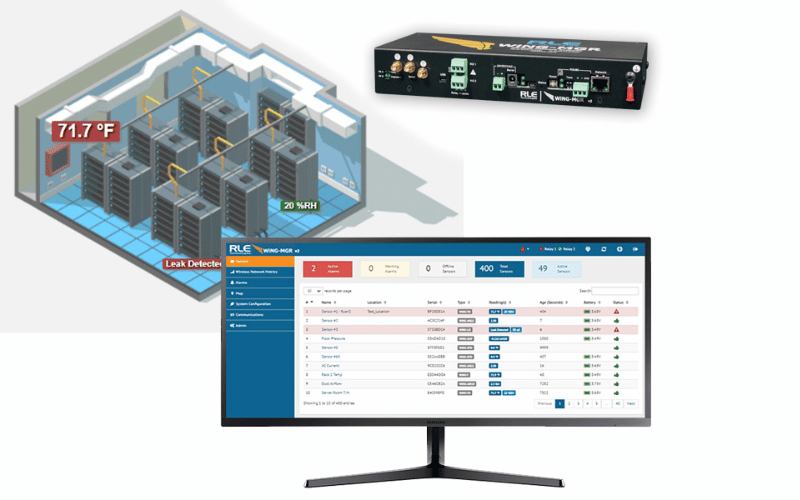
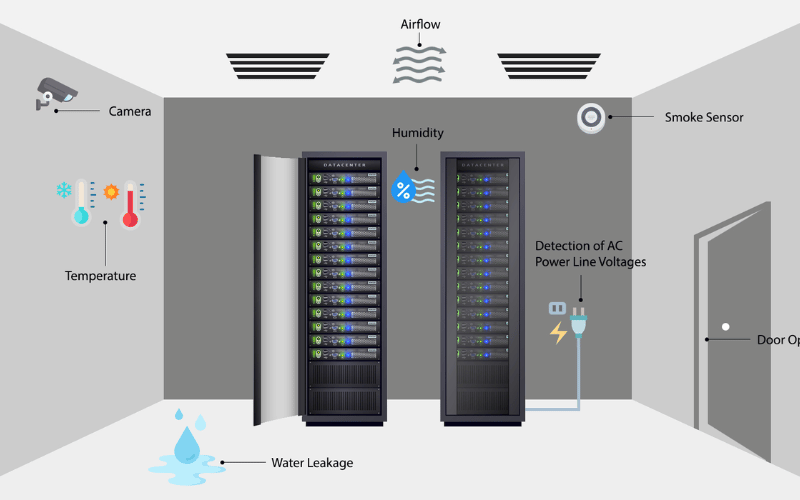
A comprehensive server room monitoring system includes several critical components:
- Temperature Sensors: These devices track heat levels to prevent overheating, which can damage hardware.
- Humidity Sensors: By detecting moisture levels, these sensors help avoid condensation and static electricity, both of which can harm sensitive equipment.
- Airflow Monitors: Proper ventilation is crucial for cooling servers, and airflow monitors ensure that air circulates effectively.
- Power Supply Monitors: These tools track voltage and power stability, helping to prevent outages or surges that could disrupt operations.
- Alert Systems: Integrated alert mechanisms notify IT staff of anomalies through email, SMS, or alarms, allowing for quick responses to potential threats.
Together, these components provide a complete picture of the server room’s environment, ensuring that any issues are identified and resolved promptly.
Overview of Server Room Temperature Management
Temperature management is a cornerstone of server room maintenance. Servers generate significant heat during operation, and without proper cooling, they can overheat and fail. Effective temperature management strategies include:
- Installing Cooling Systems: Air conditioning or liquid cooling systems help maintain optimal temperatures.
- Monitoring Hot Spots: Identifying areas with higher heat levels allows for targeted cooling solutions, ensuring even temperature distribution.
- Regular Maintenance: Cleaning vents and replacing filters ensures efficient airflow and prevents blockages that could lead to overheating.
Maintaining temperatures within the recommended range of 68–77°F (20–25°C) ensures that servers operate reliably and efficiently, reducing the risk of hardware failure and downtime.
Understanding Temperature and Humidity in Data Centers
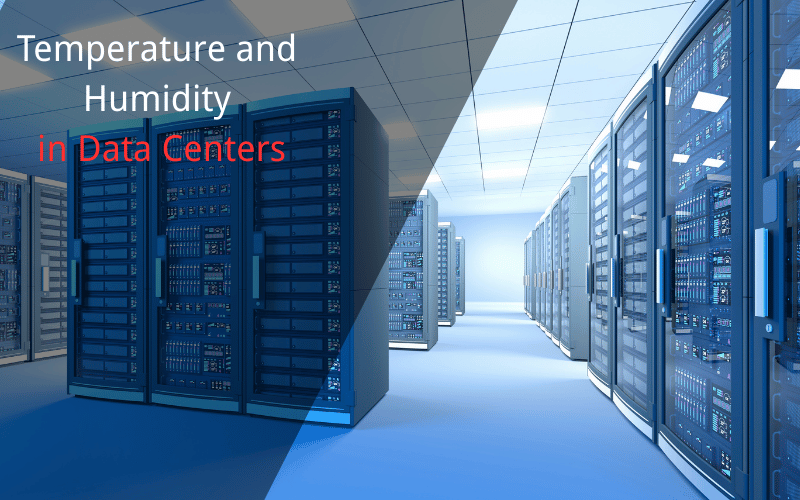
Temperature and humidity are two critical factors that directly affect the performance and longevity of data center equipment. Maintaining the right balance ensures that servers operate efficiently and reduces the risk of hardware failure. Proper environmental control not only protects sensitive equipment but also optimizes energy usage, resulting in long-term cost savings.
Impact of Temperature on Server Performance
Servers generate significant heat during operation, and excessive temperatures can lead to overheating, reduced performance, or even permanent hardware damage. High temperatures force cooling systems to work harder, increasing energy consumption and operational costs. On the other hand, temperatures that are too low can cause condensation, which may damage internal components.
To maintain optimal server performance, data centers typically aim for a temperature range of 68–77°F (20–25°C). This range ensures that servers run efficiently without overburdening cooling systems. Regular monitoring of hot spots—areas where heat accumulates more than others—helps identify and address potential issues before they escalate.
Role of Humidity in Data Center Operations
Humidity plays a crucial role in maintaining a stable environment for servers. Low humidity levels can lead to static electricity, which poses a risk to sensitive electronic components. Conversely, high humidity can cause condensation, leading to corrosion or short circuits in server hardware.
The ideal relative humidity range for data centers is typically between 40% and 60%. This range minimizes the risks associated with both static electricity and condensation. Humidity control systems, such as dehumidifiers and humidifiers, help maintain this balance, ensuring a safe and stable environment for IT equipment.
Temperature and Humidity Monitoring Techniques
Effective monitoring techniques are essential for maintaining the right temperature and humidity levels in data centers. These techniques include:
- Environmental Sensors: Install temperature and humidity sensors throughout the data center to track conditions in real time. Place sensors near server racks, cooling units, and potential hot spots for comprehensive coverage.
- Automated Alerts: Use monitoring systems that send alerts via email or SMS when conditions exceed predefined thresholds. This allows IT teams to respond quickly to potential issues.
- Thermal Imaging: Conduct regular thermal scans to identify hot spots and ensure even cooling distribution.
- Integrated Monitoring Systems: Implement centralized systems that combine temperature, humidity, and airflow monitoring for a holistic view of the data center environment.
By employing these techniques, data centers can maintain optimal conditions, protect their equipment, and ensure uninterrupted operations.
Types of Sensors for Environmental Monitoring
Environmental monitoring relies on various sensors to track critical conditions like temperature, humidity, and airflow. These sensors provide real-time data, enabling IT teams to maintain optimal conditions and prevent equipment failure. Choosing the right sensors ensures accurate monitoring and effective management of the server room environment.
Temperature Sensors: How They Work
Temperature sensors measure heat levels in the server room to prevent overheating, which can damage hardware and disrupt operations. These sensors use technologies like thermocouples, resistance temperature detectors (RTDs), or semiconductor-based sensors to detect temperature changes.
Modern temperature sensors often come with digital displays and connectivity features, allowing them to integrate with centralized monitoring systems. Placing sensors near server racks, cooling units, and potential hot spots ensures comprehensive coverage and helps maintain a stable temperature range of 68–77°F (20–25°C).
Humidity Sensors: Types and Applications
Humidity sensors measure the moisture content in the air, helping to maintain the ideal relative humidity range of 40%–60%. This balance prevents static electricity caused by low humidity and condensation caused by high humidity.
There are three main types of humidity sensors:
- Capacitive Sensors: These are the most common and measure changes in electrical capacitance caused by moisture in the air.
- Resistive Sensors: These measure changes in electrical resistance as humidity levels fluctuate.
- Thermal Conductivity Sensors: These detect humidity by measuring the difference in thermal conductivity between dry and moist air.
Humidity sensors are essential for protecting sensitive server components and ensuring a stable environment.
Integrating Environmental Sensors into Monitoring Systems
Integrating sensors into a centralized monitoring system allows IT teams to track environmental conditions in real time. These systems collect data from temperature and humidity sensors, analyze it, and provide actionable insights.
Key steps for integration include:
- Sensor Placement: Install sensors strategically near server racks, cooling units, and areas prone to hot spots or moisture.
- Connectivity: Use wired or wireless connections to link sensors to the monitoring system. Wireless options are ideal for flexibility and scalability.
- Automated Alerts: Configure the system to send alerts via email or SMS when conditions exceed safe thresholds.
- Data Visualization: Use dashboards to display real-time data and trends, making it easier to identify and address issues.
By integrating sensors into a monitoring system, businesses can maintain optimal conditions, reduce risks, and ensure the longevity of their IT infrastructure.
Setting Up a Monitoring System in the Server Room
A well-designed monitoring system is essential for maintaining optimal conditions in a server room. It helps track environmental factors like temperature, humidity, and airflow, ensuring that servers operate efficiently and remain protected from potential risks. Setting up such a system involves selecting the right equipment, configuring alerts, and establishing a reliable notification process.
Choosing the Right Monitoring Equipment
Selecting the right monitoring equipment is the foundation of an effective system. Start by identifying the specific environmental factors you need to monitor, such as temperature, humidity, and power supply. Choose sensors and devices that are accurate, reliable, and compatible with your server room setup.
For temperature monitoring, opt for sensors that can detect even slight fluctuations and provide real-time data. For humidity, select sensors that measure relative humidity within the ideal range of 40%–60%. Additionally, consider devices with wireless connectivity for easier installation and scalability.
Invest in a centralized monitoring platform that integrates data from all sensors. This platform should offer features like data visualization, trend analysis, and automated alerts to simplify management and improve response times.
Configuring Alerts for Temperature and Humidity
Alerts are a critical component of any monitoring system, as they notify IT teams of potential issues before they escalate. To configure alerts effectively, start by setting safe thresholds for temperature and humidity. For example, maintain a temperature range of 68–77°F (20–25°C) and a relative humidity range of 40%–60%.
Use the monitoring platform to define these thresholds and specify the conditions that trigger alerts. For instance, an alert can be triggered if the temperature exceeds 77°F or if humidity drops below 40%. Ensure that the system can differentiate between minor fluctuations and critical issues to avoid unnecessary notifications.
Test the alert system regularly to confirm that it works as expected. This includes verifying that alerts are sent promptly and received by the appropriate team members.
Establishing a Notification System for Critical Conditions
A robust notification system ensures that critical alerts reach the right people at the right time. Start by identifying the key personnel responsible for responding to environmental issues, such as IT administrators or facilities managers.
Set up multiple notification channels, including email, SMS, and mobile app alerts, to ensure messages are received even if one channel fails. Prioritize critical alerts by marking them as high-urgency and including clear instructions for resolving the issue.
For larger teams, use a tiered notification system. This approach escalates alerts to higher-level personnel if the initial recipient does not respond within a specified timeframe. Additionally, maintain a log of all alerts and responses to track performance and identify areas for improvement.
By implementing these steps, you can create a monitoring system that protects your server room and ensures uninterrupted operations.
Best Practices for Server Room Temperature Management
Effective temperature management is essential for ensuring the reliability and longevity of server room equipment. Start by maintaining a consistent temperature range of 68–77°F (20–25°C) to prevent overheating or condensation. Use high-quality cooling systems, such as air conditioning units or liquid cooling solutions, to regulate heat levels efficiently.
Position server racks strategically to allow proper airflow. Avoid blocking vents or placing equipment too close together, as this can create hot spots. Use blanking panels to direct airflow and prevent recirculation of hot air. Regularly inspect cooling systems to ensure they are functioning correctly and replace filters as needed to maintain efficiency.
Consider implementing advanced cooling technologies, such as hot aisle/cold aisle containment, to optimize airflow and reduce energy consumption. These setups separate hot and cold air streams, ensuring that cooling resources are used effectively.
Regular Maintenance of Monitoring Systems
Regular maintenance of monitoring systems is crucial for accurate and reliable data collection. Begin by inspecting sensors and devices periodically to ensure they are functioning correctly. Replace faulty or outdated equipment promptly to avoid gaps in monitoring.
Calibrate sensors regularly to maintain accuracy, especially in environments with fluctuating conditions. Clean sensors and other monitoring equipment to prevent dust or debris from affecting their performance.
Update the software of your monitoring platform to access the latest features and security patches. Conduct routine tests of the alert system to verify that notifications are sent and received as expected. Document maintenance activities to track performance and identify recurring issues.
Data Analysis and Reporting for Continuous Improvement
Analyzing data from monitoring systems helps identify trends and areas for improvement. Use the monitoring platform to generate reports on temperature, humidity, and other environmental factors over time. Look for patterns, such as recurring hot spots or humidity fluctuations, to address underlying issues.
Share these reports with IT and facilities teams to develop actionable strategies for optimizing the server room environment. For example, if data shows consistent overheating in a specific area, consider repositioning equipment or enhancing cooling in that zone.
Use data insights to evaluate the effectiveness of current practices and make informed decisions about upgrades or changes. Regularly review and refine monitoring thresholds to align with evolving business needs and environmental conditions.
Case Studies: Successful Implementation of Environmental Monitoring
Real-world examples highlight the benefits of effective environmental monitoring. In one case, a mid-sized business reduced server downtime by 30% after installing a centralized monitoring system. The system provided real-time alerts for temperature spikes, allowing the IT team to address cooling issues immediately.
Another example involves a data center that implemented hot aisle/cold aisle containment and integrated advanced monitoring sensors. This approach reduced energy costs by 20% while maintaining optimal server performance.
These case studies demonstrate how proactive monitoring and management can protect equipment, reduce costs, and improve overall efficiency. By learning from these successes, businesses can adopt similar strategies to enhance their server room operations.
Frequently Asked Questions
Q: What is server room monitoring?
A: Server room monitoring involves using processes and technologies to track and manage environmental conditions in a server room or data center. It includes monitoring temperature, humidity, airflow, and potential threats to ensure servers and critical equipment operate under optimal conditions.
Q: How does temperature monitoring impact server performance?
A: Temperature monitoring is essential for protecting server performance and longevity. Excessive heat can cause hardware failures and data loss. By using sensors to track room temperature and receiving instant alerts when temperatures exceed safe levels, organizations can act quickly to safeguard their equipment.
Q: What are the benefits of an environmental monitoring system?
A: An environmental monitoring system helps maintain ideal conditions in server rooms by tracking factors like temperature, humidity, and airflow. It prevents equipment damage, improves energy efficiency, and ensures compliance with industry standards, reducing risks and operational costs.
Q: How can room alert systems enhance server room security?
A: Room alert systems send real-time notifications about environmental conditions and threats, such as smoke or water leaks. These alerts enable quick responses, minimizing damage to critical infrastructure and improving overall server room security.
Q: What is the role of humidity sensors in data center monitoring?
A: Humidity sensors monitor relative humidity levels to prevent static electricity buildup and corrosion, both of which can damage sensitive equipment. Proper humidity monitoring also optimizes cooling systems, contributing to energy efficiency and equipment reliability.
Q: What types of devices can be used to monitor server rooms?
A: Devices for server room monitoring include temperature sensors, humidity sensors, and advanced environmental sensors that track multiple parameters. Systems like the Room Alert 3S and Room Alert 12SR offer comprehensive monitoring with real-time alerts for potential issues.
Q: What is the importance of using SNMP in environmental monitoring?
A: Simple Network Management Protocol (SNMP) enables remote management and monitoring of devices via Ethernet. It allows organizations to integrate environmental monitoring systems with existing IT infrastructure, improving data access and response times.
Q: How can I ensure proper airflow in my server room?
A: Proper airflow ensures cooling systems work efficiently. Achieve this by placing racks strategically, using blanking panels to prevent air recirculation, and monitoring airflow with sensors to identify and address problem areas.
Q: What features should I look for in server room management software?
A: Look for features like real-time monitoring, data history tracking, alert notifications, and remote power control. Integration with environmental monitoring systems provides a complete solution for managing server room conditions effectively.
Concluding Summary
In summary, server room environmental monitoring is an essential practice for protecting IT equipment and ensuring uninterrupted operations. By leveraging advanced sensors, automated alerts, and centralized monitoring platforms, businesses can maintain optimal temperature and humidity levels while addressing potential issues proactively. Implementing these strategies not only enhances server performance but also reduces energy costs and extends the lifespan of critical hardware. With the right tools and practices, organizations can create a reliable and efficient server room environment.
