


Pick the wrong U size and the consequences show up immediately: a GPU that won’t drop in, a cooler that bottoms out on the lid, or a server loud enough to empty a room. The U number on the label doesn’t protect you from any of that. Understanding what it actually controls does.
Form factor selection comes down to a short list of variables: component clearance, cooling capacity, noise floor, PSU compatibility, and expansion headroom. Get those right, and the rest is straightforward. This guide covers what each size class delivers, where each one runs into limits, and how to match one to your actual hardware and environment.
The Short Answer: Which Size Is Usually Best?
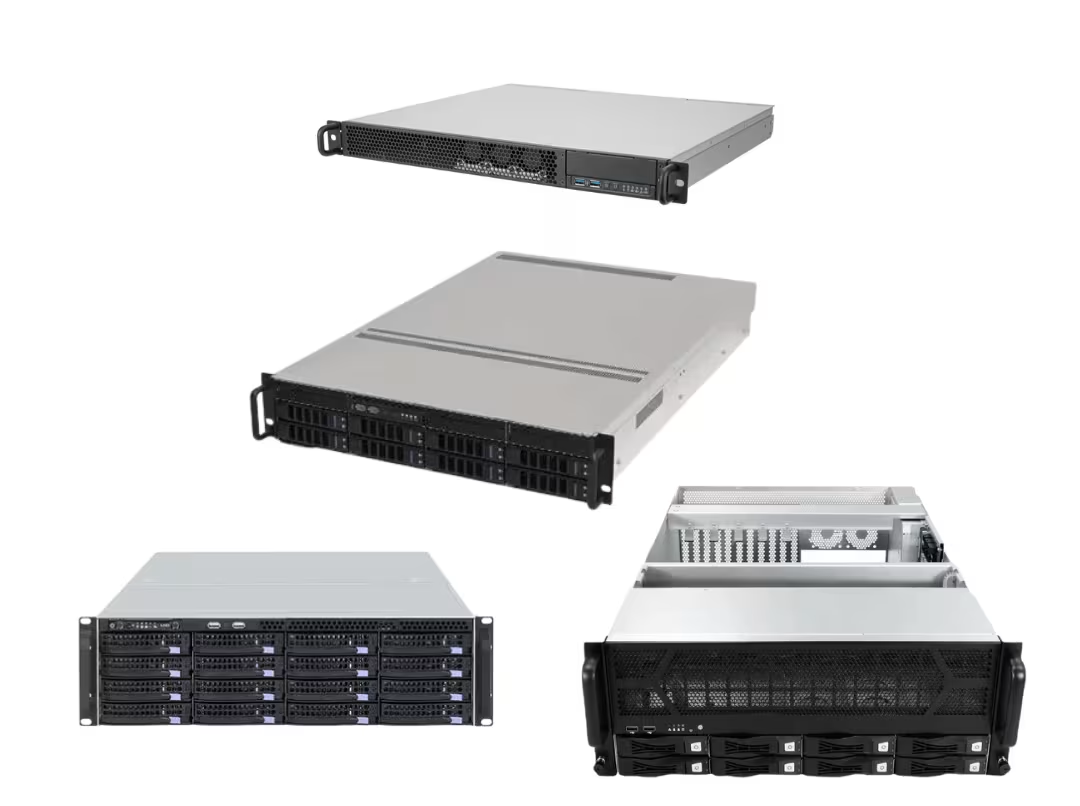
1U maximizes density at the expense of noise, expansion room, and cooling flexibility. 2U is where most builds belong—standard coolers fit, drive bays become practical, and noise stays manageable. 3U earns its place when storage capacity and quiet operation both matter enough to drive the decision. 4U removes the most constraints: full ATX and E-ATX boards, tower coolers, and full-length GPUs all fit without forcing compromises.
The underlying principle: you’re not choosing a bigger box; you’re choosing which trade-offs you can live with. Every U you add buys you cooling headroom, lower noise, and more expansion room—at the cost of rack space.
Before committing to any size, check four things: component dimensions, drive count, rack depth, and the environment’s noise tolerance. The U label alone won’t answer those questions.
What “U” Actually Means
A rack unit (U) is a height measurement. One U equals 1.75 inches (44.45 mm). Width is separately standardized at 19 inches across virtually all rackmount equipment, so it’s rarely a point of comparison between cases.
That’s what U tells you. Here’s what it doesn’t: depth, internal layout, GPU clearance, or drive capacity. Two cases with identical U ratings can be completely different inside. A compact 2U-designed networking board shares almost nothing internally with a 650mm-deep 2U storage chassis. Same number, different machine.
Nominal and usable heights are also different. The chassis floor, standoffs, and top panel all eat into clearance. A “1U” case does not give you 1.75 inches of free space above the motherboard. Always check a model’s stated internal clearances against your actual components—not just the U count on the label.
Check Your Hard Limits Before Comparing Sizes
Most buyers start by comparing U heights. The smarter move is to pin down the physical limits that can disqualify a chassis outright, regardless of its size class.
CPU cooler height. This one catches people off guard. A 1U chassis allows roughly 25mm of cooler clearance—enough only for the thinnest low-profile units. 2U opens that up, but tower-style air coolers only clear comfortably in 4U. Measure your cooler before looking at anything else.
GPU length and thickness. For GPU builds, this single measurement often decides the size class before any other variable enters the picture. Full-height, dual-slot cards need real clearance in both directions, plus room to route power cables without sharp bends. Full-length cards eliminate slim chassis entirely. Always check both dimensions against a case’s stated GPU support.
Drive count. Storage requirements can be a harder constraint than motherboard size. A chassis might accept your board without issue while capping you at two or three 3.5-inch drives. If you need eight or more, that number alone can push you toward a deeper 2U, a 3U, or a 4U—before any other spec factors in.
Rack depth and mounting style. The case has to fit the cabinet, not just the rack width. Confirm your rack’s usable depth and whether you need a short- or full-depth chassis. Check whether the rack is 2-post or 4-post—heavier 3U and 4U builds require 4-post support. Verify rail compatibility and ensure front-to-back airflow won’t be choked by solid cabinet doors or poor rack placement.

Lock these down first, and the size decision gets significantly easier. The Rackmount Case category is a practical starting point for seeing how these specs play out across real models.
1U: Choose It Only When Density Comes First
The 1U form factor is built around one priority: fitting as much equipment as possible into the least vertical space. In colocation and dense deployment environments—where rack space has a direct cost—that efficiency is genuinely valuable.
The trade-offs are just as concrete. At 1.75 inches tall, 1U accepts only low-profile expansion cards and low-profile coolers. Cooling relies on small, high-RPM fans (typically 40mm) that are effective but loud. Drive capacity is tight, PSU options narrow to flex or 1U form factors, and the chassis leaves almost no room for future expansion.
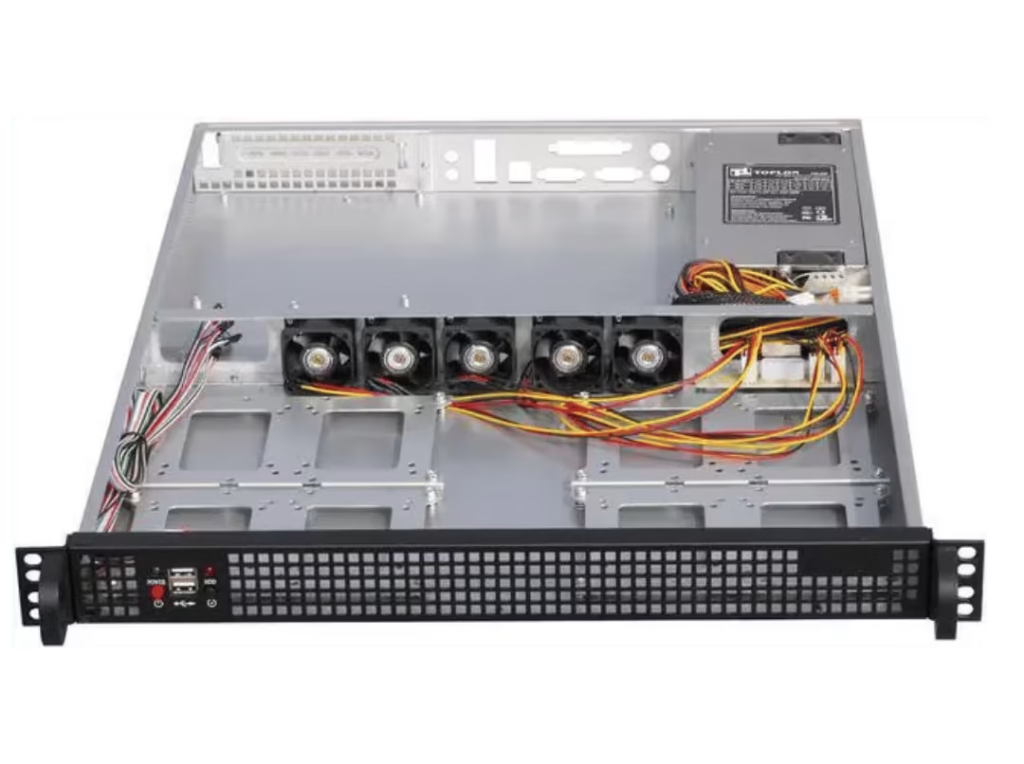
1U suits firewalls, routers, edge gateways, and lightweight compute nodes—roles that don’t require big coolers, discrete GPUs, or much storage. It’s the right call when rack space is genuinely scarce, and the workload is modest.
It’s the wrong call anywhere noise matters, where a full-size GPU is part of the plan, or where the build is likely to grow. If people work or sleep near the rack, the fan noise typically settles the question on its own.
2U: The Safest Default for Most Builds
When in doubt, start here. The 2U form factor strikes the most practical balance between capability and density, which is why it supports the widest range of real-world builds.
At 3.5 inches tall, 2U provides room for standard-height CPU coolers, more drive bays, and better airflow paths than 1U. The fan difference matters most in practice: the 80mm units common in 2U move the same amount of air at lower RPM, thereby dropping the noise floor considerably. That shift alone makes 2U workable in environments where a 1U would be unacceptable.
Component support is broad. Many 2U cases accept full ATX motherboards, riser-based expansion cards, and drive configurations up to eight 3.5-inch bays—enough for serious storage without moving up a size class. A typical virtualization host—standard ATX board, a few drives, a 10GbE NIC, moderate thermal demands—fits into a 2U chassis without any forced compromises.
Best fits: virtualization hosts, application and database servers, storage builds with fewer than 8 drives, and most homelab primary nodes. If you don’t have a specific reason to go smaller or larger, 2U is where most builds land—and for good reason. Browse the available configurations on the 2U Server Chassis page.
3U: Right for Storage-Heavy and Quieter Builds
The 3U form factor sits between two more visible size classes and tends to get overlooked. At 5.2 inches, it offers meaningfully more vertical space than 2U—which carries through into taller cooler support, more full-height expansion slots, and greater drive capacity.
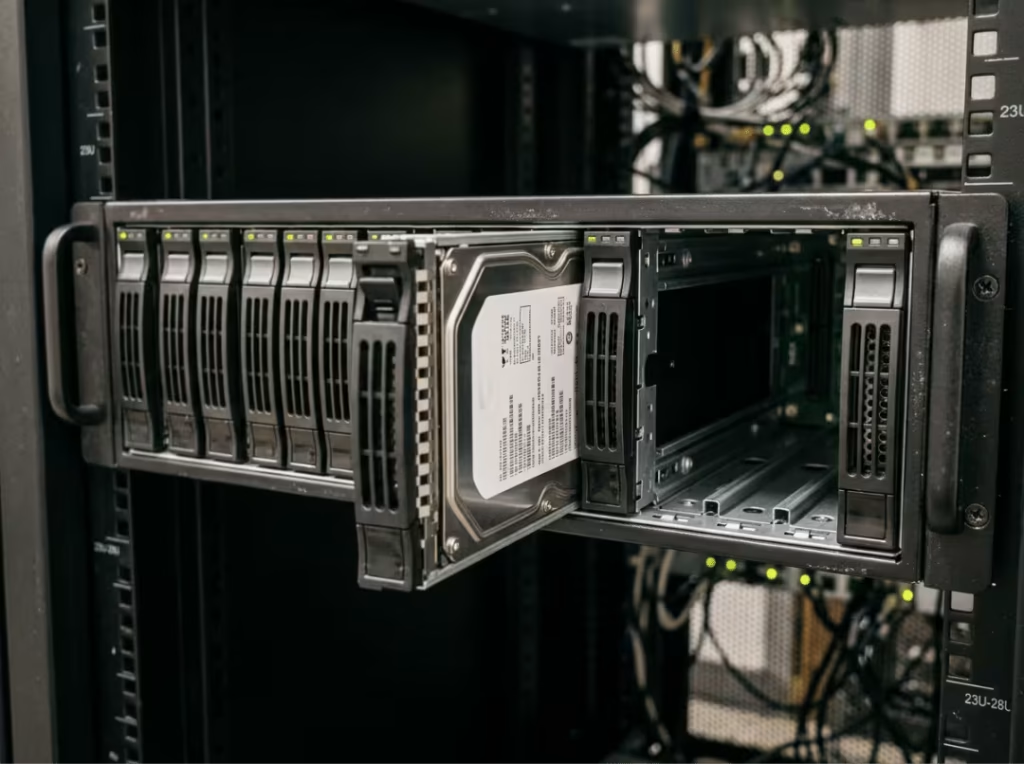
Storage is where 3U makes its clearest case. With support for 14 or more 3.5-inch drives in some configurations, it covers NAS and backup builds that would overflow a 2U. The added height also supports larger, slower-spinning fans, which produce a noticeably quieter system. For a server that shares space with people—a homelab in a living area, an office without a dedicated equipment room—that combination of capacity and quiet is hard to match in a smaller chassis.
The practical limitation: the 3U market is thinner than the 2U or 4U markets, so fewer models are available for comparison. That’s why it isn’t the default recommendation. But when high drive count and low noise are both real priorities—NAS systems, media servers, backup appliances, anything in a shared or residential space—3U is the right answer.
4U: The Right Call for GPUs and Serious Expansion
At 7 inches, 4U is where rackmount stops feeling like a constraint. Full ATX and E-ATX boards fit without adapters. Tower-style CPU coolers have real clearance. And full-length, dual-slot GPUs—the primary reason most AI and high-performance homelab builders reach for 4U—fit without compromise.
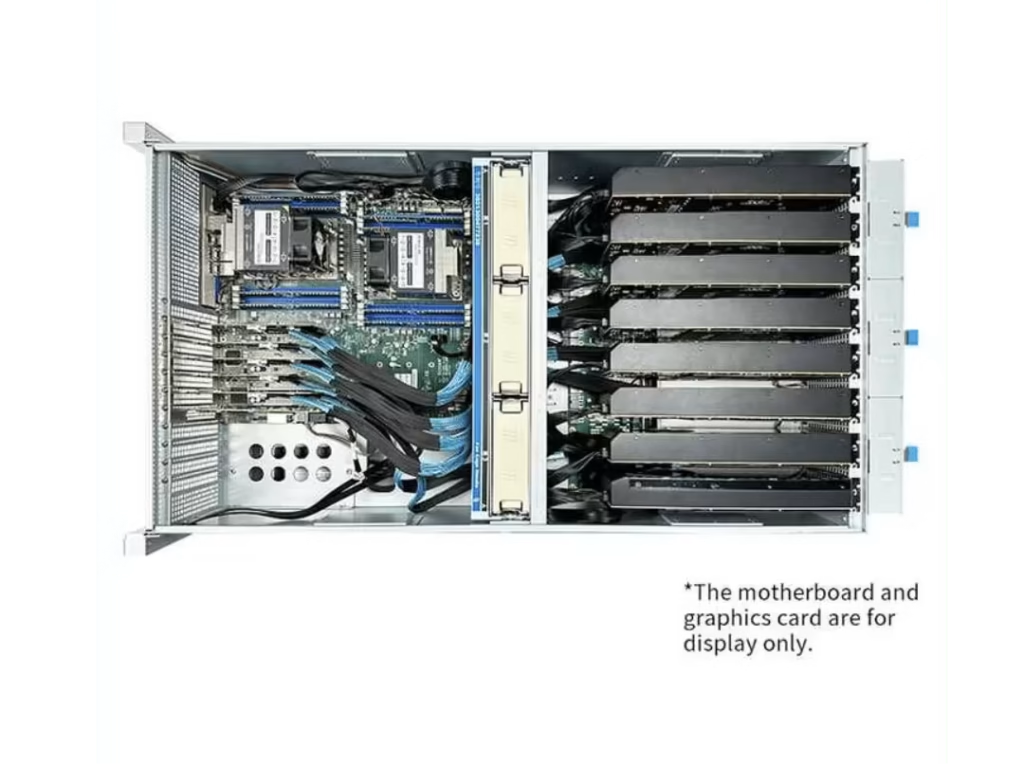
GPU support is worth covering in detail. A 4U chassis provides the length and thickness clearance that full-size cards demand, plus the internal volume to route power cables and manage the heat load they generate. High-end cards pull serious power and shed serious heat; 4U gives them the geometry to do that without throttling. For multi-GPU configurations, the spatial constraints of a 4U chassis are often what make a viable layout possible at all.
Standard ATX power supplies drop in without adapters, and many 4U cases support redundant PSU configurations for uptime-critical work. Cooling is the strongest of the four classes: largest fans, lowest RPM, quietest output. The only real cost is rack real estate.
Where 4U belongs: AI inference, rendering workstations, high-performance homelabs, and any build where heavy expansion or tower cooling is genuinely part of the plan. Where it doesn’t: light, fixed-workload servers like firewalls or basic file hosts, where four rack units is unnecessary overhead. For dedicated GPU builds, the GPU Server Case lineup runs from 4U up to 10U, covering a wide range of configurations.
Side-by-Side Comparison: 1U Through 4U
Each step up the table trades rack density for better thermals, lower noise, broader component support, and easier internal access. The pattern is consistent.
|
Form Factor |
Height |
Cooler Clearance |
GPU Support |
Drive Bays |
PSU Type |
Noise |
Best Fit |
|---|---|---|---|---|---|---|---|
|
1U |
1.75 in / 44.45 mm |
Low-profile only |
Low-profile only |
1–4 |
Flex / 1U |
Loud |
Firewalls, routers, edge nodes, dense colocation |
|
2U |
3.5 in / 89 mm |
Standard coolers |
Limited, via riser |
Up to ~8 |
Standard ATX / 2U |
Moderate |
Virtualization, app servers, general homelab |
|
3U |
5.2 in / 133 mm |
Taller coolers |
Full-height cards |
Up to ~14 |
Standard ATX / redundant |
Quiet |
NAS, backup, media servers, shared spaces |
|
4U |
7 in / 178 mm |
Tower coolers |
Full-length, multi-slot |
Up to ~15+ |
Standard ATX / redundant |
Quietest |
AI, rendering, workstation compute, GPU homelab |
No size is inherently better. Each row is a different answer to the same question: what are you willing to trade? Match your column to your actual hardware and environment, not to a general assumption about what “more” means.
How to Choose the Right Size
Work through this in order. Each step narrows the field before the next one begins.
Start With Your Component Constraints
Board size, CPU cooler height, GPU dimensions, drive count, and PSU form factor define the minimum U size that will physically work. These aren’t preferences—they’re hard limits. Establish them first, and you’ve already eliminated most of the wrong answers.
Then Check the Rack
The case has to fit the cabinet. Measure your rack’s usable depth, confirm whether it’s 2-post or 4-post (3U and 4U builds require 4-post), and verify rail compatibility. Check that front-to-back airflow won’t be blocked by solid doors or poor rack placement. A chassis that won’t mount correctly solves nothing.
Factor In the Noise Environment
Where the rack lives shapes the decision as much as the hardware does. A dedicated machine room tolerates high-RPM fans. An office, a bedroom, or a shared space does not. 1U is often the wrong call anywhere people spend significant time nearby—those fans are persistent and penetrating under load. If the environment matters, let that influence your choice between 3U and 4U before you finalize anything.
Leave Room for the Next Upgrade
Think a year out. If a GPU, extra NICs, or additional drives are realistic additions, sizing up now is cheaper than a hardware migration later. At the same time, don’t overbuild for a fixed, light workload. A firewall doesn’t need 4U as a hedge. Match headroom to realistic plans, not hypothetical ones.
Most builders land on 2U or 4U. 2U covers the broad middle of general-purpose and moderate-storage work. 4U covers GPU builds, heavy expansion, and anything requiring tower cooling. If you’re deciding between those two, the presence or absence of a full-size GPU usually settles it.
Cooling and Noise: What Most Buyers Underestimate
The physics is simple; the consequences are real. Thinner cases have less room for heatsinks and fans, so they use smaller ones that spin faster—and faster fans are louder fans.
1U relies on 40mm fans at high RPM. 2U moves up to 80mm units at lower speed. 3U and 4U can run 120mm fans that shift substantial air while barely spinning up. The thermal output may be comparable across classes. The noise is not.
This is the gap between “technically within spec” and “comfortable to run long-term.” A 1U case might keep temperatures acceptable while making the room unpleasant for everyone in it. The right chassis keeps hardware cool and the environment livable.
Unless rack density is a firm requirement, the one or two U you spend moving from 1U to 2U—or from 2U to 3U—pays back in quieter operation every day the server is powered on.
Frequently Asked Questions
Can I fit a standard ATX motherboard in a rackmount case?
Most 2U cases support full ATX boards (up to 305 × 244mm), and 4U cases handle ATX and E-ATX without issue. 1U cases are more restrictive and often require smaller or specialized boards. Always verify the case’s stated motherboard support against your board’s exact dimensions before ordering.
Is 2U enough for a GPU build?
For limited or low-profile cards, sometimes. For full-length, dual-slot GPUs—anything in the RTX 4090 class—4U is the right answer. The clearance, power routing, and airflow those cards require simply aren’t available in a 2U chassis.
How loud is a 1U server in real use?
Noticeably loud. The high-pitched whine of small fans under load is persistent and cuts through ambient noise. Manageable in a dedicated equipment room; genuinely disruptive in offices or residential spaces.
How many drives can a 2U or 4U case support?
More than the U class suggests at first glance—this depends heavily on chassis depth and internal layout. 2U builds typically reach six to eight 3.5-inch drives; 4U models can support fifteen or more. Always check the specific model, not just the size category.
Do I need to buy rails separately?
Often, yes. Rail kits are frequently sold separately, and fixed and sliding rails aren’t interchangeable. Confirm rail type, compatibility, and mounting depth for your specific rack before ordering—particularly for heavier 3U and 4U builds where sliding access makes maintenance practical.
What’s the difference between short-depth and long-depth rackmount cases?
Depth describes the front-to-back chassis length, which U height says nothing about. Short-depth cases fit shallow cabinets and are common for networking gear. Long-depth cases support more drives and larger boards but require sufficient rack depth. Always measure your cabinet’s usable depth before buying.
Choosing Your Next Rackmount Case
U height is a trade-off, not a ranking. A bigger chassis isn’t better—it’s a different set of limits. The right case is the one that fits your hardware, mounts cleanly in your rack, and works in the space where it will run.
The shorthand holds: 1U for density, 2U for most builds, 3U for storage and quiet, 4U for GPUs and serious expansion. Start there, then validate against your actual component measurements and rack conditions.
Before ordering anything, write down your CPU cooler height, GPU length, drive count, and rack depth. Those four numbers resolve most of the ambiguity. When you’re ready to match a chassis to a specific build—or need OEM/ODM support for a custom configuration—the full range across rackmount and GPU server case options is a good place to start.
