
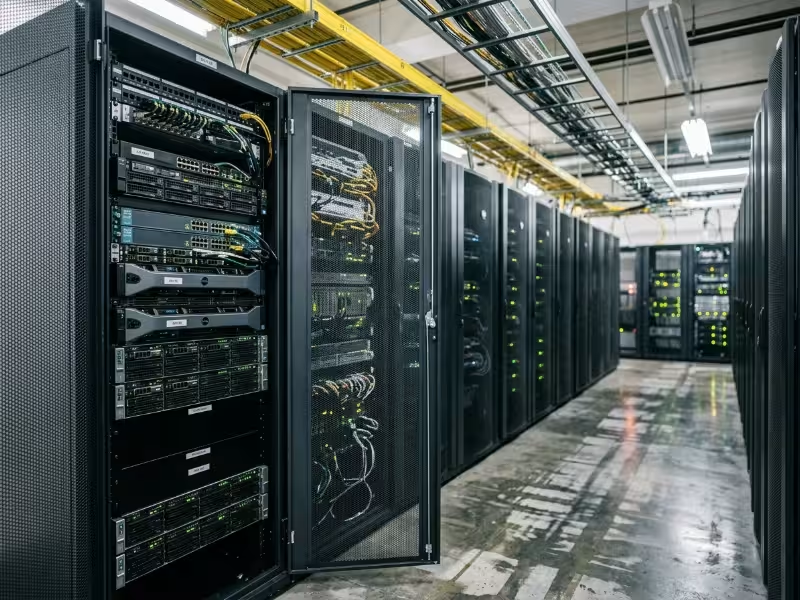
A manufacturing site swaps six aging tower servers for eight dense 1U nodes. The hardware fits in half a rack and the quote looks clean. Within a month, the top-of-rack inlet temperature hits 32°C, fans run at full speed, and the facility team discovers that the room’s single 20A circuit cannot handle the load. Nobody flagged it during planning, because rack servers are the default and defaults don’t get questioned.
That’s the core problem this article addresses. Rack mount servers dominate data centers, server rooms, and industrial edge sites—and because they’re so common, their real constraints often go unexamined until something breaks or a deployment stalls. This guide walks through the drawbacks that catch teams off guard: physical and environmental limits first, then financial and operational ones. Each section includes a practical mitigation, not to sell you on a solution, but so you can account for the problem before you’re committed to a configuration that doesn’t fit your site.
What Rack Mount Servers Are and Where They Fit
A rack mount server is designed to slide into a standard 19-inch rack on rails. Height is measured in rack units (U), where 1U equals 1.75 inches (44.45 mm). Most models ship in 1U, 2U, or 4U heights, and a full-height rack typically offers 42U of usable space. Standard features include front-to-back airflow, hot-swappable drives and power supplies, and a baseboard management controller (BMC) that keeps the server remotely accessible even when the OS is down.
Rack servers show up across a wide range of environments: enterprise data centers, colocation halls, corporate server rooms, edge cabinets on factory floors, telecom facilities, substations, and control rooms. The hardware is the same, but the site is not. In a purpose-built data hall with hot/cold aisle containment and precision cooling, rack servers run as designed. In a wall-mount cabinet near a production line, they face dust, vibration, irregular power, and limited airflow. Most of the disadvantages below come from exactly that gap—between what the server needs and what the site provides.
Physical and Environmental Disadvantages
Rack servers bring five physical drawbacks that often get treated as afterthoughts. They concentrate heat. They generate constant noise. They require a foundation of supporting infrastructure before a single node can run reliably. They draw power at densities many rooms were never designed for. And they create cabling complexity that compounds with every server added. Because these are facility-level constraints, they tend to sit outside the hardware budget and only surface after the equipment arrives.
Thermal and Cooling Challenges
Low-profile 1U and 2U chassis leave little room for large heatsinks or slow, quiet fans. They depend on small, high-RPM fans that pull cool air in from the front and push hot exhaust out the back. That airflow path works well when it stays unobstructed. Pack 20 or 30 nodes into one rack and heat concentrates quickly—every kilowatt of IT load produces roughly 3,412 BTU/hr, so a 10 kW rack puts out more than 34,000 BTU/hr from a single footprint.
The effects follow a predictable pattern. Hot spots form near the top of the rack where exhaust recirculates to the front intakes. Missing blanking panels let hot air loop back through empty U spaces. Without proper hot/cold aisle separation, inlet temperatures climb until CPUs throttle—performance drops without warning and component lifespan shortens. High-density GPU workloads can push a single rack well beyond what standard CRAC or CRAH units can handle. At that point, adding servers becomes a cooling infrastructure project, not a hardware purchase.
This hits hardest in retrofitted server rooms, branch offices, and industrial cabinets without dedicated HVAC. Floor space availability doesn’t translate to rack capacity. A room designed for 8 kW per rack won’t support a 25 kW AI rack, regardless of how much open space remains.
Mitigation: Fill every unused U with blanking panels, establish hot/cold aisle separation or add containment, and monitor inlet temperature at the top, middle, and bottom of each rack. For high-density deployments—especially GPU server configurations—plan rear-door heat exchangers or in-row cooling before the hardware arrives, not after.
Noise Levels
Small fans at high RPM produce a sustained, high-pitched noise that doesn’t let up. A loaded server room typically runs at 70–85 dBA. Heat and noise compound each other: fan curves rise with inlet temperature, so a room running warm is also a room running loud. A thermal problem often shows up as a noise complaint first.
This makes rack servers a poor fit near offices, labs, control rooms, or any space where people work long shifts. Regulatory requirements may also apply. In the US, OSHA requires a hearing conservation program when workers are regularly exposed to 85 dBA averaged over eight hours. Placing a rack cabinet in a control room to avoid building a separate equipment room can quietly create a compliance problem.
Mitigation: Use separate equipment rooms where possible. Acoustic enclosures can help, but verify that they move enough air for the actual heat load—a sealed quiet cabinet can become a heat trap. For occupied spaces with only a few nodes, tower servers or short-depth edge systems designed for lower acoustic output are worth considering.
Physical Space and Infrastructure Requirements
A rack server doesn’t stand alone. It needs an enclosure, compatible rails, cable management, and working space on both sides. The constraint most teams miss is depth. Many enterprise 1U and 2U servers are 700–800 mm deep or more, requiring racks in the 1,000–1,200 mm range plus service clearance front and rear for technicians to pull units on their rails.
Before ordering, confirm:
- Rack depth and rail compatibility: square-hole versus round-hole posts, and the adjustable depth range of the rails.
- Floor load rating: a fully populated 42U rack can exceed 900 kg (roughly 2,000 lb).
- Delivery path: door and elevator dimensions, plus ramp access for crated cabinets.
- Service aisle width: enough room to fully extend a server on its rails and work beside it.
Industrial sites make this harder. Wall-mount and shallow floor cabinets on plant floors are often only 450–600 mm deep—too shallow for most standard enterprise servers. If your site uses wall-mount enclosures, that constraint should shape your server selection, not the other way around.
Mitigation: Specify short-depth or industrial-rated servers for shallow enclosures and run a site survey before you finalize any purchase. Measuring takes ten minutes. Returning the wrong equipment can take weeks.
Power and Electrical Demands
Typical enterprise racks draw 5–15 kW. High-density compute and AI racks can push 30–40 kW, and the latest GPU platforms go further. Most enterprise servers ship with redundant power supplies, each requiring A and B power feeds, properly rated PDUs, and the right C13 or C19 connections.
A single standard circuit won’t support a populated rack. You’ll need dedicated branch circuits, higher-voltage distribution (208/230V or three-phase), a properly sized UPS, and generator planning for critical workloads. Power and cooling are coupled: every watt of IT load becomes heat that the facility must remove. Adding 5 kW of compute means adding 5 kW of cooling capacity, plus the energy to run it.
Mitigation: Base capacity planning on measured draw under realistic load, not nameplate ratings—which routinely overstate actual consumption. Use metered or switched PDUs, set power caps through the BMC where workloads allow it, and assign a power budget to each rack before adding nodes.
Cabling Density and Complexity
Each server can require two power cords, two to four data links, a dedicated management port, and sometimes fiber for storage or high-speed networking. Across 20–40 nodes, one rack can hold hundreds of cables. Poor routing blocks rear exhaust and raises temperatures. It also makes cable tracing harder and raises the chance a technician pulls the wrong connection during maintenance. In practice, a significant share of unplanned outages trace back to human error at the rear of the rack.
The problem is worst in racks that grow quickly without a cabling plan and at sites with no naming or color standards in place. The first ten servers look fine. By server thirty, nobody wants to touch the back of the cabinet.
Mitigation: Use structured cabling and top-of-rack switching to minimize run lengths. Color-code and label cables by function—power A, power B, data, management—on both ends. Add vertical cable managers and record all connections in a DCIM tool so documentation survives staff turnover.
Financial and Operational Disadvantages
The facility constraints above set the physical ceiling. The financial and operational drawbacks determine what you pay to stay under it. These costs rarely appear on a hardware quote, and they scale with time and node count. What looks like a minor line item at four servers becomes a real budget driver at forty.
High Upfront Deployment Costs
A server quote covers the server. The deployment covers everything that makes it run—and that list is longer than most first-time buyers expect.
Items that frequently get missed:
- Racks, rails, and blanking panels
- PDUs and UPS capacity
- Top-of-rack switching and optics
- Cooling upgrades or supplemental cooling
- Electrical work and new branch circuits
- KVM or local console access for out-of-band recovery
- Installation and cabling labor
- Software licenses, often billed per socket or core for hypervisors and OS
This is most painful at small edge sites and first-time deployments, where none of the supporting infrastructure exists yet. The first server in a new cabinet effectively carries the full cost of the cabinet.
Mitigation: Budget at the rack level, not per server. Get facility and electrical quotes before the hardware is approved, so the business case reflects the actual cost of day one, not just the hardware line.
Maintenance Complexity
Hot-swap drives and power supplies make some repairs straightforward. Many others aren’t. Swapping DIMMs, CPUs, risers, or non-hot-swap fans means sliding the server out on its rails, which requires rear access, enough cable slack to extend the unit without disconnecting it, and sometimes a second technician—a loaded 2U or 4U server can weigh 25–40 kg.
Firmware adds complexity. BIOS, BMC, RAID controller, and NIC firmware all require coordinated updates. Apply them out of sequence and a node can be left unbootable. Parts availability varies by vendor and generation, so a mixed fleet means a mixed spares shelf. And working inside a live, populated rack carries the constant risk of disturbing neighboring systems through a bumped cable or dislodged PSU.
Mitigation: Standardize on fewer server models, keep a spares kit on site for common failures (drives, PSUs, fans, DIMMs), schedule defined maintenance windows, and use vendor lifecycle tools to manage firmware baselines across the fleet.
Scalability Limitations
Adding another 1U looks like a simple, linear scale. In practice, every node draws from several resource pools at once: rack units, power, cooling headroom, switch ports, and cabling capacity. The first pool to empty sets the ceiling, and it’s usually power or cooling rather than space. The result is stranded capacity—racks that are half-empty by unit count but already at their thermal or electrical limit. The floor space is paid for and unusable.
When that ceiling is hit, growth stops being incremental. The next server may require a new rack, new circuits, a cooling upgrade, or a facility expansion—a step-change cost that can dwarf the servers behind it.
Mitigation: Track capacity per resource (U, kW, cooling, switch ports), not just by space. Use higher-density nodes only where cooling can support them, leverage virtualization to consolidate underutilized nodes, and treat colocation as a real option for overflow rather than forcing growth into a room that’s already constrained.
Remote Management Overhead
BMCs (via IPMI or the newer Redfish standard) make rack servers easy to manage remotely—power cycling, console access, and sensor monitoring all without touching the hardware. But each BMC is itself a networked device that needs configuration, credentials, firmware patching, and security hardening. BMC vulnerabilities are a well-documented attack surface, and default credentials left in place remain a common audit finding. In a mixed-vendor fleet, every vendor brings its own management interface and tooling, which creates inconsistent processes and gaps in coverage.
Distributed edge deployments multiply this overhead. Fifty sites with two servers each means 100 BMCs to manage, often at locations with no on-site IT staff available when remote access fails.
Mitigation: Isolate management interfaces on a dedicated network segment, rotate credentials on a regular schedule, centralize monitoring and alerting, and favor platforms that support standard APIs like Redfish to reduce vendor-specific tooling dependencies.
Total Cost of Ownership (TCO)
The purchase price gets the most scrutiny. Operating costs accumulate quietly. Energy for compute plus the overhead of cooling it—captured in power usage effectiveness (PUE)—can rival or exceed the hardware cost over a 3–5 year refresh cycle in high-density or high-utilization racks. A facility running at PUE 1.6 spends 0.6 W on overhead for every 1 W of IT load. That adds up fast.
|
Cost Category |
Components |
|---|---|
|
CapEx |
Server hardware, racks and rails, PDUs and UPS, networking, installation, facility upgrades |
|
OpEx |
Power, cooling, support and warranty contracts, software licenses, admin labor, floor space or colocation fees |
|
End of life |
Decommissioning labor, data sanitization or destruction, disposal and recycling |
Utilization is the number most budget models underweight. A server running at 15% average CPU still draws most of its peak power and costs the same to license, support, and house. Low utilization inflates the cost of every workload it carries.
Mitigation: Model TCO per rack and per workload, not per server. Track utilization continuously, consolidate underused nodes, and include end-of-life costs in the original business case so they don’t surface as a surprise in the final year of a refresh cycle.
Why Enterprises Still Choose Rack Mount Servers
Most of the drawbacks above come from the same properties that make rack servers worth using: density and standardization. When deployments go wrong, the cause is usually poor planning or a poor site fit—not a flaw in the form factor itself. That’s why rack servers remain the default even for teams that understand their limitations.
- Standardized density: The 19-inch standard supports high node counts per footprint and allows mixed-vendor racks. The trade-off is the heat and power concentration this guide has covered.
- Serviceability and redundancy: Hot-swap components, dual power feeds, and front-access designs support uptime during many common failures. Deeper repairs still require rail access and coordination.
- Centralized management: BMC-based out-of-band control and fleet automation are difficult to match with tower servers at scale. The trade-off is the credential and security management burden each BMC adds.
- Broad ecosystem: Unlike blade systems, rack servers don’t lock you into a single chassis vendor. Short-depth and ruggedized variants extend the platform to industrial and edge deployments. Choosing the right variant for each site still requires deliberate planning.
Rack vs. Tower vs. Blade Servers: Which Fits Your Site?
Rack mount is not the only form factor. Tower servers are standalone upright units—closer to a large workstation—that require no rack and minimal supporting infrastructure. Blade servers are thin compute modules that share power, cooling, and networking through a common chassis. Each form factor is optimized for a different set of conditions.
|
Factor |
Rack |
Tower |
Blade |
|---|---|---|---|
|
Density |
High |
Low |
Very high |
|
Noise |
High |
Low to moderate |
Very high |
|
Cooling demand |
High, needs managed airflow |
Low, room air often sufficient |
Very high, requires purpose-built cooling |
|
Upfront infrastructure |
Rack, PDUs, cabling, often cooling upgrades |
Minimal |
Chassis plus substantial power and cooling |
|
Scalability |
Incremental until power or cooling limit |
Poor beyond a few units |
Strong within a chassis; step cost per chassis |
|
Cable count |
High |
Low per unit |
Low, consolidated through chassis |
|
Vendor lock-in |
Low |
Low |
High—blades are chassis-specific |
|
Best-fit site |
Server rooms, data centers, edge cabinets |
Small offices, branches, occupied spaces |
Large data centers built for extreme density |
Choose tower when you need a handful of nodes in an occupied space without a dedicated equipment room. Choose rack when you expect steady growth, want standardization across sites, and can support proper power, cooling, and cabling. Choose blade only when density requirements are extreme, you’re committed to one vendor’s platform, and your facility is built for the power and cooling demand the chassis creates.
If your sites use wall-mount enclosures or shallow cabinets, standard rack servers may not physically fit—wall-mount chassis designed specifically for compact, space-constrained deployments are worth evaluating alongside your server selection.
FAQ
Are rack mount servers suitable for factory floors or harsh industrial environments?
Standard enterprise rack servers aren’t designed for it. They assume clean, cooled intake air and stable conditions. Factory floors introduce dust, vibration, humidity swings, and temperature extremes that clog filters and shorten component life. For industrial deployments, look for ruggedized or short-depth servers with extended operating temperature ratings, filtered intake designs, and conformal-coated boards, housed in enclosures rated for the environment.
How much power does a full rack of servers use?
Typical enterprise racks draw 5–15 kW. High-density compute and AI racks can exceed 30–40 kW. To size your own deployment, sum the measured draw of each server under realistic load—not nameplate ratings—then add 20–25% headroom. Remember that cooling capacity must match total IT load.
Is a tower or rack server better for a small business or branch site?
For one to three nodes in an occupied office without a dedicated equipment room, tower servers are usually the better fit. They’re quieter, need no rack, and run on standard room cooling. Shift to rack servers when you expect to grow past a few nodes, need centralized out-of-band management, or have a proper equipment closet or room to put them in.
Why are rack servers so loud, and can they be made quieter?
The noise comes from small fans spinning at high RPM to move air through a low-profile chassis. The most effective way to reduce it is to lower inlet temperature—fans slow down when intake air is cooler. You can also set a quieter fan profile through the BMC where thermal margins allow it, and use acoustic enclosures rated for your actual heat load.
How long do rack mount servers last before replacement?
Most enterprises refresh rack servers on a 3–5 year cycle, even though the hardware can often run for 5–7 years or longer. The usual triggers are expiring vendor support contracts, rising failure rates, and newer hardware delivering significantly better performance per watt. Extending past the support window reduces upfront spend but raises the risk of unplanned outages and expensive emergency parts sourcing.
Wrapping Up
The disadvantages of rack mount servers are manageable—but only if you plan for them. Heat, noise, power draw, depth constraints, cabling complexity, maintenance overhead, and total cost of ownership are all predictable. Problems arise when the server gets treated as the whole project and the facility gets treated as an afterthought.
Before committing to a deployment, verify four things:
- Cooling capacity per rack, with headroom for growth and inlet temperature monitoring at multiple heights.
- Power and redundancy, including dedicated circuits, A/B feeds, PDU ratings, and UPS sized from measured draw.
- Rack depth and floor load, confirmed on site against the actual server models being purchased.
- A realistic TCO model covering energy, cooling, licensing, support, labor, and end-of-life costs across the full refresh cycle.
If you’re sourcing chassis for a new build or a refresh—whether standard rackmount cases, high-density GPU server enclosures, or compact options for edge sites—getting the enclosure spec right before you finalize the server selection will save significant rework downstream.
