


Effective server management is always a key consideration in a data center or server room, and KVM switches simplify this task. KVM (Keyboard, Video, Mouse) switches enables one console to control numerous servers which increases accessibility and eliminates unnecessary clutter. In this blog, we discuss the importance of KVM switches in enhancing server management, their advantages, and how they have become indispensable in modern IT infrastructures.
Understanding KVM Switches
What is a KVM Switch?
A KVM (Keyboard, Video, Mouse) Switch is a device that permits users to operate several computers through a single console system comprising of a keyboard, monitor and mouse. KVM systems eliminate the need for separate peripherals for each computer, optimizing computer setups and enhancing productivity.
KVM switches are indispensable in data centers, server farms, and IT control rooms where multiple computers and systems need to be monitored and operated simultaneously. In addition to enhancing operational efficiency, KVM switches eliminate the clutter caused by various peripherals.
KVM switches of the modern era often include high-end features such as high-definition video output, USB ports, and remote access functionality. The robust yet user-friendly design makes these devices invaluable in overseeing intricate systems of information technologies.

Types of KVM Switches
KVM switches come in various types, each designed to meet specific needs and use cases. Below are the most common types:
-
Desktop KVM Switches: These are compact devices designed for small-scale setups, such as home offices or small businesses. Desktop KVM switches typically support two to four computers and are ideal for users who need to manage multiple systems from a single workstation.
-
Rackmount KVM Switches: Designed for larger environments like data centers, rackmount KVM switches can manage dozens of servers or computers. These switches are mounted directly onto server racks, saving space and providing centralized control over multiple systems.
-
IP KVM Switches: IP-based KVM switches allow remote access to connected systems over a network. This is particularly useful for IT administrators who need to manage servers or computers located in different physical locations.
-
USB KVM Switches: These switches use USB connections for both keyboard and mouse inputs, making them compatible with modern peripherals. USB KVM switches are widely used due to their ease of setup and compatibility with a variety of devices.
-
HDMI/DisplayPort KVM Switches: These switches are designed for high-resolution video output, supporting HDMI or DisplayPort connections. They are ideal for setups that require high-quality video, such as multimedia production or gaming environments.
-
Matrix KVM Switches: Matrix switches allow multiple users to access and control multiple computers simultaneously. These are commonly used in collaborative environments, such as control rooms or broadcast studios, where multiple operators need access to shared systems.
By understanding the different types of KVM switches, users can select the most appropriate device for their specific requirements, ensuring efficient and reliable system management.
Benefits of Using a KVM Switch
KVM switches offer numerous advantages, making them a vital tool for efficiently managing multiple systems. Below are some of the key benefits:
-
Space and Cost Savings: By consolidating multiple keyboards, monitors, and mice into a single set of peripherals, KVM switches reduce workspace clutter and eliminate the need for additional hardware. This not only saves space but also lowers costs associated with purchasing and maintaining extra equipment.
-
Improved Efficiency: KVM switches enable users to switch between systems quickly and seamlessly, improving productivity in environments where multiple computers need to be managed. This is especially beneficial for IT administrators, developers, and engineers who frequently work across multiple systems.
-
Centralized Control: In data centers and server rooms, KVM switches provide centralized control over multiple servers, simplifying management and troubleshooting. This reduces the time and effort required to maintain large IT infrastructures.
-
Enhanced Accessibility: IP KVM switches allow remote access to connected systems, enabling IT teams to manage servers or computers from anywhere with an internet connection. This is particularly useful for organizations with distributed operations or remote work setups.
-
High-Quality Video Support: Modern KVM switches support high-resolution video output, ensuring that users can work with clear and detailed visuals. This is essential for tasks that require precise image quality, such as video editing or graphic design.
-
Scalability: KVM switches are available in configurations that support anywhere from two to dozens of systems, making them suitable for both small-scale setups and large enterprise environments. This scalability ensures that KVM switches can grow in line with the organization’s needs.
By leveraging the benefits of KVM switches, organizations can streamline their operations, improve productivity, and reduce costs, making them a valuable addition to any IT infrastructure.
Server Management with KVM
Remote Server Access

Remote server access is a critical aspect of modern IT management, and KVM (Keyboard, Video, Mouse) technology plays a pivotal role in enabling seamless control over servers from virtually any location. With KVM solutions, IT administrators can access and manage servers remotely, eliminating the need for physical presence in the data center.
KVM-over-IP technology is particularly valuable for remote access to servers. It allows administrators to connect to servers via a secure internet connection, providing full control over the system, including BIOS-level access. This capability is essential for troubleshooting, performing updates, or configuring servers, even if the operating system is unresponsive.
The ability to access servers remotely also enhances operational efficiency. IT teams can respond to issues in real time, reducing downtime and ensuring business continuity. Additionally, remote access minimizes travel costs and time, as administrators can manage servers from their office or home.
Security is a key consideration for remote server access. Modern KVM-over-IP solutions include features such as encryption, multi-factor authentication, and user access controls to protect sensitive data and prevent unauthorized access. By implementing secure KVM solutions, organizations can ensure reliable and safe remote server management.
Digital KVM Solutions
Digital KVM solutions have revolutionized server management by offering advanced features and improved performance compared to traditional analog systems. These solutions use digital signals to transmit keyboard, video, and mouse data, resulting in higher resolution, better image quality, and reduced latency.
One of the primary advantages of digital KVM systems is their scalability. They can support a large number of servers and users, making them ideal for enterprise environments and data centers. Digital KVM switches often include features such as multi-user access, allowing multiple administrators to manage servers simultaneously without interference.
Another benefit of digital KVM solutions is their integration with existing IT infrastructure. Many systems are compatible with modern networking technologies, enabling seamless connectivity and centralized management. For example, digital KVM switches can be integrated with Data Center Infrastructure Management (DCIM) software, providing a unified platform for monitoring and controlling server operations.
Digital KVM systems also offer enhanced security features, such as encrypted data transmission and user authentication. These measures ensure that sensitive information remains protected, even when accessed remotely. Additionally, digital KVM solutions are designed for ease of use, with intuitive interfaces and remote management capabilities that simplify server administration.
By adopting digital KVM solutions, organizations can improve the efficiency, scalability, and security of their server management processes, ensuring that their IT infrastructure remains robust and reliable.
High-Performance KVM Options
High-performance KVM options are designed to meet the demanding requirements of environments where speed, reliability, and image quality are critical. These solutions are particularly suited for industries such as broadcasting, video production, and financial trading, where real-time access to servers and applications is essential.
One of the standout features of high-performance KVM systems is their support for ultra-high-resolution video, including 4K and beyond. This ensures that users can work with detailed visuals without compromising image quality. These systems also offer low-latency performance, enabling seamless interaction with servers and applications, even in time-sensitive scenarios.
High-performance KVM solutions often include advanced connectivity options, such as fiber-optic transmission, which allows for long-distance connections without signal degradation. This is especially useful in large facilities or distributed environments where servers are located far from the user’s workstation.
Another key feature is the ability to support multiple displays and peripherals. High-performance KVM systems can handle multi-monitor setups, making them ideal for tasks that require extensive screen real estate, such as video editing or financial analysis. They also support a wide range of input devices, including specialized keyboards and pointing devices, to accommodate diverse user needs.
In addition to performance, these KVM solutions prioritize reliability and security. Features such as redundant power supplies, failover capabilities, and secure data transmission ensure uninterrupted operation and protect against potential threats.
By investing in high-performance KVM options, organizations can enhance productivity, improve user experience, and ensure the seamless operation of their critical applications, even in the most demanding environments.
Console Servers and Their Role
What is a Console Server?
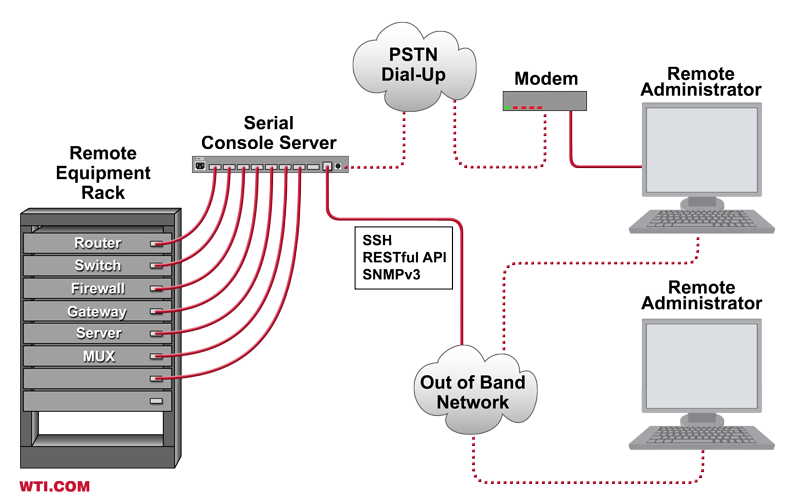
A console server, also known as a serial console server or terminal server, is a device that provides centralized access to the console ports of network equipment, servers, and other IT infrastructure. It acts as a gateway, enabling administrators to manage and troubleshoot devices remotely, even when the primary network is down or the operating system is unresponsive.
Console servers are particularly valuable in environments where uptime is critical, such as data centers, remote offices, and industrial facilities. By connecting to the serial ports of devices, they enable IT teams to perform tasks such as configuration, monitoring, and recovery without requiring physical access to the equipment.
Modern console servers often feature advanced capabilities, including secure remote access, logging functions, and integration with management tools. These features make them an essential component of any robust IT management strategy, ensuring that administrators can maintain control over their infrastructure at all times.
Advantages of Console Servers
Console servers offer a range of benefits that enhance the efficiency and reliability of IT operations. Below are some of the key advantages:
-
Remote Access: Console servers enable administrators to access and manage devices from anywhere, providing a reliable solution for remote troubleshooting and configuration. This is especially useful for managing equipment in distributed locations or during emergencies when on-site access is not feasible.
-
Out-of-Band Management: One of the most significant advantages of console servers is their ability to provide out-of-band management. This means that even if the primary network is down, administrators can still access devices through the console server, ensuring uninterrupted control and faster issue resolution.
-
Centralized Management: By consolidating access to multiple devices into a single interface, console servers simplify IT management. Administrators can monitor and control all connected equipment from one location, reducing complexity and improving operational efficiency.
-
Enhanced Security: Modern console servers include robust security features such as encryption, user authentication, and access controls. These measures protect sensitive data and prevent unauthorized access, ensuring that only authorized personnel can manage critical infrastructure.
-
Logging and Auditing: Many console servers offer logging capabilities that record all activity on connected devices. This provides a valuable audit trail for compliance purposes and helps identify the root cause of issues during troubleshooting.
-
Scalability: Console servers are available in various configurations, ranging from small units for a few devices to large-scale solutions that support hundreds of connections. This scalability makes them suitable for organizations of all sizes, from small businesses to enterprise-level data centers.
By leveraging these advantages, organizations can improve the reliability, security, and efficiency of their IT operations, ensuring that their infrastructure remains resilient and well-managed.
Integration with KVM Switches
Console servers and KVM switches are complementary tools that, when integrated, provide a comprehensive solution for IT infrastructure management. While KVM switches enable administrators to control multiple servers using a single keyboard, monitor, and mouse, console servers offer access to the serial ports of network devices and other equipment.
The integration of these two technologies allows IT teams to manage both the hardware and software aspects of their infrastructure from a single platform. For example, administrators can use a KVM switch to interact with a server’s graphical interface while simultaneously using a console server to configure network switches or troubleshoot routers.
One of the key benefits of this integration is improved efficiency. By combining the capabilities of KVM switches and console servers, organizations can streamline their management processes and reduce the time required to resolve issues. This is particularly valuable in large data centers, where managing hundreds of devices can be a complex and time-consuming task.
Another advantage is enhanced redundancy. In the event of a network outage, console servers provide out-of-band access to devices, while KVM switches ensure that administrators can still interact with servers at the hardware level. This dual-layered approach ensures that IT teams can maintain control over their infrastructure, even during critical failures.
Many modern console servers and KVM switches are designed to work seamlessly together, offering features such as shared user interfaces, centralized management, and secure remote access. By integrating these tools, organizations can create a robust and flexible IT management solution that meets the demands of today’s complex infrastructure environments.
KVM Over IP Solutions
What is KVM Over IP?
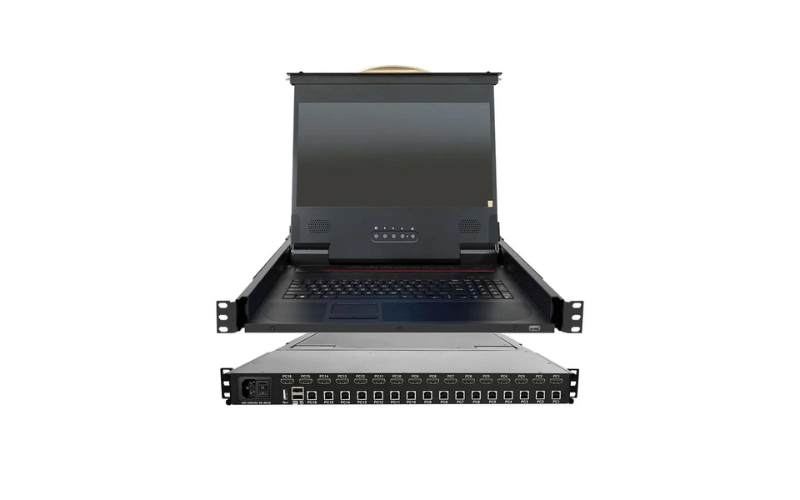
KVM Over IP (Keyboard, Video, Mouse Over Internet Protocol) is a technology that allows users to remotely access and control servers, computers, or other devices over a network or the internet. Unlike traditional KVM switches, which require physical proximity to the connected devices, KVM Over IP solutions enable administrators to manage systems from virtually any location, providing unparalleled flexibility and convenience.
This technology works by transmitting keyboard, video, and mouse signals over an IP network, allowing users to interact with devices as if they were physically present. KVM Over IP devices typically include features such as BIOS-level access, which enables troubleshooting and configuration even when the operating system is unresponsive.
KVM Over IP is widely used in data centers, IT management, and remote office setups, where centralized control and remote access are essential. It is particularly valuable for organizations with distributed infrastructure, as it eliminates the need for on-site visits and reduces downtime during critical operations.
Benefits of KVM Over IP
KVM Over IP solutions offer numerous advantages that make them an essential tool for modern IT management. Below are some of the key benefits:
-
Remote Access: The primary advantage of KVM Over IP is the ability to access and control devices from anywhere with an internet connection. This is especially useful for managing servers in remote locations or during emergencies when physical access is not possible.
-
BIOS-Level Control: Unlike software-based remote access tools, KVM Over IP provides BIOS-level access, allowing administrators to troubleshoot and configure devices even if the operating system is not functioning. This capability is critical for resolving hardware issues and performing system updates.
-
Centralized Management: KVM Over IP solutions enable IT teams to manage multiple devices from a single interface, streamlining operations and improving efficiency. This centralized approach reduces the complexity of managing distributed infrastructure and ensures consistent control across all systems.
-
Cost Savings: By eliminating the need for on-site visits, KVM Over IP reduces travel costs and minimizes downtime. It also allows organizations to consolidate their IT management tools, reducing the need for additional hardware and software.
-
Enhanced Security: Modern KVM Over IP devices include robust security features such as encryption, user authentication, and access controls. These measures protect sensitive data and prevent unauthorized access, ensuring that remote management is both secure and reliable.
-
Scalability: KVM Over IP solutions are highly scalable, making them suitable for organizations of all sizes. Whether managing a small office or a large data center, these solutions can be easily expanded to accommodate additional devices and users.
By leveraging these benefits, organizations can improve the efficiency, reliability, and security of their IT operations, ensuring that their infrastructure remains robust and well-managed.
KVM Over IP Extenders
KVM Over IP extenders are specialized devices designed to extend the range of KVM signals over long distances, enabling remote access to devices located far from the user’s workstation. These extenders are particularly useful in environments such as data centers, broadcast studios, and industrial facilities, where equipment may be distributed across large areas.
KVM Over IP extenders work by converting keyboard, video, and mouse signals into IP packets, which are then transmitted over a standard Ethernet network. This allows users to access and control devices from distances of up to several kilometers, depending on the network infrastructure.
One of the key advantages of KVM Over IP extenders is their ability to support high-resolution video and low-latency performance. Many extenders are capable of transmitting 4K video signals with minimal delay, ensuring a seamless user experience even in demanding applications such as video editing or real-time monitoring.
Another benefit is their flexibility and ease of deployment. KVM Over IP extenders can be integrated into existing network infrastructure, eliminating the need for dedicated cabling and reducing installation costs. They are also compatible with a wide range of devices, making them a versatile solution for diverse IT environments.
Security is a critical consideration for KVM Over IP extenders, as they transmit sensitive data over the network. Modern extenders include features such as encrypted data transmission, secure login credentials, and user access controls to protect against unauthorized access and data breaches.
By using KVM Over IP extenders, organizations can extend the reach of their KVM solutions, enabling efficient and secure remote management of devices across large or distributed environments. This ensures that IT teams can maintain control over their infrastructure, regardless of physical location.
Out-of-Band Management
Importance of Out-of-Band Management
Out-of-band (OOB) management is a critical component of IT infrastructure management, providing a dedicated and independent pathway for accessing and controlling devices, even when the primary network is down or unresponsive. This approach ensures that IT administrators can maintain control over critical systems during emergencies, minimizing downtime and preventing disruptions.
The primary advantage of OOB management is its ability to operate independently of the in-band network. This means that even if the main network experiences issues such as outages, misconfigurations, or cyberattacks, administrators can still access and manage devices through the out-of-band channel. This capability is essential for troubleshooting, performing updates, and restoring services quickly.
OOB management also enhances security by isolating management traffic from the production network. This separation reduces the risk of unauthorized access and ensures that sensitive management operations are protected from potential threats. Additionally, many OOB solutions include features such as encryption, multi-factor authentication, and access controls to further enhance security.
In large-scale environments such as data centers, OOB management simplifies operations by providing centralized access to all connected devices. Administrators can monitor, configure, and troubleshoot equipment from a single interface, reducing complexity and improving efficiency. This centralized approach also supports scalability, allowing organizations to manage growing infrastructure without significant changes to their management processes.
How KVM Plays a Role
KVM (Keyboard, Video, Mouse) technology plays a vital role in out-of-band management by enabling direct access to the hardware-level interface of servers and other devices. Unlike software-based tools that rely on the operating system, KVM solutions provide BIOS-level access, allowing administrators to manage devices even when the OS is unresponsive or the network is down.
KVM-over-IP solutions are particularly valuable for OOB management, as they combine the benefits of KVM technology with the flexibility of remote access. These devices allow administrators to control servers and other equipment from anywhere with an internet connection, ensuring that they can respond to issues promptly, regardless of their physical location.
One of the key advantages of using KVM for OOB management is its ability to support a wide range of devices and platforms. Whether managing servers, network switches, or storage systems, KVM solutions provide a consistent and reliable interface for accessing and controlling equipment. This versatility makes them an essential tool for IT teams responsible for diverse infrastructure.
KVM solutions also enhance the efficiency of OOB management by integrating with other management tools and systems. For example, many KVM devices can be connected to console servers or Data Center Infrastructure Management (DCIM) software, providing a unified platform for monitoring and controlling all aspects of the IT environment.
By leveraging KVM technology for out-of-band management, organizations can ensure that their infrastructure remains accessible, secure, and well-managed, even during network disruptions or system failures.
IP Solutions for Out-of-Band Management
IP-based solutions are a cornerstone of modern out-of-band management, offering secure and flexible access to devices over a network or the internet. These solutions enable IT administrators to manage infrastructure remotely, providing a reliable alternative to traditional in-band management methods.
One of the most common IP-based OOB solutions is KVM-over-IP, which allows administrators to access and control devices at the hardware level. This technology is particularly useful for troubleshooting and configuration tasks, as it provides full control over the device, including access to the BIOS level. KVM-over-IP devices are designed to work seamlessly with existing network infrastructure, making them easy to deploy and integrate.
Another popular IP-based solution is the use of console servers, which provide centralized access to the serial ports of network equipment, servers, and other devices. Console servers enable administrators to perform tasks such as configuration, monitoring, and recovery, even when the primary network is unavailable. Many console servers also include advanced features such as logging, auditing, and secure remote access, enhancing their value for OOB management.
IP-based OOB solutions offer several advantages, including scalability, security, and ease of use. These systems can support a large number of devices and users, making them suitable for organizations of all sizes. They also include robust security features such as encryption, user authentication, and access controls, ensuring that sensitive management operations are protected from potential threats.
By adopting IP-based solutions for out-of-band management, organizations can improve the reliability, efficiency, and security of their IT operations, ensuring that their infrastructure remains accessible and well-managed under all circumstances.
Frequently Asked Questions
Q: What is KVM and how does it work?
A: KVM, or Keyboard, Video, Mouse, is a device that enables users to control multiple computers or servers from a single console. It transmits keyboard, video, and mouse signals over a unified connection, making it an efficient solution for managing servers in data centers or remote environments.
Q: What are the advantages of using a KVM over IP switch?
A: KVM over IP switches provide remote access to computers and servers via an IP network, allowing users to manage systems from any location. This enhances flexibility, reduces the need for on-site presence, and simplifies remote maintenance and troubleshooting tasks.
Q: Can I monitor multiple servers using KVM products?
A: Yes, KVM products allow users to switch between and monitor multiple servers from a single console. This centralized management approach streamlines the process of overseeing numerous servers and workstations, improving efficiency in data centers and control rooms.
Q: What security features are offered by IP KVM solutions?
A: IP KVM solutions include advanced security features such as encryption, user authentication, and access controls. These measures ensure that only authorized personnel can access and manage servers, providing secure and reliable out-of-band access.
Q: Is it possible to access BIOS-level settings with KVM switches?
A: Yes, many KVM switches provide BIOS-level access, enabling administrators to perform low-level management tasks directly from the KVM. This ensures comprehensive control over connected servers, even before the operating system is loaded.
Q: How do I set up remote management with KVM over IP?
A: To set up remote management with KVM over IP, connect the KVM switch to your network and the servers you want to manage. Once configured, users can remotely access the servers through an interface that provides keyboard and mouse control, along with video output.
Q: What types of devices can be connected to a KVM switch?
A: KVM switches can connect a variety of devices, including servers, computers, and network equipment. This versatility allows for centralized management of diverse systems within a data center or server rack.
Q: Are KVM systems suitable for large data centers?
A: Yes, KVM systems are highly suitable for large data centers. They enable administrators to efficiently access and control thousands of servers and workstations, optimizing rack space and improving overall operational management.
Q: What is the difference between in-band and out-of-band management?
A: In-band management involves accessing devices through the same network they operate on, while out-of-band management uses a separate channel for access. This allows administrators to manage devices even if the primary network is down. KVM over IP switches support both methods, offering flexibility and reliability.
