


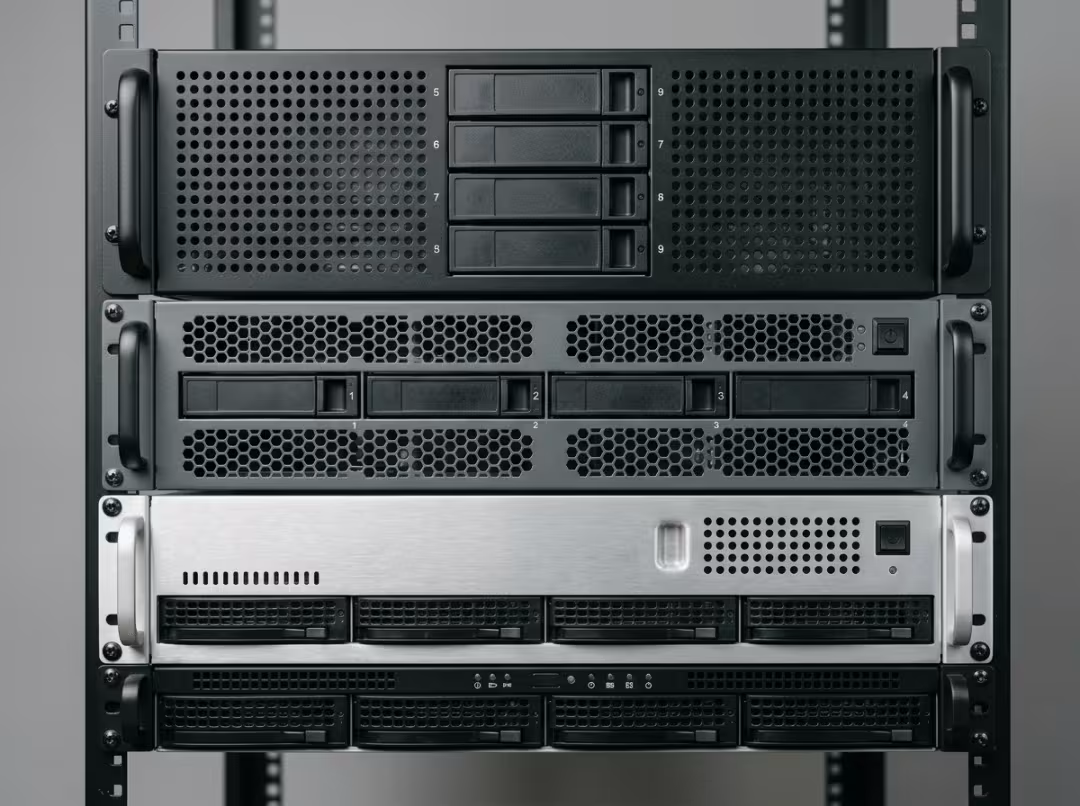
Pick the wrong chassis size, and you’ll feel it within a year—drives that don’t fit, fans loud enough to hear through a closed door, or a rack you’ve already outgrown. The problem usually isn’t that buyers make bad choices. It’s that they size for today instead of tomorrow, or grab whatever was available. Every U you add buys more cooling, storage, and expansion—but costs you servers per rack. That single tradeoff drives everything below.
What the “U” Actually Buys You
One U equals 1.75 inches of vertical height on a standard 19-inch rack. That’s the definition, and it’s the least important part of the story.
Height is only one axis. Depth and width determine real rack compatibility—and depth is the dimension buyers forget until a server won’t seat. Always confirm chassis depth against your rack before you commit, not just the U count.
The practical consequence: more U means more internal volume, and internal volume is what you’re actually purchasing. That space becomes room for drives, PCIe cards, taller heatsinks, and wider airflow channels. Every difference in capability among these four sizes traces back to that.
Most enterprise racks total 42U to 48U, making rack density a fixed budget you spend one server at a time. Carry this forward: taller chassis give you more per server, but fewer servers per rack.
1U — Maximum Density, Tightest Constraints
1U is optimized for one thing: fitting as many independent servers as physically possible into a rack. Everything else is a concession to height. Volume is shallow, clearances are tight, airflow paths are narrow.
It’s the right call when your architecture wants many small, independent nodes rather than a few powerful ones—web serving, load balancers, firewalls, edge compute. If nodes are interchangeable and lightweight, 1U lets you pack the rack and scale horizontally rather than vertically.
The penalties are real, and they’re the part buyers underestimate. Small high-RPM fans move enough air but run loud and demand tighter ambient temperature control. A full rack of 1U servers is genuinely noisy—plan for it. Expansion is constrained by design: typically one or two PCIe slots, four to ten drive bays, no tall heatsinks, no full-size GPUs. And dense racks mean more units to service—maintenance cost per rack rises with node count.
A team standing up 20-plus stateless web nodes, each handling one job, gets exactly what 1U promises: fill the rack, treat nodes as disposable, scale by addition rather than upgrade.
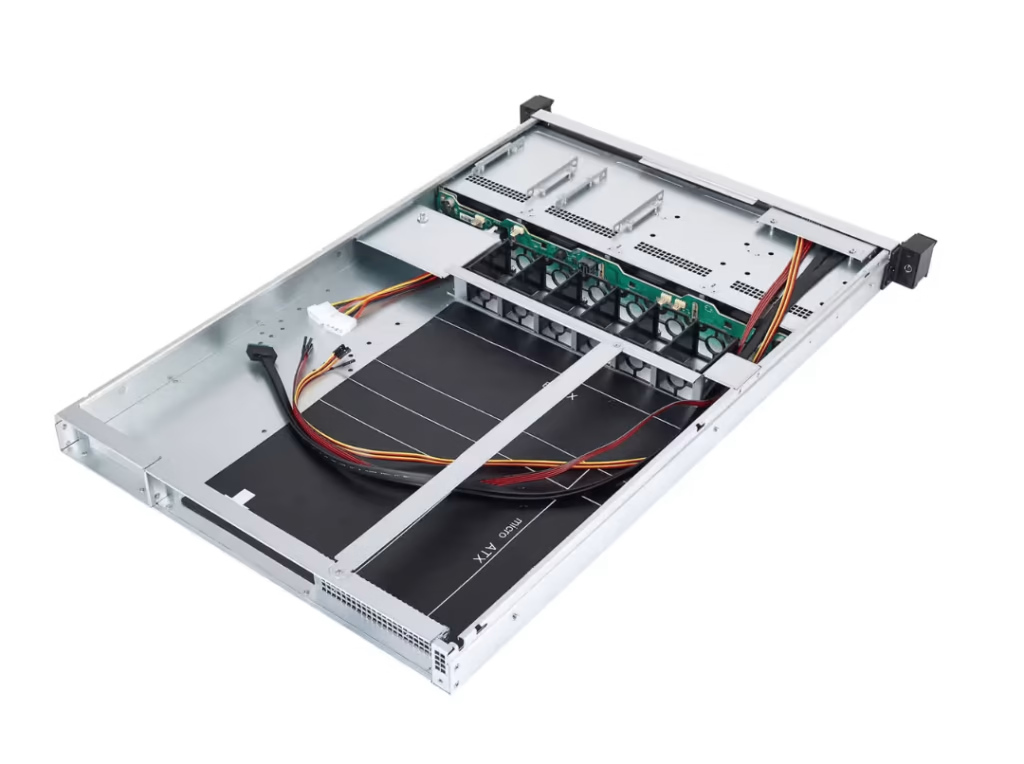
Pick 1U when node count outweighs per-node capability. Avoid it if you need real storage depth, GPU expansion, or quiet operation.
2U — The Default That Fits Most Deployments
2U dominates general-purpose enterprise deployments for a straightforward reason: it trades one extra U for a meaningful jump in nearly every capability that matters, without meaningfully hurting density. Most teams that aren’t optimizing for extreme node count belong here—whether they’ve explicitly decided that or not.
The thermal improvement comes first. Larger fans spin more slowly, move the same amount of air, and run noticeably quieter under identical load. Once a rack shares space with people—in an office, a shared closet, or a colocation bay where noise limits are enforced—that difference is no longer academic.
Storage opens up next: more 3.5-inch bays, more NVMe options, room for a proper RAID controller without sacrificing anything else. PCIe expansion follows the same pattern—more slots, dual-socket board support with full-height heatsinks, clearance for some GPUs. The workloads that naturally land in 2U cover the broad middle of enterprise IT: virtualization hosts, database servers, line-of-business applications, mixed general-purpose loads.
One thing worth flagging before you order: short-depth and full-depth 2U chassis are not interchangeable. A mismatch between chassis depth and rack depth causes real airflow and mounting problems. Measure both. A 2U server chassis in the right depth for your rack is a different decision than just picking a 2U off a spec sheet.
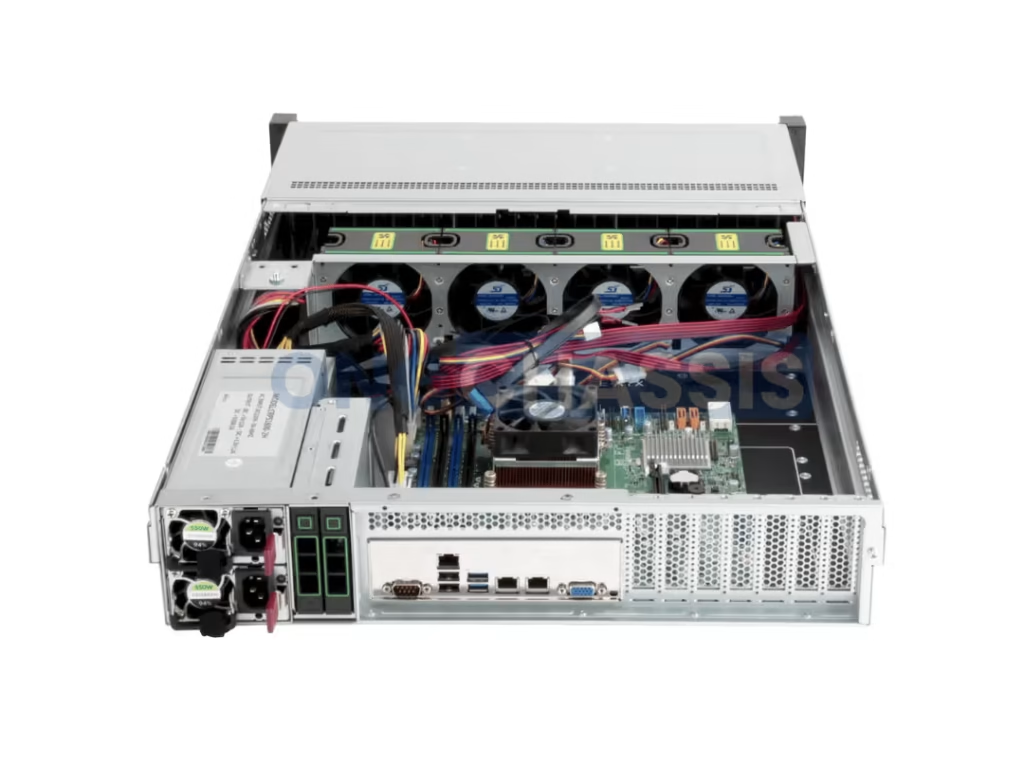
The clearest 2U scenario is a growing company building a virtualization host: dual sockets, a few PCIe cards, reasonable storage, quiet-enough operation for a shared room, and room to grow without buying a new enclosure. 2U handles all of it without forcing a harder trade.
If you don’t have a compelling reason to go smaller or larger, 2U is the choice you’re least likely to regret.
3U — The Niche Storage Middle Ground
3U occupies a narrow gap: storage-heavy builds that need high drive counts but don’t quite need everything a 4U delivers. The case for it usually comes down to one number—drive bays. Many 3U chassis hold 16 or more 3.5-inch drives, offering slightly better rack density than a 4U chassis.
Cooling sits between its neighbors: quieter than 2U, less generous than 4U. Backup servers, media archives, and custom storage appliances are the typical applications.
The practical limitation is sourcing. 3U is less standardized than 2U or 4U, which means rails, replacement parts, and compatible accessories can be genuinely difficult to find after initial purchase. Over a chassis lifespan, that friction compounds.
3U is a compromise pick, not a default. Most teams that seriously consider it end up better served by a 2U with higher-density drives or a 4U with more headroom. If you’re weighing 3U, be honest about whether the drive-count advantage actually justifies the sourcing constraints over the next three to five years.
4U — Maximum Expansion, Cooling, and Power
4U is the largest standard rack-mount form factor. It exists for one reason: to physically accommodate hardware that smaller chassis cannot—multiple full-height double-width GPUs, large passive heatsinks, 20-plus drive bays, and the PCIe slot counts that serious compute and storage builds require.
Expansion is the obvious advantage. If your build needs multiple high-end GPUs or a dense PCIe configuration, 4U is usually the only size that delivers without forcing a compromise. What’s less obvious is the acoustic and thermal upside: large low-RPM fans and generous airflow channels make 4U the quietest option at any given thermal load. For GPU-dense builds that throw off serious heat, that combination matters more than most buyers expect—simultaneous better cooling and lower noise.
Storage scales accordingly: 20-plus bays in many models, hybrid drive layouts, room to grow without external enclosures. The workloads that belong here are GPU compute, AI inference, high-performance computing, hyper-converged storage, and dense virtualization hosts consolidating significant capacity into a single node. For GPU-focused builds specifically, a purpose-designed 4U GPU server case is built around the card clearance, slot spacing, and airflow paths these systems impose—details that generic chassis often get wrong.
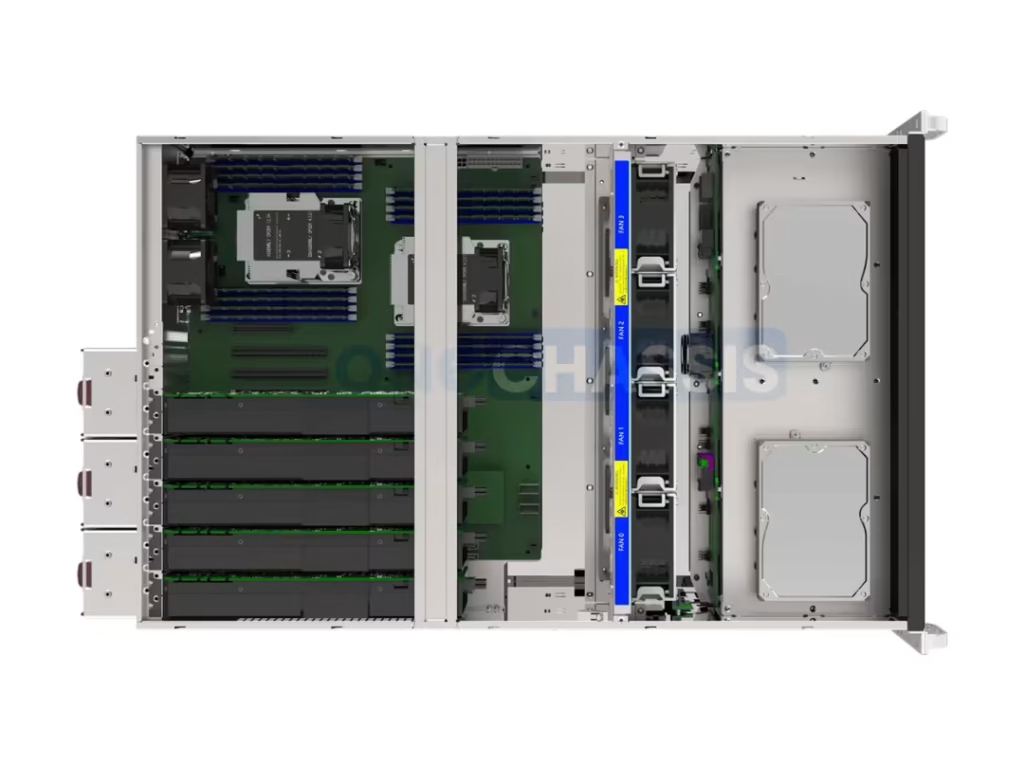
Power and weight are real constraints, not fine print. Dual-redundant PSUs, higher wattage, and heavily loaded units mean rated rail kits and careful rack-loading calculations. A fully loaded 4U is a two-person lift. Plan accordingly.
The team running GPU inference that needs two double-width cards now and a third within a year has one answer. 4U absorbs the current build and the growth without a platform change.
Choose 4U when per-server capability matters more than node count, and accept the rack space it costs.
Side-by-Side Comparison
A fast reference. The size sections above carry the reasoning—use this table to identify your deciding factor at a glance.
|
Factor |
1U |
2U |
3U |
4U |
|---|---|---|---|---|
|
Cooling / airflow |
High-RPM, tight |
Larger, slower fans |
Better than 2U |
Best, low-RPM |
|
PCIe expansion slots |
1–2 |
3–6 |
4–7 |
8+ |
|
Max drive bays |
~4–10 |
12–16 |
16+ |
20+ |
|
GPU support |
None / low-profile |
Some GPUs |
Limited |
Multiple double-width |
|
Noise level |
Loudest |
Moderate |
Quieter |
Quietest |
|
Weight (loaded) & rails |
Light, standard rails |
Manageable |
Heavier, rated rails |
Heavy, rated rails, 2-person lift |
|
Rack density (nodes/rack) |
Highest |
High |
Moderate |
Lowest |
|
Best for |
Edge, web, many nodes |
General-purpose default |
Niche storage |
GPU, HPC, max storage |
How to Choose the Right Size for Your Workload
Start with workload type—it should drive everything else. Rack space, power budget, cooling capacity, and expansion headroom are constraints on your workload choice, not independent inputs.
The workload-to-size map:
- Web tier, edge, or many light nodes → 1U
- Virtualization, databases, general enterprise → 2U
- Storage-heavy builds that don’t justify 4U → 3U
- GPU, AI, HPC, or maximum storage → 4U
From there, apply a simple rule: count the drives and PCIe cards you need today, add two to three years of realistic growth, and pick the smallest chassis that fits both. Sizing exactly to today’s load is the most common reason hardware gets replaced ahead of schedule.
Density is math, not preference. Need around 30 nodes in one rack? Only 1U or 2U will fit the budget. Need two large compute hosts? 4U, even though it costs rack space. Let node count and per-node requirements decide—not the instinct to save a U.
Before ordering, verify these facility constraints. Any one of them can override your preference:
- Power available per rack
- Cooling capacity per rack
- Floor and rack weight limits
- Rack depth (measure it; don’t assume)
Quick pre-purchase checklist: count drives, count PCIe cards, measure rack depth, confirm power budget, confirm noise tolerance. If your build spans general-purpose server work across 1U through 4U, the server case line covers all four sizes in purpose-built configurations.
Most deployments settle on 2U or 4U. 1U is for density-first architectures. 3U serves a specific storage niche. That pattern holds across most real-world deployments, and it’s a reasonable starting assumption until your workload data indicates otherwise.
Frequently Asked Questions
Does a taller chassis automatically mean better cooling?
Generally yes—more height allows larger, slower fans and wider airflow paths. But cooling also depends on fan configuration, component density, and ambient temperature. A well-designed 2U can outperform a poorly configured 4U in the right conditions.
What’s the most common server chassis size in data centers?
2U is the most common general-purpose size, covering the widest range of workloads. 1U dominates hyperscale and edge environments where node count drives architecture. 4U appears wherever GPU compute or large-scale storage lives.
Is a 4U chassis too loud for a home lab or office?
Usually the opposite—4U is the quietest form factor for a given thermal load, thanks to its large, low-RPM fans. Noise depends more on the components inside, especially GPUs, than the chassis itself. For a shared room, 4U is often the better acoustic choice over 1U or 2U.
What rack depth do I need for a full-size 4U server?
Full-depth 4U servers typically require racks around 1000mm deep, though exact figures vary by model. Always check the specific chassis depth plus rear clearance for cabling and airflow. Ordering without measuring is the most common rack-fit mistake.
Can I mix different chassis sizes in the same rack?
Yes, and it’s common practice. Place heavier units lower in the rack for stability, and account for power draw and airflow so hotter units don’t starve neighbors of cool air.
How much weight can a standard 19-inch rack support?
Most standard racks handle 800 to 1,500 pounds of static load, depending on construction. Rail kits carry their own per-unit ratings—confirm both before loading heavy 4U units. The rail kit limit is often the binding constraint, not the rack itself.
The Bottom Line
Every U you add buys cooling, storage, and expansion—but at the cost of rack density. That tradeoff decides everything. Choose 1U for maximum node density, 2U as the general-purpose default, 3U for specific high-drive-count storage builds, and 4U when per-server capability outweighs all other considerations. Verify rack depth, power, and cooling before ordering—those constraints often settle the question regardless of preference. Count your drives and PCIe cards, and pick the smallest chassis that fits both, with room to grow.
