


A rack mount UPS (Uninterruptible Power Supply) is an essential component for IT environments, designed to protect critical equipment like servers, network switches, and storage systems from power interruptions and fluctuations. These compact devices fit seamlessly into standard server racks, offering features such as hot-swappable batteries, voltage regulation, and advanced monitoring capabilities. By ensuring a consistent power supply, rack mount UPS systems prevent data loss, protect hardware, and minimize downtime, making them indispensable for data centers, server rooms, and other IT setups.
Understanding Rack Mount UPS Systems
What is a Rack Mount UPS?
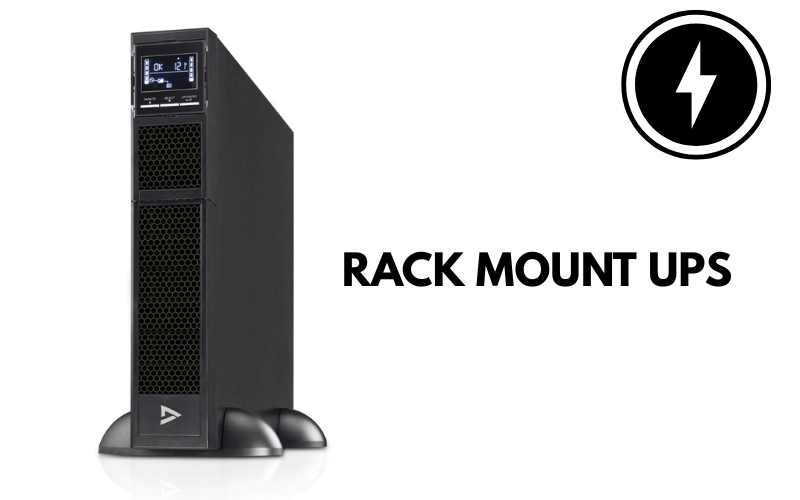
A rack mount UPS (Uninterruptible Power Supply) is a specialized power protection device designed to fit into standard server racks, typically in 1U or 2U form factors. Its primary function is to provide backup power and safeguard critical IT equipment, such as servers, network switches, and storage arrays, from power interruptions and fluctuations.
These systems are engineered to maximize space efficiency, making them ideal for data centers, server rooms, and other IT environments where rack space is at a premium. In addition to their compact design, rack mount UPS units often include features like hot-swappable batteries, LCD displays for monitoring, and network management capabilities. By ensuring a consistent and reliable power supply, they help maintain uninterrupted operations and protect sensitive equipment from damage caused by power anomalies.
Why are Uninterruptible Power Supplies Important?
UPS systems are essential for maintaining the stability and reliability of IT infrastructure. They serve as a critical line of defense against power-related issues that can disrupt operations. Here’s why they are indispensable:
- Preventing Data Loss: A sudden power outage can result in unsaved data being lost or corrupted. A UPS provides enough backup time to save work and shut down systems properly.
- Protecting Hardware: Voltage spikes, sags, and surges can damage sensitive IT equipment. A UPS regulates voltage, shielding devices from these fluctuations.
- Reducing Downtime: Power interruptions can halt operations, leading to costly downtime. A UPS bridges the gap between an outage and the activation of backup generators, ensuring continuous operation.
- Ensuring Safety: In environments like data centers, power failures can cause cascading issues, such as overheating or equipment failure. A UPS mitigates these risks by maintaining power stability.
Example: In a data center, a sudden power failure could corrupt databases, interrupt critical services, or even damage hardware. A rack mount UPS ensures that systems remain operational until power is restored or alternative solutions, like generators, take over.
How Does a Rack Mount UPS Provide Backup Power?
A rack mount UPS continuously monitors the incoming power supply to ensure stable and reliable power delivery. Here’s how it works:
- Voltage Regulation: During normal operation, the UPS regulates voltage to protect connected devices from fluctuations like surges, sags, or spikes. This ensures that sensitive equipment receives clean and consistent power.
- Battery Backup: When a power outage occurs, the UPS instantly switches to its internal battery, providing uninterrupted power to connected devices. This transition happens in milliseconds, preventing downtime or data loss.
- Power Conditioning: Advanced rack mount UPS models include features like Automatic Voltage Regulation (AVR) and pure sine wave output, which ensure that the power delivered to devices is stable and free from distortion.
- Monitoring and Alerts: Many UPS systems come with LCD displays or network management cards that allow IT teams to monitor battery health, load levels, and runtime. These features enable proactive maintenance and quick response to issues.
Real-World Application: For example, in a server room, a rack mount UPS can keep critical systems like email servers, databases, and network switches running during a power outage. This ensures that business operations continue without interruption, giving IT teams time to address the issue or safely shut down systems if necessary.
By combining backup power, voltage regulation, and advanced monitoring, a rack mount UPS provides comprehensive protection for IT environments, ensuring both reliability and efficiency.
Key Features of Rack Mount UPS
Understanding Power Ratings: 500VA to 3000VA
Power ratings, measured in VA (Volt-Amperes), indicate the capacity of a UPS to handle connected equipment. Rack mount UPS systems typically range from 500VA to 3000VA, catering to various server setups. Choosing the right capacity depends on the total power consumption of your devices.
How to Choose the Right Capacity:
- Calculate Power Needs: Add up the wattage of all connected devices. For example, if your server and peripherals consume 800 watts, select a UPS with a capacity of at least 1000VA to allow for a safety margin.
- Plan for Growth: Consider future expansions and choose a UPS with additional capacity to accommodate new equipment.
- Match Runtime Requirements: If you need extended backup time, opt for a higher VA rating or a model with external battery support.
By selecting the appropriate power rating, you ensure your UPS can handle your setup without overloading or underperforming.
Line-Interactive vs. Online UPS: Which One to Choose?
When selecting a rack mount UPS, you’ll encounter two main types: line-interactive and online. Each has distinct features suited to different environments.
Line-Interactive UPS:
- Functionality: Regulates voltage fluctuations using an automatic voltage regulator (AVR) without switching to battery power.
- Cost: More affordable than online models, making it ideal for small to medium-sized setups.
- Best For: Environments with stable power but occasional surges or sags.
Online UPS:
- Functionality: Provides continuous power by converting incoming AC power to DC and back to AC, ensuring zero transfer time during outages.
- Cost: Higher price point due to advanced technology.
- Best For: Critical IT environments like data centers or setups with sensitive equipment requiring uninterrupted power.
Choose a line-interactive UPS for cost-effective protection in less demanding environments, while an online UPS is better for mission-critical applications.
Sine Wave and AVR Technology: What You Need to Know
A rack mount UPS with pure sine wave output and Automatic Voltage Regulation (AVR) ensures stable and reliable power delivery to sensitive IT equipment.
Pure Sine Wave Output:
- Why It Matters: Many servers and networking devices require a clean, consistent power signal to operate efficiently. Pure sine wave output mimics the quality of utility power, preventing issues like overheating or malfunction.
- Applications: Essential for high-end servers, storage systems, and other critical devices.
Automatic Voltage Regulation (AVR):
- Purpose: AVR stabilizes voltage by correcting minor fluctuations without switching to battery power, extending battery life and protecting equipment.
- Benefits: Prevents damage caused by overvoltage or undervoltage, ensuring consistent performance.
When selecting a UPS, prioritize models with these features to safeguard your IT infrastructure and maintain uninterrupted operations.
Popular Rack Mount UPS Brands
APC Rackmount UPS Solutions
APC is a leading name in the UPS market, offering a wide range of rack mount solutions tailored for various IT environments. Their Smart-UPS series stands out for its advanced features, including real-time monitoring, automatic voltage regulation (AVR), and pure sine wave output. These systems are designed to protect critical equipment from power interruptions while ensuring optimal performance.
Key Features:
- Network Management Capabilities: APC UPS systems integrate seamlessly with network management tools, allowing IT teams to monitor and control power usage remotely.
- Scalability: Many models support external battery packs, providing extended runtime for mission-critical applications.
- Eco-Friendly Options: APC offers energy-efficient models that reduce power consumption without compromising performance.
APC’s solutions are ideal for data centers, server rooms, and other high-demand environments requiring reliable power protection.

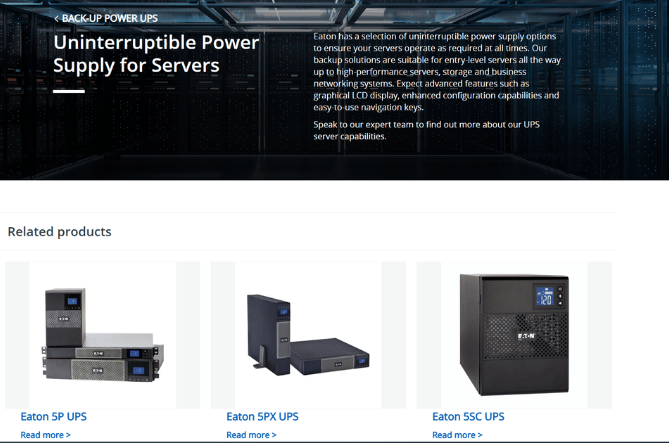
Eaton UPS Systems for Servers
Eaton is renowned for its reliable and energy-efficient UPS systems, making it a top choice for server protection. Their rack mount UPS solutions are designed to deliver consistent power while minimizing energy costs. Eaton’s advanced monitoring features ensure that IT teams can proactively manage power issues before they escalate.
Key Features:
- Reliability: Eaton UPS systems provide seamless power transitions during outages, ensuring uninterrupted operation of sensitive equipment.
- Energy Efficiency: Many models include energy-saving technologies, such as high-efficiency modes, to reduce operational costs.
- Advanced Monitoring: Eaton’s Intelligent Power Manager software allows for real-time monitoring and control, enhancing system reliability.
Eaton UPS systems are well-suited for businesses prioritizing energy efficiency and robust power protection.
CyberPower and Tripp Lite UPS Options
CyberPower and Tripp Lite offer affordable and reliable rack mount UPS solutions, making them popular choices for small to medium-sized setups. Both brands focus on delivering essential features without the high price tag, ensuring accessibility for a wide range of users.
- Affordability: CyberPower UPS systems provide cost-effective solutions for protecting servers and networking equipment.
- Compact Design: Their rack mount models are space-efficient, making them ideal for smaller server rooms.
- User-Friendly Features: Many models include LCD displays for easy monitoring of power status and battery life.
- Versatility: Tripp Lite offers a variety of UPS systems, from basic models to advanced units with network management capabilities.
- Durability: Known for their robust build quality, Tripp Lite UPS systems are designed to withstand demanding IT environments.
- Ease of Use: Simple installation and straightforward controls make Tripp Lite a practical choice for smaller setups.
Both CyberPower and Tripp Lite provide reliable power protection at an accessible price point, making them excellent options for businesses with budget constraints.
Installation and Setup of Rack Mount UPS
How to Choose the Right Rackmount Power Configuration
Selecting the correct rack mount UPS configuration is essential for ensuring reliable power protection. Consider these practical tips when making your choice:
- Load Capacity: Calculate the total power consumption of all connected devices. Choose a UPS with a capacity that exceeds this total by at least 20% to allow for future expansion and avoid overloading.
- Runtime Requirements: Determine how long you need the UPS to provide backup power during outages. If extended runtime is critical, opt for a model that supports external battery packs.
- Rack Compatibility: Ensure the UPS fits your rack’s dimensions and mounting style. Check the unit’s size (e.g., 1U, 2U) and weight to confirm compatibility with your rack.
- Power Features: Look for features like pure sine wave output, Automatic Voltage Regulation (AVR), and surge protection to safeguard sensitive equipment.
By evaluating these factors, you can select a UPS configuration that meets your specific needs and ensures uninterrupted operation.
Step-by-Step Guide to Connecting a UPS to Your Server Rack
Proper installation of a rack mount UPS is crucial for its performance and longevity. Follow these steps to set up your UPS effectively:
- Prepare the Rack: Clear the designated space in your server rack and ensure it can support the weight of the UPS.
- Secure the UPS: Use the provided mounting brackets to attach the UPS securely to the rack. Make sure it is level and stable.
- Connect Devices: Plug your servers, switches, and other critical equipment into the UPS outlets. Use labeled cables to keep the setup organized.
- Power On the UPS: Turn on the UPS and verify that it is supplying power to the connected devices.
- Test the Setup: Simulate a power outage by unplugging the UPS from the wall outlet. Ensure that the UPS switches to battery power seamlessly and keeps your devices running.
- Monitor the System: Check the UPS display or software interface to confirm that all parameters, such as load and battery status, are within safe limits.
Regularly inspect the installation to ensure cables remain secure and the UPS operates efficiently.
Power Distribution and Network Card Integration
Integrating your UPS with power distribution units (PDUs) and network management cards enhances its functionality and control.
- Power Distribution Units (PDUs): Connect the UPS to a PDU to distribute power evenly across multiple devices. Choose a PDU with sufficient outlets and features like circuit breakers for added protection.
- Network Management Cards: Install a network management card in the UPS to enable remote monitoring and control. These cards allow you to track power usage, receive alerts, and perform diagnostics through a web interface or management software.
By combining a UPS with PDUs and network management cards, you can create a robust power management system that ensures reliability and simplifies maintenance.
Maintenance and Troubleshooting
Essential UPS Battery Maintenance Tips
Proper battery maintenance is crucial for ensuring the longevity and reliability of your UPS. Follow these tips to extend battery life and maintain optimal performance:
- Perform Regular Testing: Test the UPS battery monthly to ensure it holds a charge and switches to battery power during outages. Use the self-test feature if available.
- Store Batteries Correctly: Keep the UPS in a cool, dry environment to prevent overheating, which can shorten battery life. Avoid placing it near heat sources or in direct sunlight.
- Replace Batteries on Time: Most UPS batteries last 3–5 years. Monitor their health and replace them promptly when they show signs of wear, such as reduced runtime or swelling.
- Avoid Deep Discharges: Prevent the battery from fully discharging, as this can damage its cells. Ensure the UPS is plugged in and charging when not in use.
By following these practices, you can maximize the lifespan of your UPS battery and ensure reliable backup power.
Common UPS Issues and How to Fix Them
UPS systems can encounter common issues that may disrupt their performance. Here’s how to identify and resolve them:
- Battery Failure: If the UPS fails to switch to battery power during an outage, check the battery’s health. Replace it if it no longer holds a charge.
- Overloads: Overloading occurs when connected devices exceed the UPS’s capacity. Disconnect non-essential equipment and redistribute the load to avoid this issue.
- Alarm Errors: Frequent alarms may indicate low battery, overload, or internal faults. Refer to the UPS manual to interpret the error codes and take corrective action.
- No Power Output: If the UPS doesn’t supply power, ensure it is properly connected to the wall outlet and that the circuit breaker hasn’t tripped.
Regular maintenance and prompt troubleshooting can prevent these issues from escalating and ensure uninterrupted operation.
Monitoring UPS Performance with LCD Displays
Most modern UPS systems feature LCD displays that provide real-time performance metrics. Use these displays to monitor and optimize your UPS:
- Load Monitoring: Check the load percentage to ensure connected devices don’t exceed the UPS’s capacity. Keeping the load below 80% is recommended for optimal performance.
- Battery Health: Monitor the battery status to identify issues like low charge or reduced capacity. Replace the battery if the display indicates poor health.
- Runtime Estimates: Use the runtime indicator to determine how long the UPS can support connected devices during an outage. This helps you plan shutdowns or switch to alternative power sources.
- Event Logs: Some UPS displays provide logs of past events, such as power outages or overloads. Review these logs to identify patterns and address recurring issues.
By leveraging the LCD display, you can stay informed about your UPS’s performance and take proactive steps to maintain its efficiency.
Frequently Asked Questions
Q: What is an uninterruptible power supply (UPS) for servers?
A: An uninterruptible power supply (UPS) for servers is a device that provides backup battery power during power outages or fluctuations. It keeps servers and critical networking equipment running, allowing for safe shutdowns or continued operation depending on the UPS’s runtime.
Q: How does a line-interactive UPS work?
A: A line-interactive UPS uses Automatic Voltage Regulation (AVR) to correct minor power fluctuations without switching to battery power. This makes it ideal for environments with frequent brownouts or surges, ensuring reliable power protection for servers and sensitive electronics.
Q: What is the difference between a standby UPS and an online double conversion UPS?
A: A standby UPS, or offline UPS, switches to battery power only during a power failure. In contrast, an online double conversion UPS continuously powers devices through its battery, delivering a pure sine wave output. Online UPS systems provide superior protection against power disturbances, making them ideal for critical servers and sensitive equipment.
Q: What is the typical runtime of a UPS?
A: The runtime of a UPS depends on its capacity and the load it supports. For example, a 1500VA UPS might provide several minutes of backup for a single server, while a 3000VA UPS can support multiple devices for an extended period. Factors like battery health and the total wattage of connected equipment also affect runtime.
Q: How can I determine the right size of an uninterruptible power supply?
A: To choose the right UPS size, calculate the total wattage of the devices you plan to connect. Select a UPS with a higher VA rating, such as 1000VA or 1500VA, to allow for future growth and ensure adequate battery backup during outages.
Q: What are rackmount UPS solutions?
A: Rackmount UPS solutions are compact power protection devices designed to fit into server racks. They are available in line-interactive and online double conversion models, making them essential for data centers and IT environments where space is limited.
Q: What kind of surge protection does a UPS provide?
A: A UPS protects against surges by filtering out voltage spikes and fluctuations. This shields connected devices from potential damage caused by power surges, ensuring the safety of sensitive electronics and critical servers.
Q: What does pure sine wave output mean?
A: Pure sine wave output refers to the smooth, consistent electrical waveform produced by a UPS. It mimics the quality of power from the grid, making it suitable for sensitive equipment like servers and networking devices. Using a UPS with pure sine wave output helps prevent performance issues and extends the lifespan of your equipment.
Q: Can a UPS work with 120V and NEMA 5-15R outlets?
A: Yes, many UPS systems are compatible with 120V AC power and feature NEMA 5-15R outlets. This allows for easy connection to standard power strips and devices in North American installations, meeting your power distribution needs effectively.
Concluding Summary
Rack mount UPS systems provide a comprehensive solution for safeguarding IT infrastructure against power-related disruptions. With features like pure sine wave output, Automatic Voltage Regulation (AVR), and network management integration, they ensure reliable performance and efficient power management. Whether you’re selecting the right capacity, installing the UPS, or maintaining its batteries, these systems are designed to meet the demands of modern IT environments. By investing in a rack mount UPS, businesses can enhance operational continuity, protect sensitive equipment, and maintain a stable and efficient network infrastructure.
