


Horizontal cable management is a cornerstone of efficient IT infrastructure, ensuring that server racks and enclosures remain organized, accessible, and functional. By routing cables horizontally, this practice not only enhances the aesthetics of IT setups but also improves airflow, reduces downtime, and simplifies maintenance. From data centers to server rooms, horizontal cable management plays a vital role in optimizing space, boosting network performance, and supporting the growing demands of modern technology. This article explores the key aspects, benefits, and future trends of horizontal cable management, offering actionable insights for IT professionals.
Understanding Horizontal Cable Management
What is Horizontal Cable Management?
Horizontal cable management refers to the practice of organizing and routing cables horizontally within server racks or enclosures. It involves the use of specialized tools like cable managers, trays, or panels to keep cables neatly arranged and accessible. This method plays a crucial role in maintaining a clean and efficient IT environment by preventing cable clutter, reducing the risk of damage, and ensuring that cables are easy to identify and manage.
Horizontal cable management is particularly important in data centers, server rooms, and other IT setups where a large number of cables are used to connect various devices. By keeping cables organized, it not only improves the overall aesthetics of the setup but also enhances functionality and safety.
Why is Cable Management Important?
Effective cable management offers several practical benefits that directly impact the performance and reliability of IT systems:
- Improved Airflow: Properly managed cables allow for better airflow within server racks, preventing overheating and ensuring optimal performance of equipment.
- Easier Troubleshooting: When cables are neatly organized, identifying and resolving issues becomes faster and more efficient, reducing downtime.
- Reduced Downtime: Poor cable management can lead to accidental disconnections or damage, causing unnecessary interruptions. Organized cables minimize this risk.
- Enhanced Safety: Tangled or loose cables can pose tripping hazards or lead to electrical issues. Proper management eliminates these risks.
For example, a poorly managed server rack with tangled cables can make it difficult to identify a faulty connection during a network outage, leading to extended downtime. In contrast, a well-organized rack allows IT teams to quickly locate and address the issue.
Key Benefits of Horizontal Cable Managers
Horizontal cable managers offer several specific advantages that make them an essential tool in IT environments:
- Enhanced Rack Organization: They keep cables neatly arranged, making the server rack look professional and easy to navigate.
- Better Space Utilization: By routing cables horizontally, these managers free up vertical space, allowing for more efficient use of the rack.
- Improved Network Performance: Organized cables reduce the risk of signal interference and ensure reliable connections, leading to better overall network performance.
- Simplified Maintenance: With cables properly managed, routine maintenance tasks like adding or replacing cables become quicker and less disruptive.
Incorporating horizontal cable managers into your IT setup not only improves functionality but also demonstrates a commitment to maintaining a high standard of operational efficiency.
Types of Horizontal Cable Managers
Zero U Cable Management Solutions
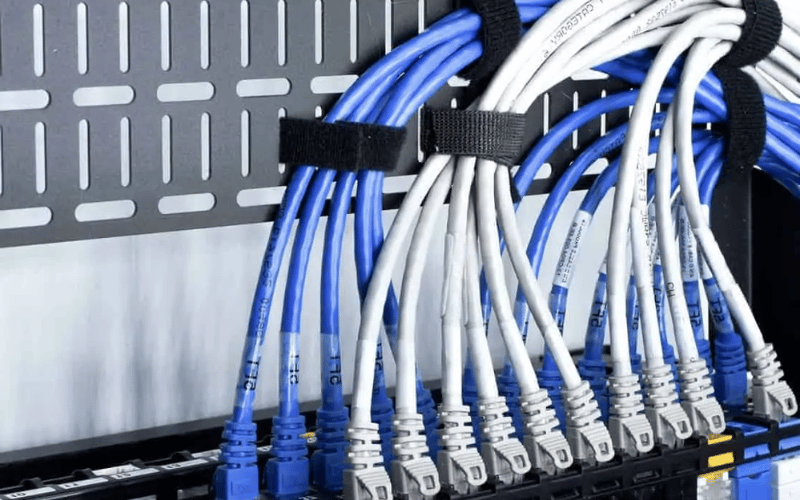
Zero U cable management solutions are designed to save valuable rack space by mounting outside the rack unit area. These solutions do not occupy any rack units (U), making them ideal for maximizing the available space for equipment. They typically attach to the sides or rear of the rack, providing a dedicated pathway for cables without interfering with the main equipment layout.
Use Cases:
- High-Density Environments: In data centers with limited rack space, Zero U solutions help manage large volumes of cables without sacrificing space for servers or switches.
- Cable Segregation: These solutions are effective for separating power and data cables to reduce interference and improve organization.
- Scalable Setups: Zero U cable managers are perfect for growing IT environments where additional equipment may be added over time, as they keep cables organized without limiting rack capacity.
Horizontal Cable Management Shelves
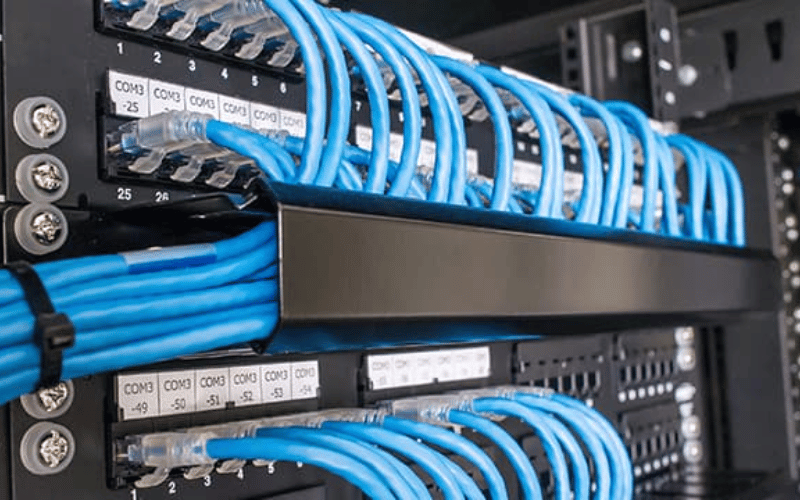
Horizontal cable management shelves combine the benefits of cable organization with equipment support. These shelves are designed to hold and manage cables while also providing a stable platform for heavy or sensitive equipment. They often include built-in cable routing features like hooks or channels to keep cables tidy and accessible.
Ideal Scenarios:
- Heavy Equipment Support: When managing devices like UPS units or large network switches, these shelves provide the necessary support while keeping cables organized.
- Sensitive Equipment: For equipment that requires minimal movement or vibration, such as storage arrays, these shelves ensure stability while maintaining a clean cable layout.
- Multi-Function Racks: In setups where both cable management and equipment support are needed, these shelves offer a two-in-one solution.
Choosing the Right Cable Management Product
Selecting the right cable management product depends on several factors, including capacity, material, ease of installation, and cost. Here’s a quick comparison to guide your decision:
- Capacity: For high-density environments, choose products that can handle large cable volumes, such as Zero U solutions or wide horizontal panels.
- Material: Durable materials like steel or high-quality plastic ensure longevity, especially in demanding IT setups.
- Ease of Installation: Look for products with tool-less installation features to save time during setup and maintenance.
- Cost: Balance your budget with the product’s features. While premium options may offer advanced features, more affordable solutions can still meet basic needs effectively.
Tips for Selection:
- Assess Your Needs: Consider the volume and type of cables you need to manage, as well as the available rack space.
- Plan for Growth: Choose scalable solutions that can accommodate future expansions.
- Prioritize Accessibility: Ensure the product allows easy access to cables for troubleshooting and maintenance.
By carefully evaluating these factors, you can select a cable management product that aligns with your specific requirements and enhances the efficiency of your IT setup.
Efficient Use of Rack Space
Maximizing Rack Space with Horizontal Management
Horizontal cable managers are essential tools for optimizing rack space in IT environments. By routing cables horizontally, they prevent overcrowding and free up vertical space for critical equipment like servers and switches. These managers often include features like cable loops, channels, or panels to keep cables neatly aligned and accessible.
Strategies for Maximization:
- Plan Cable Pathways: Map out cable routes before installation to ensure efficient use of space and avoid unnecessary overlaps.
- Use Both Sides of the Rack: Install horizontal managers on the front and rear of the rack to separate power and data cables, reducing clutter.
- Bundle Cables Smartly: Use Velcro ties or cable clips to group cables neatly without over-tightening, which can damage them.
By implementing these strategies, you can maintain a clean and organized rack while maximizing its capacity for equipment.
Practical Cable Arrangement Strategies
Efficient cable arrangement is key to maintaining an organized and functional IT setup. Here are some actionable tips to streamline your cable management:
- Group by Function: Separate cables based on their purpose, such as power, data, or audio, to make identification and troubleshooting easier.
- Color-Code Cables: Use different colors for specific cable types or functions to quickly identify them at a glance.
- Avoid Tangling: Route cables through dedicated pathways and secure them with cable ties or clips to prevent tangling and accidental disconnections.
- Label Everything: Attach clear labels to both ends of each cable to simplify maintenance and reduce downtime during troubleshooting.
These strategies not only improve organization but also save time during routine maintenance or upgrades.
Impact on Network Performance and Efficiency
Proper cable management has a direct impact on network performance and operational efficiency. When cables are neatly arranged and easily accessible, it reduces the risk of signal interference, accidental disconnections, and overheating.
Key Benefits:
- Improved Reliability: Organized cables ensure stable connections, minimizing the risk of network outages caused by loose or damaged cables.
- Faster Maintenance: Clear pathways and labeled cables make it easier for IT teams to identify and resolve issues, reducing downtime.
- Enhanced Airflow: Properly managed cables prevent airflow blockages in server racks, keeping equipment cool and operating efficiently.
Example: In a poorly managed rack, tangled cables can obstruct airflow, leading to overheating and potential hardware failure. Conversely, a well-organized rack with horizontal cable managers ensures optimal cooling and reliable performance, even in high-demand environments.
By prioritizing cable management, you can create a more efficient and reliable IT infrastructure that supports long-term growth and performance.
Best Practices for Horizontal Cable Management
Selecting the Right Cable Manager for Your Setup
Choosing the right cable manager is crucial for maintaining an efficient and organized IT environment. Use this checklist to evaluate your options:
- Rack Size Compatibility: Ensure the cable manager fits your rack’s dimensions and mounting style.
- Cable Volume: Choose a product that can handle the number of cables in your setup without overcrowding.
- Material Durability: Opt for high-quality materials like steel or reinforced plastic for long-term reliability.
- Ease of Installation: Look for tool-less designs or products with clear installation instructions to save time.
- Future Scalability: Select a cable manager that can accommodate additional cables as your setup grows.
By considering these factors, you can invest in a solution that meets your current needs while preparing for future expansions.
Installation Tips for Server Racks
Proper installation of horizontal cable managers ensures they function effectively and last longer. Follow these steps for a smooth setup:
- Gather Tools: Have screwdrivers, cable ties, and a rack layout plan ready before starting.
- Plan Cable Routes: Map out where each cable will go to avoid unnecessary overlaps or tangles.
- Install the Manager: Secure the horizontal cable manager to the rack using the provided hardware, ensuring it is level and stable.
- Route Cables: Run cables through the manager, grouping them by function or destination for easier identification.
- Secure Cables: Use Velcro ties or clips to bundle cables neatly without over-tightening, which can damage them.
Common Mistakes to Avoid:
- Overloading the cable manager, which can lead to sagging or damage.
- Skipping the planning phase, resulting in a disorganized setup.
- Using zip ties instead of Velcro, as they are harder to adjust and can damage cables.
Maintaining Cable Organization Over Time
Keeping cables organized requires ongoing effort, especially in dynamic IT environments. Here are some tips to maintain order:
- Regular Inspections: Schedule periodic checks to ensure cables are secure and free from damage.
- Labeling Systems: Use clear, durable labels on both ends of each cable to simplify identification and troubleshooting.
- Periodic Reorganization: As your setup evolves, take time to reorganize cables to accommodate new equipment or changes in layout.
- Cable Management Accessories: Invest in additional tools like cable clips, trays, or sleeves to keep everything tidy.
By following these practices, you can ensure your cable management system remains effective and adapts to your changing needs.
Future Trends in Cable Management
Innovations in Cable Management Products
The cable management industry is evolving rapidly, introducing products that address modern IT challenges while improving efficiency and sustainability. Here are some notable innovations:
- Modular Designs: New cable management systems feature modular components that can be customized and expanded as needed, making them ideal for dynamic IT environments.
- Eco-Friendly Materials: Manufacturers are increasingly using recyclable and biodegradable materials to create sustainable cable management solutions, reducing environmental impact.
- Smart Cable Management Systems: Advanced systems now include built-in sensors and monitoring capabilities, allowing IT teams to track cable performance, detect issues, and optimize layouts in real time.
These innovations not only enhance functionality but also align with the growing demand for sustainable and intelligent IT infrastructure.
Emerging Technologies in Rack Management
Technological advancements are transforming rack management, making it more efficient and adaptable. Key developments include:
- AI-Driven Cable Monitoring: Artificial intelligence is being used to monitor cable health, predict failures, and suggest optimizations, reducing downtime and maintenance costs.
- Automated Cable Routing: Automation tools are emerging that can route cables with precision, minimizing human error and ensuring optimal organization.
- Advanced Rack Designs: New racks are being designed with built-in cable management features, such as integrated pathways and adjustable panels, to simplify installation and maintenance.
These technologies are streamlining cable management processes, enabling IT teams to focus on higher-level tasks while maintaining a reliable infrastructure.
Predictions for the Future of Horizontal Cable Management
As IT environments become more complex, the demand for efficient cable management solutions will continue to grow. Here’s what the future may hold:
- Higher Data Speeds: With the rise of 5G and faster network technologies, cable management systems will need to support higher bandwidths and minimize signal interference.
- Denser Server Setups: As data centers aim to maximize space, horizontal cable managers will play a critical role in organizing cables within increasingly compact racks.
- Sustainability Focus: The push for greener IT practices will drive the adoption of eco-friendly cable management products and energy-efficient designs.
These trends highlight the importance of staying ahead in cable management to meet the evolving needs of modern IT infrastructure.
Frequently Asked Questions
Q: What are the best horizontal cable management tips for a server rack?
A: To optimize horizontal cable management in a server rack, use horizontal cable managers to route cables neatly. Bundle cables with Velcro straps to prevent tangles, and use plastic fingers to keep them organized. Position the cable manager at an appropriate height within the rack to improve cable access and airflow.
Q: How can I improve efficiency with horizontal cable management solutions?
A: Improve efficiency by using high-quality accessories like horizontal Zero U cable management panels. These panels help you maximize rack space while maintaining proper airflow. Regularly inspect and maintain your cable routing to prevent disruptions in your network.
Q: What types of cable management products should I use in a data center?
A: Use a combination of horizontal cable managers, rack-mounted accessories, and vertical cable management solutions in a data center. Incorporate 1U and 2U racks with dedicated cable access features to keep cables organized, reduce clutter, and ensure reliable connections while optimizing space.
Q: How do I install a horizontal cable manager effectively?
A: To install a horizontal cable manager effectively, identify the best location within the rack for optimal functionality. Securely mount the manager using the provided hardware, ensuring it is level. Route cables through the manager’s slots or guides to keep them organized. Regularly check the setup for maintenance needs.
Q: What is the importance of maintaining organized cables within the rack?
A: Organized cables prevent overheating and ensure efficient airflow within the rack. Disorganized cables can cause equipment damage or downtime, leading to higher costs. Horizontal cable management solutions make cables easy to access for maintenance while keeping the rack tidy and functional.
Q: Can horizontal cable management increase my data center’s efficiency?
A: Yes, horizontal cable management significantly boosts data center efficiency. By optimizing rack space and airflow, it reduces the risk of overheating and improves connection accessibility. This results in better performance, less downtime, and cost savings.
Q: What are the benefits of using horizontal cable managers?
A: Horizontal cable managers improve cable organization, enhance airflow, and simplify maintenance. They reduce clutter, making it easier to identify and resolve issues. An organized setup also extends the lifespan of your equipment and ensures a professional appearance.
Q: How does cable capacity affect horizontal cable management?
A: Cable capacity plays a critical role in horizontal cable management. Choose a manager that accommodates the length and diameter of your cables. Overloading a cable manager can cause tangling and restrict airflow, reducing the efficiency of your setup.
Q: What should I consider when choosing a horizontal cable management solution?
A: When selecting a horizontal cable management solution, evaluate the available rack space, the type and volume of cables, and the installation method. Opt for durable, flexible products that allow easy access for maintenance. Ensure the solution aligns with your data center’s optimization goals for long-term efficiency.
Concluding Summary
Horizontal cable management is more than just an organizational tool—it’s a critical component of a reliable and efficient IT environment. By leveraging solutions like Zero U cable managers, modular designs, and AI-driven technologies, organizations can optimize rack space, improve network performance, and future-proof their setups. As IT demands evolve, the focus on sustainability, scalability, and advanced technologies will continue to shape the future of cable management, ensuring that IT infrastructures remain robust, adaptable, and ready for the challenges ahead.
